
ആമുഖം
This manual provides detailed instructions for the installation, operation, and maintenance of your Hiseeu SGP10551 5MP PoE IP Security Camera. This camera is designed for both indoor and outdoor surveillance, featuring 5MP HD resolution, night vision, motion detection, and H.265 video compression for efficient storage.
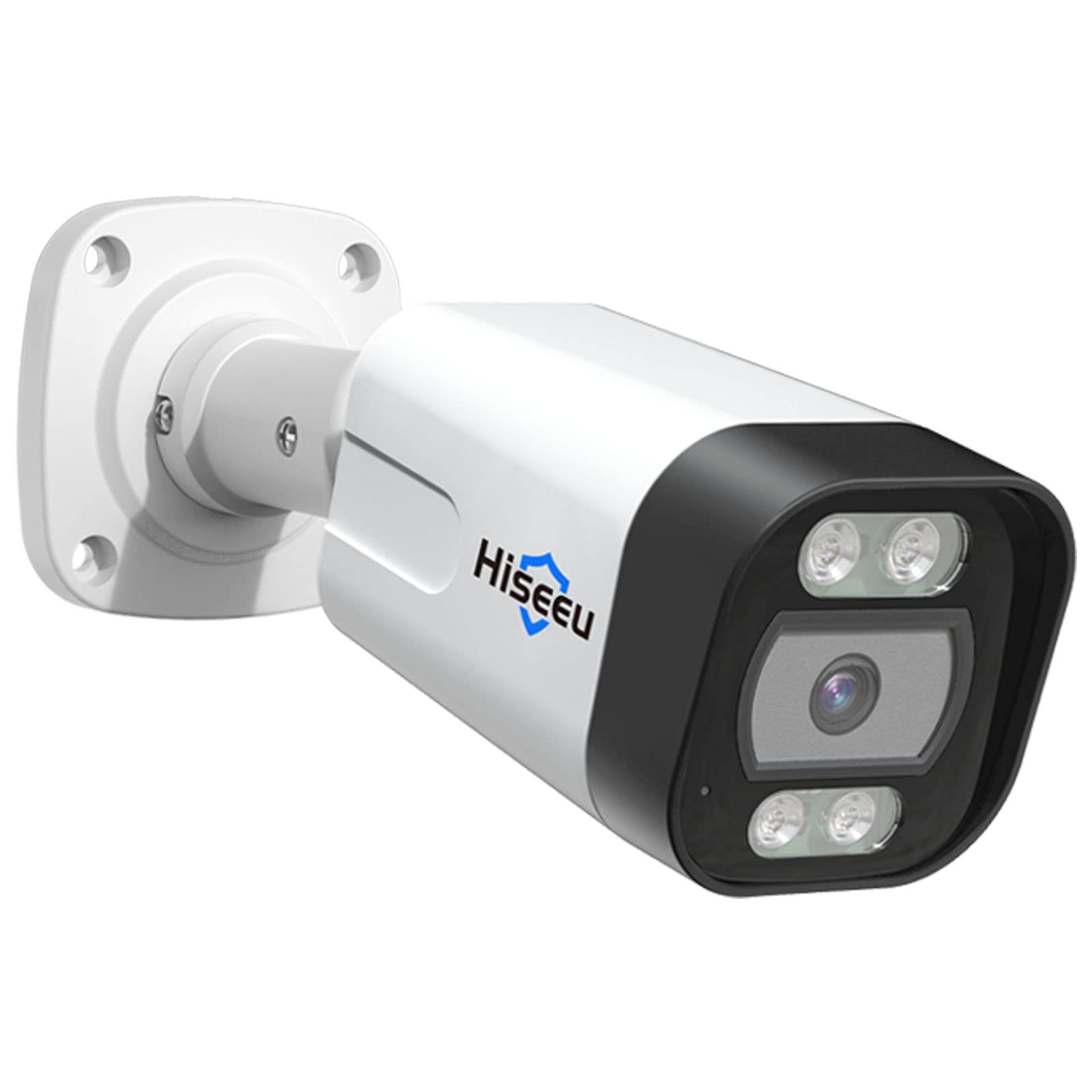
Figure 1: Hiseeu SGP10551 5MP PoE IP Security Camera
പ്രധാന സവിശേഷതകൾ:
- 5MP HD Video: Captures video at 2592x1944 pixels for clear images.
- H.265 വീഡിയോ കംപ്രഷൻ: കുറയ്ക്കുന്നു file size for efficient storage and smoother streaming.
- രാത്രി കാഴ്ച: Equipped with 18 IR LEDs for up to 30 meters (98 feet) of night vision.
- മോഷൻ ഡിറ്റക്ഷനും അലാറവും: Sends alerts via email upon detecting motion.
- IP67 കാലാവസ്ഥാ പ്രതിരോധം: Durable aluminum casing suitable for outdoor use in various weather conditions.
- PoE (പവർ ഓവർ ഇഥർനെറ്റ്): ഒരൊറ്റ ഇതർനെറ്റ് കേബിളിലൂടെ വൈദ്യുതിയും ഡാറ്റയും നൽകിക്കൊണ്ട് ഇൻസ്റ്റാളേഷൻ ലളിതമാക്കുന്നു.
- ONVIF അനുയോജ്യത: Works with third-party ONVIF-compatible NVR devices.
പാക്കേജ് ഉള്ളടക്കം
Please check the package contents upon unboxing. If any items are missing or damaged, contact Hiseeu support.
- Hiseeu SGP10551 5MP PoE IP Security Camera
- മൗണ്ടിംഗ് സ്ക്രൂകളും വാൾ പ്ലഗുകളും
- Waterproof Lid for Network Cable
- ദ്രുത ആരംഭ ഗൈഡ്

ചിത്രം 2: ക്യാമറയും ഉൾപ്പെടുത്തിയ ആക്സസറികളും
സജ്ജീകരണ ഗൈഡ്
1. ഫിസിക്കൽ ഇൻസ്റ്റലേഷൻ
- ഒരു ലൊക്കേഷൻ തിരഞ്ഞെടുക്കുക: നിങ്ങളുടെ ക്യാമറയ്ക്ക് അനുയോജ്യമായ ഒരു സ്ഥലം തിരഞ്ഞെടുക്കുക, ആവശ്യമുള്ളത് പരിഗണിച്ച് viewing area and proximity to an Ethernet cable connection. The camera is rated IP67 for outdoor use.
- ക്യാമറ ഘടിപ്പിക്കുക:
- Use the provided mounting template (if included) to mark drill holes on the wall or ceiling.
- ദ്വാരങ്ങൾ തുരന്ന് മതിൽ പ്ലഗുകൾ തിരുകുക.
- Secure the camera base using the provided screws.
- ക്യാമറ ആംഗിൾ ആവശ്യാനുസരണം ക്രമീകരിക്കുക.
- നെറ്റ്വർക്ക് കേബിൾ ബന്ധിപ്പിക്കുക:
- Connect an Ethernet cable from your PoE NVR or PoE switch to the camera's Ethernet port.
- Ensure the waterproof lid is properly installed over the Ethernet connection to protect it from moisture, especially for outdoor installations.

ചിത്രം 3: ഉദാample of camera mounting
2. നെറ്റ്വർക്ക് കോൺഫിഗറേഷൻ
The camera receives power and data through the PoE Ethernet cable. Once connected to a PoE NVR or PoE switch, the camera should power on automatically.
- For Hiseeu PoE NVR Systems: The camera should be automatically detected and configured by your Hiseeu NVR. Refer to your NVR's manual for adding new cameras.
- For Third-Party ONVIF NVRs: The camera is ONVIF compatible. You may need to manually add the camera to your NVR system using its IP address and ONVIF credentials. Consult your NVR's manual for specific instructions.
3. Mobile App Setup (EseeCloud App)
- ആപ്പ് ഡൗൺലോഡ് ചെയ്യുക: ഇതിനായി തിരയുക "EseeCloud" in your smartphone's app store (iOS or Android) and install it.
- ഒരു അക്കൗണ്ട് രജിസ്റ്റർ ചെയ്യുക: Open the EseeCloud app and follow the on-screen instructions to register a new account.
- ഉപകരണം ചേർക്കുക:
- ആപ്പിലെ "+" ഐക്കൺ അല്ലെങ്കിൽ "ഉപകരണം ചേർക്കുക" ഓപ്ഷൻ ടാപ്പ് ചെയ്യുക.
- Scan the QR code located on the camera or its packaging, or manually enter the device ID.
- Follow the prompts to complete the device addition.

Figure 4: EseeCloud mobile application for camera management
Note: One device can only be linked to one user account. The device can be shared with other users under specific situations within the app.
പ്രവർത്തന നിർദ്ദേശങ്ങൾ
1. തത്സമയം View ഒപ്പം പ്ലേബാക്ക്
Once the camera is added to your NVR or the EseeCloud app, you can access live video streams and review രേഖപ്പെടുത്തി footage.

Figure 5: Remote live view on various devices
- തത്സമയം View: നിങ്ങളുടെ ഉപകരണ ലിസ്റ്റിൽ നിന്ന് ക്യാമറ തിരഞ്ഞെടുക്കുക view തത്സമയ ഫീഡ്.
- പ്ലേബാക്ക്: റെക്കോർഡ് ചെയ്ത foo ആക്സസ് ചെയ്യുകtage through the playback function. The camera supports H.265 video compression for efficient storage and smooth playback.

Figure 6: Professional video surveillance interface with H.265+ support
2. മോഷൻ ഡിറ്റക്ഷനും അലേർട്ടുകളും
The camera features intelligent motion detection to alert you to activity in monitored areas.
- മോഷൻ ഡിറ്റക്ഷൻ കോൺഫിഗർ ചെയ്യുക:
- Access camera settings via the EseeCloud app or NVR interface.
- Navigate to the "Motion Detection" or "Alarm" section.
- Define detection zones and adjust sensitivity levels to minimize false alarms.
- Alarm Alerts: When motion is detected, the camera can push alert messages to your email. You can then remotely check the event via the app.

Figure 7: Human and vehicle detection capabilities

Figure 8: Behavior detection features like intrusion and line crossing
The camera's behavior detection reduces false positives from environmental factors like trees, clouds, or rain.
3. നൈറ്റ് വിഷൻ
The camera automatically switches to night vision mode in low-light conditions, utilizing its 18 IR LEDs to provide clear black and white images up to 30 meters.
4. Intruder Warning (Buzzer & Spotlight)
For enhanced security, the camera can activate a spotlight and buzzer upon detecting human or vehicle activity. This feature can be configured individually through the camera settings.

Figure 9: Intruder warning system in action
മെയിൻ്റനൻസ്
- വൃത്തിയാക്കൽ: ക്യാമറ ലെൻസ് പതിവായി മൃദുവായ, ഡി-ടച്ച് ഉപയോഗിച്ച് വൃത്തിയാക്കുക.amp വ്യക്തമായ ചിത്ര നിലവാരം ഉറപ്പാക്കാൻ തുണി ഉപയോഗിക്കുക. അബ്രസിവ് ക്ലീനറുകൾ ഒഴിവാക്കുക.
- ഫേംവെയർ അപ്ഡേറ്റുകൾ: Check the Hiseeu official website or the EseeCloud app periodically for available firmware updates. Keeping your camera's firmware updated ensures optimal performance and security.
- കേബിൾ പരിശോധന: Periodically inspect the Ethernet cable and connections for any signs of wear or damage, especially for outdoor installations.
ട്രബിൾഷൂട്ടിംഗ്
ഇമേജ്/വീഡിയോ ഫീഡ് ഇല്ല:
- Ensure the camera is properly connected to a PoE NVR or PoE switch.
- Verify the Ethernet cable is securely plugged in at both ends.
- Check if the NVR or switch is powered on.
- If using a third-party NVR, confirm the camera has been correctly added and configured with the right IP address and ONVIF settings.
മോശം ചിത്രത്തിന്റെ ഗുണനിലവാരം:
- ക്യാമറ ലെൻസ് വൃത്തിയാക്കുക.
- ക്യാമറയുടെ ഫീൽഡിൽ തടസ്സങ്ങളൊന്നുമില്ലെന്ന് ഉറപ്പാക്കുക. view.
- Check network bandwidth. Insufficient bandwidth can affect streaming quality.
മോഷൻ ഡിറ്റക്ഷൻ പ്രവർത്തിക്കുന്നില്ല:
- Verify motion detection settings in the app or NVR, including detection zones and sensitivity.
- Ensure the camera's time and date are correct.
ആപ്പിലേക്ക് കണക്റ്റ് ചെയ്യാൻ കഴിയില്ല:
- നിങ്ങളുടെ സ്മാർട്ട്ഫോണിന് സ്ഥിരമായ ഇന്റർനെറ്റ് കണക്ഷൻ ഉണ്ടെന്ന് ഉറപ്പാക്കുക.
- Verify the camera is online and connected to your network.
- Try restarting the camera and your router/NVR.
- Ensure you are using the correct EseeCloud account credentials.
കൂടുതൽ സഹായത്തിന്, ദയവായി പിന്തുണ വിഭാഗം പരിശോധിക്കുക.
സ്പെസിഫിക്കേഷനുകൾ
| ഫീച്ചർ | വിശദാംശങ്ങൾ |
|---|---|
| മോഡൽ നമ്പർ | SGP10551 |
| ഫലപ്രദമായ സ്റ്റിൽ റെസല്യൂഷൻ | 5 MP (2592 x 1944 pixels) |
| കണക്റ്റിവിറ്റി ടെക്നോളജി | Wired (PoE), Wireless (Wi-Fi) |
| ഇൻഡോർ/ഔട്ട്ഡോർ ഉപയോഗം | ഇൻഡോർ, ഔട്ട്ഡോർ |
| വാട്ടർപ്രൂഫ് റേറ്റിംഗ് | IP67 |
| രാത്രി കാഴ്ച ദൂരം | Up to 30 meters (18 IR LEDs) |
| വീഡിയോ കംപ്രഷൻ | H.265 |
| ഫ്രെയിം റേറ്റ് | 25 fps |
| മോഷൻ സെൻസർ | Yes (with email alerts) |
| കണക്റ്റിവിറ്റി പ്രോട്ടോക്കോൾ | ഒഎൻവിഎഫ് |
| എൻക്ലോഷർ മെറ്റീരിയൽ | അലുമിനിയം |
| പവർ ഉറവിടം | PoE (48 Volts) |
| ഇനത്തിൻ്റെ അളവുകൾ | 5.51 x 3.54 x 2.36 ഇഞ്ച് |
| ഇനത്തിൻ്റെ ഭാരം | 27.22 ഗ്രാം |
വാറൻ്റി വിവരങ്ങൾ
Hiseeu products typically come with a limited warranty. For specific warranty terms and conditions, including duration and coverage, please refer to the warranty card included with your product or visit the official Hiseeu webവാറന്റി ക്ലെയിമുകൾക്കുള്ള വാങ്ങലിന്റെ തെളിവായി നിങ്ങളുടെ വാങ്ങൽ രസീത് സൂക്ഷിക്കുക.
ഉപഭോക്തൃ പിന്തുണ
If you encounter any issues or have questions regarding your Hiseeu SGP10551 camera, please contact Hiseeu customer support.
- ഓൺലൈൻ പിന്തുണ: Visit the official Hiseeu webപതിവുചോദ്യങ്ങൾ, ട്രബിൾഷൂട്ടിംഗ് ഗൈഡുകൾ, ബന്ധപ്പെടാനുള്ള വിവരങ്ങൾ എന്നിവയ്ക്കുള്ള സൈറ്റ്.
- ഇമെയിൽ പിന്തുണ: Refer to your product packaging or quick start guide for the support email address.
- Hiseeu Store: കൂടുതൽ വിവരങ്ങളും ഉൽപ്പന്നങ്ങളും ഇവിടെ കണ്ടെത്താം Hiseeu Amazon Store.

Figure 10: Scan for Hiseeu Support