
ആമുഖം
This manual provides detailed instructions for the operation and maintenance of your NIA X3 Wireless Bluetooth Headphones. Please read this manual thoroughly before using the product to ensure proper function and longevity.
ബോക്സിൽ എന്താണുള്ളത്
- NIA X3 Wireless Bluetooth Headphones
- യുഎസ്ബി ചാർജിംഗ് കേബിൾ
- ഉപയോക്തൃ മാനുവൽ (ഈ പ്രമാണം)
- Ear Cushions (pre-installed or spare, as applicable)
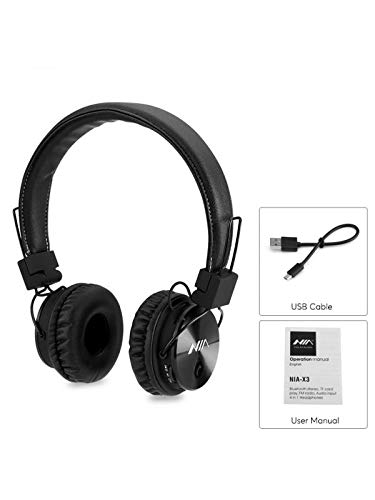
ചിത്രം 1: Contents of the NIA X3 package, including the headphones, a USB charging cable, and the user manual.
ഉൽപ്പന്നം കഴിഞ്ഞുview
Familiarize yourself with the various parts of your NIA X3 headphones.

ചിത്രം 2: ഫ്രണ്ട് view of the NIA X3 headphones, showcasinഇയർകപ്പുകളും ഹെഡ്ബാൻഡും g.
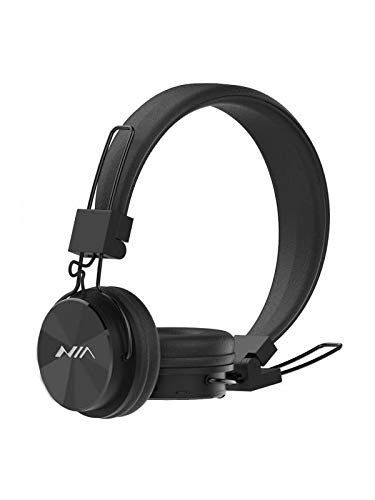
ചിത്രം 3: വശം view of the NIA X3 headphones, highlighting the adjustable headband and earcup design.
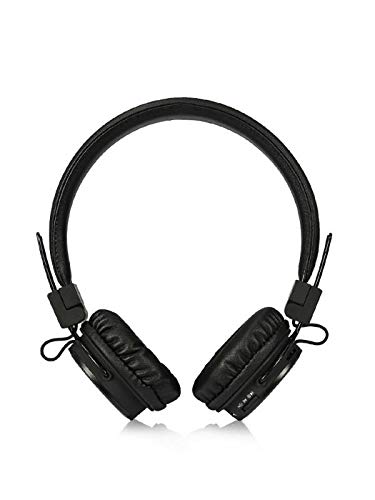
ചിത്രം 4: മുകളിൽ view of the NIA X3 headphones, showing the overall structure and earcups.
സജ്ജമാക്കുക
1. ഹെഡ്ഫോണുകൾ ചാർജ് ചെയ്യുന്നു
- Connect the micro USB end of the charging cable to the charging port on the headphones.
- Connect the standard USB end of the cable to a USB power adapter (5V DC, 500mA recommended) or a computer's USB port.
- The LED indicator will illuminate to show charging status.
- സാധാരണയായി പൂർണ്ണമായി ചാർജ് ചെയ്യാൻ ഏകദേശം 2 മണിക്കൂർ എടുക്കും.
- Once fully charged, the LED indicator will change or turn off (refer to specific product LED behavior).
2. പവർ ഓൺ/ഓഫ്
- പവർ ഓണാക്കാൻ: Press and hold the Power button (usually multi-function button) for a few seconds until the LED indicator lights up and an audible prompt is heard.
- പവർ ഓഫ് ചെയ്യാൻ: Press and hold the Power button for a few seconds until the LED indicator turns off and an audible prompt is heard.
3. ബ്ലൂടൂത്ത് ജോടിയാക്കൽ
- ഹെഡ്ഫോണുകൾ ഓഫാണെന്ന് ഉറപ്പാക്കുക.
- എൽഇഡി ഇൻഡിക്കേറ്റർ ചുവപ്പും നീലയും മാറിമാറി മിന്നുന്നതുവരെ ഏകദേശം 5-7 സെക്കൻഡ് നേരത്തേക്ക് പവർ ബട്ടൺ അമർത്തിപ്പിടിക്കുക, ഇത് ജോടിയാക്കൽ മോഡിനെ സൂചിപ്പിക്കുന്നു.
- നിങ്ങളുടെ ബ്ലൂടൂത്ത് പ്രാപ്തമാക്കിയ ഉപകരണത്തിൽ (സ്മാർട്ട്ഫോൺ, ടാബ്ലെറ്റ്, കമ്പ്യൂട്ടർ), ബ്ലൂടൂത്ത് ക്രമീകരണങ്ങളിലേക്ക് പോകുക.
- ഇതിനായി തിരയുക available devices. You should see "NIA X3" or a similar name in the list.
- Select "NIA X3" to connect. Once paired, the LED indicator will typically flash blue slowly or remain solid blue, and an audible confirmation will be heard.
- പാസ്വേഡ് ആവശ്യപ്പെടുകയാണെങ്കിൽ, "0000" എന്ന് നൽകുക.
4. വയർഡ് കണക്ഷൻ (AUX മോഡ്)
- To use the headphones with a 3.5mm audio cable, ensure the headphones are powered ഓഫ് ആദ്യം.
- Connect one end of a 3.5mm audio cable (not included) to the AUX input port on the headphones.
- മറ്റേ അറ്റം നിങ്ങളുടെ ഉപകരണത്തിന്റെ ഓഡിയോ ഔട്ട്പുട്ട് ജാക്കുമായി ബന്ധിപ്പിക്കുക.
- Audio will now be played through the wired connection.
പ്രവർത്തന നിർദ്ദേശങ്ങൾ
1. ബ്ലൂടൂത്ത് മോഡ്
- പ്ലേ/താൽക്കാലികമായി നിർത്തുക: മൾട്ടി-ഫംഗ്ഷൻ ബട്ടൺ ഒരിക്കൽ അമർത്തുക.
- അടുത്ത ട്രാക്ക്: വോളിയം അപ്പ് (+) ബട്ടൺ അമർത്തിപ്പിടിക്കുക.
- മുമ്പത്തെ ട്രാക്ക്: വോളിയം ഡൗൺ (-) ബട്ടൺ അമർത്തിപ്പിടിക്കുക.
- വോളിയം കൂട്ടുക: വോളിയം അപ്പ് (+) ബട്ടൺ ചുരുക്കി അമർത്തുക.
- വോളിയം താഴേക്ക്: വോളിയം ഡൗൺ (-) ബട്ടൺ ചുരുക്കി അമർത്തുക.
- ഉത്തരം/അവസാന കോൾ: മൾട്ടി-ഫംഗ്ഷൻ ബട്ടൺ ഒരിക്കൽ അമർത്തുക.
- കോൾ നിരസിക്കുക: മൾട്ടി-ഫംഗ്ഷൻ ബട്ടൺ 2 സെക്കൻഡ് അമർത്തിപ്പിടിക്കുക.
- അവസാന നമ്പർ വീണ്ടും ഡയൽ ചെയ്യുക: മൾട്ടി-ഫംഗ്ഷൻ ബട്ടൺ ഇരട്ട-അമർത്തുക.
2. മൈക്രോ എസ്ഡി കാർഡ് പ്ലേബാക്ക്
- Insert a Micro SD card (up to 32GB, FAT32 format) with supported audio files (MP3/WAV/WMA/FLAC/APE) into the Micro SD card slot.
- The headphones will automatically switch to Micro SD card playback mode.
- Use the Play/Pause, Next Track, Previous Track, Volume Up, and Volume Down buttons as described for Bluetooth mode.
3. എഫ്എം റേഡിയോ
- Press the Mode button (if available, or Multi-function button with short press) to switch to FM Radio mode.
- ലഭ്യമായ എഫ്എം സ്റ്റേഷനുകൾ സ്വയമേവ സ്കാൻ ചെയ്ത് സംരക്ഷിക്കാൻ പ്ലേ/പോസ് ബട്ടൺ ഒരിക്കൽ അമർത്തുക.
- Use the Next Track/Previous Track buttons to navigate between saved stations.
- Adjust volume with the Volume Up/Down buttons.
4. APP നിയന്ത്രണം
- Scan the QR code provided on the product packaging or in the quick start guide to download the dedicated control application.
- Install the application on your mobile phone.
- Ensure your headphones are connected via Bluetooth to your phone.
- Open the application to control various functions of the headphones, such as mode switching, equalizer settings, and more.
മെയിൻ്റനൻസ്
- വൃത്തിയാക്കൽ: ഹെഡ്ഫോണുകൾ വൃത്തിയാക്കാൻ മൃദുവായതും ഉണങ്ങിയതുമായ തുണി ഉപയോഗിക്കുക. അബ്രാസീവ് ക്ലീനറുകളോ ലായകങ്ങളോ ഉപയോഗിക്കരുത്.
- സംഭരണം: നേരിട്ടുള്ള സൂര്യപ്രകാശത്തിൽ നിന്നും കടുത്ത താപനിലയിൽ നിന്നും മാറി തണുത്തതും വരണ്ടതുമായ സ്ഥലത്ത് ഹെഡ്ഫോണുകൾ സൂക്ഷിക്കുക.
- ബാറ്ററി കെയർ: To prolong battery life, charge the headphones fully at least once every three months if not in regular use. Avoid fully discharging the battery frequently.
- വാട്ടർ എക്സ്പോഷർ: ഈ ഹെഡ്ഫോണുകൾ വാട്ടർപ്രൂഫ് അല്ല. വെള്ളത്തിലോ അമിതമായ ഈർപ്പത്തിലോ സമ്പർക്കം ഒഴിവാക്കുക.
ട്രബിൾഷൂട്ടിംഗ്
| പ്രശ്നം | സാധ്യമായ പരിഹാരം |
|---|---|
| ഹെഡ്ഫോണുകൾ പവർ ഓൺ ചെയ്യുന്നില്ല. | Ensure the headphones are fully charged. Connect to a power source and try again after a few minutes. |
| ബ്ലൂടൂത്ത് ഉപകരണവുമായി ജോടിയാക്കാൻ കഴിയില്ല. |
|
| ബ്ലൂടൂത്ത് മോഡിൽ ശബ്ദമില്ല. |
|
| മൈക്രോ എസ്ഡി കാർഡ് പ്ലേ ചെയ്യുന്നില്ല. |
|
| FM Radio not working or poor reception. |
|
സ്പെസിഫിക്കേഷനുകൾ
| ഫീച്ചർ | വിശദാംശങ്ങൾ |
|---|---|
| മോഡൽ | NIA-X03 |
| സൗണ്ട് മോഡ് | സ്റ്റീരിയോ |
| സ്പീക്കർ ഡ്രൈവർ യൂണിറ്റ് | Customized 40mm Nd Driver |
| പ്രതിരോധം | 32 ഓം |
| സംവേദനക്ഷമത | 108+/-3dB |
| ഫ്രീക്വൻസി പ്രതികരണം | 20-20000Hz |
| ഇൻപുട്ട് പവർ | 3.7 VDC, 280mAh (Built-in Li-ion Battery) |
| ഇൻപുട്ട് ചാർജ് ചെയ്യുന്നു | 5 VDC 500mA, Micro USB |
| പ്രവർത്തന സമയം | 5-6 മണിക്കൂർ |
| ചാർജിംഗ് സമയം | ഏകദേശം 2 മണിക്കൂർ |
| ബ്ലൂടൂത്ത് പതിപ്പ് | 4.0 |
| ട്രാൻസ്മിഷൻ ഫ്രീക്വൻസി | 2402 Mhz മുതൽ 2480 Mhz വരെ |
| ആശയവിനിമയ ശ്രേണി | 10M (പരമാവധി) |
| സ്റ്റാൻഡ്ബൈ സമയം | ഏകദേശം 48 മണിക്കൂർ |
| ബ്ലൂടൂത്ത് പ്രോfiles | A2DP, AVRCP, HSP, HFP |
| Micro SD Audio Formats | MP3/WAV/WMA/FLAC/APE |
| മൈക്രോ എസ്ഡി കാർഡ് ശേഷി | 32GB (Max) |
| മൈക്രോ എസ്ഡി കാർഡ് ഫോർമാറ്റ് | FAT32 |
| എഫ്എം റേഡിയോ ഫ്രീക്വൻസി | 88-108Mhz |
| ഓഡിയോ ഇൻപുട്ട് | 3.5 എംഎം ജാക്ക് |
| മെറ്റീരിയൽ | പ്ലാസ്റ്റിക് |
| നിയന്ത്രണ രീതി | സ്പർശിക്കുക |
വാറൻ്റിയും പിന്തുണയും
For warranty information or technical support, please refer to the warranty card included with your product or contact NIA customer service through their official webഉൽപ്പന്നം വാങ്ങിയ സൈറ്റ് അല്ലെങ്കിൽ റീട്ടെയിലർ. വാറന്റി ക്ലെയിമുകൾക്കായി നിങ്ങളുടെ വാങ്ങിയതിന്റെ തെളിവ് സൂക്ഷിക്കുക.


