
Sygonix SY-RS2W-X1
Sygonix SY-RS2W-X1 Wireless Wall Switch Instruction Manual
Model: SY-RS2W-X1 | Part Number: SY-3525558
1. ആമുഖം
Thank you for choosing the Sygonix SY-RS2W-X1 Wireless Wall Switch. This device is designed to provide convenient and reliable control over two separate electrical appliances or lighting circuits. Its robust construction and IP66 rating make it suitable for both indoor and outdoor applications, offering protection against dust and powerful water jets. Please read this manual thoroughly before installation and operation to ensure safe and efficient use of the product.
2. സുരക്ഷാ നിർദ്ദേശങ്ങൾ
- ഇലക്ട്രിക്കൽ സുരക്ഷ: Installation and wiring must be performed by a qualified electrician in accordance with all local and national electrical codes. Incorrect installation can lead to electric shock, fire, or damage to the device.
- വൈദ്യുതി വിച്ഛേദിക്കൽ: Always disconnect the main power supply before performing any installation, maintenance, or troubleshooting.
- വാല്യംtagഇയും ലോഡും: Ensure the connected devices do not exceed the maximum combined switching load of 2000W and the specified current rating of 1 Ampമുമ്പ്.
- പരിസ്ഥിതി വ്യവസ്ഥകൾ: The device is IP66 rated, meaning it is protected against dust ingress and powerful water jets. However, avoid submerging the device in water. Ensure all cable glands are properly tightened to maintain the IP66 rating.
- നാശനഷ്ട പരിശോധന: Do not use the device if it appears damaged. Contact customer support for assistance.
- കുട്ടികൾ: ഉപകരണം കുട്ടികൾക്ക് ലഭ്യമാകാതെ സൂക്ഷിക്കുക.
3. പാക്കേജ് ഉള്ളടക്കം
അൺപാക്ക് ചെയ്യുമ്പോൾ എല്ലാ ഘടകങ്ങളും ഉണ്ടെന്നും കേടുപാടുകൾ സംഭവിച്ചിട്ടില്ലെന്നും ഉറപ്പാക്കുക.
- 1x Sygonix SY-RS2W-X1 Wireless Wall Switch
- നിർദ്ദേശ മാനുവൽ (ഈ പ്രമാണം)
4. ഉൽപ്പന്ന സവിശേഷതകൾ
- Independent 2-Way Control: Capable of switching two separate devices or circuits independently.
- Outdoor Ready (IP66): Designed for use in challenging environments, offering protection against dust and strong water jets.
- High Switching Capacity: Supports a combined switching load of up to 2000 Watts.
- വയർലെസ് പ്രവർത്തനം: Provides flexible control without the need for direct wiring to the controlled devices.
- നീണ്ടുനിൽക്കുന്ന നിർമ്മാണം: Made from robust plastic material for longevity.
5. സജ്ജീകരണവും ഇൻസ്റ്റാളേഷനും
പ്രധാനപ്പെട്ടത്: All electrical work should be carried out by a qualified professional. Ensure power is disconnected before starting installation.
5.1 സ്വിച്ച് മൗണ്ട് ചെയ്യുന്നു
- Choose a suitable wall-mounting location that is easily accessible and provides optimal wireless signal transmission.
- Mark the drilling points on the wall using the switch's mounting holes as a template.
- Drill holes and insert appropriate wall plugs (not included).
- Secure the switch to the wall using screws, ensuring it is firmly attached.
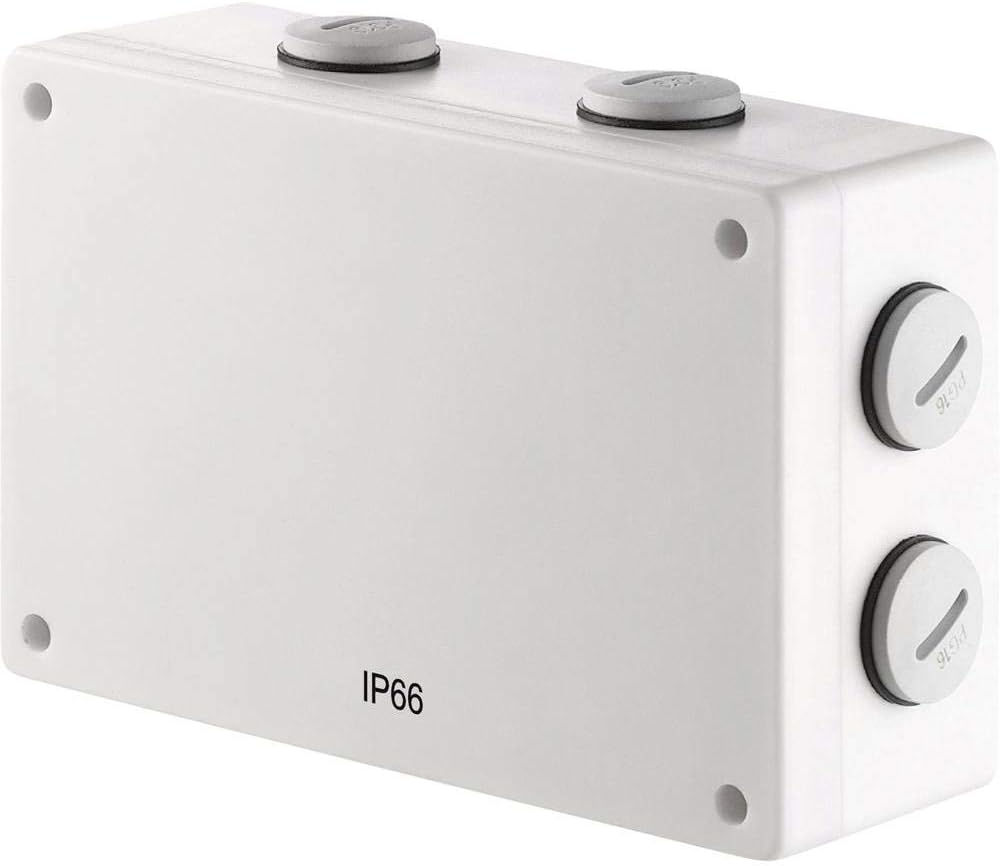
ഫ്രണ്ട് view of the Sygonix SY-RS2W-X1 wireless wall switch, showing its compact design and IP66 rating.
5.2 വയറിംഗ്
The SY-RS2W-X1 is a wireless wall switch and typically does not require direct wiring to the controlled devices. It sends wireless signals to compatible receivers (sold separately). However, if it acts as a transmitter for a wired system, follow these general guidelines:
- Open the housing of the switch carefully.
- Feed the necessary electrical cables through the provided cable glands. Ensure the cable glands are securely tightened after wiring to maintain the IP66 rating.
- Connect the wires to the appropriate terminals inside the switch. Refer to the wiring diagram provided with your specific receiver or system for correct connections.
- Close the housing securely, ensuring all seals are properly seated.

വശം view of the Sygonix SY-RS2W-X1 switch, highlighting the cable glands for secure and waterproof cable entry, essential for its IP66 rating.
5.3 Pairing with Receivers
The SY-RS2W-X1 operates wirelessly. To control devices, it must be paired with compatible wireless receivers (e.g., Sygonix 1275696 or similar). Refer to the instruction manual of your specific receiver for detailed pairing procedures. Generally, this involves:
- Placing the receiver into pairing mode.
- Pressing the desired button on the SY-RS2W-X1 switch to transmit the pairing signal.
- Confirming successful pairing on the receiver.

Diagram illustrating the wireless functionality of the RS2W wall switch, showing signal transmission.
6. പ്രവർത്തന നിർദ്ദേശങ്ങൾ
Once installed and paired with compatible receivers, the SY-RS2W-X1 operates as a simple ON/OFF switch for two independent channels.
- Channel 1 Control: Press the designated button for Channel 1 to toggle the connected device ON or OFF.
- Channel 2 Control: Press the designated button for Channel 2 to toggle the connected device ON or OFF.
The switch operates in a normally open contact type, meaning the circuit is open (OFF) until the button is pressed.

ക്ലോസ് അപ്പ് view of the Sygonix RS2W wireless wall switch, detailing its button interface.
7. പരിപാലനം
The Sygonix SY-RS2W-X1 requires minimal maintenance.
- വൃത്തിയാക്കൽ: Wipe the exterior of the switch with a soft, damp cloth. Do not use abrasive cleaners or solvents. Ensure no water enters the housing.
- പരിശോധന: Periodically inspect the switch for any signs of physical damage, wear, or loose connections. Check the integrity of the cable glands and housing seals, especially if used outdoors, to maintain the IP66 rating.
- ഉപയോക്തൃ-സേവനയോഗ്യമായ ഭാഗങ്ങൾ ഇല്ല: There are no user-serviceable parts inside the switch. Do not attempt to open or repair the device yourself.
8. പ്രശ്നപരിഹാരം
If you encounter issues with your Sygonix SY-RS2W-X1 switch, refer to the following common troubleshooting steps:
- ഉപകരണം പ്രതികരിക്കുന്നില്ല:
- Ensure the switch is properly paired with its receiver. Refer to the receiver's manual for pairing instructions.
- Check the power supply to the receiver and the connected device.
- Verify that the switch buttons are functioning correctly (e.g., no physical obstruction).
- Check for any obstructions or excessive distance between the switch and the receiver that might interfere with the wireless signal.
- ഇടയ്ക്കിടെയുള്ള പ്രവർത്തനം:
- Wireless interference from other devices can cause intermittent operation. Try relocating the switch or receiver.
- Ensure the switch is securely mounted and not experiencing any physical movement that could affect internal components.
- IP66 Rating Compromised:
- If water ingress is suspected, immediately disconnect power to the circuit.
- Inspect cable glands and housing seals for damage or improper seating. Replace if necessary.
If these steps do not resolve the issue, contact Sygonix customer support or a qualified electrician.
9 സ്പെസിഫിക്കേഷനുകൾ
| ഫീച്ചർ | സ്പെസിഫിക്കേഷൻ |
|---|---|
| നിർമ്മാതാവ് | സിഗോണിക്സ് |
| മോഡൽ നമ്പർ | SY-3525558 |
| ഉൽപ്പന്ന അളവുകൾ (L x W x H) | 15.5 x 5.2 x 10.5 സെ.മീ |
| ഭാരം | 369 ഗ്രാം |
| മെറ്റീരിയൽ | പ്ലാസ്റ്റിക് |
| പവർ ഉറവിടം | മാനുവൽ |
| സംയോജിത വാട്ട്tage | 2000 W വരെ |
| നിലവിലെ റേറ്റിംഗ് | 1 Ampമുമ്പ് |
| സ്വിച്ച് തരം | 2-way, Wireless Wall Mounting |
| മൗണ്ടിംഗ് തരം | മതിൽ മൗണ്ടിംഗ് |
| ഓപ്പറേറ്റിംഗ് മോഡ് | ഓൺ-ഓഫ് |
| ബന്ധപ്പെടാനുള്ള തരം | സാധാരണയായി തുറന്നിരിക്കുന്നു |
| സർട്ടിഫിക്കേഷനുകൾ | TÜV, IP66, CE |
| ബാറ്ററികൾ ആവശ്യമാണ് | ഇല്ല |
10. വാറൻ്റിയും പിന്തുണയും
For warranty information, please refer to the terms and conditions provided at the time of purchase or contact your retailer. Sygonix products are designed for reliability and performance.
If you require technical support or have questions not covered in this manual, please visit the official Sygonix webസൈറ്റിൽ ബന്ധപ്പെടുക അല്ലെങ്കിൽ സഹായത്തിനായി അവരുടെ ഉപഭോക്തൃ സേവന വിഭാഗവുമായി ബന്ധപ്പെടുക.
Ask a question about this manual
Ask about setup, troubleshooting, compatibility, parts, safety, or missing instructions. Manuals+ will review the question and use this page’s manual context to help answer it.