

1. ആമുഖം
Thank you for choosing the Physionics ELTR01 Elliptical Trainer. This manual provides essential information for the safe assembly, operation, and maintenance of your fitness equipment. Please read it thoroughly before use and keep it for future reference.
The Physionics ELTR01 is designed to provide an effective full-body cardio workout in the comfort of your home, engaging various muscle groups while being gentle on your joints.

Image 1.1: Physionics ELTR01 Elliptical Trainer in use.
2 സുരക്ഷാ വിവരങ്ങൾ
- ഏതെങ്കിലും പുതിയ വ്യായാമ പരിപാടി ആരംഭിക്കുന്നതിന് മുമ്പ് ഒരു ഡോക്ടറെ സമീപിക്കുക.
- ഉപയോഗ സമയത്ത് ഉപകരണങ്ങളിൽ നിന്ന് കുട്ടികളെയും വളർത്തുമൃഗങ്ങളെയും അകറ്റി നിർത്തുക.
- Place the trainer on a flat, stable surface with adequate clearance around it.
- ഓരോ ഉപയോഗത്തിനും മുമ്പ് എല്ലാ ബോൾട്ടുകളും നട്ടുകളും സുരക്ഷിതമായി മുറുക്കിയിട്ടുണ്ടെന്ന് ഉറപ്പാക്കുക.
- പരമാവധി ഉപയോക്തൃ ഭാരം കവിയരുത് 120 കി.ഗ്രാം (265 പൗണ്ട്).
- വ്യായാമത്തിന് അനുയോജ്യമായ വസ്ത്രങ്ങളും പാദരക്ഷകളും ധരിക്കുക.
- നിങ്ങൾക്ക് ക്ഷീണം, തലകറക്കം, അല്ലെങ്കിൽ വേദന അനുഭവപ്പെടുകയാണെങ്കിൽ ഉടൻ വ്യായാമം നിർത്തുക.
- The equipment is for home use only, not for commercial or therapeutic purposes.

Image 2.1: Maximum user weight capacity of 120 kg (265 lbs).
3. പാക്കേജ് ഉള്ളടക്കം
Please check that all components are present and undamaged. If any parts are missing or damaged, contact customer support.
- പ്രധാന ഫ്രെയിം ഘടകങ്ങൾ
- പെഡലുകൾ (2)
- Handlebars (2) with Pulse Sensors
- എൽസിഡി മോണിറ്റർ
- Abdominal Support Pad
- അസംബ്ലി ഹാർഡ്വെയർ (ബോൾട്ടുകൾ, വാഷറുകൾ, നട്ടുകൾ)
- അസംബ്ലി ഉപകരണങ്ങൾ (റെഞ്ചുകൾ, അല്ലെൻ കീകൾ)
- ഉപയോക്തൃ മാനുവൽ
4. സജ്ജീകരണവും അസംബ്ലിയും
Assembly typically requires two people. Follow the numbered steps in the included assembly diagram. Ensure all connections are secure before use.
- എല്ലാ ഘടകങ്ങളും അൺപാക്ക് ചെയ്ത് വൃത്തിയുള്ളതും പരന്നതുമായ ഒരു പ്രതലത്തിൽ വയ്ക്കുക.
- Attach the front and rear stabilizers to the main frame using the provided bolts and washers.
- Mount the main upright post to the base frame.
- Connect the handlebars and pedal arms to the main frame, ensuring proper alignment.
- Install the abdominal support pad onto its adjustable post.
- Attach the LCD monitor to its bracket and connect the sensor wires (pulse and speed).
- Secure the pedals to the pedal arms.
- Double-check all bolts and nuts for tightness.

Image 4.1: Product dimensions for placement planning.
5. പ്രവർത്തന നിർദ്ദേശങ്ങൾ
5.1 ആരംഭിക്കുന്നു
Step onto the pedals one foot at a time, holding onto the handlebars for balance. Begin a smooth, elliptical motion. The movement should feel natural and fluid.

Image 5.1: Key features of the elliptical trainer.
5.2 LCD Monitor Functions
The digital LCD monitor tracks your workout progress. It typically displays the following functions:
- പൾസ്: Your heart rate (when holding the pulse sensors).
- സമയം: നിങ്ങളുടെ നിലവിലെ വ്യായാമത്തിന്റെ ദൈർഘ്യം.
- ആകെ സമയം: Cumulative workout time.
- കലോറികൾ: കണക്കാക്കിയ കലോറികൾ കത്തിച്ചു.
- RPM (മിനിറ്റിൽ വിപ്ലവങ്ങൾ): Speed of your pedal strokes.
- സ്കാൻ: എല്ലാ ഡിസ്പ്ലേ ഫംഗ്ഷനുകളിലൂടെയും യാന്ത്രികമായി സൈക്കിൾ ചെയ്യുന്നു.
Use the 'MODE' button to select a specific function or 'SCAN' mode. The 'RESET' button clears all values.

Image 5.2: Close-up of the LCD monitor and its functions.
5.3 Adjustable Abdominal Support
The abdominal support pad can be adjusted for height and depth to provide comfort and stability during your workout. Loosen the adjustment knob, position the pad, and then tighten the knob securely.

Image 5.3: Detail of the two-way adjustable abdominal support.
5.4 Grip Pulse Monitor
To measure your heart rate, firmly grasp the pulse sensors on the handlebars. Your pulse will be displayed on the LCD monitor after a few seconds.

Image 5.4: How to use the grip pulse monitor.
5.5 Non-Slip Pedals
The textured, non-slip pedals are designed to ensure stability and safety during your exercise. Always ensure your feet are centered and secure on the pedals.
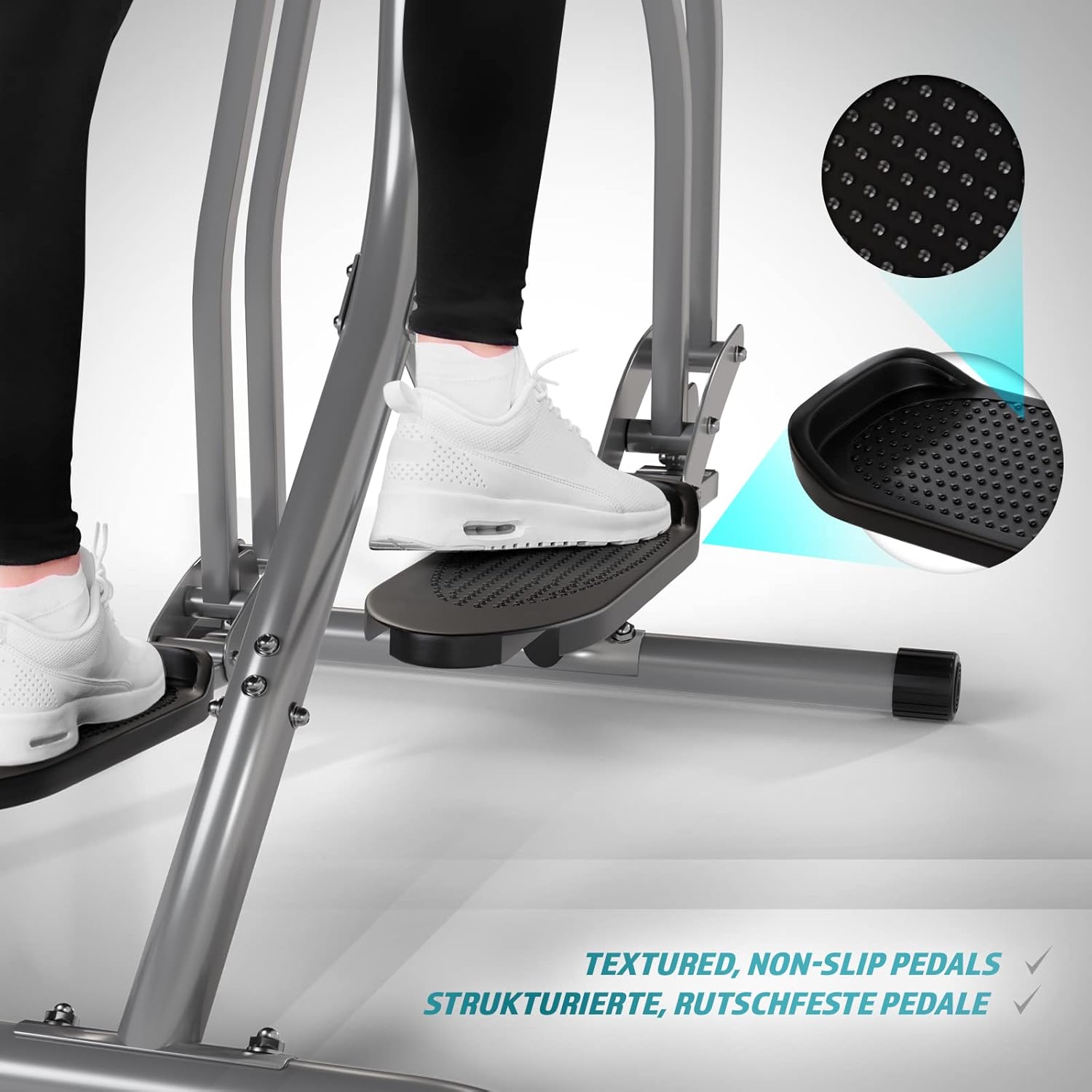
Image 5.5: Detail of the non-slip pedal surface.
5.6 Benefits of Elliptical Training
Elliptical training offers a low-impact workout that is beneficial for cardiovascular health, calorie burning, muscle toning, and improving balance and coordination. It is particularly gentle on joints compared to high-impact exercises.

Image 5.6: Elliptical training is gentle on joints.
6. പരിപാലനം
- വൃത്തിയാക്കൽ: പരസ്യം ഉപയോഗിച്ച് പരിശീലകനെ തുടച്ചുമാറ്റുകamp ഓരോ ഉപയോഗത്തിനു ശേഷവും വിയർപ്പും പൊടിയും നീക്കം ചെയ്യാൻ തുണി ഉപയോഗിക്കുക. അബ്രാസീവ് ക്ലീനറുകൾ ഉപയോഗിക്കരുത്.
- പരിശോധന: എല്ലാ ബോൾട്ടുകൾ, നട്ടുകൾ, ചലിക്കുന്ന ഭാഗങ്ങൾ എന്നിവയുടെ ഇറുകിയതും തേയ്മാനവും പതിവായി പരിശോധിക്കുക. അയഞ്ഞ ഫാസ്റ്റനറുകൾ മുറുക്കുക.
- ലൂബ്രിക്കേഷൻ: Apply a small amount of silicone-based lubricant to moving joints and pivot points every few months to ensure smooth operation and prevent squeaking.
- സംഭരണം: Store the trainer in a dry, cool place away from direct sunlight and moisture.
7. പ്രശ്നപരിഹാരം
| പ്രശ്നം | സാധ്യമായ കാരണം | പരിഹാരം |
|---|---|---|
| എൽസിഡി മോണിറ്റർ പ്രദർശിപ്പിക്കുന്നില്ല | Dead batteries; Loose sensor connection | Replace batteries; Check and secure all sensor cables. |
| ഞരക്കുകയോ പൊടിക്കുകയോ ചെയ്യുന്ന ശബ്ദം | Loose bolts; Lack of lubrication; Worn parts | Tighten all bolts; Lubricate moving joints; Contact support if noise persists. |
| പൾസ് റീഡിംഗ് കൃത്യമല്ല | Hands not firmly on sensors; Dry hands | Ensure firm, consistent contact with sensors; Slightly moisten hands if too dry. |
| ഉപയോഗ സമയത്ത് അസ്ഥിരമാണ് | Uneven surface; Loose frame connections | Move to a level surface; Check and tighten all frame bolts. |
8 സ്പെസിഫിക്കേഷനുകൾ
| ഫീച്ചർ | വിശദാംശങ്ങൾ |
|---|---|
| മോഡലിൻ്റെ പേര് | എയർ വാക്കർ |
| മോഡൽ നമ്പർ | ELTR01 |
| ബ്രാൻഡ് | ഫിസിയോണിക്സ് |
| നിറം | വെള്ളി/കറുപ്പ് |
| ഉൽപ്പന്ന അളവുകൾ (L x W x H) | 97 x 60 x 144.5 സെ.മീ |
| ഇനത്തിൻ്റെ ഭാരം | 17 കിലോഗ്രാം |
| പ്രധാന മെറ്റീരിയൽ | Steel, Plastic, Foam |
| പ്രതിരോധ സംവിധാനം | Air, Manual |
| പരമാവധി ഭാരം ശുപാർശ | 120 കിലോഗ്രാം |
| Maximum Step Length | 90 സെൻ്റീമീറ്റർ |
| ഡിസ്പ്ലേ വലിപ്പം | 90 Centimeters (Note: This value from source data may refer to step length or a general display size, not the physical screen size of the LCD monitor.) |
| നിർമ്മാതാവ് | FF Europe |
9. വാറൻ്റിയും പിന്തുണയും
For warranty information, please refer to the documentation included with your purchase or contact your retailer. If you require technical assistance, have questions about assembly, or need replacement parts, please contact Physionics customer support through their official webവാങ്ങുന്ന സ്ഥലത്ത് നൽകിയിരിക്കുന്ന കോൺടാക്റ്റ് വിശദാംശങ്ങൾ അല്ലെങ്കിൽ സൈറ്റ്.
Please have your model number (ELTR01) and purchase date ready when contacting support.