
1. ആമുഖം
This manual provides detailed instructions for the installation, operation, and maintenance of your ASRock B365 PRO4 ATX Motherboard. Please read this manual thoroughly before proceeding with installation to ensure correct setup and to prevent damage to the components.
The ASRock B365 PRO4 motherboard supports 9th and 8th Generation Intel Core Processors, offering a robust platform for personal computing. It features a Digi Power Design with an 8 Power Phase Design, ensuring stable power delivery to the CPU.
2 സുരക്ഷാ വിവരങ്ങൾ
- ഏതെങ്കിലും ഘടകങ്ങൾ ഇൻസ്റ്റാൾ ചെയ്യുന്നതിനോ നീക്കം ചെയ്യുന്നതിനോ മുമ്പ് എല്ലായ്പ്പോഴും വൈദ്യുതി വിതരണം വിച്ഛേദിക്കുക.
- സെൻസിറ്റീവ് ഘടകങ്ങൾക്ക് ഇലക്ട്രോസ്റ്റാറ്റിക് ഡിസ്ചാർജ് (ഇഎസ്ഡി) കേടുപാടുകൾ സംഭവിക്കുന്നത് തടയാൻ ആന്റി-സ്റ്റാറ്റിക് റിസ്റ്റ് സ്ട്രാപ്പ് ധരിക്കുക.
- സെൻസിറ്റീവ് ഘടകങ്ങൾ സ്പർശിക്കാതിരിക്കാൻ മദർബോർഡിന്റെ അരികുകളിൽ പിടിക്കുക.
- നിങ്ങളുടെ പിസി കേസിനുള്ളിൽ അമിതമായി ചൂടാകുന്നത് തടയാൻ ശരിയായ വായുസഞ്ചാരം ഉറപ്പാക്കുക.
- മദർബോർഡ് ഈർപ്പം, കടുത്ത താപനില എന്നിവയിൽ നിന്ന് അകറ്റി നിർത്തുക.
3. സജ്ജീകരണവും ഇൻസ്റ്റാളേഷനും
3.1 പാക്കേജ് ഉള്ളടക്കം
പാക്കേജിൽ എല്ലാ ഇനങ്ങളും ഉണ്ടെന്ന് ഉറപ്പാക്കുക:
- ASRock B365 PRO4 Motherboard
- ദ്രുത ഇൻസ്റ്റലേഷൻ ഗൈഡ്
- പിന്തുണ സിഡി
- ഐ / ഒ ഷീൽഡ്
- 2 x SATA ഡാറ്റ കേബിളുകൾ
- M.3 സോക്കറ്റുകൾക്കുള്ള 2 x സ്ക്രൂകൾ
- M.2 സോക്കറ്റിന് 1 x സ്റ്റാൻഡ്ഓഫ്

Image: ASRock B365 PRO4 Motherboard and its included accessories, including the quick installation guide, support CD, I/O shield, SATA cables, and M.2 screws/standoff.
3.2 മദർബോർഡ് ലേayട്ട്
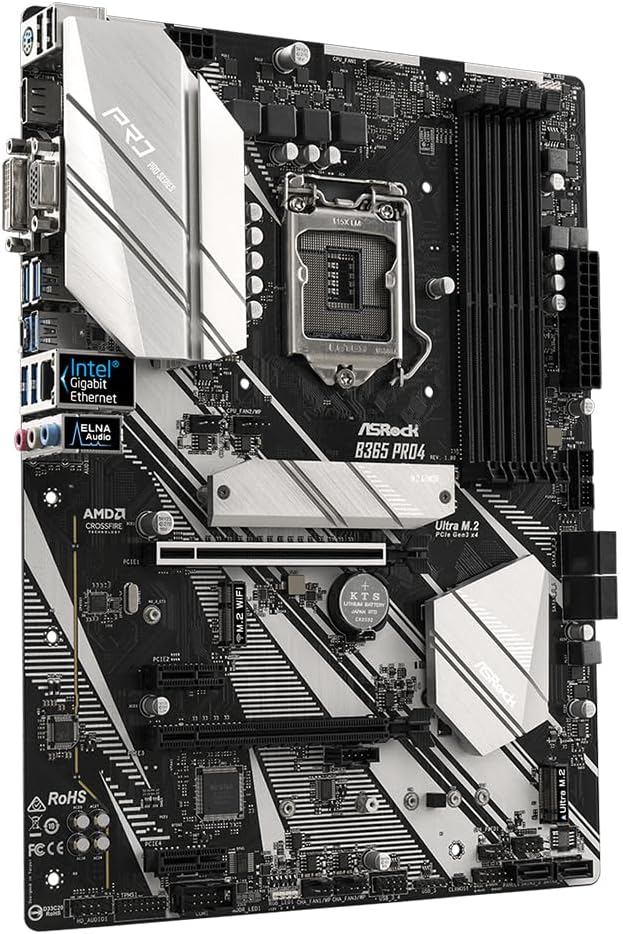
മദർബോർഡിലെ പ്രധാന ഘടകങ്ങളും കണക്ടറുകളും പരിചയപ്പെടുക.

ചിത്രം: മുകളിൽ നിന്ന് താഴേക്ക് view of the ASRock B365 PRO4 Motherboard, highlighting the CPU socket, RAM slots, PCIe slots, and M.2 slots.

ചിത്രം: ആംഗിൾഡ് view of the ASRock B365 PRO4 Motherboard, showing the heatsinks and various connectors.
3.3 CPU Installation (LGA1151)
- സിപിയു സോക്കറ്റ് ലിവർ തുറന്ന് ലോഡ് പ്ലേറ്റ് ഉയർത്തുക.
- സിപിയു സോക്കറ്റുമായി ശ്രദ്ധാപൂർവ്വം വിന്യസിക്കുക, സിപിയുവിലെ സുവർണ്ണ ത്രികോണം സോക്കറ്റിലെ ത്രികോണവുമായി പൊരുത്തപ്പെടുന്നുണ്ടെന്ന് ഉറപ്പാക്കുക.
- നിർബന്ധിച്ച് അമർത്താതെ സിപിയു സോക്കറ്റിൽ സൌമ്യമായി വയ്ക്കുക.
- ലോഡ് പ്ലേറ്റ് അടച്ച് ലിവർ ഉപയോഗിച്ച് ഉറപ്പിക്കുക.
3.4 മെമ്മറി (റാം) ഇൻസ്റ്റലേഷൻ
The motherboard features 4 DDR4 DIMM slots, supporting dual-channel memory up to 64GB.
- DIMM സ്ലോട്ടിന്റെ രണ്ടറ്റത്തുമുള്ള ക്ലിപ്പുകൾ തുറക്കുക.
- DIMM സ്ലോട്ടിലെ കീ ഉപയോഗിച്ച് RAM മൊഡ്യൂളിലെ നോച്ച് വിന്യസിക്കുക.
- Insert the RAM module firmly until the clips snap into place.
3.5 സ്റ്റോറേജ് ഡിവൈസ് ഇൻസ്റ്റലേഷൻ
The motherboard supports 6 SATA3 ports and 2 Ultra M.2 ports.
- SATA ഡ്രൈവുകൾ: Connect SATA data cables to the SATA ports on the motherboard and to your storage devices (HDDs/SSDs). Connect power cables from your power supply to the devices.
- M.2 SSD-കൾ: Locate the M.2 slots. Insert the M.2 SSD into the slot at an angle, then gently push it down and secure it with the provided screw and standoff.
3.6 എക്സ്പാൻഷൻ കാർഡ് ഇൻസ്റ്റലേഷൻ (PCIe)
The motherboard has 2 PCI-Express 3.0 x16 slots and 2 PCI-Express 3.0 x1 slots.
- Select an appropriate PCIe slot for your expansion card (e.g., graphics card).
- നിങ്ങളുടെ പിസി കേസിൽ നിന്ന് അനുബന്ധ മെറ്റൽ ബ്രാക്കറ്റ് നീക്കം ചെയ്യുക.
- Align the card with the slot and press firmly until it is seated correctly.
- പിസി കേസിൽ ഒരു സ്ക്രൂ ഉപയോഗിച്ച് കാർഡ് ഉറപ്പിക്കുക.
3.7 Connecting Peripherals to the I/O Panel
ബാഹ്യ ഉപകരണങ്ങളെ ബന്ധിപ്പിക്കുന്നതിന് പിൻഭാഗത്തെ I/O പാനൽ വിവിധ പോർട്ടുകൾ നൽകുന്നു.
ചിത്രം: ക്ലോസ്-അപ്പ് view of the ASRock B365 PRO4 Motherboard's rear I/O panel, showing ports for PS/2, USB 2.0, USB 3.1 Gen 1, VGA, DVI-D, HDMI, LAN, and audio jacks.
- USB പോർട്ടുകൾ: Connect USB devices (keyboard, mouse, external drives) to the available USB 2.0 (5 ports) and USB 3.1 Gen 1 (8 ports, including 1 Type-C rear) ports.
- വീഡിയോ ഔട്ട്പുട്ടുകൾ: Connect your monitor to the VGA, DVI-D, or HDMI port.
- LAN പോർട്ട്: നെറ്റ്വർക്ക് ആക്സസ്സിനായി ഒരു ഇഥർനെറ്റ് കേബിൾ ബന്ധിപ്പിക്കുക.
- ഓഡിയോ ജാക്കുകൾ: Connect speakers, headphones, or microphones to the audio jacks.
- PS/2 പോർട്ട്: Connect a PS/2 keyboard or mouse.
4. പ്രവർത്തന നിർദ്ദേശങ്ങൾ
4.1 ആദ്യ ബൂട്ടും ബയോസ് സജ്ജീകരണവും
- After assembling all components, connect the power supply and monitor.
- Power on your system. Press ഡെൽ or F2 during startup to enter the BIOS/UEFI setup utility.
- Configure boot order, system time, and other necessary settings. Save changes and exit.
- Install your operating system from a bootable USB drive or optical media.
4.2 ഡ്രൈവർ ഇൻസ്റ്റലേഷൻ
After installing the operating system, install the necessary drivers from the provided Support CD or download the latest versions from the ASRock webസൈറ്റ്. പ്രധാന ഡ്രൈവറുകളിൽ ഇവ ഉൾപ്പെടുന്നു:
- ചിപ്സെറ്റ് ഡ്രൈവറുകൾ
- ഓഡിയോ ഡ്രൈവറുകൾ (റിയൽടെക് ALC892)
- LAN Drivers (Intel I219V Gigabit Ethernet)
- ഗ്രാഫിക്സ് ഡ്രൈവറുകൾ (ഇന്റഗ്രേറ്റഡ് ഗ്രാഫിക്സിനോ ഡിസ്ക്രീറ്റ് ജിപിയുവിനോ വേണ്ടി)
5. പരിപാലനം
- പൊടി നീക്കം: Regularly clean dust from the motherboard and case fans using compressed air. Ensure the system is powered off and unplugged before cleaning.
- ബയോസ് അപ്ഡേറ്റുകൾ: ASRock പരിശോധിക്കുക website periodically for BIOS updates. Updates can improve system stability and compatibility. Follow the instructions carefully when updating the BIOS.
- കേബിൾ മാനേജുമെന്റ്: വായുസഞ്ചാരം മെച്ചപ്പെടുത്തുന്നതിനും തടസ്സങ്ങൾ തടയുന്നതിനും കേബിളുകൾ വൃത്തിയായി റൂട്ട് ചെയ്തിട്ടുണ്ടെന്ന് ഉറപ്പാക്കുക.
6. പ്രശ്നപരിഹാരം
- ശക്തിയില്ല:
- Check all power connections, including the 24-pin ATX and 8-pin 12V CPU power connectors.
- പവർ സപ്ലൈ സ്വിച്ച് ഓൺ സ്ഥാനത്താണെന്ന് ഉറപ്പാക്കുക.
- ഡിസ്പ്ലേ ഇല്ല:
- Verify that the monitor is connected to the correct video output (either integrated graphics or discrete GPU).
- ഗ്രാഫിക്സ് കാർഡും റാം മൊഡ്യൂളുകളും വീണ്ടും ഇൻസ്റ്റാൾ ചെയ്യുക.
- സിസ്റ്റം അസ്ഥിരത/ക്രാഷുകൾ:
- ശരിയായ സീറ്റിംഗിനായി RAM മൊഡ്യൂളുകൾ പരിശോധിക്കുക.
- സിപിയു കൂളർ ശരിയായി ഇൻസ്റ്റാൾ ചെയ്തിട്ടുണ്ടെന്നും നല്ല സമ്പർക്കം പുലർത്തുന്നുണ്ടെന്നും ഉറപ്പാക്കുക.
- ഡ്രൈവറുകളും ബയോസും ഏറ്റവും പുതിയ പതിപ്പുകളിലേക്ക് അപ്ഡേറ്റ് ചെയ്യുക.
- M.2 SSD കണ്ടെത്തിയില്ല:
- Ensure the M.2 SSD is correctly seated and secured.
- Check BIOS settings to ensure M.2 slots are enabled and configured correctly (SATA vs. PCIe mode).
7 സ്പെസിഫിക്കേഷനുകൾ
| ഫീച്ചർ | വിശദാംശങ്ങൾ |
|---|---|
| സിപിയു സോക്കറ്റ് | LGA 1151 |
| അനുയോജ്യമായ പ്രോസസ്സറുകൾ | 9th/8th Generation Intel Core Processors (up to 95W) |
| ചിപ്സെറ്റ് | ഇൻ്റൽ B365 |
| മെമ്മറി | 4 x DDR4 DIMM slots, Dual Channel, Non-ECC, Buffered, Max 64GB (2666/2400/2133 MHz) |
| വിപുലീകരണ സ്ലോട്ടുകൾ | 2 x പിസിഐഇ 3.0 x16, 2 x പിസിഐഇ 3.0 x1 |
| Multi-Graphics Support | AMD Quad CrossFireX and CrossFire Technology |
| സംഭരണം | 6 x SATA3 ports (RAID 0, 1, 5, 10), 2 x Ultra M.2 ports (PCIe Gen3 x4 & SATA3) |
| ഓഡിയോ | റിയൽടെക് ALC892 7.1- ചാനൽ എച്ച്ഡി ഓഡിയോ |
| ലാൻ | Intel I219V Gigabit Ethernet |
| USB പോർട്ടുകൾ | 8 x USB 3.1 Gen1 (1 Type-C rear, 5 rear, 2 via header), 5 x USB 2.0 (2 rear, 3 via header) |
| വീഡിയോ ഔട്ട്പുട്ടുകൾ | 1 x VGA, 1 x DVI-D, 1 x HDMI |
| ഫോം ഫാക്ടർ | ATX (12.0 x 9.0 inch / 30.5 x 22.9 cm) |
8. വാറൻ്റിയും പിന്തുണയും
8.1 വാറൻ്റി വിവരങ്ങൾ
The ASRock B365 PRO4 Motherboard comes with a 1 വർഷത്തെ പരിമിത വാറൻ്റി. This warranty covers defects in materials and workmanship under normal use. For specific terms and conditions, please refer to the warranty card included with your product or visit the official ASRock webസൈറ്റ്.
Note: Damage caused by improper installation, misuse, unauthorized modifications, or natural disasters is not covered under warranty.
8.2 സാങ്കേതിക പിന്തുണ
For technical assistance, driver downloads, BIOS updates, or further troubleshooting, please visit the official ASRock support webസൈറ്റ്:
You may also contact ASRock customer service directly through their webവ്യക്തിഗതമാക്കിയ പിന്തുണയ്ക്കുള്ള സൈറ്റ്.