
ആമുഖം
This manual provides essential instructions for the installation, operation, and maintenance of the Perlick 1008503 Qc Control Replacement Kit 440. This kit is a genuine OEM replacement part designed for specific Perlick equipment, ensuring proper function and compatibility. Please read this manual thoroughly before proceeding with installation or operation.
സുരക്ഷാ വിവരങ്ങൾ
മുന്നറിയിപ്പ്: Electrical shock hazard. Always disconnect power to the equipment before installing, servicing, or removing this control kit. Failure to do so can result in serious injury or death.
- യോഗ്യതയുള്ള ഒരു ടെക്നീഷ്യൻ മാത്രമേ ഇൻസ്റ്റാളേഷൻ നടത്താവൂ.
- എല്ലാ പ്രാദേശിക, ദേശീയ വൈദ്യുത കോഡുകളും പാലിക്കുന്നുണ്ടെന്ന് ഉറപ്പാക്കുക.
- Do not operate the equipment with damaged wiring or components.
- Keep hands and tools clear of moving parts and electrical connections.
പാക്കേജ് ഉള്ളടക്കം
ഇൻസ്റ്റാളേഷൻ ആരംഭിക്കുന്നതിന് മുമ്പ് എല്ലാ ഘടകങ്ങളും നിലവിലുണ്ടെന്നും കേടുപാടുകൾ സംഭവിച്ചിട്ടില്ലെന്നും ഉറപ്പാക്കുക.
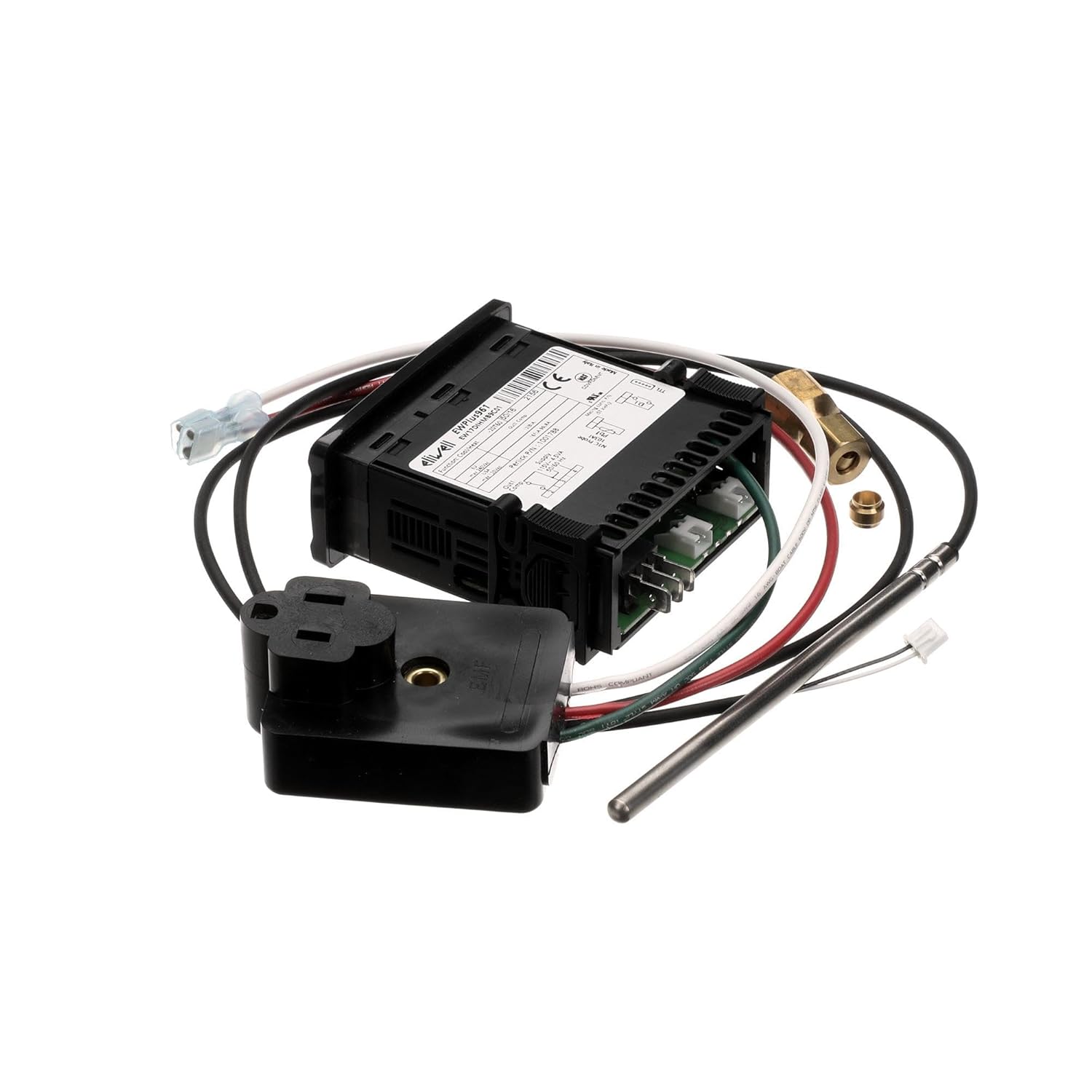
- Qc Control Unit (Digital Controller)
- താപനില സെൻസർ അന്വേഷണം
- Wiring Harness with connectors
- പവർ അഡാപ്റ്റർ/പ്ലഗ്
- Mounting Hardware (if applicable, not explicitly listed but often included)

ചിത്രം 1: ഓവർview of the Perlick 1008503 Qc Control Replacement Kit components.
സജ്ജീകരണവും ഇൻസ്റ്റാളേഷനും
This replacement kit is designed for specific Perlick equipment. Refer to your equipment's service manual for detailed, model-specific installation instructions. The following steps are general guidelines.
- പവർ വിച്ഛേദിക്കുക: Ensure the Perlick equipment is completely disconnected from its power source.
- Access Control Area: Locate and open the control panel or access area where the existing Qc control unit is installed.
- Document Existing Connections: Before disconnecting, take clear photos or make detailed diagrams of all wiring connections to the old control unit. Note the position and color of each wire.
- പഴയ യൂണിറ്റ് നീക്കം ചെയ്യുക: Carefully disconnect all wires and the temperature sensor from the old control unit. Remove any mounting hardware and extract the old unit.
- പുതിയ യൂണിറ്റ് ഇൻസ്റ്റാൾ ചെയ്യുക: Mount the new Perlick 1008503 Qc Control unit in the same location as the old one, using appropriate mounting hardware.
- വയറിംഗ് ബന്ധിപ്പിക്കുക: Following your documented connections, carefully attach the wiring harness to the new control unit. Ensure all connections are secure and correctly matched.
- Connect Temperature Sensor: Insert the new temperature sensor probe into its designated location within the equipment. Connect the sensor wiring to the control unit.
- സുരക്ഷിത കണക്ഷനുകൾ: Double-check all electrical connections for tightness and proper insulation.
- ആക്സസ് പാനൽ അടയ്ക്കുക: Securely close any access panels or control covers.
- പവർ പുന ore സ്ഥാപിക്കുക: Reconnect power to the Perlick equipment.
ചിത്രം 2: പിൻഭാഗം view of the control unit, highlighting wiring terminals.
ഓപ്പറേഷൻ
The Perlick 1008503 Qc Control is a digital controller designed to monitor and regulate specific parameters within your Perlick equipment, typically temperature. Once installed and powered, the unit will display current readings and allow for parameter adjustments.
അടിസ്ഥാന പ്രവർത്തനങ്ങൾ:
- ഡിസ്പ്ലേ: The front panel features a digital display showing the current measured value (e.g., temperature).
- ബട്ടണുകൾ: Typically, there are buttons for adjusting set points, navigating menus, and confirming selections. Common buttons include "SET", "UP", and "DOWN" or similar directional controls.
- സെറ്റ് പോയിന്റ് അഡ്ജസ്റ്റ്മെന്റ്: To change the desired operating parameter (e.g., target temperature), press the "SET" button, use the UP/DOWN buttons to adjust the value, and press "SET" again to confirm.
- ഇൻഡിക്കേറ്റർ ലൈറ്റുകൾ: The unit may have indicator lights to show operational status, such as heating/cooling cycles, alarms, or power.
For detailed programming and advanced operational settings, consult the specific user manual for the Perlick equipment in which this control kit is installed, as settings can vary.

ചിത്രം 3: മുൻഭാഗം view of the control unit, showing the display and buttons.
മെയിൻ്റനൻസ്
The Perlick 1008503 Qc Control Replacement Kit is designed for reliable operation with minimal maintenance. However, periodic checks can help ensure longevity and proper function.
- വൃത്തിയാക്കൽ: Gently wipe the exterior of the control unit with a soft, damp തുണി. അബ്രാസീവ് ക്ലീനറുകളോ ലായകങ്ങളോ ഉപയോഗിക്കരുത്. യൂണിറ്റിനുള്ളിൽ ദ്രാവകം പ്രവേശിക്കുന്നില്ലെന്ന് ഉറപ്പാക്കുക.
- വയറിംഗ് പരിശോധന: Periodically inspect all wiring connections for signs of wear, corrosion, or looseness. Ensure all connections remain secure.
- സെൻസർ പരിശോധന: Verify that the temperature sensor probe is clean and properly positioned within the equipment.
- പരിസ്ഥിതി വ്യവസ്ഥകൾ: Ensure the control unit is operating within its specified environmental conditions (temperature, humidity) to prevent damage.
If any issues are observed during maintenance, refer to the Troubleshooting section or contact Perlick customer support.
ട്രബിൾഷൂട്ടിംഗ്
This section addresses common issues you might encounter with the Perlick 1008503 Qc Control. For complex problems, contact a qualified service technician.
| പ്രശ്നം | സാധ്യമായ കാരണം | പരിഹാരം |
|---|---|---|
| യൂണിറ്റ് പവർ ഓണാക്കുന്നില്ല. | No power supply; loose wiring connection; faulty unit. | Check power source. Verify all wiring connections are secure. If power is present and connections are good, the unit may be faulty and require replacement. |
| തെറ്റായ താപനില വായന. | Sensor improperly installed; faulty sensor; wiring issue. | Ensure the sensor is correctly positioned and clean. Check sensor wiring for damage or loose connections. Replace sensor if faulty. |
| Equipment not responding to control settings. | Incorrect set point; wiring issue to controlled component; faulty control unit. | Verify set points are correctly programmed. Check wiring from the control unit to the controlled component (e.g., compressor, fan). If all else fails, the control unit may be faulty. |
| ഡിസ്പ്ലേ പിശക് കോഡ് കാണിക്കുന്നു. | നിർദ്ദിഷ്ട സിസ്റ്റം തകരാറ്. | Refer to the specific Perlick equipment service manual for a list of error codes and their corresponding solutions. |

ചിത്രം 4: വശം view of the control unit, illustrating wiring entry points.
സ്പെസിഫിക്കേഷനുകൾ
| ഫീച്ചർ | വിശദാംശങ്ങൾ |
|---|---|
| ഉൽപ്പന്ന തരം | Food Service Supply Replacement Part |
| മോഡൽ നമ്പർ | 1008503 |
| ബ്രാൻഡ് | പെർലിക്ക് |
| ഉൽപ്പന്ന അളവുകൾ | 8 x 7 x 0.2 ഇഞ്ച് |
| ഉൽപ്പന്ന ഭാരം | 11.68 ഔൺസ് |
| Shipping Package Dimensions | 7.0" എൽ x 9.0" W x 9.0" എച്ച് |
| Shipping Package Weight | 0.8 പൗണ്ട് |
| മാതൃരാജ്യം | യുണൈറ്റഡ് സ്റ്റേറ്റ്സ് |
| ആദ്യം ലഭ്യമായത് | ഫെബ്രുവരി 25, 2019 |
വാറൻ്റിയും പിന്തുണയും
For specific warranty information regarding the Perlick 1008503 Qc Control Replacement Kit 440, please refer to the documentation provided with your original Perlick equipment or contact Perlick customer service directly. As an OEM replacement part, its warranty typically aligns with the original equipment's terms.
For technical support, replacement parts, or service inquiries, please visit the official Perlick webസൈറ്റിൽ പ്രവേശിക്കുകയോ അവരുടെ അംഗീകൃത സേവന ദാതാക്കളെ ബന്ധപ്പെടുകയോ ചെയ്യുക.