
KW-300-ലേക്ക്
ഫോർഎവർ KW-300 സ്മാർട്ട് വാച്ച് ഉപയോക്തൃ മാനുവൽ
Model: KW-300 (GSM036547)
ആമുഖം
This manual provides comprehensive instructions for the operation, maintenance, and troubleshooting of your FOREVER KW-300 Smartwatch. Please read this manual carefully before using the device to ensure proper functionality and to maximize its lifespan.

Figure 1: FOREVER KW-300 Smartwatch - Front View
The image displays the pink FOREVER KW-300 Smartwatch, highlighting its square display and the two-tone pink and red strap design. A button is visible on the right side of the watch face.
പാക്കേജ് ഉള്ളടക്കം
പാക്കേജ് തുറക്കുമ്പോൾ, എല്ലാ ഘടകങ്ങളും നിലവിലുണ്ടെന്നും നല്ല നിലയിലാണെന്നും ഉറപ്പാക്കുക:
- FOREVER KW-300 Smartwatch
- യുഎസ്ബി ചാർജിംഗ് കേബിൾ
- Small Screwdriver (for SIM card tray access, if applicable)
- ഉപയോക്തൃ മാനുവൽ (ഈ പ്രമാണം)

Figure 2: Smartwatch and Included Accessories
This image shows the pink FOREVER KW-300 Smartwatch alongside its USB charging cable and a small screwdriver, which are typically included for setup and maintenance.
സജ്ജമാക്കുക
1 ഉപകരണം ചാർജ് ചെയ്യുന്നു
Before initial use, fully charge the smartwatch. Connect the magnetic charging cable to the charging pins on the back of the watch and plug the USB end into a compatible USB power adapter (not included) or a computer's USB port.
- സാധാരണയായി ഒരു പൂർണ്ണ ചാർജ് ഏകദേശം 2-3 മണിക്കൂർ എടുക്കും.
- The screen will indicate charging status.
2. പവർ ഓൺ/ഓഫ്
To power on the smartwatch, press and hold the power button (located on the side) for a few seconds until the screen illuminates. To power off, press and hold the power button until the power-off option appears on the screen, then confirm.
3. Initial Configuration and App Pairing
The KW-300 Smartwatch requires pairing with a smartphone application for full functionality, including GPS tracking, communication, and settings management. Refer to the quick start guide included in the box for specific app download instructions (e.g., "Seeme" app).
- Download the official companion application from your smartphone's app store.
- Create an account and follow the on-screen prompts to register your device.
- Scan the QR code displayed on the smartwatch screen or enter the device ID manually to pair.
- Configure essential settings such as time zone, emergency contacts, and GPS tracking frequency within the app.
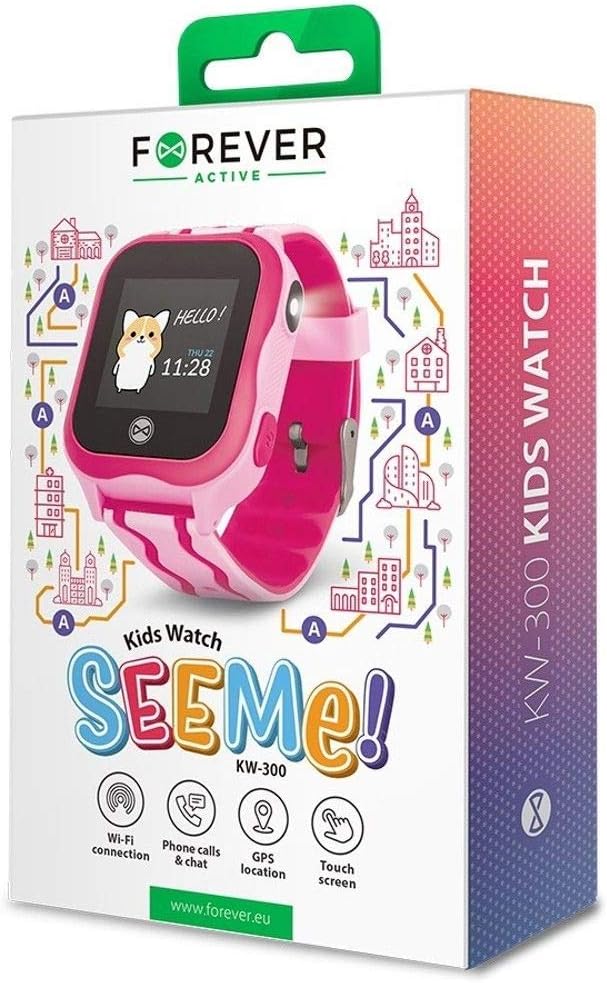
Figure 3: Product Packaging Highlighting Key Features
The product box for the FOREVER KW-300 Kids Watch "SEEMe!" displays icons for Wi-Fi connection, Phone calls & chat, GPS location, and Touch screen, indicating the smartwatch's primary functionalities.
പ്രവർത്തന നിർദ്ദേശങ്ങൾ
ഇൻ്റർഫേസ് നാവിഗേറ്റ് ചെയ്യുന്നു
The KW-300 features a touch screen display. Swipe left/right or up/down to navigate through menus and applications. Tap to select an option.
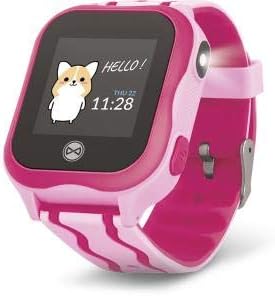
Figure 4: Smartwatch Display Example
This image shows the smartwatch display with a friendly "Hello!" message, a cartoon character, and the current time and date (Thursday, 11:28).
കോളുകൾ ചെയ്യലും സ്വീകരിക്കലും
Once a SIM card is properly installed (if applicable) and contacts are synced via the app, the smartwatch can make and receive calls to pre-approved numbers.
- ഒരു കോൾ ചെയ്യുന്നു: Navigate to the "Contacts" or "Dialer" app on the watch, select a contact, and tap to call.
- ഒരു കോൾ സ്വീകരിക്കുന്നു: When a call comes in, the watch will ring and display the caller ID. Tap the green icon to answer or the red icon to decline.
ജിപിഎസ് ട്രാക്കിംഗ്
The integrated GPS module allows for real-time location tracking. This feature is primarily managed through the companion smartphone application.
- View the watch's current location on a map within the app.
- Set up geofences (safe zones) and receive alerts when the watch enters or exits these areas.
- Review location history.
SOS പ്രവർത്തനം
The smartwatch is equipped with an SOS button for emergencies. When pressed and held, it will automatically dial pre-set emergency contacts and send location alerts.
- Configure SOS contacts in the companion application.
- Ensure the watch has network connectivity for the SOS function to work.
മെയിൻ്റനൻസ്
വൃത്തിയാക്കൽ
Regularly clean your smartwatch to maintain its appearance and functionality.
- മൃദുവായ, ലിന്റ് രഹിത തുണി ഉപയോഗിച്ച് സ്ക്രീനും ബോഡിയും തുടയ്ക്കുക.
- കഠിനമായ പാടുകൾക്ക്, ചെറുതായി dampതുണിയിൽ വെള്ളം ഒഴിക്കുക. കഠിനമായ രാസവസ്തുക്കളോ ഉരച്ചിലുകളോ ഉള്ള വസ്തുക്കൾ ഒഴിവാക്കുക.
- Ensure the charging pins are clean and free of debris.
സംഭരണം
When not in use for extended periods, store the smartwatch in a cool, dry place away from direct sunlight and extreme temperatures. It is recommended to charge the device to about 50% before long-term storage to preserve battery health.
ട്രബിൾഷൂട്ടിംഗ്
| പ്രശ്നം | സാധ്യമായ കാരണം | പരിഹാരം |
|---|---|---|
| വാച്ച് ഓണാക്കുന്നില്ല. | ബാറ്ററി കുറവാണ്; ഉപകരണം ഫ്രീസുചെയ്തു. | Charge the watch for at least 30 minutes. If still unresponsive, perform a forced restart (refer to specific model instructions or hold power button for 10-15 seconds). |
| കോളുകൾ വിളിക്കാനോ സ്വീകരിക്കാനോ കഴിയില്ല. | No SIM card; SIM card not active; poor network signal; contacts not synced. | Ensure SIM card is correctly inserted and active. Check network signal strength. Verify contacts are synced via the companion app. |
| GPS location is inaccurate. | Poor GPS signal (indoors/dense areas); device not connected to network. | Move to an open outdoor area. Ensure the watch has a stable network connection. |
| Cannot pair with smartphone app. | Bluetooth/Wi-Fi off; incorrect pairing code; app issues. | Ensure Bluetooth/Wi-Fi is enabled on both devices. Re-enter pairing code. Restart both devices and try again. Reinstall the app if necessary. |
സ്പെസിഫിക്കേഷനുകൾ
| ഫീച്ചർ | വിശദാംശങ്ങൾ |
|---|---|
| മോഡലിൻ്റെ പേര് | കെ.ഡബ്ല്യു -300 |
| മോഡൽ നമ്പർ | GSM036547 |
| ബ്രാൻഡ് | എന്നേക്കും |
| കണക്റ്റിവിറ്റി ടെക്നോളജി | GPS, Bluetooth |
| പ്രത്യേക സവിശേഷതകൾ | ജിപിഎസ് |
| അനുയോജ്യമായ ഉപകരണങ്ങൾ | സ്മാർട്ട്ഫോൺ |
| ആകൃതി | വൃത്താകൃതി |
| ഇനത്തിന്റെ അളവുകൾ (L x W x H) | 13 x 4 x 8 സെൻ്റീമീറ്റർ |
വാറൻ്റിയും പിന്തുണയും
Information regarding the specific warranty period and terms for your FOREVER KW-300 Smartwatch is typically provided with the product packaging or available on the manufacturer's official webസൈറ്റ്. വാറന്റി ക്ലെയിമുകൾക്കായി നിങ്ങളുടെ വാങ്ങലിന്റെ തെളിവ് സൂക്ഷിക്കുക.
ഉപഭോക്തൃ പിന്തുണ
For technical assistance, troubleshooting beyond this manual, or warranty inquiries, please contact FOREVER customer support through their official channels. Visit the FOREVER webബന്ധപ്പെടാനുള്ള വിവരങ്ങൾക്കും പതിവ് ചോദ്യങ്ങൾക്കുമുള്ള സൈറ്റ്.
Note: Specific contact details are not provided in this manual.
Ask a question about this manual
Ask about setup, troubleshooting, compatibility, parts, safety, or missing instructions. Manuals+ will review the question and use this page’s manual context to help answer it.