
1. ആമുഖവും അവസാനവുംview
This manual provides essential information for the safe and efficient operation of your Sharp Microwave Oven with Grill, Model R-77AT. Please read these instructions thoroughly before using the appliance and retain them for future reference. This microwave oven is designed for reheating, cooking quick meals, defrosting frozen items, and grilling food.
Your Sharp R-77AT microwave oven features:
- 34 Liters Capacity
- 1000 Watts Microwave Output Power
- 1100 Watts Grill Power
- 5 പവർ ലെവലുകൾ
- 9 ഓട്ടോമാറ്റിക് പാചക പരിപാടികൾ
- ടൈമർ പ്രവർത്തനം
- സ്റ്റെയിൻലെസ്സ് സ്റ്റീൽ എക്സ്റ്റീരിയർ
- സുരക്ഷാ ലോക്ക് ഫീച്ചർ
2. പ്രധാന സുരക്ഷാ നിർദ്ദേശങ്ങൾ
ഇലക്ട്രിക്കൽ ഉപകരണങ്ങൾ ഉപയോഗിക്കുമ്പോൾ, ഇനിപ്പറയുന്നവ ഉൾപ്പെടെ അടിസ്ഥാന സുരക്ഷാ മുൻകരുതലുകൾ പാലിക്കണം:
- ഉപകരണം ഉപയോഗിക്കുന്നതിന് മുമ്പ് എല്ലാ നിർദ്ദേശങ്ങളും വായിക്കുക.
- വാതിലിന്റെയോ വാതിലിന്റെയോ സീലുകൾക്ക് കേടുപാടുകൾ സംഭവിച്ചിട്ടുണ്ടെങ്കിൽ ഓവൻ പ്രവർത്തിപ്പിക്കരുത്. യോഗ്യതയുള്ള സേവന ഉദ്യോഗസ്ഥരെ ബന്ധപ്പെടുക.
- സ്ഫോടനത്തിന് സാധ്യതയുള്ളതിനാൽ ദ്രാവകങ്ങളോ മറ്റ് ഭക്ഷണങ്ങളോ അടച്ച പാത്രങ്ങളിൽ ചൂടാക്കരുത്.
- മൈക്രോവേവ് ഓവനുകൾക്ക് അനുയോജ്യമായ പാത്രങ്ങൾ മാത്രം ഉപയോഗിക്കുക.
- ഈ ഉപകരണത്തിൽ നശിപ്പിക്കുന്ന രാസവസ്തുക്കളോ നീരാവി ഉപയോഗിക്കരുത്.
- ഈ ഉപകരണം ഗാർഹിക ഉപയോഗത്തിന് മാത്രമുള്ളതാണ്.
- കുട്ടികൾ ഉപകരണത്തിന് സമീപം ആയിരിക്കുമ്പോൾ എപ്പോഴും മേൽനോട്ടം വഹിക്കുക.
- ഉപകരണം ശരിയായി നിലത്തുണ്ടെന്ന് ഉറപ്പാക്കുക.
- Do not immerse the cord, plug, or oven in water or other liquid.
- കേടായ കോർഡോ പ്ലഗോ ഉപയോഗിച്ച് ഒരു ഉപകരണവും പ്രവർത്തിപ്പിക്കരുത്, അല്ലെങ്കിൽ ഉപകരണത്തിൻ്റെ തകരാറുകൾ അല്ലെങ്കിൽ ഏതെങ്കിലും വിധത്തിൽ കേടുപാടുകൾ സംഭവിച്ചതിന് ശേഷം.
3. ഉൽപ്പന്ന ഘടകങ്ങൾ
നിങ്ങളുടെ മൈക്രോവേവ് ഓവന്റെ പ്രധാന ഭാഗങ്ങളുമായി പരിചയപ്പെടുക.
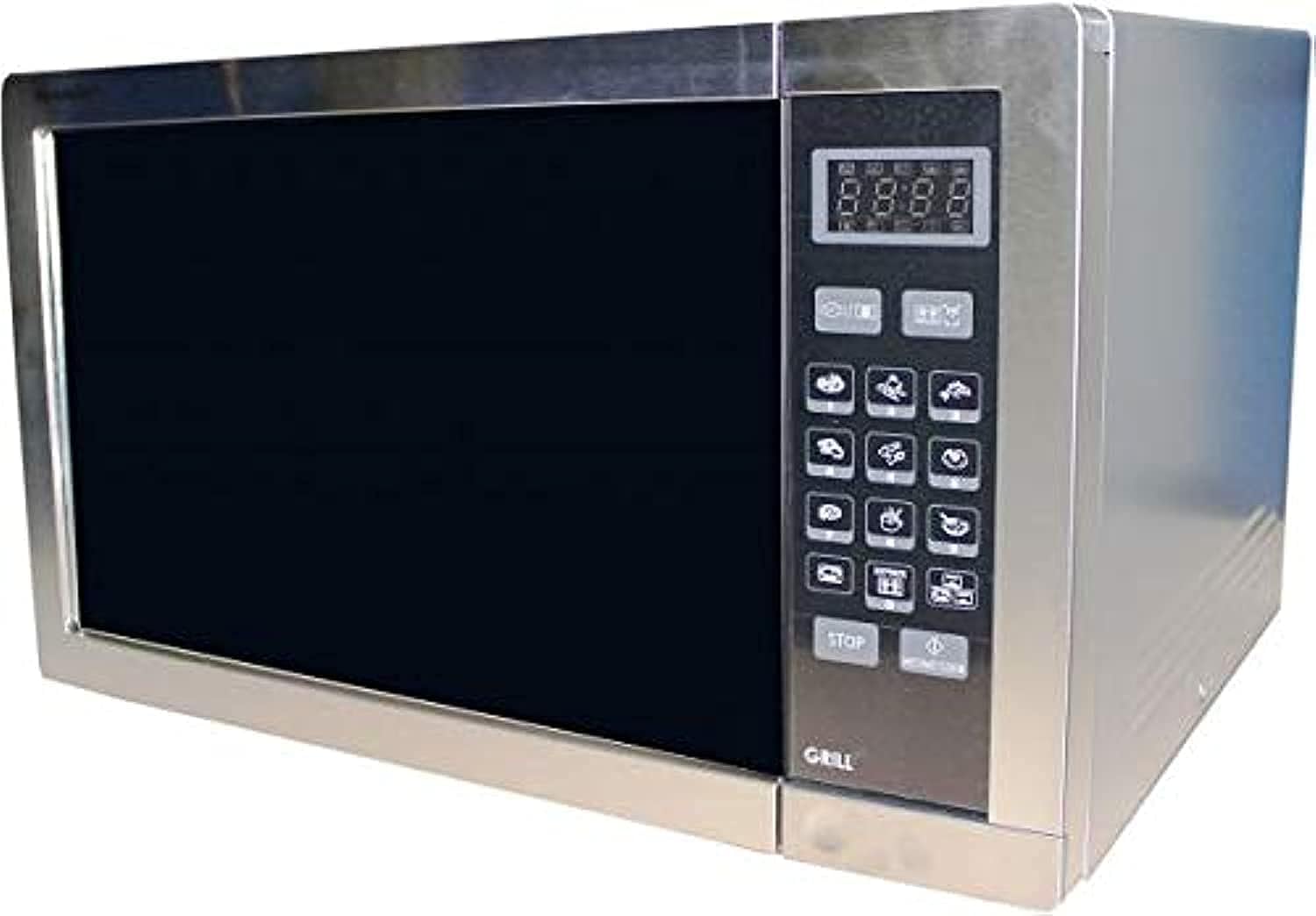
- ഓവൻ കാവിറ്റി: ഭക്ഷണം സൂക്ഷിക്കുന്ന ഉൾഭാഗം.
- ടർട്ടബിൾ: തുല്യമായ പാചകം ഉറപ്പാക്കുന്ന ഒരു കറങ്ങുന്ന ഗ്ലാസ് ട്രേ.
- ടേൺ ചെയ്യാവുന്ന പിന്തുണ: ടർടേബിളിനെ പിന്തുണയ്ക്കുന്നു.
- നിയന്ത്രണ പാനൽ: Features a digital display, touch buttons for settings, and a timer.
- Door with Safety Lock: Prevents microwave operation when open.
- ഗ്രിൽ റാക്ക്: ഗ്രിൽ ഫംഗ്ഷനോടൊപ്പം ഉപയോഗിക്കുന്നതിനായി ഉൾപ്പെടുത്തിയിരിക്കുന്നു.
4. സജ്ജീകരണം
നിങ്ങളുടെ മൈക്രോവേവ് ഓവൻ സജ്ജീകരിക്കാൻ ഈ ഘട്ടങ്ങൾ പാലിക്കുക:
- അൺപാക്ക് ചെയ്യുന്നു: Remove all packaging materials and accessories. Check the oven for any damage, such as dents or a broken door. Do not install if damaged.
- പ്ലേസ്മെൻ്റ്: Place the oven on a flat, stable surface that can support its weight and the heaviest food likely to be cooked in it. Ensure there is adequate ventilation space: at least 20 cm (8 inches) above the oven, 10 cm (4 inches) at the rear, and 5 cm (2 inches) on each side.
- പവർ കണക്ഷൻ: പവർ കോർഡ് ഒരു സ്റ്റാൻഡേർഡ് ഗ്രൗണ്ടഡ് ഇലക്ട്രിക്കൽ ഔട്ട്ലെറ്റിലേക്ക് പ്ലഗ് ചെയ്യുക. വോള്യം ഉറപ്പാക്കുകtage ഉം ഫ്രീക്വൻസിയും ഓവന്റെ റേറ്റിംഗ് ലേബലിലെ സ്പെസിഫിക്കേഷനുകളുമായി പൊരുത്തപ്പെടുന്നു.
- ടേൺടേബിൾ ഇൻസ്റ്റാളേഷൻ: Place the turntable support ring in the center of the oven cavity. Position the glass turntable plate securely on top of the support.
5. പ്രവർത്തന നിർദ്ദേശങ്ങൾ
Your Sharp R-77AT microwave oven offers various cooking functions.
5.1. അടിസ്ഥാന മൈക്രോവേവ് പാചകം
- ഭക്ഷണം മൈക്രോവേവ്-സുരക്ഷിത പാത്രത്തിൽ ടേൺടേബിളിൽ വയ്ക്കുക.
- അടുപ്പിൻ്റെ വാതിൽ സുരക്ഷിതമായി അടയ്ക്കുക.
- Press the 'Microwave' button to select the desired power level (1-5).
- Use the number buttons or dial to set the cooking time.
- പാചകം ആരംഭിക്കാൻ 'ആരംഭിക്കുക' അമർത്തുക.
5.2. ഗ്രിൽ ഫംഗ്ഷൻ
ഭക്ഷണം ബ്രൗണിംഗ് ചെയ്യുന്നതിനും ക്രിസ്പിങ്ങിനും ഗ്രിൽ ഫംഗ്ഷൻ അനുയോജ്യമാണ്.
- ഭക്ഷണം ഗ്രിൽ റാക്കിൽ (നൽകിയിട്ടുണ്ടെങ്കിൽ) അല്ലെങ്കിൽ ചൂട് പ്രതിരോധശേഷിയുള്ള ഒരു പാത്രത്തിൽ വയ്ക്കുക.
- 'ഗ്രിൽ' ബട്ടൺ അമർത്തുക.
- Set the desired grilling time using the number buttons or dial.
- ഗ്രില്ലിംഗ് ആരംഭിക്കാൻ 'ആരംഭിക്കുക' അമർത്തുക.
- കുറിപ്പ്: The grill element will heat up and cool down periodically to maintain the set temperature.
5.3. ഓട്ടോ പ്രോഗ്രാമുകൾ
The oven has 9 pre-set auto programs for common foods.
- Press the 'Auto Menu' button repeatedly or use the dial to select the desired program (e.g., Popcorn, Potato, Pizza).
- Confirm the weight or quantity if prompted.
- Press 'Start' to begin the automatic program.
5.4. ഡിഫ്രോസ്റ്റ് ഫംഗ്ഷൻ
The automatic defrost function allows for quick and even thawing.
- ശീതീകരിച്ച ഭക്ഷണം മൈക്രോവേവ്-സുരക്ഷിത പാത്രത്തിൽ വയ്ക്കുക.
- 'ഡിഫ്രോസ്റ്റ്' ബട്ടൺ അമർത്തുക.
- Enter the weight of the food using the number buttons or dial.
- Press 'Start'. The oven will automatically calculate the defrosting time and may prompt you to turn the food over during the cycle.
5.5. ടൈമർ ഫംഗ്ഷൻ
Use the timer for general kitchen timing, independent of cooking functions.
- 'ടൈമർ' ബട്ടൺ അമർത്തുക.
- Set the desired time using the number buttons or dial.
- Press 'Start'. The timer will count down without activating the microwave or grill.
6. പരിപാലനവും ശുചീകരണവും
Regular cleaning and maintenance ensure optimal performance and longevity of your microwave oven.
- പുറം: പരസ്യം ഉപയോഗിച്ച് പുറംഭാഗം തുടയ്ക്കുകamp തുണിയും മൃദുവായ ഡിറ്റർജൻ്റും. ഉരച്ചിലുകൾ ഉള്ള ക്ലീനറുകൾ ഒഴിവാക്കുക.
- ഇൻ്റീരിയർ: Clean the oven cavity after each use. Wipe with a damp cloth. For stubborn food splatters, place a bowl of water with lemon slices inside and microwave for 2-3 minutes to loosen residue, then wipe clean. The interior material is enamel.
- ടേൺടേബിളും പിന്തുണയും: The glass turntable and its support can be washed in warm soapy water or in a dishwasher.
- വാതിൽ മുദ്രകൾ: ശരിയായ അടയ്ക്കലും സുരക്ഷിതമായ പ്രവർത്തനവും ഉറപ്പാക്കാൻ വാതിൽ സീലുകൾ വൃത്തിയായി സൂക്ഷിക്കുക.
- ഗ്രിൽ റാക്ക്: Wash the grill rack with warm soapy water after use.
- പവർ കോർഡ്: പവർ കോർഡിന് എന്തെങ്കിലും കേടുപാടുകൾ സംഭവിച്ചിട്ടുണ്ടോ എന്ന് പതിവായി പരിശോധിക്കുക.
വൃത്തിയാക്കുന്നതിന് മുമ്പ് എല്ലായ്പ്പോഴും മൈക്രോവേവ് ഓവൻ അൺപ്ലഗ് ചെയ്യുക.
7. പ്രശ്നപരിഹാരം
നിങ്ങളുടെ മൈക്രോവേവ് ഓവനിൽ പ്രശ്നങ്ങൾ നേരിടുകയാണെങ്കിൽ, ഇനിപ്പറയുന്ന പൊതുവായ പ്രശ്നങ്ങളും പരിഹാരങ്ങളും പരിശോധിക്കുക:
| പ്രശ്നം | സാധ്യമായ കാരണം | പരിഹാരം |
|---|---|---|
| ഓവൻ ആരംഭിക്കുന്നില്ല | പവർ കോർഡ് പ്ലഗ് ഇൻ ചെയ്തിട്ടില്ല; വാതിൽ ശരിയായി അടച്ചിട്ടില്ല; ഫ്യൂസ് പൊട്ടിത്തെറിച്ചു അല്ലെങ്കിൽ സർക്യൂട്ട് ബ്രേക്കർ ട്രിപ്പുചെയ്തു. | പ്ലഗ് ഔട്ട്ലെറ്റിൽ സുരക്ഷിതമായി ഉറപ്പിച്ചിട്ടുണ്ടെന്ന് ഉറപ്പാക്കുക; വാതിൽ കർശനമായി അടയ്ക്കുക; വീട്ടിലെ ഫ്യൂസ്/സർക്യൂട്ട് ബ്രേക്കർ പരിശോധിക്കുക. |
| Food not cooking/heating | Door not closed properly; Cooking time/power level not set correctly; Utensil not microwave-safe. | Close door firmly; Adjust time/power; Use microwave-safe cookware. |
| അടുപ്പിനുള്ളിൽ തീപ്പൊരി | അടുപ്പിലെ ലോഹമോ ഫോയിലോ; അറയുടെ ചുവരുകളിൽ ഭക്ഷണ അവശിഷ്ടങ്ങൾ. | ലോഹ വസ്തുക്കൾ നീക്കം ചെയ്യുക; ഓവൻ ഉൾഭാഗം നന്നായി വൃത്തിയാക്കുക. |
| ടേൺടേബിൾ കറങ്ങുന്നില്ല | Turntable not positioned correctly; Obstruction under turntable. | Reposition turntable and support; Remove any obstructions. |
ഈ പരിഹാരങ്ങൾ പരീക്ഷിച്ചതിന് ശേഷവും പ്രശ്നം നിലനിൽക്കുകയാണെങ്കിൽ, ദയവായി യോഗ്യതയുള്ള സേവന ഉദ്യോഗസ്ഥരെ ബന്ധപ്പെടുക.
8 സ്പെസിഫിക്കേഷനുകൾ
| ഫീച്ചർ | സ്പെസിഫിക്കേഷൻ |
|---|---|
| ബ്രാൻഡ് | മൂർച്ചയുള്ള |
| മോഡൽ നമ്പർ | R-77AT |
| ശേഷി | 34 ലിറ്റർ |
| മൈക്രോവേവ് പവർ ഔട്ട്പുട്ട് | 1000 വാട്ട്സ് |
| ഗ്രിൽ പവർ | 1100 വാട്ട്സ് |
| പവർ ലെവലുകളുടെ എണ്ണം | 5 |
| പ്രോഗ്രാമുകളുടെ എണ്ണം | 9 (Auto Programs) |
| നിയന്ത്രണ തരം | ടച്ച് ബട്ടണുകൾ |
| പ്രത്യേക സവിശേഷതകൾ | Timer Function, Safety Lock |
| ഡിഫ്രോസ്റ്റ് സിസ്റ്റം | ഓട്ടോമാറ്റിക് ഡിഫ്രോസ്റ്റ് |
| ചൂടാക്കൽ രീതി | ഇലക്ട്രിക് |
| മെറ്റീരിയൽ (ബാഹ്യ) | സ്റ്റെയിൻലെസ്സ് സ്റ്റീൽ |
| മെറ്റീരിയൽ (ഇന്റീരിയർ) | ഇനാമൽ |
| നിറം | വെള്ളി |
| ആവൃത്തി | 50 Hz |
| ഇൻസ്റ്റലേഷൻ തരം | ഫ്രീസ്റ്റാൻഡിംഗ് |
| ഉൾപ്പെടുത്തിയ ഘടകങ്ങൾ | ഗ്രിൽ റാക്ക് |
9. വാറൻ്റിയും പിന്തുണയും
വാറന്റി വിവരങ്ങൾക്കും ഉപഭോക്തൃ പിന്തുണയ്ക്കും, ദയവായി നിങ്ങളുടെ ഉൽപ്പന്നത്തിനൊപ്പം ഉൾപ്പെടുത്തിയിരിക്കുന്ന വാറന്റി കാർഡ് പരിശോധിക്കുകയോ ഔദ്യോഗിക ഷാർപ്പ് സന്ദർശിക്കുകയോ ചെയ്യുക. webസൈറ്റ്. ഏതെങ്കിലും വാറന്റി ക്ലെയിമുകൾക്ക് വാങ്ങിയതിന്റെ തെളിവായി നിങ്ങളുടെ വാങ്ങൽ രസീത് സൂക്ഷിക്കുക.
For technical assistance or service inquiries, please contact Sharp customer service through their official channels.