
1. ആമുഖവും അവസാനവുംview
The Asustor AS5304T is a high-performance 4-bay Network Attached Storage (NAS) device designed for personal private cloud storage, media streaming, and data backup. Featuring an Intel Celeron Quad-Core processor and 4GB DDR4 RAM (expandable), it offers robust performance for various applications. Dual 2.5GbE ports provide high-speed network connectivity, ensuring efficient data transfer.

Figure 1: Asustor AS5304T 4-Bay NAS device.
വീഡിയോ 1: കഴിഞ്ഞുview of Asustor Nimbustor NAS AS5202T AS5304T features.
2. ബോക്സിൽ എന്താണുള്ളത്?
Upon unboxing your Asustor AS5304T, you should find the following items:
- Asustor AS5304T NAS Unit
- ദ്രുത ആരംഭ ഗൈഡ്
- 2x RJ-45 Cat 5e Ethernet Cables
- 1x AC Adapter & Power Cable
- 16x Phillips Screws for 2.5" Drives
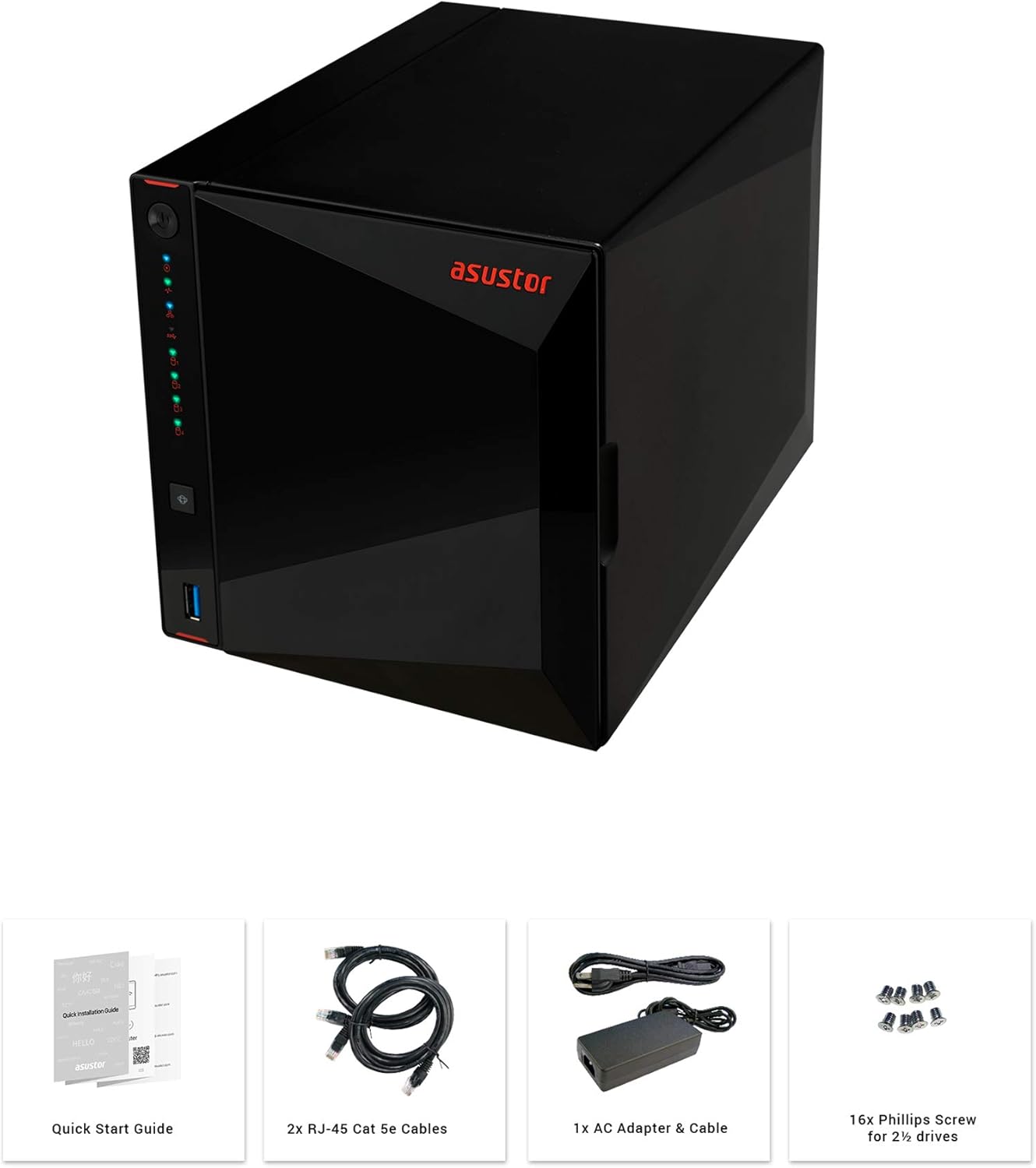
Figure 2: Unboxing contents of the Asustor AS5304T.
3. Hardware Features and Specifications
The Asustor AS5304T is equipped with advanced hardware for reliable and high-performance network storage.
- പ്രോസസ്സർ: Intel Celeron Quad-Core
- റാം: 4GB DDR4 (വികസിപ്പിക്കാവുന്നത്)
- ഡ്രൈവ് ബേസ്: 4x Hot-swappable 3.5"/2.5" SATA HDD/SSD bays
- നെറ്റ്വർക്ക് പോർട്ടുകൾ: 2x 2.5 Gigabit Ethernet (2.5GbE) ports
- USB പോർട്ടുകൾ: 3x USB 3.2 Gen 1 ports (1 front, 2 rear)
- എച്ച്ഡിഎംഐ: 1x HDMI 2.0a port
- അളവുകൾ: 9.06 x 6.85 x 6.69 ഇഞ്ച്
- ഭാരം: 4.84 പൗണ്ട്
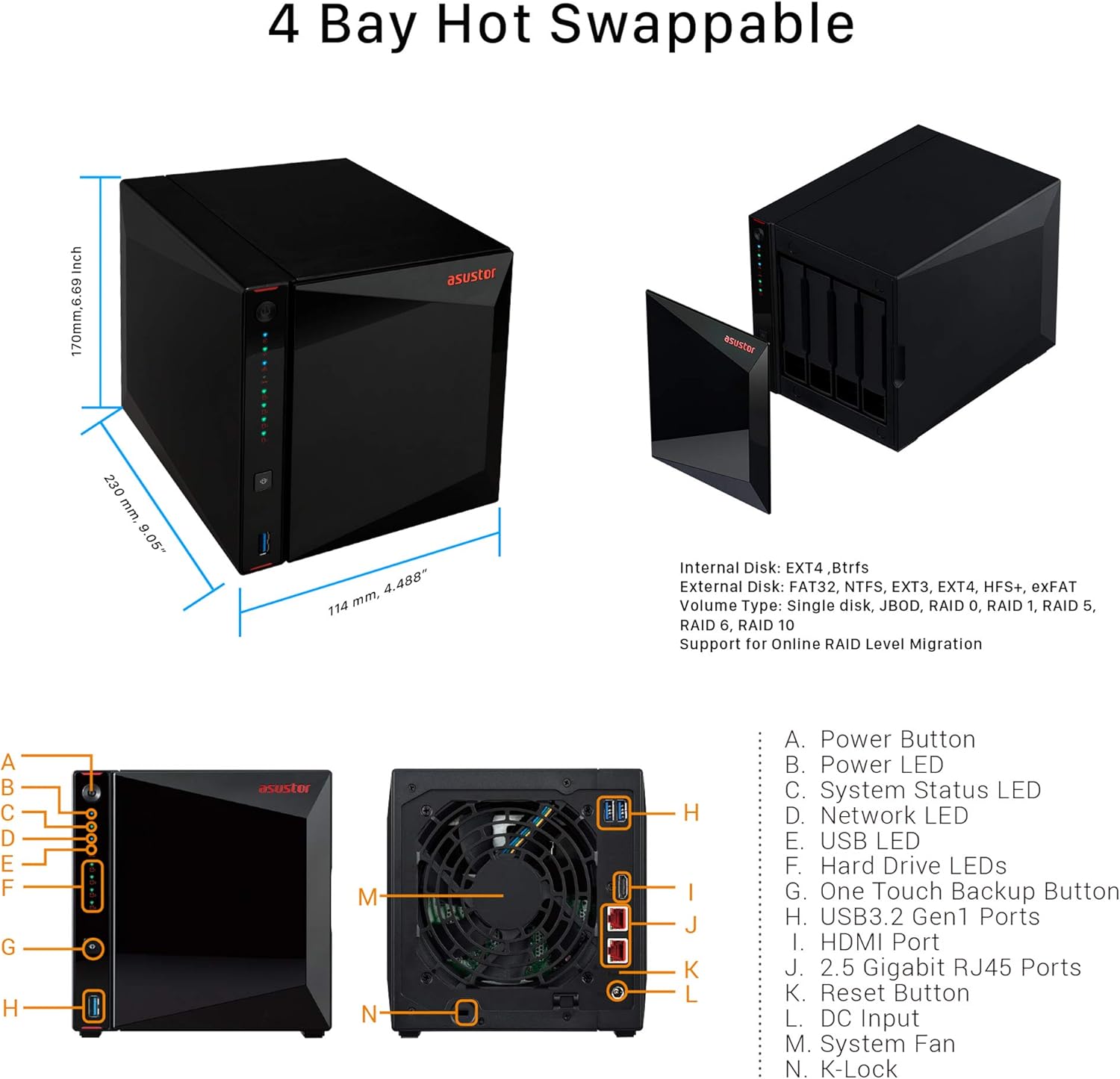
Figure 3: Asustor AS5304T dimensions and port layout.
4. സജ്ജീകരണവും ഇൻസ്റ്റാളേഷനും
Follow these steps to set up and install your Asustor AS5304T NAS:
- ഹാർഡ് ഡ്രൈവുകൾ ഇൻസ്റ്റാൾ ചെയ്യുക: Unlock the drive tray, place your 3.5" or 2.5" hard drive or SSD into the tray, and relock the tray. Slide the tray back into the NAS unit.
- കേബിളുകൾ ബന്ധിപ്പിക്കുക: Connect the power adapter to the NAS and plug it into a power outlet. Connect one or both Ethernet cables from the NAS to your network router or switch.
- പവർ ഓൺ: Press the power button on the front of the NAS.
- Initialize NAS: Download and install the ASUSTOR Control Center software on your Windows or macOS computer, or the AiMaster app for Android/iOS devices. Use the software/app to easily initialize your NAS.

Figure 4: Drive installation and cable connection steps.
Video 2: Quickstart Guide for ASUSTOR NAS devices, demonstrating initial setup procedures.
5. പ്രവർത്തന നിർദ്ദേശങ്ങൾ
The Asustor AS5304T runs on the ASUSTOR Data Master (ADM) operating system, providing a user-friendly interface for managing your NAS. Key operating features include:
- File മാനേജ്മെൻ്റ്: Access, organize, and share fileകൾ വഴി web interface or mobile apps.
- ആപ്പ് സെൻട്രൽ: Expand NAS functionality with a wide range of apps for media streaming (Plex, Kodi), surveillance (Surveillance Center), download management, and more.
- ബാക്കപ്പ് പരിഹാരങ്ങൾ: Configure comprehensive backup plans to external drives, cloud services, or other NAS devices.
- മൊബൈൽ ആക്സസ്: Use AiMaster, AiFoto, AiMusic, and other mobile apps to access your files, stream media, and manage your NAS from anywhere.
- ഹോം വിനോദം: Stream 4K video, manage music libraries, and share content across your home network.

ചിത്രം 5: ഓവർview of Asustor NAS features and applications.
6. പരിപാലനം
Regular maintenance ensures the longevity and optimal performance of your NAS:
- വൃത്തിയായി സൂക്ഷിക്കു: Periodically clean the exterior of the NAS and ensure ventilation areas are free from dust.
- ഫേംവെയർ അപ്ഡേറ്റുകൾ: Regularly check for and install ADM firmware updates to benefit from new features, security patches, and performance improvements.
- ഡ്രൈവ് ആരോഗ്യ പരിശോധന: Utilize the Storage Manager in ADM to monitor the health status of your hard drives.
- ബാക്കപ്പ് ഡാറ്റ: Always maintain up-to-date backups of critical data stored on your NAS.
7. പ്രശ്നപരിഹാരം
If you encounter issues with your NAS, consider the following basic troubleshooting steps:
- ശക്തിയില്ല: Ensure the power cable is securely connected to both the NAS and the power outlet. Test the outlet with another device.
- നെറ്റ്വർക്ക് കണക്ഷൻ ഇല്ല: Verify that Ethernet cables are securely connected to the NAS and your router/switch. Check network settings in ADM.
- ഡ്രൈവ് കണ്ടെത്തിയില്ല: Ensure hard drives are properly seated in their trays. Check drive health status in Storage Manager.
- മന്ദഗതിയിലുള്ള പ്രകടനം: Check network traffic and CPU/RAM usage in ADM. Consider upgrading RAM if consistently high.
- സിസ്റ്റം പുനരാരംഭിക്കുക: ഒരു ലളിതമായ പുനരാരംഭം പലപ്പോഴും ചെറിയ സോഫ്റ്റ്വെയർ തകരാറുകൾ പരിഹരിക്കും.
8 സ്പെസിഫിക്കേഷനുകൾ
| ഫീച്ചർ | സ്പെസിഫിക്കേഷൻ |
|---|---|
| ഉൽപ്പന്ന അളവുകൾ | 9.06 x 6.85 x 6.69 ഇഞ്ച് |
| ഇനത്തിൻ്റെ ഭാരം | 4.84 പൗണ്ട് |
| നിർമ്മാതാവ് | Asustor |
| ASIN | B07PYJ2KNC |
| ഇനത്തിൻ്റെ മോഡൽ നമ്പർ | 90IX0181-BW3S10 |
| ബാറ്ററികൾ | 1 CR123A ബാറ്ററികൾ ആവശ്യമാണ്. |
| ബ്രാൻഡ് | Asustor |
| അനുയോജ്യമായ ഉപകരണങ്ങൾ | ക്യാമറ |
9. വാറൻ്റിയും പിന്തുണയും
The Asustor AS5304T comes with a 3-year manufacturer's warranty. For technical support, firmware updates, and additional resources, please visit the official Asustor webസൈറ്റ് അല്ലെങ്കിൽ അവരുടെ ഉപഭോക്തൃ പിന്തുണയുമായി ബന്ധപ്പെടുക.