
auna 388-BT
auna 388-BT Stereo System
ഉപയോക്തൃ മാനുവൽ
പ്രധാനപ്പെട്ട സുരക്ഷാ നിർദ്ദേശങ്ങൾ
Please read these instructions carefully before operating the unit and retain them for future reference. Adhere to all warnings and instructions provided with the product.
- ഊർജ്ജ സ്രോതസ്സ്: Connect the unit only to a power supply of the type described in the operating instructions or as marked on the appliance.
- വെൻ്റിലേഷൻ: Ensure proper ventilation. Do not block any ventilation openings. Install in accordance with the manufacturer's instructions.
- ജലവും ഈർപ്പവും: ഈ ഉപകരണം വെള്ളത്തിനടുത്തോ വെള്ളത്തിലോ ഉപയോഗിക്കരുത്.amp പരിസരങ്ങൾ.
- വൃത്തിയാക്കൽ: Clean only with a dry cloth. Unplug the unit from the wall outlet before cleaning.
- ചൂട്: റേഡിയറുകൾ, ഹീറ്റ് രജിസ്റ്ററുകൾ, സ്റ്റൗകൾ, അല്ലെങ്കിൽ മറ്റ് ഉപകരണങ്ങൾ (ഉൾപ്പെടെ) പോലെയുള്ള താപ സ്രോതസ്സുകൾക്ക് സമീപം ഇൻസ്റ്റാൾ ചെയ്യരുത്. ampലൈഫയറുകൾ) ചൂട് ഉത്പാദിപ്പിക്കുന്നത്.
- പവർ കോർഡ് സംരക്ഷണം: പ്രത്യേകിച്ച് പ്ലഗുകൾ, കൺവീനിയൻസ് റെസെപ്റ്റക്കിളുകൾ, ഉപകരണത്തിൽ നിന്ന് പുറത്തുകടക്കുന്ന ഇടം എന്നിവയിൽ നടക്കുകയോ നുള്ളുകയോ ചെയ്യുന്നതിൽ നിന്ന് പവർ കോർഡ് സംരക്ഷിക്കുക.
- സേവനം: കവറുകൾ തുറക്കുകയോ നീക്കം ചെയ്യുകയോ ചെയ്യുന്നത് നിങ്ങളെ അപകടകരമായ വോളിയത്തിന് വിധേയമാക്കിയേക്കാമെന്നതിനാൽ ഈ ഉൽപ്പന്നം സ്വയം സേവിക്കാൻ ശ്രമിക്കരുത്tagഇ അല്ലെങ്കിൽ മറ്റ് അപകടങ്ങൾ. എല്ലാ സേവനങ്ങളും യോഗ്യതയുള്ള സേവന ഉദ്യോഗസ്ഥർക്ക് റഫർ ചെയ്യുക.
- ഒബ്ജക്റ്റ്, ലിക്വിഡ് എൻട്രി: അപകടകരമായ വോളിയം സ്പർശിച്ചേക്കാവുന്നതിനാൽ, തുറസ്സുകളിലൂടെ ഈ ഉൽപ്പന്നത്തിലേക്ക് ഏതെങ്കിലും തരത്തിലുള്ള വസ്തുക്കളെ ഒരിക്കലും തള്ളരുത്tagതീയോ വൈദ്യുതാഘാതമോ ഉണ്ടാക്കിയേക്കാവുന്ന ഇ പോയിൻ്റുകൾ അല്ലെങ്കിൽ ഷോർട്ട്-ഔട്ട് ഭാഗങ്ങൾ. ഉൽപ്പന്നത്തിൽ ഒരിക്കലും ഏതെങ്കിലും തരത്തിലുള്ള ദ്രാവകം ഒഴിക്കരുത്.
ഉൽപ്പന്നം കഴിഞ്ഞുview
The auna 388-BT is a versatile stereo system designed to play various audio formats, including vinyl records, CDs, cassette tapes, and digital audio via USB, SD card, and Bluetooth. It features an integrated FM radio tuner and includes two external speakers for stereo sound.

ചിത്രം 1: മുൻഭാഗം view of the auna 388-BT stereo system with turntable, main unit, and two external speakers.
പ്രധാന ഘടകങ്ങൾ:
- പ്രധാന യൂണിറ്റ്: Houses the turntable, CD player, cassette decks, radio tuner, and control panel.
- External Speakers (x2): Provide stereo audio output.
- റിമോട്ട് കൺട്രോൾ: ദൂരെ നിന്ന് സൗകര്യപ്രദമായ പ്രവർത്തനത്തിന്.
- പൊടി കവർ: Protects the turntable from dust.
Front Panel Controls and Features:

ചിത്രം 2: വിശദമായി view of the main unit's front panel, showing the display, control buttons, and input ports.
- പവർ ബട്ടൺ: യൂണിറ്റ് ഓണാക്കുകയോ ഓഫാക്കുകയോ ചെയ്യുന്നു.
- Function/Source Selector: Switches between Phono/BT, Tape, CD/USB/SD, and Tuner modes.
- വോളിയം നിയന്ത്രണം: Adjusts the overall audio output level.
- LCD ഡിസ്പ്ലേ: നിലവിലെ മോഡ്, ട്രാക്ക് വിവരങ്ങൾ, റേഡിയോ ഫ്രീക്വൻസി മുതലായവ കാണിക്കുന്നു.
- USB പോർട്ട്: യുഎസ്ബി ഫ്ലാഷ് ഡ്രൈവുകൾ ബന്ധിപ്പിക്കുന്നതിന്.
- SD/MMC കാർഡ് സ്ലോട്ട്: SD അല്ലെങ്കിൽ MMC മെമ്മറി കാർഡുകൾ ചേർക്കുന്നതിന്.
- ഹെഡ്ഫോൺ ജാക്ക് (3.5 മിമി): സ്വകാര്യ ശ്രവണത്തിനായി.
- സിഡി ട്രേ: For inserting audio CDs and MP3-CDs.
- Cassette Decks (Deck 1 & Deck 2): കാസറ്റ് ടേപ്പുകൾ പ്ലേ ചെയ്യുന്നതിനും റെക്കോർഡുചെയ്യുന്നതിനും.
- പ്ലേബാക്ക് നിയന്ത്രണങ്ങൾ: Play, Pause, Stop, Fast Forward, Rewind, Skip Track.
- റെക്കോർഡ് ബട്ടൺ: Initiates recording to cassette or USB.
പിൻ പാനൽ കണക്ഷനുകൾ:

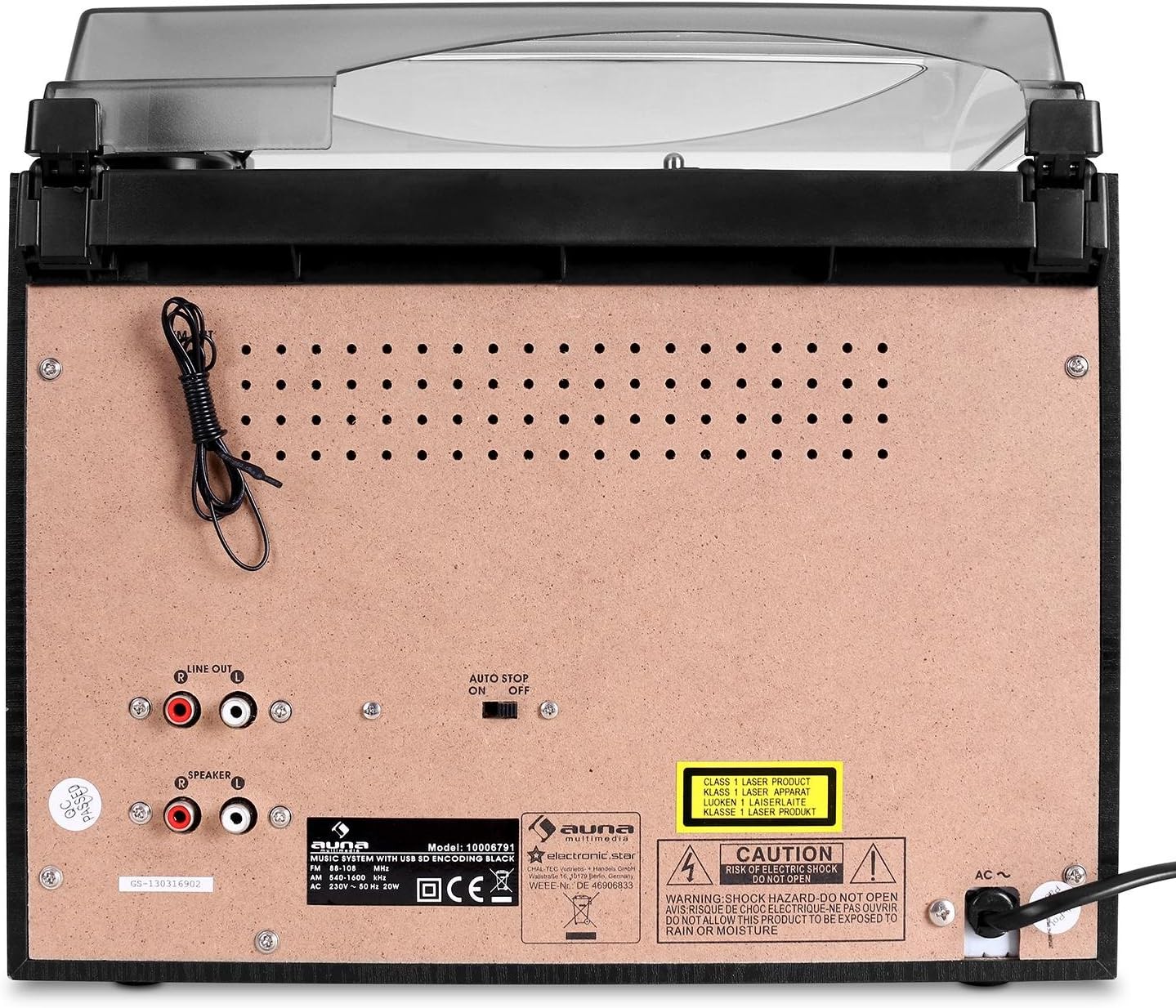
Figure 3: Rear panel of the main unit, displaying speaker outputs, line out, and power input.
- Speaker Outputs (RCA): ഉൾപ്പെടുത്തിയിരിക്കുന്ന ബാഹ്യ സ്പീക്കറുകൾ ബന്ധിപ്പിക്കുക.
- ലൈൻ ഔട്ട് (ആർസിഎ): ഒരു ബാഹ്യ ഉപകരണത്തിലേക്ക് ബന്ധിപ്പിക്കുന്നതിന് ampലൈഫയർ അല്ലെങ്കിൽ പവർഡ് സ്പീക്കറുകൾ.
- എഫ്എം ആന്റിന: Integrated wire antenna for radio reception.
- എസി പവർ ഇൻപുട്ട്: പവർ കോർഡ് ബന്ധിപ്പിക്കുക.
- ഓട്ടോ സ്റ്റോപ്പ് സ്വിച്ച്: For turntable auto-stop function.
സജ്ജമാക്കുക
1. അൺപാക്കിംഗും പ്ലേസ്മെൻ്റും:
- പാക്കേജിംഗിൽ നിന്ന് എല്ലാ ഘടകങ്ങളും ശ്രദ്ധാപൂർവ്വം നീക്കം ചെയ്യുക.
- Place the main unit on a stable, flat surface, away from direct sunlight, heat sources, and excessive dust or moisture.
- യൂണിറ്റിന് ചുറ്റും വായുസഞ്ചാരത്തിന് മതിയായ ഇടമുണ്ടെന്ന് ഉറപ്പാക്കുക.
2. Connecting the Speakers:
The auna 388-BT comes with two external speakers. Connect them to the main unit using the provided speaker cables.

ചിത്രം 4: പിൻഭാഗം view of the external speakers, showing the integrated audio cables for connection to the main unit.
- Locate the RCA speaker output jacks on the rear of the main unit.
- Connect the RCA plugs from the speaker cables into the corresponding speaker output jacks (Left and Right) on the main unit.
- Position the speakers to the left and right of the main unit for optimal stereo separation.
3. പവർ കണക്ഷൻ:
- Ensure the unit's power switch is in the "OFF" position.
- Plug the AC power cord into the AC power input on the rear of the main unit.
- Plug the other end of the power cord into a standard AC wall outlet (230V, 50Hz).
പ്രവർത്തന നിർദ്ദേശങ്ങൾ
പൊതുവായ പ്രവർത്തനം:
- പവർ ഓൺ/ഓഫ്: അമർത്തുക പവർ യൂണിറ്റ് ഓണാക്കാനോ ഓഫാക്കാനോ ഫ്രണ്ട് പാനലിലെ ബട്ടണോ റിമോട്ട് കൺട്രോളോ അമർത്തുക.
- വോളിയം ക്രമീകരണം: തിരിക്കുക വോളിയം മുൻ പാനലിലെ നോബ് അല്ലെങ്കിൽ ഉപയോഗിക്കുക VOL + / VOL- റിമോട്ട് കൺട്രോളിലെ ബട്ടണുകൾ.
- ഉറവിട തിരഞ്ഞെടുപ്പ്: അമർത്തുക ഫങ്ഷൻ button repeatedly on the front panel or use the dedicated source buttons on the remote control (PHONO/BT, TAPE, CD/USB/SD, TUNER) to select the desired audio source.
ടേൺ ചെയ്യാവുന്ന പ്രവർത്തനം:
- പൊടി കവർ ഉയർത്തുക.
- ടർടേബിൾ പ്ലാറ്ററിൽ ഒരു വിനൈൽ റെക്കോർഡ് സ്ഥാപിക്കുക.
- Select the appropriate speed (33 or 45 RPM) using the speed selector switch. For 45 RPM records, place the included adapter on the spindle.
- Move the tone arm from its rest and gently place the stylus on the desired groove of the record. The platter will start spinning automatically.
- To stop playback, lift the tone arm and return it to its rest. The platter will stop spinning.
- ദി ഓട്ടോ സ്റ്റോപ്പ് switch on the rear panel controls whether the turntable stops automatically at the end of a record.
സിഡി പ്ലെയർ പ്രവർത്തനം:
- അമർത്തുക CD/USB/SD സിഡി മോഡ് തിരഞ്ഞെടുക്കാനുള്ള ബട്ടൺ.
- അമർത്തുക തുറക്കുക/അടയ്ക്കുക സിഡി ട്രേ തുറക്കാൻ ബട്ടൺ.
- Place a CD (audio CD or MP3-CD) with the label side facing up into the tray.
- അമർത്തുക തുറക്കുക/അടയ്ക്കുക again to close the tray. The unit will read the disc and begin playback automatically.
- ഉപയോഗിക്കുക പ്ലേ/താൽക്കാലികമായി നിർത്തുക, നിർത്തുക, ഫോർവേഡ് ഒഴിവാക്കുക, ഒപ്പം പിന്നോട്ട് പോകുക പ്ലേബാക്ക് നിയന്ത്രണത്തിനുള്ള ബട്ടണുകൾ.
- പ്രോഗ്രാം പ്ലേ: നിർദ്ദിഷ്ട ട്രാക്ക് ഓർഡറുകൾ പ്രോഗ്രാം ചെയ്യുന്നതിനായി പൂർണ്ണ മാനുവലിലെ വിശദമായ നിർദ്ദേശങ്ങൾ കാണുക.
കാസറ്റ് പ്ലെയർ/റെക്കോർഡർ പ്രവർത്തനം:
- അമർത്തുക ടേപ്പ് കാസറ്റ് മോഡ് തിരഞ്ഞെടുക്കാൻ ബട്ടൺ.
- Open the cassette deck door (Deck 1 or Deck 2) and insert a cassette tape.
- പ്ലേബാക്ക് നിയന്ത്രണങ്ങൾ ഉപയോഗിക്കുക (കളിക്കുക, നിർത്തുക/പുറത്തള്ളുക, ഫാസ്റ്റ് ഫോർവേഡ്, റിവൈൻഡ് ചെയ്യുക) to control tape playback.
- റെക്കോർഡിംഗ്: To record from the radio or turntable to a cassette, select the desired source (TUNER or PHONO), then press the രേഖപ്പെടുത്തുക button on the cassette deck. Ensure a blank tape is inserted.
- High-Speed Dubbing: Use Deck 1 for playback and Deck 2 for recording to dub tapes at high speed.
Radio (FM) Operation:
- അമർത്തുക ട്യൂണർ റേഡിയോ മോഡ് തിരഞ്ഞെടുക്കാൻ ബട്ടൺ.
- Extend the FM wire antenna on the rear of the unit for better reception.
- ഉപയോഗിക്കുക ട്യൂണിംഗ് നോബ് അല്ലെങ്കിൽ TUNE+ / TUNE- ഒരു സ്റ്റേഷനിലേക്ക് സ്വമേധയാ ട്യൂൺ ചെയ്യാൻ റിമോട്ടിലെ ബട്ടണുകൾ.
- ഓട്ടോ സ്കാൻ: അമർത്തിപ്പിടിക്കുക പ്ലേ/താൽക്കാലികമായി നിർത്തുക button (or similar on remote) to automatically scan and save available stations.
ബ്ലൂടൂത്ത് പ്രവർത്തനം:
- അമർത്തുക PHONO/BT ബ്ലൂടൂത്ത് മോഡ് തിരഞ്ഞെടുക്കാനുള്ള ബട്ടൺ. ഡിസ്പ്ലേ "BT" കാണിക്കുകയും ഫ്ലാഷ് കാണിക്കുകയും ചെയ്യും, ഇത് ജോടിയാക്കൽ മോഡിലാണെന്ന് സൂചിപ്പിക്കുന്നു.
- Enable Bluetooth on your external device (smartphone, tablet, etc.) and search for "auna 388-BT" or similar.
- Select the unit from the list of available devices to pair. Once connected, the "BT" indicator will stop flashing.
- You can now play audio from your Bluetooth device through the stereo system. Use your device's controls for playback.
USB/SD Playback and Digitalization:
ചിത്രം 5: വിശദമായി view of the USB port and SD/MMC card slot on the front panel.
- USB പോർട്ടിലേക്ക് ഒരു USB ഫ്ലാഷ് ഡ്രൈവ് അല്ലെങ്കിൽ കാർഡ് സ്ലോട്ടിലേക്ക് ഒരു SD/MMC കാർഡ് ഇടുക.
- അമർത്തുക CD/USB/SD button to select USB or SD mode. The unit will automatically detect and begin playing MP3 files.
- Use the playback controls to navigate tracks.
- Digitalization (Recording to USB/SD):
- Select the source you wish to record from (Turntable, CD, or Radio).
- Ensure a USB drive or SD card is inserted.
- ഉറവിട മെറ്റീരിയലിന്റെ പ്ലേബാക്ക് ആരംഭിക്കുക.
- അമർത്തുക രേഖപ്പെടുത്തുക button on the main unit. The recording indicator will light up.
- അമർത്തുക രേഖപ്പെടുത്തുക again to stop recording. The recorded audio will be saved as an MP3 file on the USB drive or SD card.
മെയിൻ്റനൻസ്
- യൂണിറ്റ് വൃത്തിയാക്കൽ:
- വൃത്തിയാക്കുന്നതിന് മുമ്പ് എല്ലായ്പ്പോഴും പവർ ഔട്ട്ലെറ്റിൽ നിന്ന് യൂണിറ്റ് അൺപ്ലഗ് ചെയ്യുക.
- പുറംഭാഗങ്ങൾ തുടയ്ക്കാൻ മൃദുവായതും ഉണങ്ങിയതുമായ തുണി ഉപയോഗിക്കുക.
- അബ്രാസീവ് ക്ലീനറുകൾ, മെഴുക് അല്ലെങ്കിൽ ലായകങ്ങൾ എന്നിവ ഉപയോഗിക്കരുത്, കാരണം അവ ഫിനിഷിന് കേടുവരുത്തും.
- സ്റ്റൈലസ് കെയർ:
- Gently clean the stylus tip periodically with a soft brush, brushing from back to front.
- നിങ്ങളുടെ വിരലുകൾ കൊണ്ട് സ്റ്റൈലസിൽ തൊടുന്നത് ഒഴിവാക്കുക.
- Replace the stylus when sound quality deteriorates or if the stylus is visibly damaged.
- പൊടി കവർ: പൊടി അടിഞ്ഞുകൂടുന്നത് തടയാൻ ടർടേബിൾ ഉപയോഗത്തിലില്ലാത്തപ്പോൾ പൊടി കവർ അടച്ചിടുക.
- സിഡി/കാസറ്റ് പരിചരണം: Handle CDs and cassettes by their edges. Store them in their cases to prevent scratches and dust.
ട്രബിൾഷൂട്ടിംഗ്
| പ്രശ്നം | സാധ്യമായ കാരണം | പരിഹാരം |
|---|---|---|
| ശക്തിയില്ല | പവർ കോർഡ് ബന്ധിപ്പിച്ചിട്ടില്ല; പവർ ഔട്ട്ലെറ്റ് സജീവമല്ല. | Ensure power cord is securely plugged in. Check if the power outlet is working. |
| സ്പീക്കറുകളിൽ നിന്ന് ശബ്ദമില്ല | Volume too low; Speakers not connected; Incorrect source selected. | Increase volume. Check speaker connections to the main unit. Select the correct audio source. |
| Turntable not spinning or distorted sound | Speed setting incorrect; Stylus dirty or damaged; Auto Stop switch off. | Check if 33/45 RPM switch matches the record. Clean or replace stylus. Ensure Auto Stop switch is set correctly. |
| സിഡി ഒഴിവാക്കുകയോ പ്ലേ ചെയ്യാതിരിക്കുകയോ ചെയ്യുന്നു | സിഡി വൃത്തികെട്ടതോ പോറലുള്ളതോ ആണ്; സിഡി തെറ്റായി ചേർത്തിരിക്കുന്നു. | Clean the CD with a soft cloth. Ensure the CD is inserted label-side up. Try another CD. |
| ബ്ലൂടൂത്ത് കണക്റ്റ് ചെയ്യുന്നില്ല | Unit not in pairing mode; Device too far; Bluetooth disabled on external device. | Ensure unit is in Bluetooth pairing mode (BT flashing). Move device closer. Enable Bluetooth on your device. |
| USB/SD not recognized or playing | തെറ്റാണ് file format; USB/SD card corrupted; Card inserted incorrectly. | ഉറപ്പാക്കുക files are MP3 format. Try reformatting the USB/SD card (backup data first). Reinsert the card correctly. |
സ്പെസിഫിക്കേഷനുകൾ
| ബ്രാൻഡ്: | auna |
| മോഡൽ: | 388-ബി.ടി |
| വൈദ്യുതി വിതരണം: | എസി 230 വി, 50 ഹെർട്സ് |
| വൈദ്യുതി ഉപഭോഗം: | 25W |
| Main Unit Dimensions (W x H x D): | 31.8 x 28.5 x 28.5 സെ.മീ |
| Speaker Dimensions (W x H x D): | 14.7 x 22.5 x 14.2 സെ.മീ |
| പ്രധാന യൂണിറ്റ് ഭാരം: | ഏകദേശം 3.8 കിലോ |
| Speaker Weight (each): | ഏകദേശം 950 ഗ്രാം |
| കണക്റ്റിവിറ്റി: | Bluetooth, USB, SD/MMC, Stereo RCA Line In, Stereo RCA Line Out, 3.5mm Headphone Jack |
| പിന്തുണയ്ക്കുന്ന മീഡിയ: | Vinyl Records (33/45 RPM), Audio CD, MP3-CD, Cassette Tapes, MP3 (USB/SD) |
| സ്പീക്കർ ഔട്ട്പുട്ട് പവർ: | 2 x 5W / 4 ohms |
| Digitalization Format: | MP3 (128 kbps, 44.1 kHz) |
വാറൻ്റിയും പിന്തുണയും
This product is covered by a manufacturer's warranty. Please refer to the warranty card included with your purchase or contact your retailer for specific warranty terms and conditions.
For technical support or service inquiries, please contact the auna customer service department or your local distributor. Contact information can typically be found on the manufacturer's webസൈറ്റ് അല്ലെങ്കിൽ നിങ്ങളുടെ വാങ്ങൽ ഡോക്യുമെന്റേഷൻ.
അനുബന്ധ രേഖകൾ - 388-ബി.ടി
 |
auna BX-Graceland TT Jukebox User Manual User manual for the auna BX-Graceland TT Jukebox (model US-10030442) by Berlin Brands Group Inc. This guide provides setup, operation, safety, and technical details for the turntable and Bluetooth-enabled jukebox. |
 |
auna Fullmatic Plattenspieler Bedienungsanleitung | Modell 10032888, 10032889 Entdecken Sie die auna Fullmatic Plattenspieler Bedienungsanleitung. Erfahren Sie mehr über Installation, Bedienung, Wartung und technische Daten der Modelle 10032888 und 10032889. |
 |
ഔന ടേൺടബിൾ പ്ലെയർ 10000343 / 10015399: ഇൻസ്ട്രക്ഷൻ മാനുവൽ ഔന ടേൺടേബിൾ പ്ലെയറിനായുള്ള ഉപയോക്തൃ മാനുവൽ (മോഡലുകൾ 10000343 / 10015399), സജ്ജീകരണം, പ്രവർത്തനം, സുരക്ഷാ മുൻകരുതലുകൾ, പരിസ്ഥിതി നിർമാർജന നിർദ്ദേശങ്ങൾ എന്നിവ ഉൾക്കൊള്ളുന്നു. |
 |
Auna NR-620 Kompaktanlage: Plattenspieler, Kassettendeck, MP3-CD-Player & Radio Umfassende Bedienungsanleitung für die Auna NR-620 Kompaktanlage. Erfahren Sie mehr über die Funktionen wie Plattenspieler, Kassettendeck, CD-Player, Radio, MP3-Wiedergabe und Digitalisierung von Schallplatten und Kassetten. |
 |
auna TT-Play Turntable: User Manual and Specifications Comprehensive user manual for the auna TT-Play turntable (models 10045081, 10045082), covering setup, operation, safety, technical specifications, and maintenance. Features Bluetooth connectivity. |
 |
Auna Stereo Components HiFi System User Manual Comprehensive user manual for the Auna Stereo Components HiFi system, covering amplifier and CD player functions, connections, remote control operation, MP3 playback, USB input, radio tuning, troubleshooting, and disposal information. |
Ask a question about this manual
Ask about setup, troubleshooting, compatibility, parts, safety, or missing instructions. Manuals+ will review the question and use this page’s manual context to help answer it.