
1. ആമുഖം
This manual provides essential information for the safe and effective operation, maintenance, and troubleshooting of your Sharp KC-G60EUW Air Purifier with Humidifier. Please read this manual thoroughly before using the appliance and keep it for future reference.
The Sharp KC-G60EUW is designed to purify and humidify the air in rooms up to 50 square meters. It features a 5-stage filtration system and Plasmacluster Ion technology to improve air quality by removing various pollutants, allergens, and odors.
2 സുരക്ഷാ വിവരങ്ങൾ
തീ, വൈദ്യുതാഘാതം, പരിക്കുകൾ എന്നിവ കുറയ്ക്കുന്നതിന് വൈദ്യുത ഉപകരണങ്ങൾ ഉപയോഗിക്കുമ്പോൾ എല്ലായ്പ്പോഴും അടിസ്ഥാന സുരക്ഷാ മുൻകരുതലുകൾ പാലിക്കുക.
- വൈദ്യുതി വിതരണം വോളിയം ഉറപ്പാക്കുകtage യൂണിറ്റിലെ റേറ്റിംഗ് ലേബലുമായി പൊരുത്തപ്പെടുന്നു.
- കേടായ പവർ കോർഡ് അല്ലെങ്കിൽ പ്ലഗ് ഉപയോഗിച്ച് യൂണിറ്റ് പ്രവർത്തിപ്പിക്കരുത്.
- Keep the unit away from water and moisture. Do not immerse in water.
- എയർ ഇൻലെറ്റുകളോ ഔട്ട്ലെറ്റുകളോ തടയരുത്.
- വൃത്തിയാക്കുന്നതിനോ അറ്റകുറ്റപ്പണികൾ നടത്തുന്നതിനോ മുമ്പ് യൂണിറ്റ് അൺപ്ലഗ് ചെയ്യുക.
- ഈ ഉപകരണം, അവരുടെ സുരക്ഷയ്ക്ക് ഉത്തരവാദിയായ ഒരു വ്യക്തി ഉപകരണത്തിൻ്റെ ഉപയോഗത്തെ സംബന്ധിച്ച മേൽനോട്ടമോ നിർദ്ദേശമോ നൽകിയിട്ടില്ലെങ്കിൽ, ശാരീരികമോ ഇന്ദ്രിയപരമോ മാനസികമോ ആയ കഴിവുകൾ കുറഞ്ഞതോ അനുഭവത്തിൻ്റെയും അറിവിൻ്റെയും അഭാവം ഉള്ള വ്യക്തികൾക്ക് (കുട്ടികൾ ഉൾപ്പെടെ) ഉപയോഗിക്കാൻ ഉദ്ദേശിച്ചുള്ളതല്ല.
- കത്തുന്ന വാതകങ്ങൾക്കോ ജ്വലന വസ്തുക്കൾക്കോ സമീപം യൂണിറ്റ് ഉപയോഗിക്കരുത്.
3. ഉൽപ്പന്നം കഴിഞ്ഞുview
The Sharp KC-G60EUW combines air purification and humidification functions. Key components include the control panel, air inlets/outlets, water tank, and a multi-stagഇ ഫിൽട്ടർ സിസ്റ്റം.
3.1 പ്രധാന യൂണിറ്റ്

ചിത്രം 3.1: ഫ്രണ്ട് view of the Sharp KC-G60EUW Air Purifier, showing the Sharp logo and Plasmacluster ion indicator.
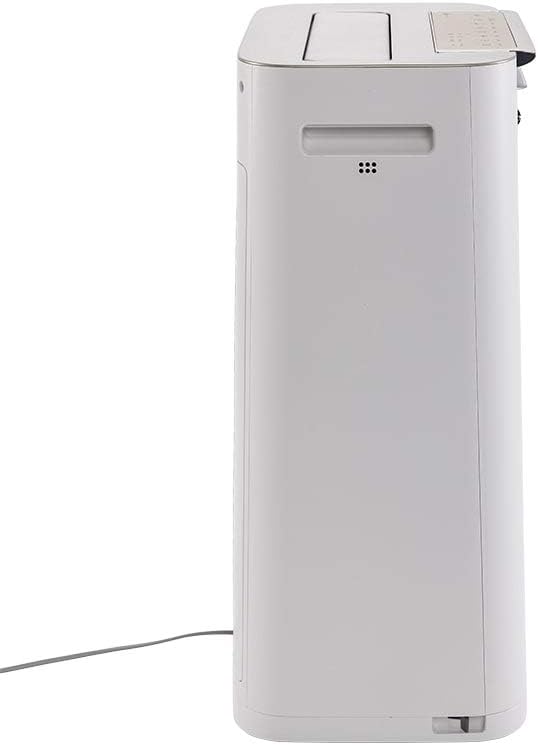
ചിത്രം 3.2: വശം view of the Sharp KC-G60EUW Air Purifier, illustrating its slim profile and power cord connection.
3.2 നിയന്ത്രണ പാനൽ
The control panel is located on the top of the unit and allows you to manage all functions.

ചിത്രം 3.3: മുകളിൽ view of the Sharp KC-G60EUW, showing the control panel with various function buttons and indicators.

ചിത്രം 3.4: വിശദമായി view of the control panel buttons, including Power, Mode, Humidification, Spot, and Intelligent Auto mode.
3.3 ഫിൽട്ടറേഷൻ സിസ്റ്റം
The unit employs a 5-stage filtration system for comprehensive air purification:
- പ്രീ-ഫിൽട്ടർ: Captures large particles like dust, hair, and pet dander (up to 240 microns).
- Carbon Filter with Silica Gel: Absorbs unpleasant odors, volatile organic compounds (VOCs) such as benzene, formaldehyde, and benzo(a)pyrene. The silica gel layer enhances the removal of nitrogen and sulfur oxides.
- HEPA H13 ഫിൽട്ടർ: Removes 99.97% of PM 2.5 particles, pollen, and other fine airborne allergens.
- Humidifier Filter: Retains sediment from water, reducing scale buildup and ensuring clean humidification.
- Plasmacluster Ionizer: Generates positive and negative ions to neutralize airborne viruses, bacteria, mold spores, and odors.
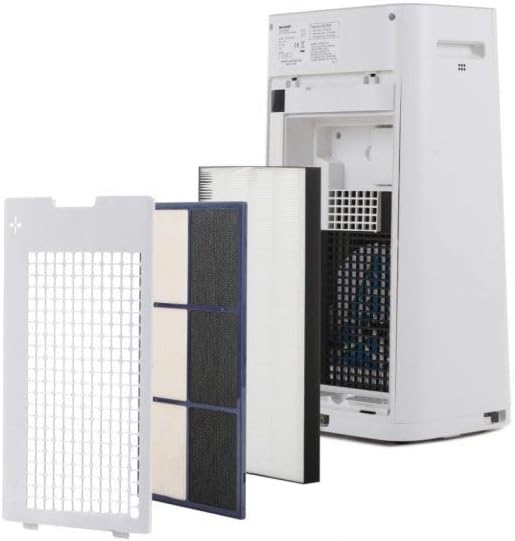
ചിത്രം 3.5: മൾട്ടി-എസ്tage filtration system of the Sharp KC-G60EUW, showing the individual filters removed from the back of the unit.
4. സജ്ജീകരണം
Follow these steps to set up your air purifier for the first time:
- യൂണിറ്റ് അൺപാക്ക് ചെയ്യുക: Carefully remove the air purifier from its packaging. Retain packaging for future transport or storage.
- ഫിൽട്ടർ പാക്കേജിംഗ് നീക്കം ചെയ്യുക: Open the back cover of the unit. Remove all filters (pre-filter, carbon filter, HEPA filter) and unwrap them from their protective plastic bags. Reinstall the filters in the correct order, ensuring they are securely seated. Refer to Image 3.5 for filter arrangement.
- Fill Water Tank (for Humidification): Remove the water tank from the side of the unit. Fill it with clean tap water. Do not use distilled water or water with additives. Reinsert the water tank securely.
- യൂണിറ്റ് സ്ഥാപിക്കുക: Place the air purifier on a flat, stable surface, ensuring there is adequate space (at least 20 cm) around the air inlets and outlets for optimal airflow.
- പവർ ബന്ധിപ്പിക്കുക: അനുയോജ്യമായ ഒരു ഇലക്ട്രിക്കൽ ഔട്ട്ലെറ്റിലേക്ക് പവർ കോർഡ് പ്ലഗ് ചെയ്യുക.
5. പ്രവർത്തന നിർദ്ദേശങ്ങൾ
The Sharp KC-G60EUW offers various operating modes and settings.
5.1 പവർ ഓൺ/ഓഫ്
- അമർത്തുക ഓൺ/ഓഫ് യൂണിറ്റ് ഓണാക്കാനോ ഓഫാക്കാനോ നിയന്ത്രണ പാനലിലെ ബട്ടൺ.
5.2 മോഡ് തിരഞ്ഞെടുക്കൽ
അമർത്തുക മോഡ് button to cycle through different purification modes:
- യാന്ത്രിക മോഡ്: The unit automatically adjusts fan speed and humidification based on sensor readings (dust, odor, humidity). This is the recommended mode for general use.
- പരമാവധി മോഡ്: Operates at maximum fan speed for rapid air purification.
- മെഡ് മോഡ്: Medium fan speed for balanced purification.
- കുറഞ്ഞ മോഡ്: ശാന്തമായ പ്രവർത്തനത്തിന് കുറഞ്ഞ ഫാൻ വേഗത.
- സ്ലീപ്പ് മോഡ്: Operates at the lowest fan speed with dimmed indicators for undisturbed sleep.
5.3 ഹ്യുമിഡിഫിക്കേഷൻ ഫംഗ്ഷൻ
To activate or deactivate humidification:
- അമർത്തുക HUMIDIFY ON/OFF button. The humidification indicator will light up when active.
- Ensure the water tank is filled for humidification to function.
5.4 Plasmacluster Ion Function
The Plasmacluster Ion function is typically active by default. If there is a dedicated button, press the ION button to toggle it on or off. The Plasmacluster indicator will confirm its status.
5.5 Intelligent Auto Mode
അമർത്തുക ഇന്റലിജന്റ് മോഡ് button to engage the advanced automatic operation, which optimizes purification and humidification based on environmental conditions detected by the unit's sensors.
6. പരിപാലനം
പതിവ് അറ്റകുറ്റപ്പണികൾ മികച്ച പ്രകടനം ഉറപ്പാക്കുകയും നിങ്ങളുടെ എയർ പ്യൂരിഫയറിന്റെ ആയുസ്സ് വർദ്ധിപ്പിക്കുകയും ചെയ്യുന്നു.
6.1 പ്രീ-ഫിൽറ്റർ വൃത്തിയാക്കൽ
- ആവൃത്തി: Approximately once a month, or when the filter indicator lights up.
- നടപടിക്രമം:
- യൂണിറ്റ് അൺപ്ലഗ് ചെയ്യുക.
- പിൻ പാനൽ നീക്കം ചെയ്യുക.
- Carefully remove the pre-filter.
- Use a vacuum cleaner to remove dust and debris from the pre-filter. For stubborn dirt, wash it gently with water and a mild detergent. Rinse thoroughly and allow it to air dry completely before reinstalling.
- Reinstall the pre-filter and back panel.
6.2 Cleaning the Humidifier Filter and Water Tank
- ആവൃത്തി: Weekly or as needed, especially if scale buildup is visible.
- നടപടിക്രമം:
- യൂണിറ്റ് അൺപ്ലഗ് ചെയ്യുക.
- Remove the water tank and humidifier filter assembly.
- ടാങ്കിൽ നിന്ന് ശേഷിക്കുന്ന വെള്ളം ഒഴിക്കുക.
- Clean the water tank with a soft brush and mild detergent. Rinse thoroughly.
- Clean the humidifier filter by rinsing it under running water. For scale buildup, soak the filter in a descaling solution (e.g., citric acid solution) as per the solution's instructions, then rinse thoroughly.
- വീണ്ടും കൂട്ടിച്ചേർക്കുന്നതിനും വീണ്ടും ഇൻസ്റ്റാൾ ചെയ്യുന്നതിനും മുമ്പ് എല്ലാ ഭാഗങ്ങളും പൂർണ്ണമായും വായുവിൽ ഉണങ്ങാൻ അനുവദിക്കുക.
6.3 HEPA and Carbon Filter Replacement
- ആവൃത്തി: The HEPA and Carbon filters are not washable and must be replaced periodically. Refer to the filter replacement indicator on the unit or the manufacturer's recommendations (typically every 2-5 years depending on usage and air quality).
- നടപടിക്രമം:
- യൂണിറ്റ് അൺപ്ലഗ് ചെയ്യുക.
- Remove the back panel and the old HEPA and Carbon filters.
- Install new, genuine Sharp replacement filters, ensuring correct orientation.
- പിൻ പാനൽ അടയ്ക്കുക.
- Reset the filter replacement indicator (refer to the control panel instructions, usually by pressing and holding a specific button for 3 seconds).
7. പ്രശ്നപരിഹാരം
If you encounter issues with your Sharp KC-G60EUW, refer to the following common problems and solutions:
| പ്രശ്നം | സാധ്യമായ കാരണം | പരിഹാരം |
|---|---|---|
| യൂണിറ്റ് ഓണാക്കുന്നില്ല. | വൈദ്യുതി വിതരണം ഇല്ല. | Check if the power cord is securely plugged into the unit and the wall outlet. Ensure the outlet is functional. |
| No humidification. | Water tank is empty or not properly installed. Humidification function is off. | Fill the water tank. Ensure the tank is correctly seated. Press the HUMIDIFY ON/OFF button. |
| Weak airflow or poor purification. | Filters are dirty or blocked. Air inlets/outlets are obstructed. | Clean the pre-filter. Check if HEPA/Carbon filters need replacement. Ensure no objects are blocking air vents. |
| അസാധാരണമായ ശബ്ദം. | Foreign object inside the unit. Filters not installed correctly. | Unplug the unit and check for any foreign objects. Reinstall filters correctly. If noise persists, contact customer support. |
| ദുർഗന്ധം തുടരുന്നു. | Carbon filter is saturated. | Replace the carbon filter. |
ഈ പരിഹാരങ്ങൾ പരീക്ഷിച്ചതിന് ശേഷവും പ്രശ്നം നിലനിൽക്കുകയാണെങ്കിൽ, ദയവായി ഷാർപ്പ് ഉപഭോക്തൃ പിന്തുണയുമായി ബന്ധപ്പെടുക.
8 സ്പെസിഫിക്കേഷനുകൾ
| ഫീച്ചർ | വിശദാംശങ്ങൾ |
|---|---|
| മോഡൽ നമ്പർ | KC-G60EUW |
| ബ്രാൻഡ് | മൂർച്ചയുള്ള |
| ബാധകമായ ഫ്ലോർ ഏരിയ | 50 ചതുരശ്ര മീറ്റർ (538 ചതുരശ്ര അടി) വരെ |
| Max Purification Efficiency | 408 m³/h |
| Max Humidification Efficiency | 630 മില്ലി / മണിക്കൂർ |
| ശബ്ദ നില | 24 dB (കുറഞ്ഞത്) |
| ഫിൽട്ടറേഷൻ സിസ്റ്റം | 5-സെtage (Pre-filter, Carbon, HEPA H13, Humidifier, Plasmacluster Ionizer) |
| Particle Retention (Pre-filter) | 240 മൈക്രോൺ വരെ |
| പ്രത്യേക സവിശേഷതകൾ | Plasmacluster Technology, Intelligent AUTO mode |
| പവർ ഉറവിടം | കോർഡഡ് ഇലക്ട്രിക് |
| നിയന്ത്രണ രീതി | റിമോട്ട് കൺട്രോൾ, ബട്ടൺ കൺട്രോൾ |
| ഇനത്തിൻ്റെ ഭാരം | 28.44 പൗണ്ട് (ഏകദേശം 12.9 കിലോഗ്രാം) |
9. വാറൻ്റിയും പിന്തുണയും
Sharp products are manufactured to high-quality standards and are warranted against manufacturing defects. For specific warranty terms and conditions, please refer to the warranty card included with your product or visit the official Sharp webനിങ്ങളുടെ പ്രദേശത്തിനായുള്ള സൈറ്റ്.
For technical assistance, troubleshooting beyond this manual, or to order replacement parts/filters, please contact Sharp customer support:
- ഓൺലൈൻ പിന്തുണ: Visit the official Sharp support webസൈറ്റ്.
- ഫോൺ പിന്തുണ: Refer to your product documentation or the Sharp webപ്രാദേശിക കോൺടാക്റ്റ് നമ്പറുകൾക്കായുള്ള സൈറ്റ്.
- When contacting support, please have your model number (KC-G60EUW) and serial number ready.