
1. ആമുഖം
The Zealot S11 is a portable, wireless Bluetooth speaker designed for versatile use, including outdoor activities. It features IP67 waterproofing, a multi-mode flashlight, a power bank function, and supports various audio input methods. This manual provides detailed instructions for its setup, operation, and maintenance.

Image 1: Zealot S11 Waterproof Bluetooth Speaker
2. പാക്കേജ് ഉള്ളടക്കം
ഉപയോഗിക്കുന്നതിന് മുമ്പ്, എല്ലാ ഇനങ്ങളും പാക്കേജിൽ ഉണ്ടെന്ന് ദയവായി ഉറപ്പാക്കുക:
- Zealot S11 Bluetooth Speaker
- Bike/Cycle Mount
- 3.5 എംഎം ഓഡിയോ കേബിൾ
- യുഎസ്ബി ചാർജിംഗ് കേബിൾ
- ഉപയോക്തൃ മാനുവൽ
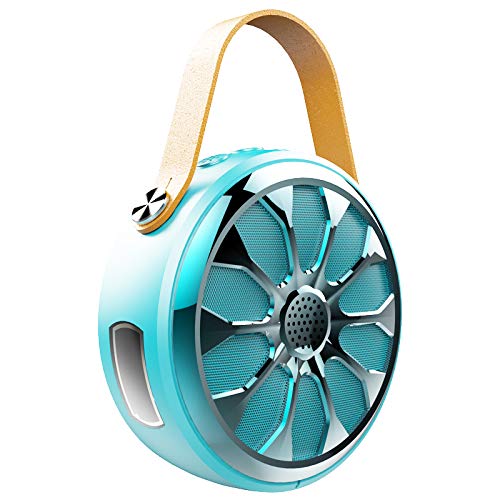
Image 2: Zealot S11 Speaker with included accessories
3. ഉൽപ്പന്ന ലേഔട്ട്
3.1 പോർട്ടുകളും കണക്ടറുകളും

ചിത്രം 3: വശം view of the Zealot S11 showing the AUX-in port, USB-out port (for power bank), USB-in port (for charging), Power ON/OFF switch, and TF card slot.
- IN (USB-in): സ്പീക്കർ ചാർജ് ചെയ്യുന്നതിനുള്ള മൈക്രോ യുഎസ്ബി പോർട്ട്.
- ഓഫ് / ഓൺ: Power switch to turn the speaker on or off.
- ടിഎഫ്: Slot for a TF (MicroSD) card for local music playback.
- OUT (USB-out): Standard USB port for using the speaker as a power bank.
- ഓക്സ്: 3.5mm audio input jack for wired connection.
3.2 നിയന്ത്രണ ബട്ടണുകൾ

ചിത്രം 4: മുകളിൽ view of the Zealot S11 showing the control buttons for Flashlight, Mode Switch, Volume Down/Previous Track, and Volume Up/Next Track.
- ഫ്ലാഷ്ലൈറ്റ് ബട്ടൺ: ഫ്ലാഷ്ലൈറ്റ് മോഡുകൾ വഴി സജീവമാക്കുകയും സൈക്കിൾ ചെയ്യുകയും ചെയ്യുന്നു.
- M (Mode Switch): Switches between Bluetooth, TF card, and AUX modes.
- Vol-/Pre Track: വോളിയം കുറയ്ക്കാൻ ഷോർട്ട് പ്രസ്സ് ചെയ്യുക, മുമ്പത്തെ ട്രാക്കിനായി ദീർഘനേരം അമർത്തുക.
- വോളിയം+/അടുത്ത ട്രാക്ക്: വോളിയം കൂട്ടാൻ ഷോർട്ട് പ്രസ്സ് ചെയ്യുക, അടുത്ത ട്രാക്കിനായി ദീർഘനേരം പ്രസ്സ് ചെയ്യുക.
4. സജ്ജീകരണം
4.1 സ്പീക്കർ ചാർജ് ചെയ്യുന്നു
- Connect the provided USB charging cable to the IN സ്പീക്കറിൽ പോർട്ട്.
- USB കേബിളിന്റെ മറ്റേ അറ്റം ഒരു 5V/1A USB പവർ അഡാപ്റ്ററുമായി (ഉൾപ്പെടുത്തിയിട്ടില്ല) അല്ലെങ്കിൽ ഒരു കമ്പ്യൂട്ടറിന്റെ USB പോർട്ടുമായി ബന്ധിപ്പിക്കുക.
- The charging indicator light will illuminate. Once fully charged, the light will change or turn off (refer to specific LED behavior in the quick start guide if available).
- A full charge provides approximately 20 hours of music playback.
4.2 Mounting on a Bike/Cycle
The Zealot S11 includes a mount for attachment to a bike or cycle handlebar.
- Locate the screw hole on the bottom of the speaker.
- Attach the provided bike mount to the speaker using the screw.
- Securely fasten the mount to your bike's handlebar. Ensure the speaker is stable before riding.
5. പ്രവർത്തന നിർദ്ദേശങ്ങൾ
5.1 പവർ ഓൺ/ഓഫ്
- പവർ ഓൺ ചെയ്യാൻ, സ്ലൈഡ് ചെയ്യുക ഓഫ്/ഓൺ 'ഓൺ' സ്ഥാനത്തേക്ക് മാറുക.
- പവർ ഓഫ് ചെയ്യാൻ, സ്ലൈഡ് ചെയ്യുക ഓഫ്/ഓൺ 'ഓഫ്' സ്ഥാനത്തേക്ക് മാറുക.
5.2 ബ്ലൂടൂത്ത് ജോടിയാക്കൽ
- Ensure the speaker is powered on and in Bluetooth mode (indicated by a flashing LED, if applicable). If not, press the M ബ്ലൂടൂത്ത് മോഡിലേക്ക് മാറാനുള്ള ബട്ടൺ.
- നിങ്ങളുടെ സ്മാർട്ട്ഫോണിലോ ടാബ്ലെറ്റിലോ, ബ്ലൂടൂത്ത് പ്രവർത്തനക്ഷമമാക്കി ലഭ്യമായ ഉപകരണങ്ങൾക്കായി തിരയുക.
- Select "Zealot S11" from the list of devices.
- Once paired, the speaker will emit an audible confirmation, and the LED indicator will stop flashing.
5.3 മ്യൂസിക് പ്ലേബാക്ക്

Image 5: The Zealot S11 supports three major player modes: Bluetooth, TF card, and AUX input.
- Bluetooth Play: വിജയകരമായ ജോടിയാക്കലിന് ശേഷം, നിങ്ങളുടെ കണക്റ്റുചെയ്ത ഉപകരണത്തിൽ നിന്ന് സംഗീതം പ്ലേ ചെയ്യുക.
- TF കാർഡ് പ്ലേ: സംഗീതമുള്ള ഒരു TF (മൈക്രോ എസ്ഡി) കാർഡ് ചേർക്കുക fileഎസ് TF slot. The speaker will automatically switch to TF card mode or you can press the M അത് തിരഞ്ഞെടുക്കാനുള്ള ബട്ടൺ.
- AUX Play: Connect an audio device using the 3.5mm audio cable to the ഓക്സ് port. Press the M AUX മോഡിലേക്ക് മാറാനുള്ള ബട്ടൺ.
5.4 ഹാൻഡ്സ്-ഫ്രീ കോളിംഗ്

Image 6: The Zealot S11 allows for hands-free phone calls when connected via Bluetooth.
നിങ്ങളുടെ സ്മാർട്ട്ഫോണുമായി ബ്ലൂടൂത്ത് വഴി ബന്ധിപ്പിക്കുമ്പോൾ, ഹാൻഡ്സ് ഫ്രീ കോളുകൾക്കായി സ്പീക്കർ ഉപയോഗിക്കാം.
- മറുപടി കോൾ: അമർത്തുക M ഒരു ഇൻകമിംഗ് കോളിന് ഉത്തരം നൽകാൻ ഒരിക്കൽ ബട്ടൺ.
- കോൾ അവസാനിപ്പിക്കുക: അമർത്തുക M button once during a call to end it.
- കോൾ നിരസിക്കുക: അമർത്തിപ്പിടിക്കുക M ഒരു ഇൻകമിംഗ് കോൾ നിരസിക്കാനുള്ള ബട്ടൺ.
5.5 ഫ്ലാഷ്ലൈറ്റ് പ്രവർത്തനം
The speaker features a 3-mode flashlight.
- അമർത്തുക ഫ്ലാഷ്ലൈറ്റ് ബട്ടൺ once to turn on the flashlight.
- Press again to cycle through the different modes (e.g., high, low, SOS).
- Press a third time to turn off the flashlight.
5.6 പവർ ബാങ്ക് പ്രവർത്തനം
The Zealot S11 can act as a power bank to charge other devices.
- Connect your mobile phone or other USB-powered device to the പുറത്ത് (USB-out) port on the speaker using a compatible USB cable.
- The speaker will begin providing 5V/1A current to charge your device.
6. പരിപാലനം
- വാട്ടർപ്രൂഫ് റേറ്റിംഗ്: The Zealot S11 is IP67 waterproof and dustproof. This means it can withstand immersion in water up to 1 meter for 30 minutes and is protected against dust ingress. Ensure all port covers are securely closed before exposure to water or dust.
- വൃത്തിയാക്കൽ: മൃദുവായ സ്പീക്കർ തുടയ്ക്കുക, ഡിamp തുണി. കഠിനമായ രാസവസ്തുക്കളോ ഉരച്ചിലുകളുള്ള ക്ലീനറുകളോ ഉപയോഗിക്കരുത്.
- സംഭരണം: നേരിട്ടുള്ള സൂര്യപ്രകാശത്തിൽ നിന്നും കടുത്ത താപനിലയിൽ നിന്നും മാറി തണുത്തതും വരണ്ടതുമായ സ്ഥലത്ത് സ്പീക്കർ സൂക്ഷിക്കുക.
- ബാറ്ററി കെയർ: To prolong battery life, fully charge the speaker before first use and at least once every three months if not used regularly. Avoid completely draining the battery frequently.
7. പ്രശ്നപരിഹാരം
- സ്പീക്കർ ഓണാകുന്നില്ല: ബാറ്ററി ചാർജ്ജ് ചെയ്തിട്ടുണ്ടെന്ന് ഉറപ്പാക്കുക. USB ചാർജിംഗ് കേബിൾ ഉപയോഗിച്ച് സ്പീക്കർ ഒരു പവർ സ്രോതസ്സുമായി ബന്ധിപ്പിക്കുക.
- ബ്ലൂടൂത്ത് വഴി ജോടിയാക്കാൻ കഴിയില്ല:
- സ്പീക്കർ ബ്ലൂടൂത്ത് ജോടിയാക്കൽ മോഡിൽ (മിന്നുന്ന LED) ആണെന്ന് ഉറപ്പാക്കുക.
- Make sure your device's Bluetooth is enabled and within range (typically 10 meters).
- Forget "Zealot S11" from your device's Bluetooth list and try pairing again.
- സ്പീക്കറും നിങ്ങളുടെ ബ്ലൂടൂത്ത് ഉപകരണവും പുനരാരംഭിക്കുക.
- ശബ്ദമില്ല:
- സ്പീക്കറിലും കണക്റ്റുചെയ്ത ഉപകരണത്തിലും വോളിയം ലെവലുകൾ പരിശോധിക്കുക.
- Ensure the correct playback mode (Bluetooth, TF, AUX) is selected.
- AUX ഉപയോഗിക്കുകയാണെങ്കിൽ, കേബിൾ പൂർണ്ണമായും ചേർത്തിട്ടുണ്ടെന്നും പ്രവർത്തനക്ഷമമാണെന്നും ഉറപ്പാക്കുക.
- ടോർച്ച് പ്രവർത്തിക്കുന്നില്ല: Ensure the speaker is powered on and press the flashlight button.
- Power bank not charging device: Ensure the speaker has sufficient charge. Verify the USB cable and the connected device are functional.
8 സ്പെസിഫിക്കേഷനുകൾ
| ഫീച്ചർ | സ്പെസിഫിക്കേഷൻ |
|---|---|
| മോഡൽ | എസ് 11 |
| ബ്രാൻഡ് | സെലോട്ട് |
| കണക്റ്റിവിറ്റി ടെക്നോളജി | ബ്ലൂടൂത്ത്, ഓക്സിലറി, വയർലെസ്സ് |
| ജല പ്രതിരോധ നില | IP67 വാട്ടർപ്രൂഫ് |
| പവർ ഉറവിടം | ബാറ്ററി പവർ |
| ബാറ്ററി ശേഷി | 4000mAh ലിഥിയം ബാറ്ററി |
| ബാറ്ററി ശരാശരി ആയുസ്സ് | 20 Hours (Music Time) |
| നിയന്ത്രണ രീതി | ടച്ച് (ബട്ടണുകൾ) |
| പ്രത്യേക സവിശേഷതകൾ | Bluetooth, Portable, Wireless, Flashlight (3 Modes), Power Bank, TF Card Support, Hands-Free Calling |
| അനുയോജ്യമായ ഉപകരണങ്ങൾ | സ്മാർട്ട്ഫോൺ, ടാബ്ലെറ്റ് |
| ഓഡിയോ put ട്ട്പുട്ട് മോഡ് | സ്റ്റീരിയോ |
| ഇനത്തിൻ്റെ ഭാരം | 360 ഗ്രാം |
| ഉൽപ്പന്ന അളവുകൾ (LxWxH) | 11.5 x 11.5 x 4.5 സെ.മീ |
9. ഉൽപ്പന്ന വീഡിയോ കഴിഞ്ഞുview
ഈ വീഡിയോ ഒരു ദൃശ്യാവിഷ്കാരം നൽകുന്നുview of the Zealot S11 speaker's features, including its flashlight, design, and various playback options. Please note that the video source URL is a placeholder as a direct m3u8 link was not provided in the product data.
10. വാറൻ്റിയും പിന്തുണയും
For warranty information and customer support, please refer to the documentation included with your purchase or visit the official Zealot webസൈറ്റ്. ഏതെങ്കിലും വാറന്റി ക്ലെയിമുകൾക്ക് നിങ്ങളുടെ വാങ്ങലിന്റെ തെളിവ് സൂക്ഷിക്കുക.