
PF-103
PETWANT PF-103 Smart Auto Feeding Pet Feeder User Manual
Model: PF-103
ആമുഖം
This user manual provides detailed instructions for the setup, operation, and maintenance of your PETWANT PF-103 Smart Auto Feeding Pet Feeder. This device is designed to provide automated feeding for your pets, featuring remote control via an application, a built-in camera for monitoring, and a voice recorder function. Please read this manual thoroughly before using the product to ensure proper and safe operation.
സുരക്ഷാ വിവരങ്ങൾ
- ഫീഡർ ടിപ്പിംഗ് തടയാൻ സ്ഥിരതയുള്ളതും നിരപ്പായതുമായ ഒരു പ്രതലത്തിൽ സ്ഥാപിച്ചിട്ടുണ്ടെന്ന് ഉറപ്പാക്കുക.
- Use only the provided AC-DC adapter (DC 5V/2A) to power the device.
- Keep the feeder away from water and excessive moisture. Do not immerse any part of the feeder in water.
- ഈ ഉപകരണം ഇൻഡോർ ഉപയോഗത്തിന് മാത്രമുള്ളതാണ്.
- Keep out of reach of children and pets when not in use or during assembly.
- Only use dry or semi-wet pet food with a diameter between 0.8cm and 1.5cm. Larger food may cause blockages.
- Unplug the feeder from the power outlet before cleaning.
പാക്കേജ് ഉള്ളടക്കം
പാക്കേജിൽ എല്ലാ ഇനങ്ങളും ഉണ്ടെന്ന് ഉറപ്പാക്കുക:
- 1 x PETWANT PF-103 Pet Feeder Unit
- 1 x Power Adapter (US Standard Plug)
- 1 x ഉപയോക്തൃ മാനുവൽ

Image: The PETWANT PF-103 pet feeder shown alongside its power adapter and the included user manual, illustrating the complete package contents.
ഉൽപ്പന്നം കഴിഞ്ഞുview
Familiarize yourself with the main components of the PETWANT PF-103 Smart Auto Feeding Pet Feeder.

ചിത്രം: മുൻഭാഗം view of the PETWANT PF-103 pet feeder, showing the main unit with the food dispenser and integrated camera.

ചിത്രം: വശം view of the PETWANT PF-103 pet feeder, highlighting its slim profile and the attached food bowl.
പ്രധാന ഘടകങ്ങൾ:
- Food Storage Container: Located at the top, with a transparent lid for easy viewing of food levels. Capacity: 4.3L.
- Food Dispenser: Internal mechanism that dispenses food into the bowl.
- Feeding Bowl: Detachable tray at the base for pets to eat from.
- HD ക്യാമറ: 100W pixels, 110-degree ultra-wide angle, located on the front for pet monitoring.
- നിയന്ത്രണ പാനൽ: Buttons and indicator lights (Link, Power, Alarm, Mic, Set) for manual control and status indication.
- സ്പീക്കർ/മൈക്രോഫോൺ: For two-way audio communication and voice recording.
- പവർ പോർട്ട്: എസി അഡാപ്റ്റർ ബന്ധിപ്പിക്കുന്നതിന്.
- ബാറ്ററി കമ്പാർട്ട്മെൻ്റ്: Located at the bottom for optional battery backup (batteries not included).
സജ്ജമാക്കുക
1. അൺപാക്കിംഗും അസംബ്ലിയും
- പാക്കേജിംഗിൽ നിന്ന് എല്ലാ ഘടകങ്ങളും ശ്രദ്ധാപൂർവ്വം നീക്കം ചെയ്യുക.
- പ്രധാന ഫീഡർ യൂണിറ്റ് പരന്നതും സ്ഥിരതയുള്ളതുമായ ഒരു പ്രതലത്തിൽ സ്ഥാപിക്കുക.
- Attach the feeding bowl to the base of the feeder by sliding it into place until it clicks securely.

Image: The PETWANT PF-103 pet feeder with its food tray detached, illustrating how the tray connects to the main unit.
2. പവർ കണക്ഷൻ
- Connect the provided AC-DC adapter to the power port on the feeder.
- Plug the adapter into a standard US wall outlet.
- For power backup during outages, open the battery compartment at the bottom of the feeder and insert 3 x D-size batteries (not included).

Image: The underside of the PETWANT PF-103 pet feeder, showing the open battery compartment for D-size batteries and the power switch.
- Flip the power switch located near the battery compartment to the "ON" position. The Power indicator light on the control panel should illuminate.
3. Food Loading
- Open the transparent lid on top of the feeder.

ചിത്രം: മുകളിൽ view of the PETWANT PF-103 pet feeder with its lid open, revealing the food storage compartment and the internal dispensing mechanism.
- Pour dry or semi-wet pet food into the storage container. Ensure the food kibble size is between 0.8cm and 1.5cm in diameter.
- Do not overfill the container. Close the lid securely to maintain food freshness and prevent moisture.
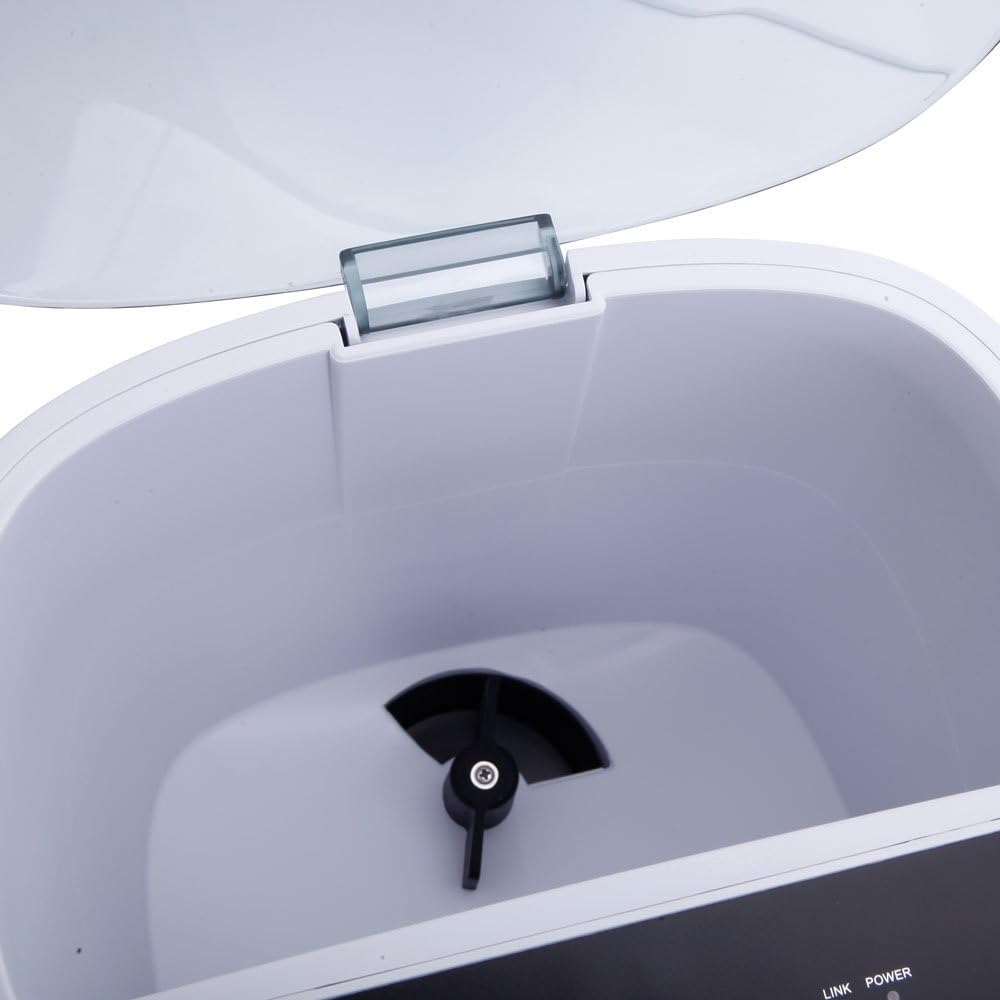
ചിത്രം: ക്ലോസ്-അപ്പ് view of the internal food dispensing mechanism of the PETWANT PF-103 pet feeder, showing the rotating impeller.
4. App Installation and WiFi Connection
The PETWANT PF-103 requires a smartphone application for full functionality, including scheduling and remote monitoring.
- Download the "PETWANT" app from your smartphone's app store (iOS App Store or Google Play Store).
- ഒരു അക്കൗണ്ടിനായി രജിസ്റ്റർ ചെയ്ത് ലോഗിൻ ചെയ്യുക.
- On the feeder's control panel, press and hold the "SET" button for 5 seconds until the Link indicator light starts blinking rapidly. This indicates the feeder is in pairing mode.

ചിത്രം: ക്ലോസ്-അപ്പ് view of the PETWANT PF-103 pet feeder's control panel, showing the 'SET' button and indicator lights for Link, Power, Alarm, and Mic.
- In the PETWANT app, follow the on-screen instructions to add a new device. Select the PF-103 model.
- Enter your Wi-Fi network name (SSID) and password. Ensure your Wi-Fi is 2.4GHz.
- The app will guide you through the connection process. Once connected, the Link indicator light on the feeder will turn solid.
പ്രവർത്തന നിർദ്ദേശങ്ങൾ
1. മാനുവൽ ഫീഡിംഗ്
To dispense food manually, press the "SET" button once on the feeder's control panel. One portion (approximately 24mL) of food will be dispensed immediately.
2. Scheduled Feeding (via App)
The primary method for feeding is through scheduled meals using the PETWANT app.
- Open the PETWANT app and select your PF-103 feeder.
- Navigate to the "Feeding Schedule" or "Meal Plan" section.
- Add a new feeding schedule. You can set up to 4 meals per day.
- For each meal, specify the feeding time and the number of portions (each portion is approximately 24mL).
- Save the schedule. The feeder will automatically dispense food at the set times.
3. വോയ്സ് റെക്കോർഡിംഗ്
You can record a short voice message that will play during scheduled feeding times to call your pet.
- In the PETWANT app, go to the feeder's settings or "Voice Recording" section.
- Press the record button and speak your message (e.g., "Time to eat, [Pet's Name]!").
- Play back the recording to ensure clarity.
- Save the recording. It will automatically play before each scheduled meal.
4. Remote Monitoring (Camera)
The built-in camera allows you to monitor your pet and the feeder remotely.

ചിത്രം: ക്ലോസ്-അപ്പ് view of the integrated camera lens on the front of the PETWANT PF-103 pet feeder, used for remote monitoring.
- Open the PETWANT app and select your feeder.
- The live video feed from the camera will be displayed.
- Use the app's interface to take snapshots, record video, or use the two-way audio function (microphone and speaker).
മെയിൻ്റനൻസ്
ക്ലീനിംഗ് നിർദ്ദേശങ്ങൾ
Regular cleaning ensures hygiene and proper functioning of the feeder.
- പവർ വിച്ഛേദിക്കുക: Always unplug the feeder from the power outlet before cleaning. If using battery backup, remove the batteries.
- Empty Food: Remove any remaining food from the storage container.
- വേർപെടുത്താവുന്ന ഭാഗങ്ങൾ: The feeding bowl is detachable and can be washed with mild soap and water. Rinse thoroughly and dry completely before reattaching.
- പ്രധാന യൂണിറ്റ്: Wipe the exterior of the feeder with a soft, damp തുണി. അബ്രാസീവ് ക്ലീനറുകൾ ഉപയോഗിക്കരുത് അല്ലെങ്കിൽ പ്രധാന യൂണിറ്റ് വെള്ളത്തിൽ മുക്കരുത്.
- ആന്തരിക ഘടകങ്ങൾ: Use a dry brush or cloth to clean any food residue from the internal dispensing mechanism. Ensure no moisture enters the electronic components.
- ഉണക്കൽ: വീണ്ടും കൂട്ടിച്ചേർക്കുന്നതിനും പവർ കണക്റ്റ് ചെയ്യുന്നതിനും മുമ്പ് എല്ലാ ഭാഗങ്ങളും പൂർണ്ണമായും ഉണങ്ങിയെന്ന് ഉറപ്പാക്കുക.
ട്രബിൾഷൂട്ടിംഗ്
| പ്രശ്നം | സാധ്യമായ കാരണം | പരിഹാരം |
|---|---|---|
| ഫീഡർ ഭക്ഷണം വിതരണം ചെയ്യുന്നില്ല. |
|
|
| Cannot connect to Wi-Fi / App. |
|
|
| ക്യാമറ ഫീഡ് മങ്ങിയതോ ഇരുണ്ടതോ ആണ്. |
|
|
| വോയ്സ് റെക്കോർഡിംഗ് പ്ലേ ചെയ്യുന്നില്ല. |
|
|
സ്പെസിഫിക്കേഷനുകൾ
| ഫീച്ചർ | വിശദാംശങ്ങൾ |
|---|---|
| മോഡൽ | PF-103 |
| മെറ്റീരിയൽ | എബിഎസ് (അക്രിലോണിട്രൈൽ ബ്യൂട്ടാഡീൻ സ്റ്റൈറൈൻ) |
| അളവുകൾ (L x W x H) | (9.45 x 7.48 x 14.96) inches / (24 x 19 x 38) cm |
| ഭാരം | 78.03 ഔൺസ് / 2212 ഗ്രാം |
| നിറം | വെള്ള |
| ശേഷി | 4.3 ലിറ്റർ |
| Supported Food Type | Dry & Semi-wet Food |
| Supported Kibble Diameter | 0.8 - 1.5 സെ.മീ |
| പവർ ഇൻപുട്ട് | AC-DC Adapter DC 5V/2A |
| പ്ലഗ് തരം | യുഎസ് സ്റ്റാൻഡേർഡ് |
| ക്യാമറ റെസല്യൂഷൻ | 100W Pixels (HD) |
| ക്യാമറ ആംഗിൾ | 110 Degrees (Ultra Wide Angle) |
| ഫീഡിംഗ് ഷെഡ്യൂൾ | പ്രതിദിനം 4 ഭക്ഷണം വരെ |
| ഭാഗത്തിൻ്റെ വലിപ്പം | Approx. 24mL per portion |
വാറൻ്റിയും പിന്തുണയും
For warranty information, technical support, or service inquiries, please refer to the contact information provided by the retailer or the manufacturer's official webവാറന്റി ക്ലെയിമുകൾക്കുള്ള വാങ്ങലിന്റെ തെളിവായി നിങ്ങളുടെ വാങ്ങൽ രസീത് സൂക്ഷിക്കുക.
Ask a question about this manual
Ask about setup, troubleshooting, compatibility, parts, safety, or missing instructions. Manuals+ will review the question and use this page’s manual context to help answer it.