
1. ആമുഖവും അവസാനവുംview
This manual provides essential information for the safe and effective use of your Walfront 10-60V to 12-97V 1500W 30A DC-DC Step-Up Converter Module. This non-isolated DC power converter is designed for high-power applications, offering stable and efficient voltage conversion with advanced protection features.
പ്രധാന സവിശേഷതകൾ:
- ഉയർന്ന പവർ ഔട്ട്പുട്ട്: Converts 10-60VDC input to a stable 12-97VDC output, supporting up to 1500W.
- ഉയർന്ന പരിവർത്തന കാര്യക്ഷമത: Achieves 92%-97% efficiency, minimizing energy loss.
- ഒന്നിലധികം സംരക്ഷണ പ്രവർത്തനങ്ങൾ: Includes overcurrent protection, short circuit protection, and reverse input protection for enhanced safety.
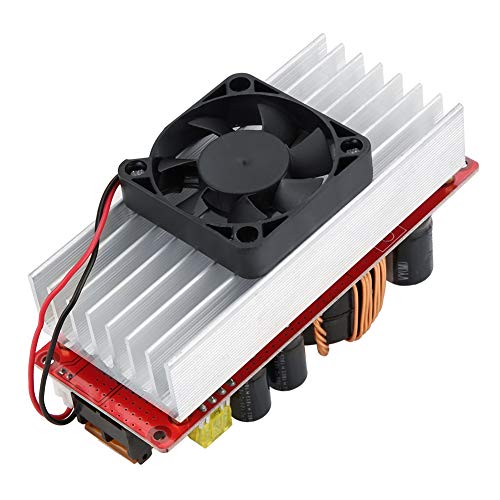
- ബുദ്ധിപരമായ താപനില നിയന്ത്രണം: Features a fan that automatically activates at approximately 60°C and stops below 60°C to maintain optimal operating temperature and extend lifespan.
- വിശാലമായ ആപ്ലിക്കേഷൻ ശ്രേണി: Suitable for solar street light drivers, LED lighting, vehicle power supplies, DIY adjustable power supplies, and battery charging.
2 സുരക്ഷാ വിവരങ്ങൾ
Please read and understand all safety warnings before operating this device. Failure to follow these instructions may result in electric shock, fire, or serious injury.
- വൈദ്യുത അപകടം: This module operates with high voltage and current. Always disconnect power before making any connections or adjustments.
- ശരിയായ വെൻ്റിലേഷൻ: Ensure adequate airflow around the module, especially the heatsink and fan, to prevent overheating.
- ശരിയായ ധ്രുവീകരണം: Always connect input and output with correct polarity. Reverse polarity can damage the module and connected devices.
- ഇൻസുലേഷൻ: Ensure all connections are properly insulated to prevent short circuits.
- പ്രൊഫഷണൽ ഇൻസ്റ്റാളേഷൻ: If you are not familiar with electrical wiring, seek assistance from a qualified professional.
- പരിസ്ഥിതി വ്യവസ്ഥകൾ: Do not expose the module to moisture, extreme temperatures, or corrosive environments.
3. പാക്കേജ് ഉള്ളടക്കം
പാക്കേജ് തുറക്കുമ്പോൾ എല്ലാ ഇനങ്ങളും നിലവിലുണ്ടെന്നും നല്ല നിലയിലാണെന്നും ഉറപ്പാക്കുക.
- 1 x Walfront 10-60V to 12-97V 1500W 30A DC-DC Step-Up Converter Module
- ഉപയോക്തൃ മാനുവൽ (ഈ പ്രമാണം)
4. സജ്ജീകരണ നിർദ്ദേശങ്ങൾ
Follow these steps to set up your DC-DC converter module.
- ഘടകങ്ങൾ തിരിച്ചറിയുക: Familiarize yourself with the input/output terminals, voltage/current adjustment potentiometers, and protection features.

- ഇൻപുട്ട് കണക്ഷൻ: Connect your DC power source (10-60V) to the input terminals labeled 'Input +' and 'Input -' (or 'Input GND'). Ensure correct polarity. Use appropriate gauge wires for the expected current.
- ഔട്ട്പുട്ട് കണക്ഷൻ: Connect your load or device to the output terminals labeled 'Output +' and 'Output -' (or 'Output GND'). Ensure correct polarity.
- Initial Adjustment (Voltagഇ): Before applying power to the load, turn the CV (Constant Voltage) potentiometer (labeled 'CV電圧調整' or 'w204') counter-clockwise to its minimum setting.
- Initial Adjustment (Current): Turn the CC (Constant Current) potentiometer (labeled 'cc定電流制御') counter-clockwise to its minimum setting.
- പവർ ഓൺ: Apply power to the input of the module.
- ഔട്ട്പുട്ട് വോളിയം സജ്ജമാക്കുകtage: Using a multimeter, measure the output voltage. Slowly turn the CV potentiometer clockwise until the desired output voltage (12-97V) is reached.
- Set Output Current (Optional, for constant current applications): If using constant current mode (e.g., for battery charging), connect your load. Then, slowly turn the CC potentiometer clockwise until the desired output current is reached. If not using constant current, this step may be skipped, or the CC can be set to maximum to allow the voltage to regulate freely.
- ഫാൻ കണക്ഷൻ: The module includes a temperature-controlled fan. Connect the fan to the designated fan connector (labeled 'ファン接続'). The fan will operate automatically when the module temperature reaches approximately 60°C.
5. പ്രവർത്തന നിർദ്ദേശങ്ങൾ
Once set up, the module operates automatically. Observe the following guidelines for optimal performance:
- താപനില നിരീക്ഷിക്കുക: The intelligent fan will manage the module's temperature. Ensure the fan is not obstructed.
- ലോഡ് മാനേജ്മെന്റ്: Do not exceed the maximum output power (1500W) or current (30A) to prevent damage.
- വാല്യംtage and Current Stability: The module is designed to provide stable output. If fluctuations occur, check input power stability and load conditions.
6. പരിപാലനം
Regular maintenance helps ensure the longevity and reliable operation of your module.
- വൃത്തിയാക്കൽ: Periodically clean the module, especially the heatsink and fan blades, to remove dust and debris. Use a soft brush or compressed air. Ensure power is disconnected before cleaning.
- കണക്ഷൻ പരിശോധന: Regularly inspect all wiring connections to ensure they are secure and free from corrosion.
- പരിസ്ഥിതി പരിശോധന: പ്രവർത്തന അന്തരീക്ഷം നിശ്ചിത താപനിലയിലും ഈർപ്പത്തിലും പരിധിക്കുള്ളിൽ തുടരുന്നുവെന്ന് ഉറപ്പാക്കുക.
7. പ്രശ്നപരിഹാരം
If you encounter issues with your module, refer to the following common problems and solutions:
| പ്രശ്നം | സാധ്യമായ കാരണം | പരിഹാരം |
|---|---|---|
| ട്ട്പുട്ട് വോളിയം ഇല്ലtage | No input power; Incorrect input polarity; Blown fuse; Output short circuit; Undervoltagഇ സംരക്ഷണം സജീവമാക്കി. | Check input power supply; Verify input wiring polarity; Replace fuse if necessary; Check output for short circuits; Ensure input voltage അണ്ടർവോളിനു മുകളിലാണ്tagഇ സംരക്ഷണ പരിധി. |
| Putട്ട്പുട്ട് വോളിയംtagവളരെ താഴ്ന്നത്/ഉയർന്നതാണ് | CV potentiometer incorrectly set; Input voltagവളരെ താഴ്ന്നത്/ഉയർന്നതാണ്. | Adjust CV potentiometer; Ensure input voltage 10-60V പരിധിയിലാണ്. |
| No output current (in CC mode) | CC potentiometer incorrectly set; Load resistance too high; Overcurrent protection activated. | Adjust CC potentiometer; Check load for open circuit; Reduce load or ensure it's within current limits. |
| മൊഡ്യൂൾ അമിത ചൂടാക്കൽ | Insufficient ventilation; Excessive load; Fan malfunction. | Ensure proper airflow; Reduce load; Check fan operation and clear obstructions. |
8 സാങ്കേതിക സവിശേഷതകൾ
Detailed specifications for the Walfront DC-DC Step-Up Converter Module:
| പരാമീറ്റർ | മൂല്യം |
|---|---|
| ബ്രാൻഡ് | വാൾഫ്രണ്ട് |
| മോഡൽ നമ്പർ | Wal front9sbfz08351 |
| ഇൻപുട്ട് വോളിയംtage | ഡിസി ക്സനുമ്ക്സ-ക്സനുമ്ക്സവ് |
| Putട്ട്പുട്ട് വോളിയംtage | DC 12-97V (Adjustable) |
| ഔട്ട്പുട്ട് പവർ | 1500W (പരമാവധി) |
| ഔട്ട്പുട്ട് കറൻ്റ് | 30A (പരമാവധി) |
| പരിവർത്തന കാര്യക്ഷമത | 92% - 97% |
| പ്രവർത്തന താപനില | -40°C മുതൽ 85°C വരെ |
| സ്വിച്ചിംഗ് ഫ്രീക്വൻസി | 150KHz |
| Module Size (with copper pillars and fan) | 130mm x 52mm x 84mm |
| Module Size (without copper pillars and fan) | 130mm x 52mm x 67mm |
| ഉൽപ്പന്ന ഭാരം | 0.37 കി.ഗ്രാം |
| യു.പി.സി | 750086417451 |
| ASIN | B07RMT9W7D |
| മാതൃരാജ്യം | ചൈന |

9. വാറൻ്റി വിവരങ്ങൾ
Walfront products are manufactured to high-quality standards. This product is covered by a standard manufacturer's warranty against defects in materials and workmanship. The warranty period typically begins from the date of purchase. Please retain your proof of purchase for warranty claims.
ഇനിപ്പറയുന്ന കാരണങ്ങളാൽ ഉണ്ടാകുന്ന നാശനഷ്ടങ്ങൾ വാറൻ്റി കവർ ചെയ്യുന്നില്ല:
- അനുചിതമായ ഇൻസ്റ്റാളേഷൻ അല്ലെങ്കിൽ ഉപയോഗം.
- അനധികൃത പരിഷ്കാരങ്ങൾ അല്ലെങ്കിൽ അറ്റകുറ്റപ്പണികൾ.
- Accidents, abuse, or neglect.
- Operating outside the specified environmental or electrical parameters.
For specific warranty terms and conditions, please refer to the product packaging or contact Walfront customer support.
10. ഉപഭോക്തൃ പിന്തുണ
If you have any questions, require technical assistance, or need to make a warranty claim, please contact Walfront customer support through the following channels:
- ഓൺലൈൻ പിന്തുണ: Visit the official Walfront webപതിവുചോദ്യങ്ങൾ, പിന്തുണാ ഉറവിടങ്ങൾ, കോൺടാക്റ്റ് ഫോമുകൾ എന്നിവയ്ക്കുള്ള സൈറ്റ്.
- ഇമെയിൽ: Refer to your product packaging or the Walfront webഉചിതമായ പിന്തുണാ ഇമെയിൽ വിലാസത്തിനായി സൈറ്റ് സന്ദർശിക്കുക.
- റീട്ടെയിലർ പിന്തുണ: If purchased from a retailer, you may also contact their customer service for assistance.
When contacting support, please have your product model number (Wal front9sbfz08351) and proof of purchase readily available.