
2BOOM BX390
2BOOM BX390 Bass King Wireless Bluetooth Boombox Stereo Speaker User Manual
മോഡൽ: BX390
1. ആമുഖം
വാങ്ങിയതിന് നന്ദി.asing the 2BOOM BX390 Bass King Wireless Bluetooth Boombox Stereo Speaker. This manual provides essential information for setting up, operating, and maintaining your speaker to ensure optimal performance and longevity. Please read this manual thoroughly before using the product.

Image 1.1: The 2BOOM BX390 Bass King Wireless Bluetooth Boombox Stereo Speaker.
This image shows the 2BOOM BX390 Bass King speaker in blue, featuring a cylindrical design with a handle/strap attached. The front panel displays the control interface and speaker grille.
2. പാക്കേജ് ഉള്ളടക്കം
പാക്കേജിൽ ഇനിപ്പറയുന്ന ഇനങ്ങൾ ഉണ്ടോ എന്ന് പരിശോധിക്കുക:
- 1 x 2BOOM BX390 Bass King Speaker
- 1 x 3.5mm ഓക്സ് കേബിൾ
- 1 x USB ചാർജിംഗ് കേബിൾ
- 1 x ഉപയോക്തൃ മാനുവൽ (ഈ പ്രമാണം)
- 1 x Attachable Shoulder Strap

Image 2.1: The 2BOOM BX390 speaker shown with its detachable shoulder strap, 3.5mm Aux cable, and USB charging cable.
This image displays the blue 2BOOM BX390 speaker from an angled perspective, highlighting the included shoulder strap attached to its side rings. The USB charging cable and 3.5mm Aux cable are visible in the foreground.
3. ഉൽപ്പന്ന സവിശേഷതകൾ
- Powerful Bass Sound: Equipped with 4-inch subwoofers and vibrating disks for crisp, clear, loud sound, booming low tones, and dynamic sound effects.
- ബ്ലൂടൂത്ത് കണക്റ്റിവിറ്റി: Connects wirelessly to smartphones, tablets, and other Bluetooth-enabled devices up to 33 ft.
- ബിൽറ്റ്-ഇൻ മൈക്രോഫോൺ: Supports hands-free calls.
- മോടിയുള്ളതും പോർട്ടബിൾ ഡിസൈൻ: Features a rugged, rubberized exterior and an attachable strap for easy carrying.
- ഒന്നിലധികം ഇൻപുട്ട് ഓപ്ഷനുകൾ: Includes FM Radio, Aux-in Line, USB port, and SD Card slot.
- സംയോജിത നിയന്ത്രണ പാനൽ: Direct control over volume, bass, and sound equalizer.

Image 3.1: The 2BOOM BX390 speaker with visual callouts for Deep Digital Bass, FM Radio, Long-Lasting Battery, and Straps Included.
This image shows the blue 2BOOM BX390 speaker from the front, with graphic overlays pointing out its key features: deep digital bass, FM radio capability, long-lasting battery, and the inclusion of straps for portability.
4. നിയന്ത്രണങ്ങളും പോർട്ടുകളും
Familiarize yourself with the control panel and input ports of your BX390 speaker:

Image 4.1: Detailed diagram of the 2BOOM BX390 control panel and input ports.
ഈ ചിത്രം ഒരു ക്ലോസ്-അപ്പ് നൽകുന്നു view of the speaker's front panel, clearly labeling each button, port, and indicator. Labels include USB, DC 5V (charging), AUX, Previous, Play/Pause, Next, Mode, EQ, SD card slot, LED display, Power ON/OFF switch, Volume controls, and Bass controls.
- USB പോർട്ട്: യുഎസ്ബി ഡ്രൈവ് പ്ലേബാക്കിനായി.
- DC 5V (Charging Port): Connect the USB charging cable here to charge the speaker.
- AUX ഇൻപുട്ട്: 3.5mm jack for connecting external audio devices via an Aux cable.
- Previous / Volume -: മുമ്പത്തെ ട്രാക്കിനായി ഹ്രസ്വമായി അമർത്തുക; ശബ്ദം കുറയ്ക്കാൻ ദീർഘനേരം അമർത്തുക.
- പ്ലേ/താൽക്കാലികമായി നിർത്തുക: Press to play or pause audio. In FM mode, short press to auto-scan.
- Next / Volume +: അടുത്ത ട്രാക്കിനായി ചെറുതായി അമർത്തുക; ശബ്ദം കൂട്ടാൻ ദീർഘനേരം അമർത്തുക.
- മോഡ്: Press to switch between Bluetooth, FM Radio, USB, SD Card, and AUX modes.
- EQ (സമനില): Press to cycle through different equalizer presets.
- SD കാർഡ് സ്ലോട്ട്: Insert an SD card for audio playback.
- LED ഡിസ്പ്ലേ: നിലവിലെ മോഡ്, ട്രാക്ക് നമ്പർ അല്ലെങ്കിൽ എഫ്എം ഫ്രീക്വൻസി കാണിക്കുന്നു.
- പവർ ഓൺ/ഓഫ് സ്വിച്ച്: Slide to turn the speaker on or off.
- വോളിയം +/-: മൊത്തത്തിലുള്ള വോളിയം കൂട്ടാനോ കുറയ്ക്കാനോ ഉള്ള ബട്ടണുകൾ.
- ബാസ് +/-: Buttons to increase or decrease the bass level.
5. സജ്ജീകരണം
5.1 സ്പീക്കർ ചാർജ് ചെയ്യുന്നു
Before first use, fully charge the speaker. Connect the supplied USB charging cable to the DC 5V port on the speaker and the other end to a USB power adapter (not included) or a computer's USB port. The LED display may indicate charging status.
- ചാർജിംഗ് സമയം വ്യത്യാസപ്പെടാം.
- Disconnect the charger once fully charged to preserve battery life.
5.2 പവർ ഓൺ/ഓഫ്
To turn the speaker ON, slide the Power ON/OFF switch to the 'ON' position. You will hear an audible prompt, and the LED display will light up.
To turn the speaker ഓഫ്, slide the Power ON/OFF switch to the 'OFF' position.
6. പ്രവർത്തന നിർദ്ദേശങ്ങൾ
6.1 ബ്ലൂടൂത്ത് മോഡ്
The speaker automatically enters Bluetooth pairing mode when powered on if no other input source is connected, or after pressing the മോഡ് button until "Bluetooth" is indicated.
- സ്പീക്കർ ഓണാണെന്ന് ഉറപ്പാക്കുക.
- നിങ്ങളുടെ ബ്ലൂടൂത്ത് പ്രവർത്തനക്ഷമമാക്കിയ ഉപകരണത്തിൽ (സ്മാർട്ട്ഫോൺ, ടാബ്ലെറ്റ് മുതലായവ), ബ്ലൂടൂത്ത് പ്രവർത്തനക്ഷമമാക്കി ലഭ്യമായ ഉപകരണങ്ങൾക്കായി തിരയുക.
- "തിരഞ്ഞെടുക്കുക"2BOOM BX390" or similar from the list.
- Once paired, the speaker will confirm with an audible prompt.
- ഇപ്പോൾ നിങ്ങളുടെ ഉപകരണത്തിൽ നിന്ന് സ്പീക്കറിലൂടെ ഓഡിയോ പ്ലേ ചെയ്യാൻ കഴിയും.
കുറിപ്പ്: The speaker will automatically reconnect to the last paired device if it's within range and Bluetooth is enabled.

Image 6.1: The 2BOOM BX390 speaker highlighting its Bluetooth connectivity.
This image shows the blue 2BOOM BX390 speaker with a prominent "Bluetooth" logo and "PORTABLE WIRELESS BASS KING SPEAKER" text, emphasizing its wireless audio capabilities.
6.2 എഫ്എം റേഡിയോ മോഡ്
To switch to FM Radio mode, press the മോഡ് button until "FM" or the radio frequency is displayed.
- In FM mode, short press the പ്ലേ/താൽക്കാലികമായി നിർത്തുക button to automatically scan and save available FM stations. The speaker will cycle through frequencies and store them.
- ഉപയോഗിക്കുക മുമ്പത്തെ ഒപ്പം അടുത്തത് സംരക്ഷിച്ച സ്റ്റേഷനുകൾക്കിടയിൽ നാവിഗേറ്റ് ചെയ്യാനുള്ള ബട്ടണുകൾ.
- For better reception, extend the antenna (if applicable, or reposition the speaker).
6.3 USB / SD കാർഡ് മോഡ്
The speaker supports audio playback from USB flash drives and SD cards.
- ഇതിലേക്ക് ഒരു USB ഫ്ലാഷ് ഡ്രൈവ് ചേർക്കുക USB പോർട്ട് അല്ലെങ്കിൽ ഒരു SD കാർഡ് SD കാർഡ് സ്ലോട്ട്.
- The speaker will automatically switch to the corresponding mode (USB or SD) and begin playing audio files. ഇല്ലെങ്കിൽ, അമർത്തുക മോഡ് തിരഞ്ഞെടുക്കാനുള്ള ബട്ടൺ.
- ഉപയോഗിക്കുക മുമ്പത്തെ, പ്ലേ/താൽക്കാലികമായി നിർത്തുക, ഒപ്പം അടുത്തത് പ്ലേബാക്ക് നിയന്ത്രിക്കുന്നതിനുള്ള ബട്ടണുകൾ.
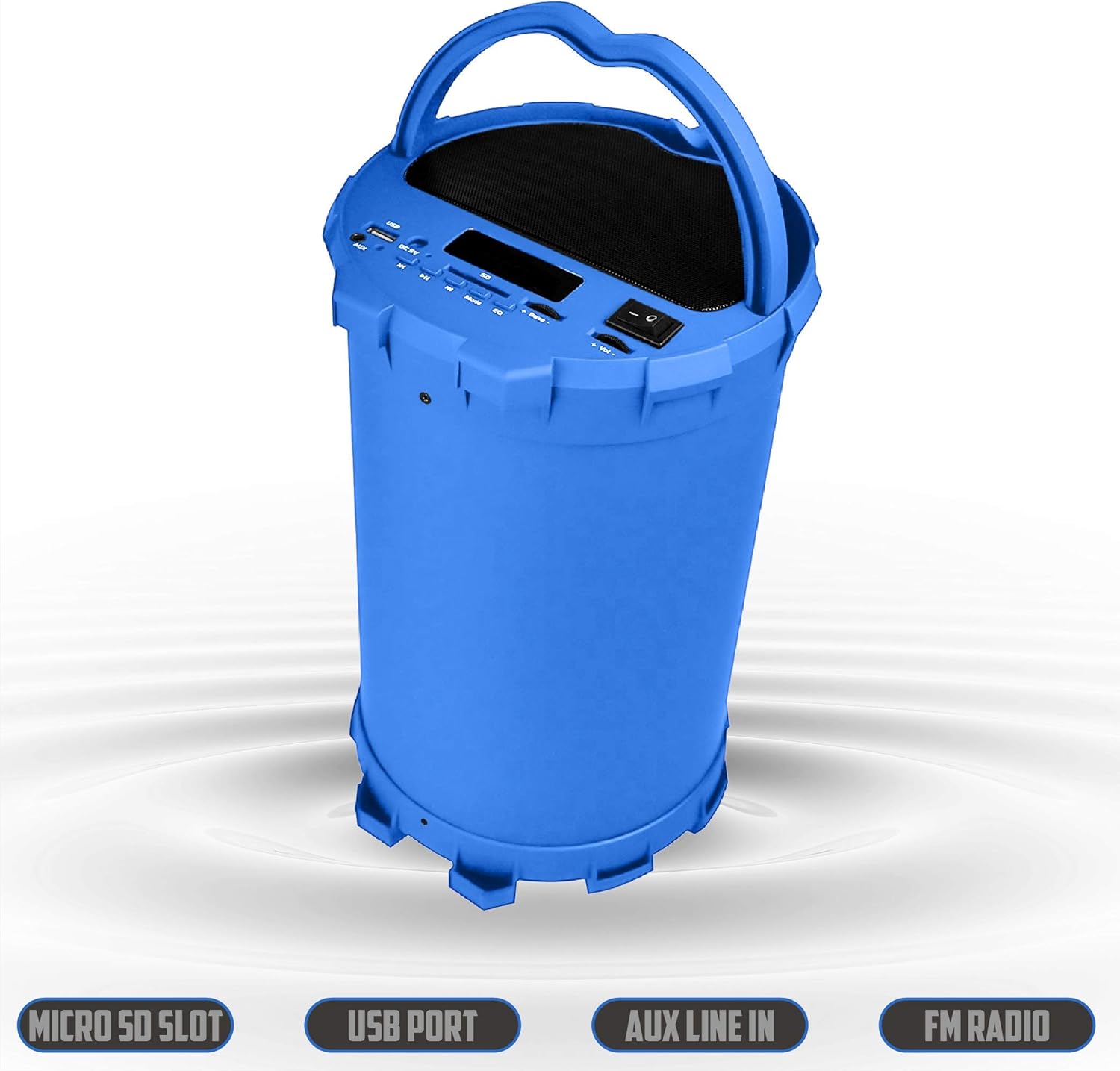
Image 6.2: The 2BOOM BX390 speaker shown upright, emphasizing the Micro SD Slot, USB Port, Aux Line In, and FM Radio capabilities.
This image displays the blue 2BOOM BX390 speaker in an upright position, with graphic overlays highlighting the Micro SD Slot, USB Port, Aux Line In, and FM Radio features on its control panel.
6.4 AUX ഇൻപുട്ട് മോഡ്
Connect external audio devices (e.g., MP3 players, computers) using the supplied 3.5mm Aux cable.
- Connect one end of the 3.5mm Aux cable to the AUX ഇൻപുട്ട് സ്പീക്കറിൽ പോർട്ട്.
- Connect the other end to the audio output jack of your external device.
- സ്പീക്കർ സ്വയമേവ AUX മോഡിലേക്ക് മാറും. ഇല്ലെങ്കിൽ, അമർത്തുക മോഡ് തിരഞ്ഞെടുക്കാനുള്ള ബട്ടൺ.
- നിങ്ങളുടെ ബാഹ്യ ഉപകരണത്തിൽ നിന്ന് പ്ലേബാക്ക് നിയന്ത്രിക്കുക.
6.5 Adjusting Volume, Bass, and Equalizer
- വോളിയം: ഉപയോഗിക്കുക വോളിയം +/- buttons (long press Previous/Next) to increase or decrease the overall volume.
- ബാസ്: ഉപയോഗിക്കുക ബാസ് +/- buttons to adjust the bass level to your preference.
- ഇക്വലൈസർ (EQ): അമർത്തുക EQ button to cycle through various preset equalizer modes (e.g., Pop, Rock, Jazz, Classical, Normal) to optimize sound for different music genres.
7. പരിപാലനം
- വൃത്തിയാക്കൽ: സ്പീക്കറിന്റെ പുറംഭാഗം വൃത്തിയാക്കാൻ മൃദുവായതും ഉണങ്ങിയതുമായ തുണി ഉപയോഗിക്കുക. അബ്രസീവ് ക്ലീനറുകളോ ലായകങ്ങളോ ഉപയോഗിക്കരുത്.
- സംഭരണം: ദീർഘനേരം ഉപയോഗിക്കാത്തപ്പോൾ നേരിട്ടുള്ള സൂര്യപ്രകാശത്തിൽ നിന്നും കടുത്ത താപനിലയിൽ നിന്നും മാറി തണുത്തതും വരണ്ടതുമായ സ്ഥലത്ത് സ്പീക്കർ സൂക്ഷിക്കുക.
- ബാറ്ററി കെയർ: ബാറ്ററി ലൈഫ് വർദ്ധിപ്പിക്കാൻ, ബാറ്ററി ഇടയ്ക്കിടെ പൂർണ്ണമായും ഡിസ്ചാർജ് ചെയ്യുന്നത് ഒഴിവാക്കുക. ഉപയോഗത്തിലില്ലെങ്കിൽ പോലും സ്പീക്കർ പതിവായി ചാർജ് ചെയ്യുക.
- ജല പ്രതിരോധം: ഈ സ്പീക്കർ വാട്ടർപ്രൂഫ് അല്ല. വെള്ളത്തിലോ അമിതമായ ഈർപ്പത്തിലോ സമ്പർക്കം ഒഴിവാക്കുക.
8. പ്രശ്നപരിഹാരം
| പ്രശ്നം | സാധ്യമായ കാരണം | പരിഹാരം |
|---|---|---|
| ശക്തിയില്ല | ബാറ്ററി കുറവാണ് അല്ലെങ്കിൽ തീർന്നു. | Charge the speaker fully using the supplied USB cable. |
| ശബ്ദമില്ല | ശബ്ദം വളരെ കുറവാണ്; തെറ്റായ മോഡ് തിരഞ്ഞെടുത്തു; ഉപകരണം ശരിയായി കണക്റ്റുചെയ്തിട്ടില്ല. | Increase volume on speaker and connected device. Press മോഡ് to select correct input. Reconnect Bluetooth or Aux cable. |
| ബ്ലൂടൂത്ത് ജോടിയാക്കൽ പരാജയപ്പെട്ടു | സ്പീക്കർ ജോടിയാക്കൽ മോഡിലല്ല; ഉപകരണം വളരെ അകലെയാണ്; ഇടപെടൽ. | Ensure speaker is in Bluetooth mode. Move device closer to speaker. Turn off other Bluetooth devices. Forget "2BOOM BX390" on your device and re-pair. |
| മോശം എഫ്എം സ്വീകരണം | Weak signal; speaker position. | Reposition the speaker. Try auto-scanning again. |
| USB/SD കാർഡ് പ്ലേ ചെയ്യുന്നില്ല | പിന്തുണയ്ക്കുന്നില്ല file ഫോർമാറ്റ്; കാർഡ്/ഡ്രൈവ് ശരിയായി ചേർത്തിട്ടില്ല; കേടായി files. | ഉറപ്പാക്കുക files are in a supported format (e.g., MP3). Reinsert the USB drive/SD card. Try a different drive/card. |
9 സ്പെസിഫിക്കേഷനുകൾ
| ഫീച്ചർ | വിശദാംശങ്ങൾ |
|---|---|
| ബ്രാൻഡ് | 2ബൂം |
| മോഡൽ | BX390 Bass King |
| കണക്റ്റിവിറ്റി ടെക്നോളജി | ഓക്സിലറി, ബ്ലൂടൂത്ത്, യുഎസ്ബി |
| സ്പീക്കർ തരം | സ്റ്റീരിയോ |
| അനുയോജ്യമായ ഉപകരണങ്ങൾ | ലാപ്ടോപ്പ്, സ്മാർട്ട്ഫോൺ, ടാബ്ലെറ്റ് |
| സബ് വൂഫറുകൾ | 4-inch (Quantity not specified, but implied by "subwoofers" and "dual subwoofers" in image) |
| ബ്ലൂടൂത്ത് ശ്രേണി | 33 അടി വരെ (10 മീറ്റർ) |
| ഇൻപുട്ട് പോർട്ടുകൾ | USB, SD Card, 3.5mm AUX |
| റേഡിയോ | എഫ്എം റേഡിയോ |
10. വാറൻ്റിയും പിന്തുണയും
The 2BOOM BX390 Bass King speaker comes with an UNLIMITED 2BOOM WARRANTY.
For warranty claims or technical support, please contact 2BOOM customer service. Refer to the product packaging or 2BOOM's official webബന്ധപ്പെടാനുള്ള വിവരങ്ങൾക്കുള്ള സൈറ്റ്.
വാറന്റി ആവശ്യങ്ങൾക്കായി നിങ്ങളുടെ വാങ്ങിയതിന്റെ തെളിവ് സൂക്ഷിക്കുക.
Ask a question about this manual
Ask about setup, troubleshooting, compatibility, parts, safety, or missing instructions. Manuals+ will review the question and use this page’s manual context to help answer it.