
ആമുഖം
Thank you for choosing the Mipro MR-823 Dual Hand Wireless Microphone system. This manual provides detailed instructions for the proper setup, operation, and maintenance of your new wireless microphone system. Please read this manual thoroughly before using the product to ensure optimal performance and longevity.
സുരക്ഷാ വിവരങ്ങൾ
- തീയോ വൈദ്യുതാഘാതമോ തടയാൻ യൂണിറ്റ് മഴയിലോ ഈർപ്പത്തിലോ തുറന്നുകാട്ടരുത്.
- പാത്രങ്ങൾ പോലുള്ള ദ്രാവകങ്ങൾ നിറച്ച വസ്തുക്കൾ യൂണിറ്റിൽ വയ്ക്കരുത്.
- ശരിയായ വായുസഞ്ചാരം ഉറപ്പാക്കുക; ഏതെങ്കിലും വായുസഞ്ചാര ദ്വാരങ്ങൾ തടയരുത്.
- നിർമ്മാതാവ് വ്യക്തമാക്കിയ അറ്റാച്ച്മെൻ്റുകൾ/ആക്സസറികൾ മാത്രം ഉപയോഗിക്കുക.
- യോഗ്യതയുള്ള സേവന ഉദ്യോഗസ്ഥർക്ക് എല്ലാ സേവനങ്ങളും റഫർ ചെയ്യുക. ഉപകരണം ഏതെങ്കിലും വിധത്തിൽ കേടുവരുമ്പോൾ സർവീസ് ആവശ്യമാണ്.
പാക്കേജ് ഉള്ളടക്കം
എല്ലാ ഇനങ്ങളും ഉണ്ടെന്ന് ഉറപ്പാക്കാൻ നിങ്ങളുടെ പാക്കേജിന്റെ ഉള്ളടക്കങ്ങൾ പരിശോധിക്കുക:
- 1 x Mipro MR-823 Wireless Receiver Unit
- 2 x Handheld Wireless Microphones
- പവർ അഡാപ്റ്റർ
- ഓഡിയോ കേബിൾ
ഉൽപ്പന്നം കഴിഞ്ഞുview
The Mipro MR-823 system consists of a receiver unit and two handheld wireless microphones, designed for clear and reliable audio transmission.
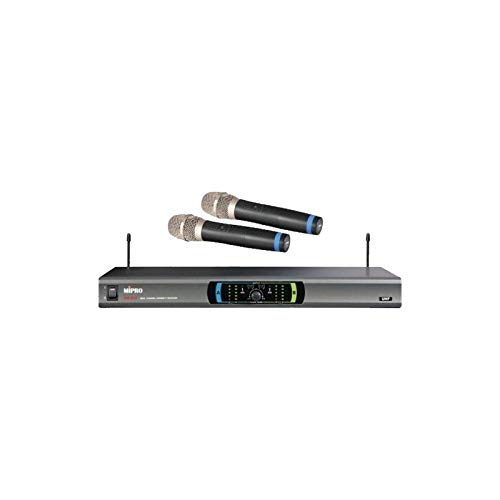
This image displays the complete Mipro MR-823 Dual Hand Wireless Microphone system. It features a sleek, rectangular receiver unit with a control panel and two antennas, accompanied by two black handheld wireless microphones. The microphones have silver grilles and blue accents near the base of the grille.
Receiver Unit Features:
- Front panel display for channel and status indication.
- Volume controls for each microphone channel.
- Antenna inputs for optimal signal reception.
- Audio output jacks (XLR and 1/4" unbalanced) on the rear panel.
Handheld Microphone Features:
- Integrated transmitter.
- വൈദ്യുതി സ്വിച്ച്.
- ബാറ്ററി കമ്പാർട്ട്മെൻ്റ്.
സജ്ജമാക്കുക
- ഘടകങ്ങൾ അൺപാക്ക് ചെയ്യുക: പാക്കേജിംഗിൽ നിന്ന് എല്ലാ ഇനങ്ങളും ശ്രദ്ധാപൂർവ്വം നീക്കം ചെയ്യുക.
- സ്ഥാനം സ്വീകരിക്കുന്നയാൾ: Place the receiver unit on a stable, flat surface, away from potential sources of interference (e.g., computers, Wi-Fi routers). Ensure adequate ventilation around the unit.
- ആന്റിനകൾ ബന്ധിപ്പിക്കുക: Screw the two antennas securely into their respective connectors on the rear of the receiver. Position them vertically for best reception.
- ഓഡിയോ put ട്ട്പുട്ട് കണക്റ്റുചെയ്യുക: Connect the receiver's audio output (XLR or 1/4" unbalanced) to your mixer, amplifier, or sound system using the provided audio cable.
- പവർ ബന്ധിപ്പിക്കുക: Plug the power adapter into the DC input on the receiver and then into a suitable power outlet. Do not power on the unit yet.
- Install Microphone Batteries: Open the battery compartment of each handheld microphone and insert fresh batteries, observing the correct polarity.
- പവർ ഓൺ: Turn on your audio system first, then power on the Mipro MR-823 receiver. Finally, turn on each handheld microphone.
പ്രവർത്തന നിർദ്ദേശങ്ങൾ
ചാനൽ സമന്വയം:
The MR-823 system typically features automatic frequency synchronization. Once the receiver and microphones are powered on, they should automatically link to an available clear channel. Refer to the receiver's display for channel information.
വോളിയം ക്രമീകരിക്കുന്നു:
Use the individual volume control knobs on the front panel of the receiver to adjust the output level of each microphone. Start with a low volume and gradually increase it to avoid feedback or distortion.
മൈക്രോഫോൺ ഉപയോഗം:
- ഒപ്റ്റിമൽ ശബ്ദ പിക്കപ്പിനായി മൈക്രോഫോൺ നിങ്ങളുടെ വായിൽ നിന്ന് ഏകദേശം 2-6 ഇഞ്ച് അകലെ പിടിക്കുക.
- Avoid covering the microphone grille with your hand, as this can affect sound quality and signal strength.
- Ensure a clear line of sight between the microphones and the receiver for best wireless performance.
മെയിൻ്റനൻസ്
- വൃത്തിയാക്കൽ: Use a soft, dry cloth to clean the exterior of the receiver and microphones. Do not use liquid cleaners or abrasive chemicals.
- ബാറ്ററി മാറ്റിസ്ഥാപിക്കൽ: Replace microphone batteries when the low battery indicator appears or when audio quality degrades. Always use fresh, high-quality batteries.
- സംഭരണം: When not in use for extended periods, remove batteries from the microphones and store the system in a cool, dry place, away from direct sunlight and extreme temperatures.
- ആന്റിന കെയർ: Handle antennas carefully to avoid bending or breaking.
ട്രബിൾഷൂട്ടിംഗ്
| പ്രശ്നം | സാധ്യമായ കാരണം | പരിഹാരം |
|---|---|---|
| മൈക്രോഫോണിൽ നിന്ന് ശബ്ദമില്ല | Microphone not powered on; Low or dead batteries; Receiver not powered on; Volume too low; Microphone out of range; Frequency mismatch. | Ensure microphone and receiver are on; Replace batteries; Check receiver power; Increase volume; Move closer to receiver; Re-sync frequencies if necessary. |
| മോശം ശബ്ദ നിലവാരം / സ്റ്റാറ്റിക് | Interference; Low batteries; Microphone too far from receiver; Obstructions; Incorrect gain settings. | Change operating frequency (if available); Replace batteries; Reduce distance; Remove obstructions; Adjust receiver volume. |
| ഫീഡ്ബാക്ക് (ഓലിക്കുന്ന ശബ്ദം) | Microphone too close to speakers; Volume too high; Room acoustics. | Move microphone away from speakers; Lower volume; Adjust speaker placement or use acoustic treatment. |
| ചെറിയ വയർലെസ് ശ്രേണി | Obstructions; Interference; Antenna position. | Ensure clear line of sight; Re-position antennas; Avoid placing receiver near metal objects or other wireless devices. |
സ്പെസിഫിക്കേഷനുകൾ
| ഫീച്ചർ | സ്പെസിഫിക്കേഷൻ |
|---|---|
| ബ്രാൻഡ് | മിപ്രോ |
| മോഡൽ | MR-823 |
| പ്രതിരോധം | 250 ഓം |
| പവർ ഉറവിടം | ബാറ്ററി പവർ |
| സിഗ്നൽ-ടു-നോയിസ് അനുപാതം | 78 ഡി.ബി |
| ഫ്രീക്വൻസി റേഞ്ച് | 100 ഹെർട്സ് - 10 കിലോ ഹെർട്സ് |
| ഫ്രീക്വൻസി പ്രതികരണം | 16 KHz |
| പാക്കേജ് അളവുകൾ | 34.01 x 24.99 x 21.01 സെ.മീ |
| ഇനത്തിൻ്റെ ഭാരം | 122 ഗ്രാം |
| ബാറ്ററികൾ ആവശ്യമാണ് | No (for receiver, but yes for microphones) |
| പ്രത്യേക ഫീച്ചർ | വയർലെസ് |
| നിറം | കറുപ്പ് |
| പോളാർ പാറ്റേൺ | ഓമ്നിഡയറക്ഷണൽ |
വാറൻ്റിയും പിന്തുണയും
For warranty information and technical support, please refer to the warranty card included with your product or visit the official MIPRO webസൈറ്റ്. ഏതെങ്കിലും വാറന്റി ക്ലെയിമുകൾക്ക് വാങ്ങിയതിന്റെ തെളിവായി നിങ്ങളുടെ വാങ്ങൽ രസീത് സൂക്ഷിക്കുക.
If you encounter issues not covered in this manual, please contact MIPRO customer service or your authorized dealer for assistance.