
ആമുഖം
This manual provides detailed instructions for the safe and efficient use of your Maxcom MM426 Dual SIM Mobile Phone. Designed for simplicity and ease of use, this GSM mobile phone features a 1.8-inch color display, Dual SIM capability, Bluetooth connectivity, and an essential SOS function for emergencies. Please read this manual thoroughly before operating your device.
പാക്കേജ് ഉള്ളടക്കം
നിങ്ങളുടെ ഉൽപ്പന്ന പാക്കേജിൽ ഇനിപ്പറയുന്ന എല്ലാ ഇനങ്ങളും ഉണ്ടെന്ന് ഉറപ്പാക്കുക:
- Maxcom MM426 Mobile Phone
- ബാറ്ററി (ലിഥിയം-അയൺ)
- ചാർജർ
- USB കേബിൾ
- ചാർജ്ജിംഗ് തൊട്ടിൽ
- ഉപയോക്തൃ മാനുവൽ
- വാറൻ്റി കാർഡ്
ഫോൺ ഓവർview
Familiarize yourself with the key components of your Maxcom MM426 mobile phone.
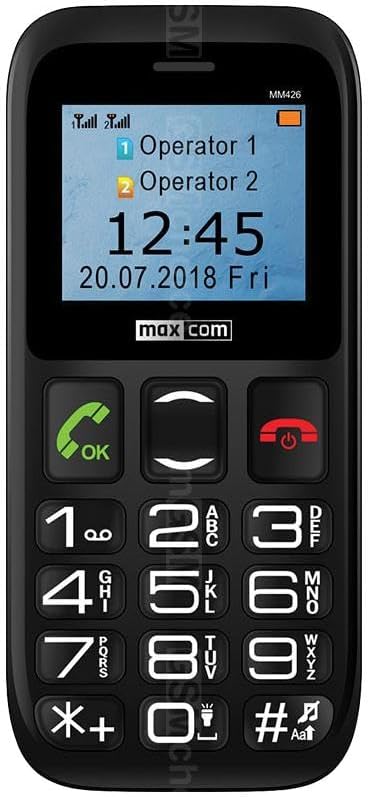
ചിത്രം: ഫ്രണ്ട് view of the Maxcom MM426 mobile phone, showing its 1.8-inch color display and large, easy-to-read keypad with clearly marked buttons for calls, navigation, and numbers.
- ഡിസ്പ്ലേ: 1.8-inch color LCD screen for clear visibility of menus, contacts, and messages.
- കീപാഡ്: എളുപ്പത്തിൽ ഡയൽ ചെയ്യുന്നതിനും നാവിഗേഷനുമായി വലിയ, സ്പർശിക്കുന്ന ബട്ടണുകൾ.
- Call/End Buttons: Dedicated buttons for initiating and ending calls.
- നാവിഗേഷൻ കീകൾ: For moving through menus and options.
- SOS ബട്ടൺ: Located on the back for emergency calls (see Special Features section).
- 3.5 എംഎം ഹെഡ്ഫോൺ ജാക്ക്: ഹെഡ്ഫോണുകൾ ബന്ധിപ്പിക്കുന്നതിന്.
സജ്ജമാക്കുക
1. ബാറ്ററി ഇൻസ്റ്റാളേഷൻ
- ഫോണിന്റെ പിൻ കവർ ശ്രദ്ധാപൂർവ്വം നീക്കം ചെയ്യുക.
- Insert the Lithium-ion battery into the battery compartment, ensuring the gold contacts align with the phone's terminals.
- സുരക്ഷിതമായി സ്ഥലത്ത് ക്ലിക്ക് ചെയ്യുന്നതുവരെ പിൻ കവർ മാറ്റിസ്ഥാപിക്കുക.
2. SIM Card Installation (Dual SIM)
The Maxcom MM426 supports two SIM cards, allowing you to manage two different numbers simultaneously.
- With the battery removed, locate the SIM card slots.
- Insert your SIM cards into the designated slots (SIM1 and SIM2) with the gold contacts facing down and the cut corner aligned as shown in the diagram (refer to the physical manual for diagram).
- Ensure the SIM cards are fully seated.
3. മൈക്രോ എസ്ഡി കാർഡ് ഇൻസ്റ്റാളേഷൻ (ഓപ്ഷണൽ)
To expand storage for photos, music, or other files, you can install a MicroSD card (up to 32 GB, sold separately).
- Locate the MicroSD card slot, usually near the SIM card slots.
- Insert the MicroSD card into the slot until it clicks into place.
4. ഫോൺ ചാർജ് ചെയ്യുന്നു
Before first use, fully charge the phone's battery. Charging takes approximately 3 hours.
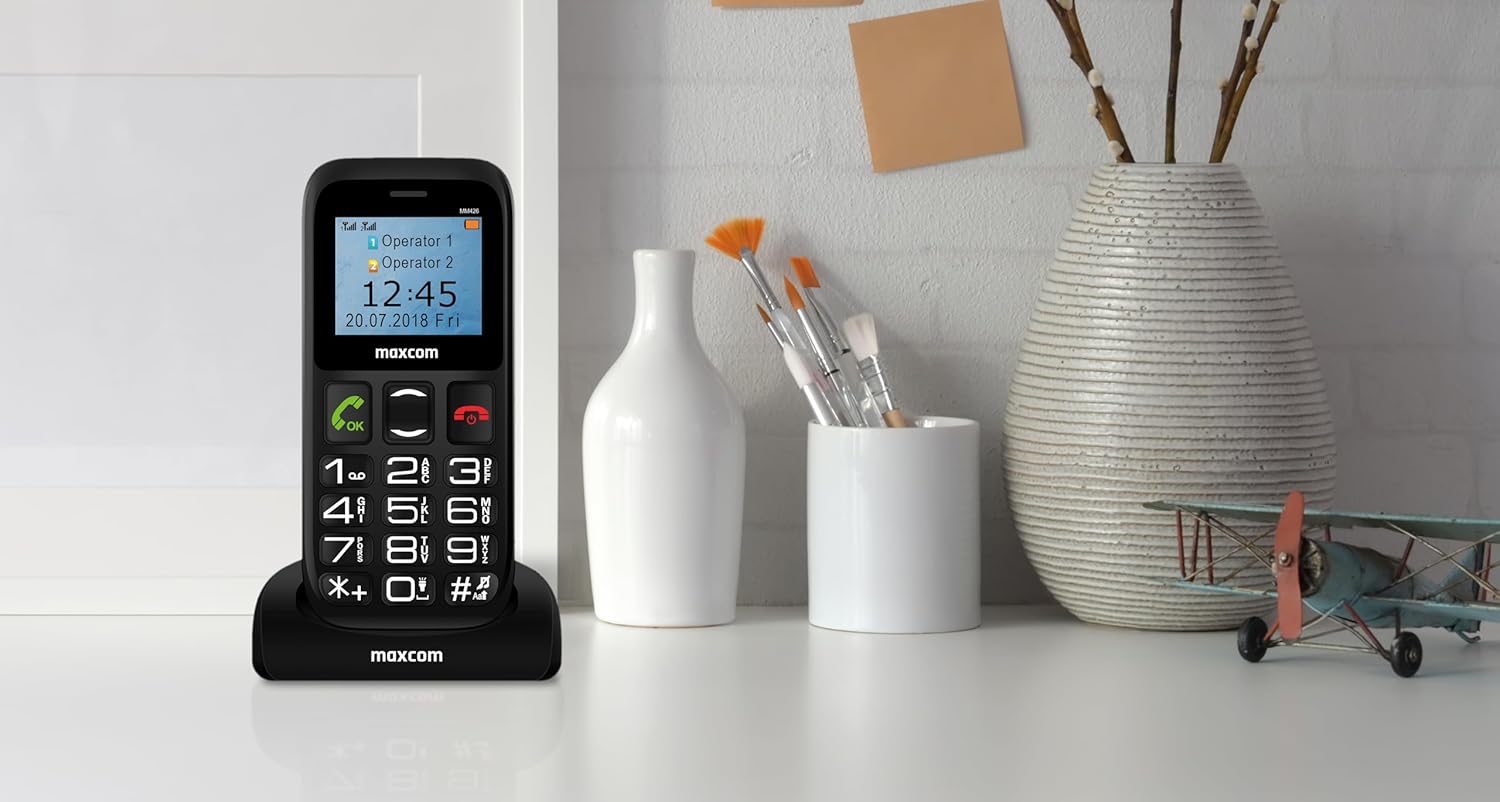
ചിത്രം: The Maxcom MM426 mobile phone placed in its dedicated charging cradle, ready for charging. The phone's screen displays network and time information.
- Connect the USB cable to the charger and plug the charger into a power outlet.
- Place the phone into the charging cradle, ensuring it is properly seated. The charging indicator on the phone's screen should activate.
- Alternatively, you can connect the USB cable directly to the phone's charging port.
- പൂർണ്ണമായി ചാർജ് ചെയ്തുകഴിഞ്ഞാൽ, ചാർജർ വിച്ഛേദിക്കുക.
അടിസ്ഥാന പ്രവർത്തനം
1. പവർ ഓൺ/ഓഫ്
- പവർ ഓണാക്കാൻ: അമർത്തിപ്പിടിക്കുക കോൾ/പവർ അവസാനിപ്പിക്കുക button (red button) until the screen lights up.
- പവർ ഓഫ് ചെയ്യാൻ: അമർത്തിപ്പിടിക്കുക കോൾ/പവർ അവസാനിപ്പിക്കുക button until the power-off options appear, then select "Power off".
2. കോളുകൾ ചെയ്യുന്നു
- കീപാഡ് ഉപയോഗിച്ച് ഫോൺ നമ്പർ നൽകുക.
- അമർത്തുക വിളിക്കൂ കോൾ ആരംഭിക്കാൻ ബട്ടൺ (പച്ച ബട്ടൺ).
- കോൾ അവസാനിപ്പിക്കാൻ, അമർത്തുക കോൾ അവസാനിപ്പിക്കുക ബട്ടൺ.
- To call from contacts, navigate to the "Contacts" menu, select a contact, and press the വിളിക്കൂ ബട്ടൺ.
3. കോളുകൾ സ്വീകരിക്കുന്നു
- When a call comes in, the phone will ring and display the caller's information.
- അമർത്തുക വിളിക്കൂ button (green button) to answer.
- അമർത്തുക കോൾ അവസാനിപ്പിക്കുക button (red button) to reject or end the call.
4. SMS സന്ദേശങ്ങൾ അയയ്ക്കുന്നു
- Go to the "Messages" menu.
- "സന്ദേശം എഴുതുക" അല്ലെങ്കിൽ "പുതിയ SMS" തിരഞ്ഞെടുക്കുക.
- Enter your message using the keypad. Press the # key to switch input modes (e.g., ABC, abc, 123).
- സ്വീകർത്താവിന്റെ ഫോൺ നമ്പർ നൽകുക അല്ലെങ്കിൽ കോൺടാക്റ്റുകളിൽ നിന്ന് തിരഞ്ഞെടുക്കുക.
- "അയയ്ക്കുക" തിരഞ്ഞെടുക്കുക.
5. വോളിയം ക്രമീകരിക്കുന്നു
During a call or when navigating menus, use the dedicated volume keys (if present) or the navigation keys to adjust the volume. You can also adjust ringtone and media volumes in the "Settings" menu.
പ്രത്യേക സവിശേഷതകൾ
1. SOS പ്രവർത്തനം
The SOS button provides a quick way to contact pre-set emergency numbers in critical situations.

ചിത്രം: പിൻഭാഗം view of the Maxcom MM426 mobile phone, highlighting the prominent orange SOS button designed for quick access in emergencies.
- SOS നമ്പറുകൾ സജ്ജീകരിക്കുന്നു: പോകുക Settings > SOS Settings to add up to five emergency contact numbers.
- Using the SOS Function: അടിയന്തര സാഹചര്യത്തിൽ, അമർത്തിപ്പിടിക്കുക SOS ബട്ടൺ on the back of the phone for a few seconds. The phone will automatically call and send an emergency SMS to the pre-set numbers in sequence until one is answered.
2. ബ്ലൂടൂത്ത് കണക്റ്റിവിറ്റി
Connect your phone to other Bluetooth-enabled devices like headsets or car kits.
- പോകുക ക്രമീകരണങ്ങൾ > ബ്ലൂടൂത്ത്.
- ബ്ലൂടൂത്ത് ഓണാക്കുക On.
- "തിരഞ്ഞെടുക്കുക"ഇതിനായി തിരയുക devices" or "Pair new device".
- ലിസ്റ്റിൽ നിന്ന് നിങ്ങൾക്ക് ആവശ്യമുള്ള ഉപകരണം തിരഞ്ഞെടുത്ത് ജോടിയാക്കാൻ ഓൺ-സ്ക്രീൻ നിർദ്ദേശങ്ങൾ പാലിക്കുക.
3. എഫ്എം റേഡിയോ
Enjoy listening to your favorite radio stations.
- Plug in a 3.5mm headset (acts as an antenna).
- Go to the "FM Radio" application from the main menu.
- സ്റ്റേഷനുകൾക്കായി സ്കാൻ ചെയ്യുന്നതിനോ സ്വമേധയാ ട്യൂൺ ചെയ്യുന്നതിനോ നാവിഗേഷൻ കീകൾ ഉപയോഗിക്കുക.
4. MP3 പ്ലെയർ
MP3 ഓഡിയോ പ്ലേ ചെയ്യുക files stored on your MicroSD card.
- Ensure an MicroSD card with MP3 files ചേർത്തിരിക്കുന്നു.
- Go to the "Music" or "MP3 Player" application from the main menu.
- നിങ്ങൾക്ക് ആവശ്യമുള്ള ഓഡിയോ ബ്രൗസ് ചെയ്ത് തിരഞ്ഞെടുക്കുക. fileകളിക്കാൻ എസ്.
മെയിൻ്റനൻസ്
1. നിങ്ങളുടെ ഫോൺ വൃത്തിയാക്കൽ
- Use a soft, dry cloth to wipe the phone's surface.
- Avoid using liquid cleaners, aerosols, or harsh chemicals, as these can damage the device.
- The phone is not water-resistant; keep it away from liquids.
2. ബാറ്ററി പരിചരണം
- അങ്ങേയറ്റത്തെ താപനിലയിലേക്ക് ബാറ്ററി തുറന്നുകാട്ടരുത്.
- Use only the original charger and battery provided with the phone.
- ഫോൺ കൂടുതൽ നേരം ഉപയോഗിക്കാൻ കഴിയുന്നില്ലെങ്കിൽ, സൂക്ഷിക്കുന്നതിന് മുമ്പ് ബാറ്ററി ഏകദേശം 50% ചാർജ് ചെയ്യുക.
ട്രബിൾഷൂട്ടിംഗ്
If you encounter problems with your phone, refer to the following common issues and solutions:
| പ്രശ്നം | സാധ്യമായ പരിഹാരം |
|---|---|
| ഫോൺ പവർ ഓൺ ആകുന്നില്ല. | ബാറ്ററി ശരിയായി ഇൻസ്റ്റാൾ ചെയ്തിട്ടുണ്ടെന്നും പൂർണ്ണമായും ചാർജ് ചെയ്തിട്ടുണ്ടെന്നും ഉറപ്പാക്കുക. കുറഞ്ഞത് 30 മിനിറ്റെങ്കിലും ഫോൺ ചാർജ് ചെയ്യാൻ ശ്രമിക്കുക. |
| കോളുകൾ വിളിക്കാനോ സ്വീകരിക്കാനോ കഴിയില്ല. | Check if SIM cards are properly inserted. Ensure you have network signal. Contact your mobile operator if the issue persists. |
| നെറ്റ്വർക്ക് സിഗ്നൽ ഇല്ല. | Move to an open area. Check network settings in the phone menu. Restart the phone. |
| ബാറ്ററി പെട്ടെന്ന് തീരുന്നു. | Reduce screen brightness. Close unused applications. Limit background data usage (if applicable). Ensure the battery is not old or damaged. |
| വിളിക്കുന്നയാൾക്ക് കേൾക്കാൻ കഴിയുന്നില്ല / വിളിക്കുന്നയാൾക്ക് ഞാൻ പറയുന്നത് കേൾക്കാൻ കഴിയുന്നില്ല. | Check volume settings. Ensure microphone and speaker are not blocked. Test with another call. |
If these solutions do not resolve your issue, please contact Maxcom customer support.
സ്പെസിഫിക്കേഷനുകൾ
| മോഡൽ | MM426 |
| ബ്രാൻഡ് | മാക്സ്കോം |
| അളവുകൾ | 12 x 0.8 x 0.8 സെ.മീ |
| ഭാരം | 72 ഗ്രാം |
| പ്രദർശിപ്പിക്കുക | 1.8-ഇഞ്ച് എൽസിഡി, 240 x 320 റെസല്യൂഷൻ |
| റാം | 4 MB |
| സിപിയു മോഡൽ | കോർട്ടക്സ് |
| സെല്ലുലാർ ടെക്നോളജി | 2G (GSM) |
| സിം കാർഡ് സ്ലോട്ടുകൾ | ഡ്യുവൽ സിം |
| കണക്റ്റിവിറ്റി | ബ്ലൂടൂത്ത് |
| വികസിപ്പിക്കാവുന്ന മെമ്മറി | 32 ജിബി വരെ മൈക്രോ എസ്ഡി |
| ബാറ്ററി തരം | ലിഥിയം-അയൺ |
| ബാറ്ററി ശേഷി | 600 mAh |
| സംസാര സമയം | 3 മണിക്കൂർ വരെ |
| ചാർജിംഗ് സമയം | ഏകദേശം 3 മണിക്കൂർ |
| ക്യാമറ | 3 എംപി (പിൻവശം) |
| പ്രത്യേക സവിശേഷതകൾ | SOS button, FM Radio, MP3 Player, Keypad input |
| ജല പ്രതിരോധം | വാട്ടർ റെസിസ്റ്റൻ്റ് അല്ല |
വാറൻ്റിയും പിന്തുണയും
Your Maxcom MM426 mobile phone comes with a warranty. Please refer to the included Warranty Card for details on coverage and terms. For technical assistance, troubleshooting beyond this manual, or warranty claims, please contact Maxcom customer support. Keep your purchase receipt and warranty card handy.
You can find more information and support on the official Maxcom webസൈറ്റ് അല്ലെങ്കിൽ സന്ദർശിക്കുക വഴി Maxcom Store on Amazon.