
1. ആമുഖം
വാങ്ങിയതിന് നന്ദി.asinLUPO ഡിജിറ്റൽ പോക്കറ്റ് സ്കെയിൽ. 0.01 ഗ്രാം ഗ്രാജുവേഷനോടുകൂടിയ 200 ഗ്രാം വരെയുള്ള ചെറിയ ഇനങ്ങളുടെ കൃത്യമായ തൂക്കത്തിനായാണ് ഈ കൃത്യതയുള്ള ഉപകരണം രൂപകൽപ്പന ചെയ്തിരിക്കുന്നത്. ഇതിന്റെ ഒതുക്കമുള്ളതും പോർട്ടബിൾ രൂപകൽപ്പനയും ആഭരണങ്ങൾ, ഭക്ഷ്യവസ്തുക്കൾ, ഔഷധസസ്യങ്ങൾ, മറ്റ് ചെറിയ വസ്തുക്കൾ എന്നിവ തൂക്കുന്നത് ഉൾപ്പെടെയുള്ള വിവിധ ആപ്ലിക്കേഷനുകൾക്ക് അനുയോജ്യമാക്കുന്നു. നിങ്ങളുടെ സ്കെയിലിന്റെ ശരിയായ പ്രവർത്തനവും ദീർഘായുസ്സും ഉറപ്പാക്കാൻ ദയവായി ഈ മാനുവൽ ശ്രദ്ധാപൂർവ്വം വായിക്കുക.
പ്രധാന സവിശേഷതകൾ:
- പരമാവധി ശേഷി: 200 ഗ്രാം
- ബിരുദം: 0.01 ഗ്രാം
- ഒന്നിലധികം തൂക്ക യൂണിറ്റുകൾ: g, gn, oz, ozt, ct, tl, dwt
- ഈടുനിൽക്കുന്ന സ്റ്റെയിൻലെസ് സ്റ്റീൽ പ്ലാറ്റ്ഫോം
- ബാക്ക്ലിറ്റ് എൽസിഡി ഡിസ്പ്ലേ
- ടെയർ ഫംഗ്ഷൻ
- ഓട്ടോമാറ്റിക് ഷട്ട്-ഓഫ്
- കുറഞ്ഞ ബാറ്ററി സൂചകം
- ഓവർലോഡ് സംരക്ഷണം
2. പാക്കേജ് ഉള്ളടക്കം
- 1 x LUPO 200 ഗ്രാം ഡിജിറ്റൽ പോക്കറ്റ് സ്കെയിൽ
- 2 x AAA ബാറ്ററികൾ
- 1 x ഉപയോക്തൃ മാനുവൽ
3. സജ്ജീകരണം
3.1 ബാറ്ററി ഇൻസ്റ്റാളേഷൻ
സ്കെയിലിന് 2 AAA ബാറ്ററികൾ ആവശ്യമാണ് (ഉൾപ്പെടുത്തിയിരിക്കുന്നു). ബാറ്ററികൾ ഇൻസ്റ്റാൾ ചെയ്യുന്നതിനോ മാറ്റിസ്ഥാപിക്കുന്നതിനോ:
- സ്കെയിലിന്റെ അടിഭാഗത്ത് സ്ഥിതിചെയ്യുന്ന ബാറ്ററി കമ്പാർട്ട്മെന്റ് കവർ തുറക്കുക.
- ശരിയായ പോളാരിറ്റി (+/-) ഉറപ്പാക്കിക്കൊണ്ട് 2 AAA ബാറ്ററികൾ ഇടുക.
- ബാറ്ററി കമ്പാർട്ട്മെൻ്റ് കവർ സുരക്ഷിതമായി അടയ്ക്കുക.
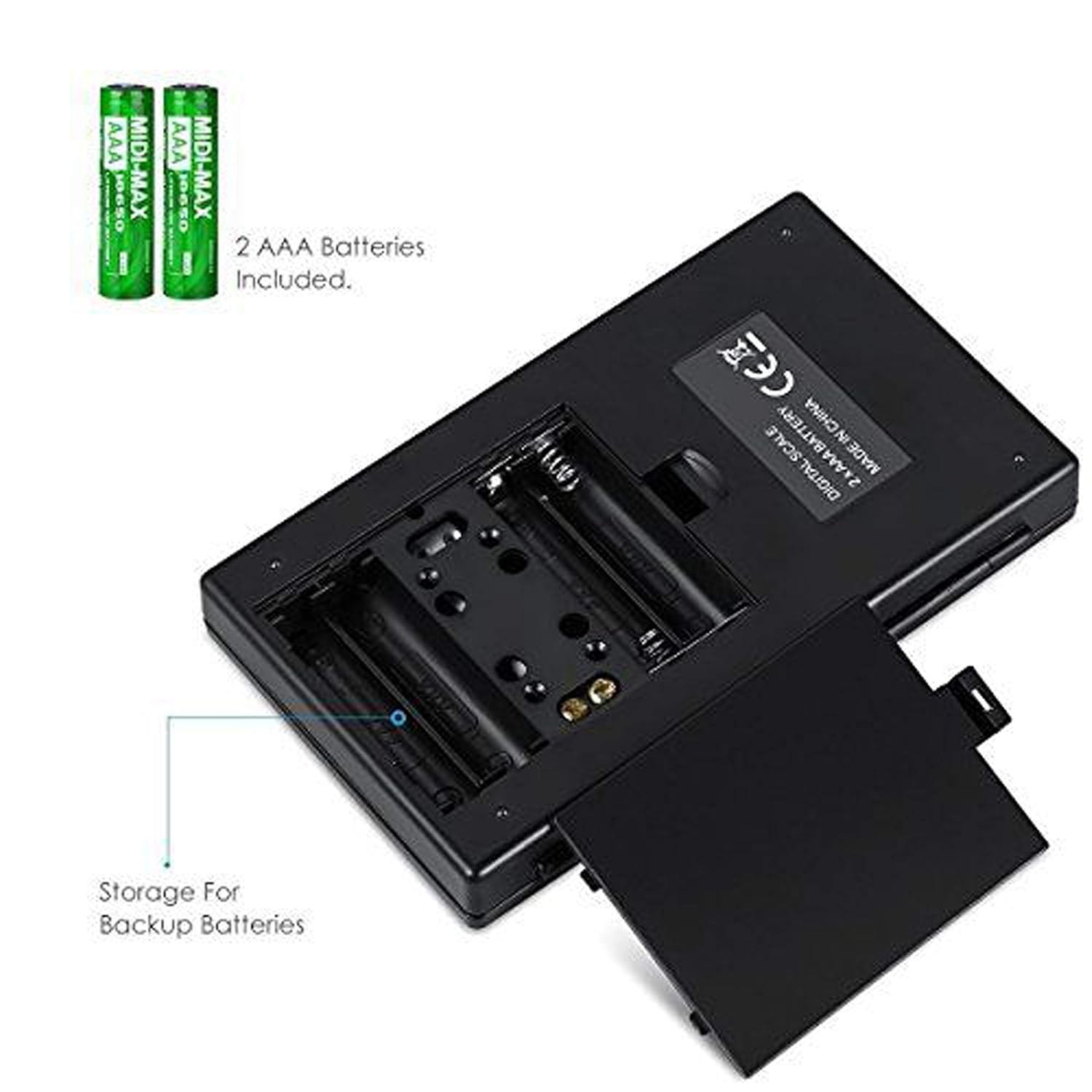
ചിത്രം 3.1: AAA ബാറ്ററികളുള്ള ബാറ്ററി കമ്പാർട്ട്മെന്റ്.
3.2 പ്രാരംഭ പ്ലേസ്മെന്റ്
കൃത്യമായ റീഡിംഗുകൾക്കായി, സ്കെയിൽ കട്ടിയുള്ളതും പരന്നതും സ്ഥിരതയുള്ളതുമായ ഒരു തിരശ്ചീന പ്രതലത്തിൽ സ്ഥാപിക്കുക. മൃദുവായതോ അസമമായതോ ആയ പ്രതലങ്ങളിലോ വൈബ്രേഷൻ അല്ലെങ്കിൽ വൈദ്യുതകാന്തിക ഇടപെടൽ സ്രോതസ്സുകൾക്ക് സമീപമോ സ്ഥാപിക്കുന്നത് ഒഴിവാക്കുക.
4. ഓപ്പറേഷൻ
4.1 അടിസ്ഥാന തൂക്കം
- അമർത്തുക ഓൺ/ഓഫ് സ്കെയിൽ ഓണാക്കാനുള്ള ബട്ടൺ.
- വെയ്റ്റിംഗ് പ്ലാറ്റ്ഫോമിൽ ഏതെങ്കിലും ഇനങ്ങൾ വയ്ക്കുന്നതിന് മുമ്പ് ഡിസ്പ്ലേ "0.00" (അല്ലെങ്കിൽ "0") കാണിക്കുന്നത് വരെ കാത്തിരിക്കുക.
- നിങ്ങൾ തൂക്കാൻ ആഗ്രഹിക്കുന്ന ഇനം(ങ്ങൾ) സ്റ്റെയിൻലെസ് സ്റ്റീൽ വെയ്റ്റിംഗ് പ്ലാറ്റ്ഫോമിന്റെ മധ്യഭാഗത്ത് സൌമ്യമായി വയ്ക്കുക.
- ഭാരം എൽസിഡി സ്ക്രീനിൽ പ്രദർശിപ്പിക്കും.

ചിത്രം 4.1: അടിസ്ഥാന തൂക്കത്തിനുള്ള ദ്രുത ആരംഭ ഗൈഡ്.
4.2 യൂണിറ്റ് പരിവർത്തനം
സ്കെയിൽ ഒന്നിലധികം തൂക്ക യൂണിറ്റുകളെ പിന്തുണയ്ക്കുന്നു. യൂണിറ്റ് മാറ്റാൻ:
- സ്കെയിൽ ഓണാക്കി "0.00" പ്രദർശിപ്പിക്കുമ്പോൾ, അമർത്തുക മോഡ് ബട്ടൺ ആവർത്തിച്ച്.
- ഡിസ്പ്ലേ ലഭ്യമായ യൂണിറ്റുകളിലൂടെ കടന്നുപോകും: ഗ്രാം (g), ധാന്യങ്ങൾ (gn), ഔൺസ് (oz), ട്രോയ് ഔൺസ് (ozt), കാരറ്റ് (ct), പെന്നിവെയ്റ്റ്സ് (dwt).
- അമർത്തുന്നത് നിർത്തുക മോഡ് നിങ്ങളുടെ ആവശ്യമുള്ള യൂണിറ്റ് പ്രദർശിപ്പിക്കുമ്പോൾ.
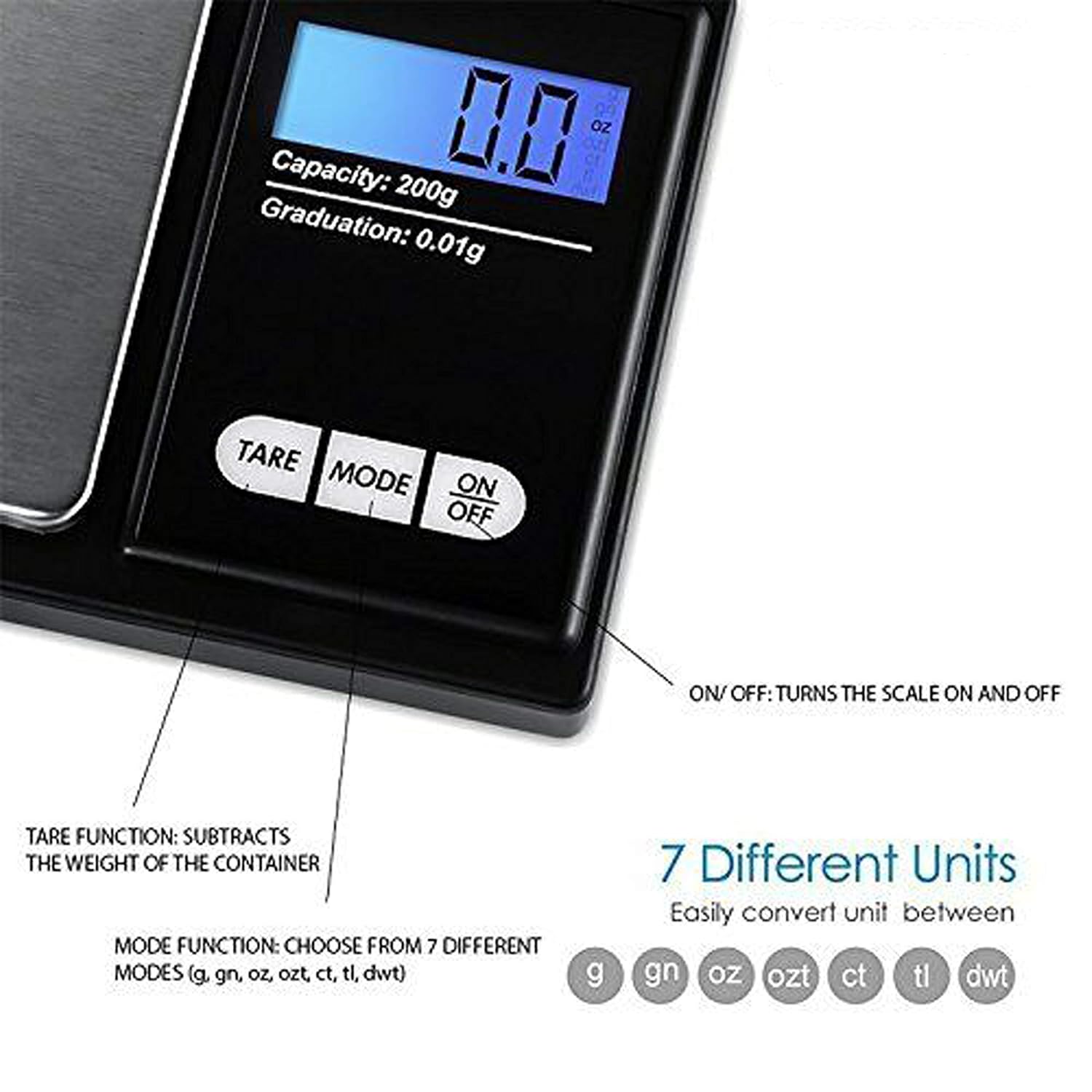
ചിത്രം 4.2: ലഭ്യമായ വെയ്റ്റിംഗ് യൂണിറ്റുകളും ബട്ടൺ ഫംഗ്ഷനുകളും.
4.3 ടാരെ ഫംഗ്ഷൻ
ഒരു കണ്ടെയ്നറിന്റെ ഭാരം കുറയ്ക്കാൻ ടെയർ ഫംഗ്ഷൻ നിങ്ങളെ അനുവദിക്കുന്നു, അതിനാൽ നിങ്ങൾ അതിലെ ഉള്ളടക്കത്തിന്റെ മൊത്തം ഭാരം മാത്രമേ അളക്കുന്നുള്ളൂ.
- വെയ്സിംഗ് പ്ലാറ്റ്ഫോമിൽ ഒരു ഒഴിഞ്ഞ പാത്രം വയ്ക്കുക.
- അമർത്തുക TARE ബട്ടൺ. ഡിസ്പ്ലേ "0.00" ആയി പുനഃസജ്ജമാക്കും.
- ഇനി, നിങ്ങൾ തൂക്കാൻ ആഗ്രഹിക്കുന്ന ഇനം(ങ്ങൾ) കണ്ടെയ്നറിൽ വയ്ക്കുക. ഡിസ്പ്ലേ ഇനത്തിന്റെ(ങ്ങളുടെ) ഭാരം മാത്രമേ കാണിക്കൂ.
5. കാലിബ്രേഷൻ
കാലിബ്രേഷൻ നിങ്ങളുടെ സ്കെയിലിന്റെ കൃത്യത ഉറപ്പാക്കുന്നു. ഇടയ്ക്കിടെ അല്ലെങ്കിൽ പൊരുത്തക്കേടുള്ള വായനകൾ ശ്രദ്ധയിൽപ്പെട്ടാൽ സ്കെയിൽ കാലിബ്രേറ്റ് ചെയ്യാൻ ശുപാർശ ചെയ്യുന്നു. 200 ഗ്രാം കാലിബ്രേഷൻ ഭാരം ആവശ്യമാണ് (ഉൾപ്പെടുത്തിയിട്ടില്ല).
- അമർത്തി സ്കെയിൽ ഓണാക്കുക ഓൺ/ഓഫ് ബട്ടൺ.
- ഡിസ്പ്ലേ "0.00" കാണിക്കുന്നത് വരെ കാത്തിരിക്കുക.
- അമർത്തിപ്പിടിക്കുക മോഡ് ഡിസ്പ്ലേയിൽ "CAL" കാണിക്കുന്നത് വരെ ബട്ടൺ അമർത്തിപ്പിടിക്കുക, തുടർന്ന് ബട്ടൺ വിടുക.
- അമർത്തുക മോഡ് വീണ്ടും ബട്ടൺ അമർത്തുക. ഡിസ്പ്ലേ "CAL" കാണിക്കും, തുടർന്ന് ആവശ്യമായ കാലിബ്രേഷൻ ഭാരം (ഉദാ. "200.00g") കാണിക്കും.
- വെയ്റ്റിംഗ് പ്ലാറ്റ്ഫോമിന്റെ മധ്യഭാഗത്ത് കൃത്യമായ 200 ഗ്രാം കാലിബ്രേഷൻ ഭാരം വയ്ക്കുക.
- ഡിസ്പ്ലേ "PASS" കാണിക്കുകയും തുടർന്ന് സാധാരണ വെയ്റ്റിംഗ് മോഡിലേക്ക് മടങ്ങുകയും ചെയ്യും.
- കാലിബ്രേഷൻ ഭാരം നീക്കം ചെയ്യുക. കാലിബ്രേഷൻ പൂർത്തിയായി.
കുറിപ്പ്: നിങ്ങളുടെ കൈവശം 200 ഗ്രാം കാലിബ്രേഷൻ ഭാരം ഇല്ലെങ്കിൽ, കൃത്യമായ കാലിബ്രേഷനായി നിങ്ങൾ പ്രത്യേകം ഒന്ന് വാങ്ങേണ്ടി വന്നേക്കാം.
6. പരിപാലനം
6.1 വൃത്തിയാക്കൽ
ചെറുതായി ഡി ഉപയോഗിച്ച് സ്കെയിൽ തുടയ്ക്കുകamp തുണി. സ്കെയിൽ വെള്ളത്തിൽ മുക്കുകയോ അബ്രാസീവ് ക്ലീനറുകൾ ഉപയോഗിക്കുകയോ ചെയ്യരുത്. വെയ്റ്റിംഗ് പ്ലാറ്റ്ഫോം വൃത്തിയുള്ളതും അവശിഷ്ടങ്ങൾ ഇല്ലാത്തതുമായി സൂക്ഷിക്കുക.
6.2 സംഭരണം
വൃത്തിയുള്ളതും വരണ്ടതുമായ അന്തരീക്ഷത്തിൽ സ്കെയിൽ സൂക്ഷിക്കുക. സ്കെയിൽ കൂടുതൽ നേരം ഉപയോഗിക്കുന്നില്ലെങ്കിൽ, ചോർച്ച തടയാൻ ബാറ്ററികൾ നീക്കം ചെയ്യാൻ ശുപാർശ ചെയ്യുന്നു.
7. പ്രശ്നപരിഹാരം
നിങ്ങളുടെ സ്കെയിലിൽ പ്രശ്നങ്ങൾ നേരിടുകയാണെങ്കിൽ, ഇനിപ്പറയുന്ന കാര്യങ്ങൾ പരിഗണിക്കുക:
- കൃത്യമല്ലാത്ത വായനകൾ:
- സ്കെയിൽ സ്ഥിരതയുള്ളതും നിരപ്പുള്ളതുമായ പ്രതലത്തിലാണെന്ന് ഉറപ്പാക്കുക.
- ശക്തമായ റേഡിയോ ഫ്രീക്വൻസി ഇടപെടലിന് സമീപം സ്കെയിൽ വയ്ക്കുന്നത് ഒഴിവാക്കുക.
- ഉയർന്ന ആർദ്രത, വായുപ്രവാഹം (ഉദാ: ഫാനുകൾ, തുറന്ന ജനാലകൾ), തീവ്രമായ താപനില എന്നിവയിൽ നിന്ന് സ്കെയിൽ അകറ്റി നിർത്തുക.
- തൂക്കുമ്പോൾ വൈബ്രേഷൻ കുറയ്ക്കുക.
- ഒരു കാലിബ്രേഷൻ നടത്തുക (വിഭാഗം 5 കാണുക).
- "ലോ" അല്ലെങ്കിൽ "ലോ ബാറ്ററി" ഡിസ്പ്ലേ: AAA ബാറ്ററികൾ മാറ്റിസ്ഥാപിക്കുക.
- "O-Ld" അല്ലെങ്കിൽ "Overload" ഡിസ്പ്ലേ: പ്ലാറ്റ്ഫോമിലുള്ള ഇനം പരമാവധി ശേഷിയായ 200 ഗ്രാം കവിയുന്നു. സ്കെയിലിന് കേടുപാടുകൾ സംഭവിക്കാതിരിക്കാൻ ഉടൻ തന്നെ അത് നീക്കം ചെയ്യുക.
- സ്കെയിൽ ഓണാക്കുന്നില്ല: ബാറ്ററി ഇൻസ്റ്റാളേഷൻ പരിശോധിച്ച് ബാറ്ററികൾ തീർന്നിട്ടില്ലെന്ന് ഉറപ്പാക്കുക.

ചിത്രം 7.1: ഓവർലോഡ്, ലോ ബാറ്ററി സൂചകങ്ങൾ.
8 സ്പെസിഫിക്കേഷനുകൾ
| ഫീച്ചർ | വിശദാംശങ്ങൾ |
|---|---|
| ബ്രാൻഡ് | ലുപോ |
| മോഡൽ നമ്പർ | BHT2018376_200 ഗ്രാം_പോക്ക് |
| ശേഷി | 0.05 ഗ്രാം മുതൽ 200 ഗ്രാം വരെ |
| ബിരുദം | 0.01 ഗ്രാം |
| വെയ്റ്റിംഗ് യൂണിറ്റുകൾ | ജി, ജിഎൻ, ഓസ്, ഓസ്, സിടി, ടിഎൽ, ഡിഡബ്ല്യുടി |
| ഡിസ്പ്ലേ തരം | ബാക്ക്ലൈറ്റിനൊപ്പം എൽസിഡി |
| പവർ ഉറവിടം | 2 x AAA ബാറ്ററികൾ (ഉൾപ്പെട്ടിരിക്കുന്നു) |
| മെറ്റീരിയൽ | പ്ലാസ്റ്റിക്, സ്റ്റെയിൻലെസ് സ്റ്റീൽ പ്ലാറ്റ്ഫോം |
| അളവുകൾ (ഏകദേശം) | 14.8 x 9 x 2.4 സെ.മീ (പാക്കേജ്); 5.0 x 3.0 x 0.8 ഇഞ്ച് (സ്കെയിൽ) |
| ഭാരം (ഏകദേശം) | 140 ഗ്രാം (പാക്കേജ്) |
| പ്രത്യേക സവിശേഷതകൾ | ബാക്ക്ലിറ്റ് ഡിസ്പ്ലേ, ഓട്ടോ-ഓഫ്, ടെയർ ഫംഗ്ഷൻ, ഭാരം കുറഞ്ഞത്, പോർട്ടബിൾ |
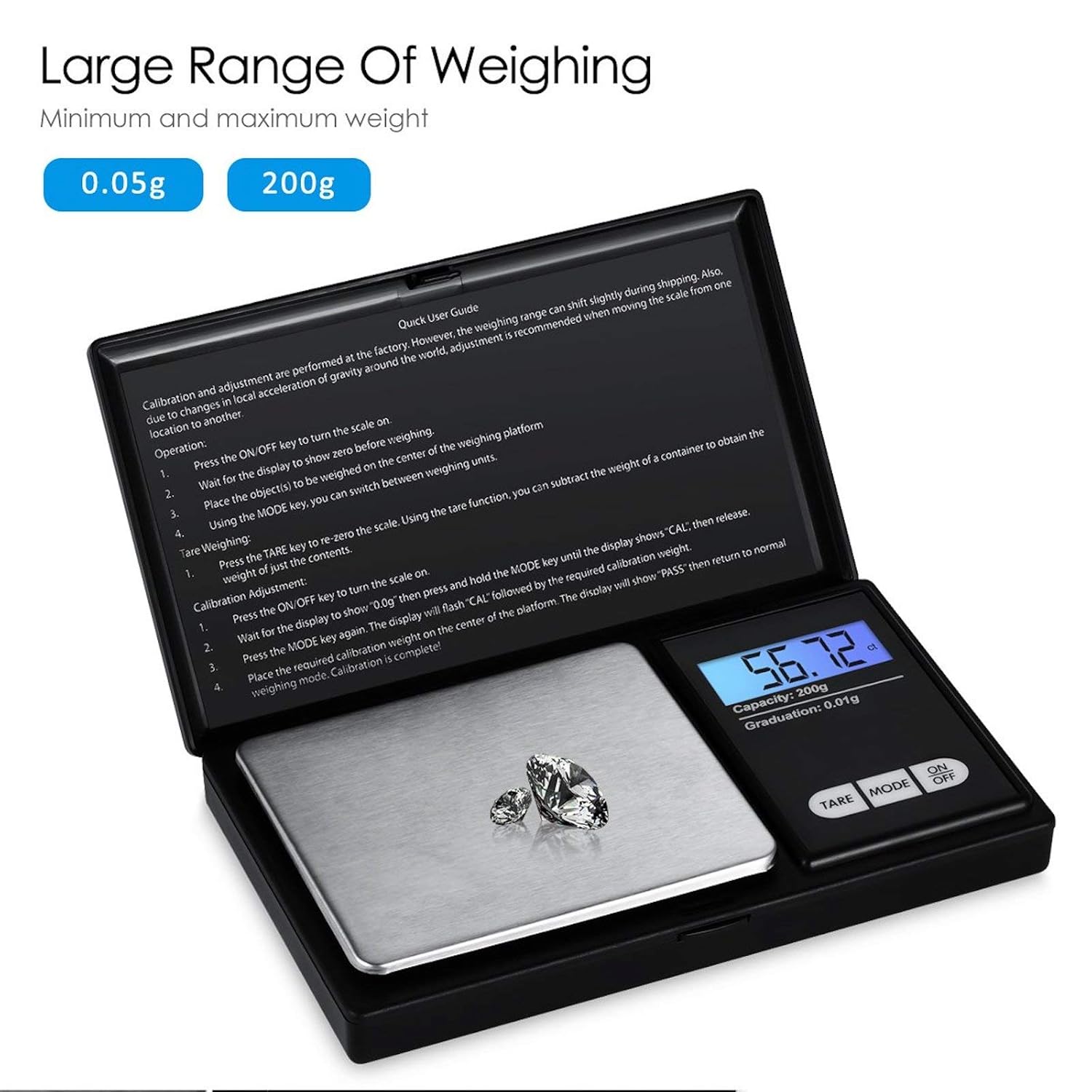
ചിത്രം 8.1: സ്കെയിലിന്റെ തൂക്ക പരിധി.
9. വാറൻ്റിയും പിന്തുണയും
നൽകിയിരിക്കുന്ന വിശദാംശങ്ങളിൽ ഈ ഉൽപ്പന്നത്തിനായുള്ള വാറന്റി വിവരങ്ങൾ വ്യക്തമായി വ്യക്തമാക്കിയിട്ടില്ല. ഏതെങ്കിലും പിന്തുണാ അന്വേഷണങ്ങൾക്കോ വാറന്റി ക്ലെയിമുകൾക്കോ, ദയവായി റീട്ടെയിലറെയോ നിർമ്മാതാവിനെയോ നേരിട്ട് ബന്ധപ്പെടുക.