
ഉൽപ്പന്നം കഴിഞ്ഞുview
The LeeKooLuu Wireless Backup Camera System provides enhanced rear visibility for various vehicles, including trucks, cars, mini-RVs, and campers. It features a 1080P HD waterproof camera and a 5-inch monitor, utilizing stable digital wireless signals for clear and interference-free viewing. The system supports two camera channels, allowing for expansion with an additional camera (sold separately) for versatile viewing options such as hitch view, വശം view, അല്ലെങ്കിൽ ഫ്രണ്ട് view.
പ്രധാന സവിശേഷതകളിൽ ഇവ ഉൾപ്പെടുന്നു:
- Easy and time-saving installation with minimal wiring.
- Stable digital wireless signal for interference-free operation up to 36 feet.
- Support for two camera channels (second camera sold separately).
- DIY grid lines setting for adjustable width, height, and position.
- 1080P HD picture quality with upgraded night vision sensor.
- IP69 waterproof camera for reliable performance in various weather conditions.

Figure 1: LeeKooLuu Wireless Backup Camera System components including the 5-inch monitor and the license plate camera.
പാക്കേജ് ഉള്ളടക്കം
താഴെ ലിസ്റ്റ് ചെയ്തിരിക്കുന്ന എല്ലാ ഇനങ്ങളും നിങ്ങളുടെ പാക്കേജിൽ ഉൾപ്പെടുത്തിയിട്ടുണ്ടെന്ന് ഉറപ്പാക്കുക:
- 5 ഇഞ്ച് മോണിറ്റർ
- Wireless Camera (License Plate Mount)
- Monitor Bracket (Suction Mount)
- സിഗരറ്റ് ലൈറ്റർ പവർ അഡാപ്റ്റർ
- DC Test Wires
- Power Cord for Camera
- T-Taps (Wire Connectors)
- Antenna for Camera

Figure 2: Visual representation of the complete package contents.
സജ്ജീകരണവും ഇൻസ്റ്റാളേഷനും
The LeeKooLuu Wireless Backup Camera System is designed for quick and easy installation. Follow these steps for proper setup:
- Power the Monitor: Connect the monitor to a power source. This can be done by plugging the monitor's power cable into your vehicle's cigarette lighter outlet. Alternatively, it can be wired directly to the Fuse box, ACC, Radio, or Ignition switch for a more permanent installation.
- ക്യാമറ ബന്ധിപ്പിക്കുക: The camera requires a continuous power source for constant monitoring or can be connected to the backup light for reversing use only.
- For continuous use (driving): Connect the camera's power wire to a continuous power source such as the tail light, running light, or license plate light.
- For reversing use only: Connect the camera's power wire to the vehicle's backup light circuit.
- ക്യാമറ ഘടിപ്പിക്കുക: The camera is designed for license plate mounting. Securely attach it to the rear of your vehicle. Ensure the antenna is positioned for optimal signal reception.
- മോണിറ്റർ മൌണ്ട് ചെയ്യുക: Use the included suction mount to fix the monitor on your dashboard or windshield. The monitor can be easily detached from its mount for storage or adjustment.
- Turn on the Monitor: Once powered, turn on the monitor. The system should automatically pair and display the camera feed.
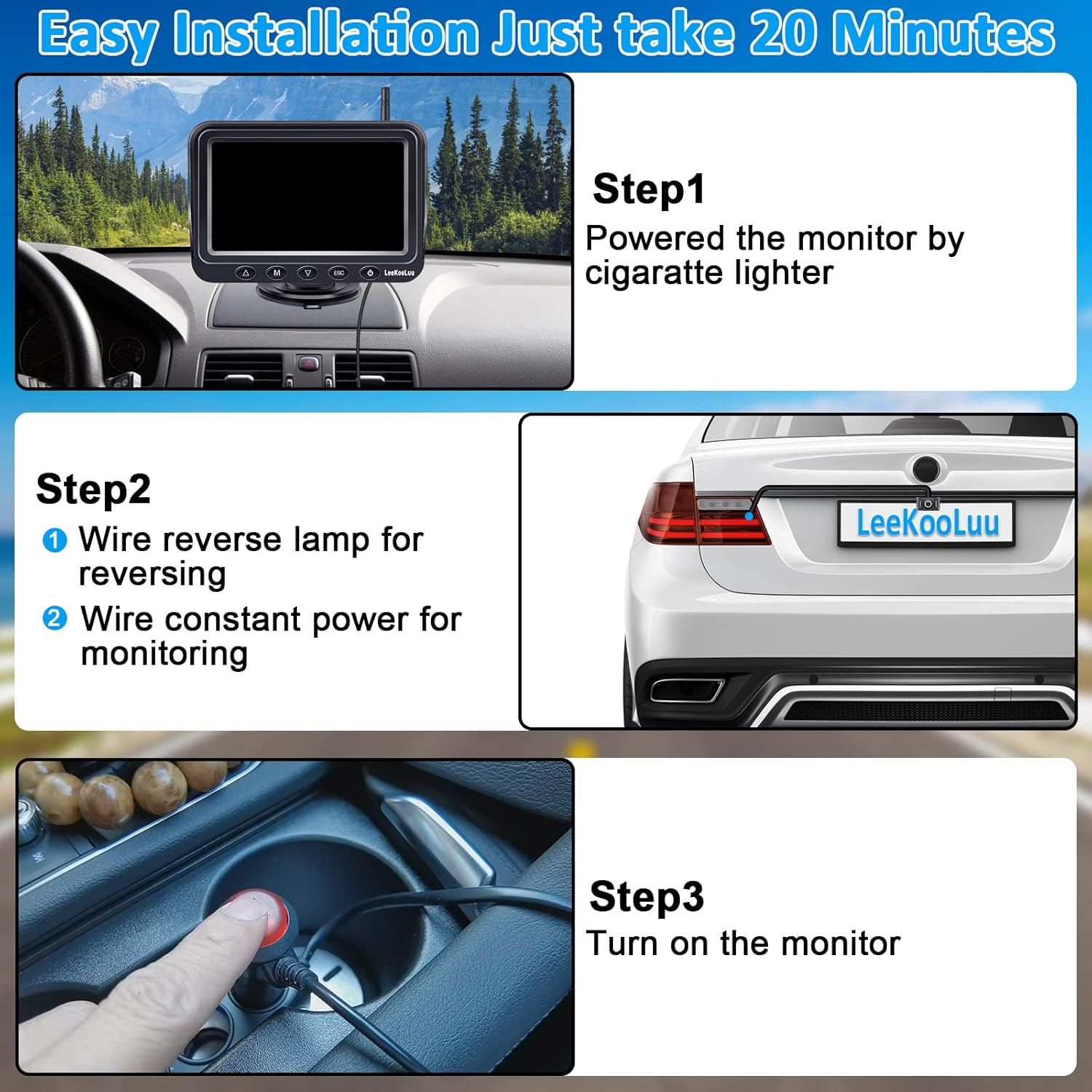
Figure 3: Simplified installation steps for the backup camera system.

Figure 4: Detailed wiring diagram for the camera and monitor connections.
പ്രവർത്തന നിർദ്ദേശങ്ങൾ
The 5-inch monitor provides a clear 1080P HD picture and offers various display modes and settings for optimal use.
ഡിസ്പ്ലേ മോഡുകൾ നിരീക്ഷിക്കുക
The monitor supports both single-screen and split-screen views, especially useful if a second camera is connected.

Figure 5: Monitor display options: single camera view സ്പ്ലിറ്റ്-സ്ക്രീനും view for two cameras.
DIY Guide Lines Setting
The system allows for customization of the parking guide lines to suit your vehicle and preferences. You can:
- Turn guide lines on or off.
- ഗൈഡ് ലൈനുകളുടെ വീതി ക്രമീകരിക്കുക.
- Adjust the height of the guide lines.
- Move the guide lines left/right/up/down.

Figure 6: Customization options for parking guide lines.
നൈറ്റ് വിഷൻ
The camera is equipped with an upgraded sensor for enhanced night vision, providing clear images even in low-light conditions.

Figure 7: Demonstration of 1080P HD and clear night vision capabilities.
മെയിൻ്റനൻസ്
Proper maintenance ensures the longevity and optimal performance of your LeeKooLuu backup camera system.
വാട്ടർപ്രൂഫ് റേറ്റിംഗ്
The camera boasts an IP69 waterproof rating, meaning it is highly resistant to dust and water ingress. This allows for reliable operation in various weather conditions, including rain and car washes.

Figure 8: The camera's IP69 waterproof design ensures durability.
ജനറൽ കെയർ
- ക്യാമറ ലെൻസ് പതിവായി മൃദുവായ, ഡി-ടച്ച് ഉപയോഗിച്ച് വൃത്തിയാക്കുക.amp cloth to ensure clear visibility.
- Check all cable connections periodically to ensure they remain secure and free from corrosion.
- Avoid exposing the monitor to extreme temperatures for prolonged periods.
ട്രബിൾഷൂട്ടിംഗ്
If you encounter issues with your LeeKooLuu Wireless Backup Camera System, refer to the following common problems and solutions:
| പ്രശ്നം | സാധ്യമായ കാരണം | പരിഹാരം |
|---|---|---|
| No image on monitor / Blank screen |
|
|
| Image is fuzzy or intermittent |
|
|
| Delay in camera activation (e.g., 3 seconds) |
|
|
| Monitor stops functioning when hot |
|
|
സ്പെസിഫിക്കേഷനുകൾ
| ഫീച്ചർ | വിശദാംശങ്ങൾ |
|---|---|
| ഉൽപ്പന്ന അളവുകൾ | 9 x 5.6 x 6.8 ഇഞ്ച് |
| ഇനത്തിൻ്റെ ഭാരം | 1.1 പൗണ്ട് |
| ഇനം മോഡൽ നമ്പർ | BC-128 (F09) |
| ഡിസ്പ്ലേ ടെക്നോളജി | എൽസിഡി |
| സ്ക്രീൻ വലിപ്പം | 5 ഇഞ്ച് |
| നിറം | കറുപ്പ് |
| വാട്ടർപ്രൂഫ് റേറ്റിംഗ് | IP69 |
| Digital Wireless Signal Range | Up to 36 feet (RV Camera 40ft, License Plate Camera 33ft) |
| വീഡിയോ ക്യാപ്ചർ റെസല്യൂഷൻ | 1080p |
| ലക്സ് റേറ്റിംഗ് | 0.1 ലക്സ് |
| വാല്യംtage | 35 വോൾട്ട് |
| ഒപ്റ്റിക്കൽ സെൻസർ ടെക്നോളജി | ഇൻഫ്രാറെഡ് |
വാറൻ്റി & പിന്തുണ
LeeKooLuu offers a 3-year warranty for this product. For any support inquiries, technical assistance, or warranty claims, please refer to the contact information provided with your product packaging or visit the official LeeKooLuu webസൈറ്റ്.
Customer satisfaction and driving safety are primary goals. Each product undergoes rigorous testing and inspection before shipment.