
DG-TH1981
Digoo DG-TH1981 Weather Station User Manual
Model: DG-TH1981
1. ആമുഖം
Welcome to the user manual for the Digoo DG-TH1981 Weather Station. This manual provides essential information for the proper setup, operation, and maintenance of your device. Please read it thoroughly before using the product.
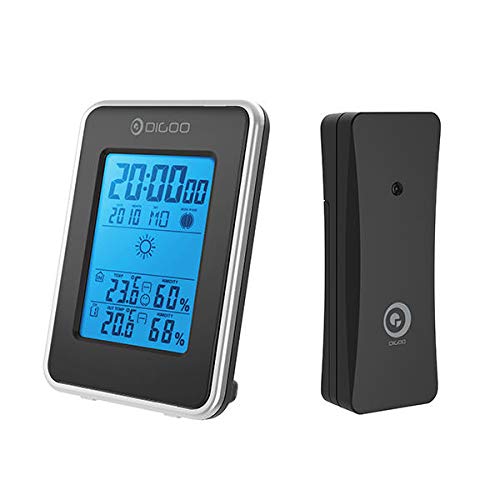
Figure 1: Digoo DG-TH1981 Weather Station main display unit and remote outdoor sensor.
2 സുരക്ഷാ വിവരങ്ങൾ
സുരക്ഷിതമായ പ്രവർത്തനം ഉറപ്പാക്കുന്നതിനും കേടുപാടുകൾ തടയുന്നതിനും, ഇനിപ്പറയുന്ന സുരക്ഷാ മുൻകരുതലുകൾ പാലിക്കുക:
- ഉപകരണത്തെ തീവ്രമായ താപനിലയിലോ, നേരിട്ടുള്ള സൂര്യപ്രകാശത്തിലോ, ഉയർന്ന ആർദ്രതയിലോ തുറന്നുകാട്ടരുത്.
- ശക്തമായ ആഘാതങ്ങൾക്ക് ഉപകരണം ഇടുകയോ ഇടുകയോ ചെയ്യുന്നത് ഒഴിവാക്കുക.
- Do not attempt to disassemble or repair the device yourself. Refer to qualified personnel.
- Use only specified battery types.
- കുട്ടികൾക്ക് ലഭ്യമാകാതെ സൂക്ഷിക്കുക.
3. സജ്ജീകരണം
3.1 പാക്കേജ് ഉള്ളടക്കം
പാക്കേജിൽ എല്ലാ ഇനങ്ങളും ഉണ്ടെന്ന് ഉറപ്പാക്കുക:
- Digoo DG-TH1981 Main Display Unit
- Outdoor Wireless Sensor
- ഉപയോക്തൃ മാനുവൽ (ഈ പ്രമാണം)
3.2 ബാറ്ററി ഇൻസ്റ്റാളേഷൻ
The device requires batteries for operation. Batteries are not included.
- Locate the battery compartment on the back of the main display unit and the outdoor sensor.
- ബാറ്ററി കവറുകൾ തുറക്കുക.
- Insert the required batteries (e.g., AA or AAA, typically 2-3 per unit) according to the polarity indicators (+/-).
- ബാറ്ററി കവറുകൾ സുരക്ഷിതമായി അടയ്ക്കുക.
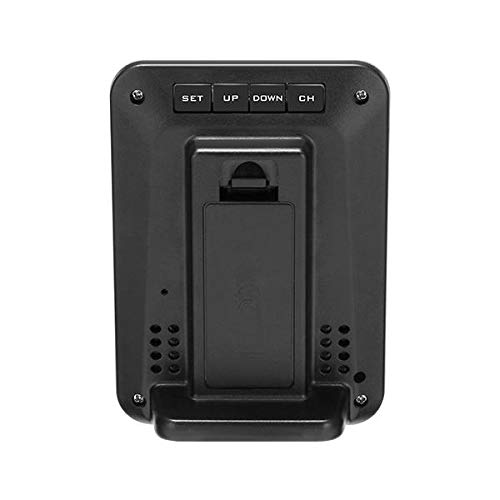
ചിത്രം 2: പിൻഭാഗം view of the main display unit, showing the battery compartment and control buttons.
3.3 സെൻസർ പ്ലേസ്മെന്റ്
For accurate outdoor readings, place the wireless sensor in a suitable location:
- Place the sensor outdoors, away from direct sunlight and heat sources.
- Ensure it is protected from direct rain and snow.
- Maintain a clear line of sight or minimal obstructions between the sensor and the main unit for optimal wireless signal transmission.
- The maximum wireless range is approximately 30 meters (100 feet) in open air.
4. പ്രവർത്തന നിർദ്ദേശങ്ങൾ
4.1 Initial Power-On and Synchronization
After installing batteries:
- The main unit display will light up.
- It will automatically search for the outdoor sensor. This may take a few minutes.
- Once synchronized, the outdoor temperature and humidity will appear on the main display.
4.2 പ്രദർശനം പൂർത്തിയായിview
The main display shows various information:
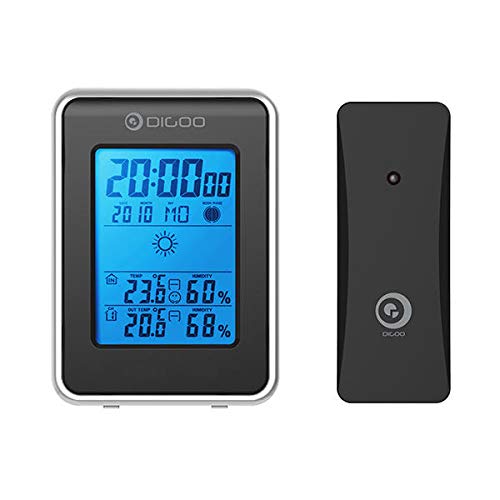
Figure 3: Front display of the main unit, showing various readings and forecast.
- സമയവും തീയതിയും: ഡിസ്പ്ലേയുടെ മുകളിൽ സ്ഥിതിചെയ്യുന്നു.
- ഇൻഡോർ താപനിലയും ഈർപ്പവും: Displays current indoor conditions.
- പുറത്തെ താപനിലയും ഈർപ്പവും: Displays current outdoor conditions received from the sensor.
- കാലാവസ്ഥാ പ്രവചനം: Icons indicating predicted weather (e.g., sunny, cloudy, rainy).
- കംഫർട്ട് ലെവൽ ഇൻഡിക്കേറ്റർ: (If applicable) An icon showing indoor comfort based on temperature and humidity.
4.3 സമയവും തീയതിയും ക്രമീകരിക്കുക
Use the buttons on the back of the unit (SET, UP, DOWN, CH) to adjust settings.
- അമർത്തിപ്പിടിക്കുക സെറ്റ് ടൈം സെറ്റിംഗ് മോഡ് നൽകാനുള്ള ബട്ടൺ.
- The hour digits will flash. Use UP or താഴേക്ക് ക്രമീകരിക്കാൻ.
- അമർത്തുക സെറ്റ് again to move to minutes, then year, month, and day.
- അമർത്തുക സെറ്റ് to confirm each setting and exit.
4.4 താപനില യൂണിറ്റ് തിരഞ്ഞെടുക്കൽ (°C/°F)
ചുരുക്കത്തിൽ അമർത്തുക UP സെൽഷ്യസിനും (°C) ഫാരൻഹീറ്റിനും (°F) ഇടയിൽ മാറാനുള്ള ബട്ടൺ.
4.5 Channel Selection (if multiple sensors supported)
If you have multiple outdoor sensors (not typically included with this model but a common feature):
- അമർത്തുക CH button to cycle through different sensor channels.
5. പരിപാലനം
- ഡിസ്പ്ലേ വൃത്തിയാക്കി സി.asinമൃദുവായതും ഉണങ്ങിയതുമായ തുണി ഉപയോഗിച്ച് വൃത്തിയാക്കുക. അബ്രാസീവ് ക്ലീനറുകളോ ലായകങ്ങളോ ഉപയോഗിക്കരുത്.
- ഡിസ്പ്ലേയിൽ ബാറ്ററി കുറവാണെന്ന് കാണിക്കുമ്പോൾ ബാറ്ററികൾ മാറ്റി സ്ഥാപിക്കുക.
- ഉപകരണം ദീർഘനേരം ഉപയോഗിക്കുന്നില്ലെങ്കിൽ, ചോർച്ച തടയാൻ ബാറ്ററികൾ നീക്കം ചെയ്യുക.
6. പ്രശ്നപരിഹാരം
| പ്രശ്നം | സാധ്യമായ കാരണം | പരിഹാരം |
|---|---|---|
| പ്രധാന യൂണിറ്റിൽ ഡിസ്പ്ലേ ഇല്ല. | ബാറ്ററികൾ തീർന്നിരിക്കുന്നു അല്ലെങ്കിൽ തെറ്റായി ചേർത്തിരിക്കുന്നു. | ബാറ്ററി പോളാരിറ്റി പരിശോധിക്കുക അല്ലെങ്കിൽ പുതിയ ബാറ്ററികൾ ഉപയോഗിച്ച് മാറ്റിസ്ഥാപിക്കുക. |
| പുറത്തെ താപനില/ഈർപ്പം പ്രദർശിപ്പിച്ചിട്ടില്ല. | Sensor out of range, batteries dead in sensor, or interference. | Move sensor closer to main unit, replace sensor batteries, or relocate away from electronic interference. Re-synchronize if necessary (power cycle both units). |
| കൃത്യമല്ലാത്ത വായനകൾ. | നേരിട്ടുള്ള സൂര്യപ്രകാശം, താപ സ്രോതസ്സുകൾ അല്ലെങ്കിൽ ഈർപ്പം എന്നിവയിൽ സെൻസർ തുറന്നിരിക്കുന്നു. | Relocate sensor to a shaded, well-ventilated area protected from elements. |
7 സ്പെസിഫിക്കേഷനുകൾ
- മോഡൽ: DG-TH1981
- ബ്രാൻഡ്: ജെനറിക്
- ഊർജ്ജ സ്രോതസ്സ്: ബാറ്ററി പവർ (ബാറ്ററികൾ ഉൾപ്പെടുത്തിയിട്ടില്ല)
- പ്രത്യേക സവിശേഷത: Clock, Weather Forecast, Indoor/Outdoor Temperature & Humidity
- ഡിസ്പ്ലേ തരം: ബ്ലൂ ബാക്ക്ലിറ്റ് എൽസിഡി
- താപനില പരിധി (ഇൻഡോർ): സാധാരണയായി 0°C മുതൽ 50°C വരെ (32°F മുതൽ 122°F വരെ)
- താപനില പരിധി (ഔട്ട്ഡോർ): സാധാരണയായി -20°C മുതൽ 60°C വരെ (-4°F മുതൽ 140°F വരെ)
- ഈർപ്പം പരിധി: 20% മുതൽ 95% വരെ RH
- വയർലെസ് ശ്രേണി: തുറസ്സായ സ്ഥലത്ത് 30 മീറ്റർ (100 അടി) വരെ
- അളവുകൾ: (Approximate, based on typical weather stations) Main Unit: 150mm x 90mm x 25mm; Sensor: 90mm x 50mm x 20mm
8. വാറൻ്റിയും പിന്തുണയും
This product is covered by a standard manufacturer's warranty. Please refer to your purchase documentation for specific warranty terms and conditions. For technical support or service inquiries, please contact your retailer or the manufacturer's customer service department.
കുറിപ്പ്: വാറന്റി നിബന്ധനകൾ പ്രദേശത്തിനും റീട്ടെയിലറിനും അനുസരിച്ച് വ്യത്യാസപ്പെടാം. വാറന്റി ക്ലെയിമുകൾക്കായി നിങ്ങളുടെ വാങ്ങിയതിന്റെ തെളിവ് സൂക്ഷിക്കുക.
Ask a question about this manual
Ask about setup, troubleshooting, compatibility, parts, safety, or missing instructions. Manuals+ will review the question and use this page’s manual context to help answer it.