
1. ആമുഖം
The Dual DAB 3A Digital Radio Adapter is designed to upgrade your existing audio system with modern digital radio reception and Bluetooth streaming capabilities. This adapter allows you to enjoy DAB+ and FM radio broadcasts with clear digital quality and stream audio wirelessly from compatible devices. Its user-friendly interface and remote control ensure convenient operation.
2 സുരക്ഷാ വിവരങ്ങൾ
- വൈദ്യുതി വിതരണം: Use only the provided AC power adapter. Ensure the voltage matches the requirements specified on the adapter.
- ജലവും ഈർപ്പവും: Do not expose the device to rain, moisture, or dripping/splashing liquids. Keep it away from water sources.
- വെൻ്റിലേഷൻ: Ensure adequate ventilation around the unit. Do not block ventilation openings. Avoid placing the device on soft surfaces that may obstruct airflow.
- താപ സ്രോതസ്സുകൾ: റേഡിയേറ്ററുകൾ, ഹീറ്റ് രജിസ്റ്ററുകൾ, സ്റ്റൗകൾ അല്ലെങ്കിൽ മറ്റ് ചൂട് ഉൽപ്പാദിപ്പിക്കുന്ന ഉപകരണങ്ങൾ പോലുള്ള താപ സ്രോതസ്സുകളിൽ നിന്ന് ഉപകരണം അകറ്റി നിർത്തുക.
- വൃത്തിയാക്കൽ: Disconnect the power before cleaning. Use a soft, dry cloth. Do not use liquid cleaners or aerosol sprays.
- സേവനം: ഈ ഉൽപ്പന്നം സ്വയം സേവിക്കാൻ ശ്രമിക്കരുത്. യോഗ്യതയുള്ള സേവന ഉദ്യോഗസ്ഥർക്ക് എല്ലാ സേവനങ്ങളും റഫർ ചെയ്യുക.
3. പാക്കേജ് ഉള്ളടക്കം
താഴെ പട്ടികപ്പെടുത്തിയിരിക്കുന്ന എല്ലാ ഇനങ്ങളും നിങ്ങളുടെ പാക്കേജിൽ ഉൾപ്പെടുത്തിയിട്ടുണ്ടോയെന്ന് ദയവായി പരിശോധിക്കുക:
- Dual DAB 3A Digital Radio Adapter
- എസി പവർ അഡാപ്റ്റർ
- റിമോട്ട് കൺട്രോൾ
- ഉടമയുടെ മാനുവൽ
- External Wire Antenna
4. ഉൽപ്പന്നം കഴിഞ്ഞുview
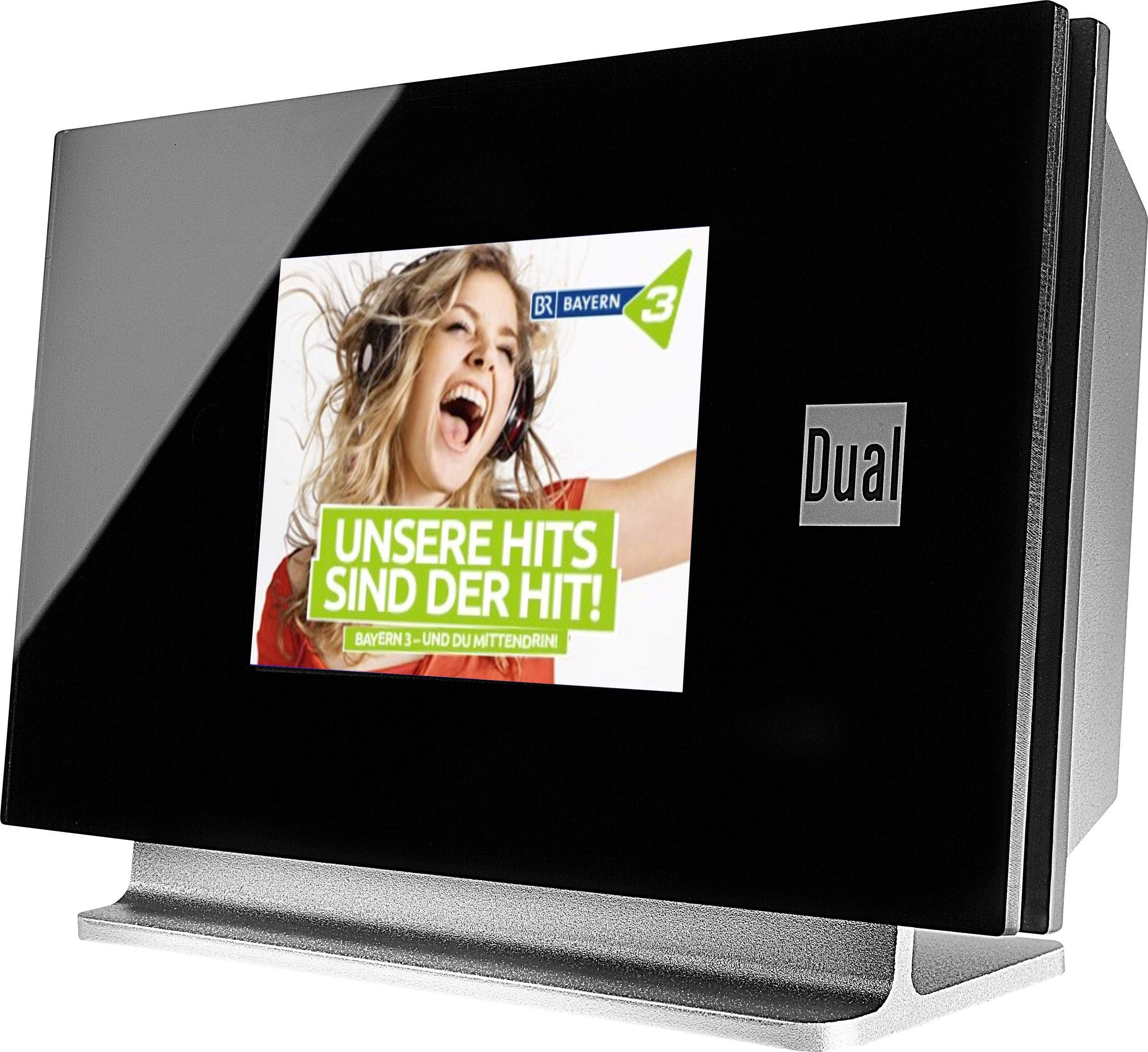
This image displays the Dual DAB 3A Digital Radio Adapter from a front-side angle. The front features a large, black TFT color display showing a radio station's album art and text. The side view indicates the product dimensions: 15 cm (width), 6 cm (depth), and 10.49 cm (height).
ഫ്രണ്ട് പാനൽ
- TFT കളർ ഡിസ്പ്ലേ: Shows station information, track details, album art, and menu options.
പിൻ പാനൽ കണക്ഷനുകൾ
- ആന്റിന ഇൻപുട്ട്: For connecting the external wire antenna or a commercially available antenna.
- ഓക്സ്- U ട്ട്: Audio output for connecting to an external ampലൈഫയർ അല്ലെങ്കിൽ ഓഡിയോ സിസ്റ്റം.
- പവർ ഇൻപുട്ട്: എസി പവർ അഡാപ്റ്റർ ബന്ധിപ്പിക്കുന്നതിന്.
റിമോട്ട് കൺട്രോൾ
The included remote control provides full functionality for navigating menus, changing stations, adjusting volume, and selecting input modes.
5. സജ്ജീകരണം
- ആന്റിന ബന്ധിപ്പിക്കുക: Connect the supplied external wire antenna to the antenna input on the rear panel of the DAB 3A adapter. For optimal reception, extend the antenna fully.
- ഓഡിയോ സിസ്റ്റത്തിലേക്ക് ബന്ധിപ്പിക്കുക: Use an appropriate audio cable (not included) to connect the AUX-OUT port on the rear of the DAB 3A to an available audio input (e.g., AUX-IN, Line-IN) on your existing ampലൈഫയർ അല്ലെങ്കിൽ സ്റ്റീരിയോ സിസ്റ്റം.
- പവർ ബന്ധിപ്പിക്കുക: Plug the AC power adapter into the power input on the rear of the DAB 3A, then plug the adapter into a wall outlet.
- പവർ ഓൺ: Press the Power button on the unit or the remote control to turn on the adapter. The display will illuminate.
- Initial Scan (DAB+): Upon first power-on, the unit may automatically perform a scan for available DAB+ stations. Allow this process to complete.
6. പ്രവർത്തിക്കുന്നു
പവർ ഓൺ/ഓഫ്
- അമർത്തുക ശക്തി button on the unit or remote control to turn the device on or off.
DAB+ Radio Mode
- അമർത്തുക മോഡ് button on the remote control until DAB+ mode is selected.
- If no stations are found or you wish to rescan, navigate to the 'Full Scan' option in the menu and confirm. The adapter will search for available DAB+ stations.
- ഉപയോഗിക്കുക മുകളിലേക്ക് / താഴേക്ക് navigation buttons on the remote to browse through the list of available stations.
- അമർത്തുക ശരി/എന്റർ ചെയ്യുക ഒരു സ്റ്റേഷൻ തിരഞ്ഞെടുക്കാൻ.
- The TFT display will show station name, program information, and potentially album art or weather data.
എഫ്എം റേഡിയോ മോഡ്
- അമർത്തുക മോഡ് button on the remote control until FM mode is selected.
- To automatically scan for stations, press and hold the സ്കാൻ ചെയ്യുക button (or equivalent on remote). The adapter will tune to the next strong station.
- സ്വമേധയാ ട്യൂൺ ചെയ്യാൻ, ഉപയോഗിക്കുക മുകളിലേക്ക് / താഴേക്ക് navigation buttons to adjust the frequency.
ബ്ലൂടൂത്ത് മോഡ്
- അമർത്തുക മോഡ് button on the remote control until Bluetooth mode is selected. The display will show 'Bluetooth Pairing' or similar.
- നിങ്ങളുടെ സ്മാർട്ട്ഫോണിലോ ടാബ്ലെറ്റിലോ, ബ്ലൂടൂത്ത് പ്രവർത്തനക്ഷമമാക്കി ലഭ്യമായ ഉപകരണങ്ങൾക്കായി തിരയുക.
- Select 'Dual DAB 3A' from the list of devices to pair.
- Once paired, you can stream audio from your device to the DAB 3A adapter.
ഓക്സ്-ഇൻ മോഡ്
- Connect an external audio source (e.g., MP3 player, CD player) to the AUX-IN port on the rear of the DAB 3A using a 3.5mm audio cable (not included).
- അമർത്തുക മോഡ് button on the remote control until AUX-IN mode is selected.
- Audio from the connected external device will now play through your audio system.
7. പരിപാലനം
- യൂണിറ്റ് വൃത്തിയാക്കൽ: Disconnect the power adapter before cleaning. Use a soft, dry, lint-free cloth to wipe the surface of the unit. Do not use abrasive cleaners, waxes, or solvents.
- ഡിസ്പ്ലേ വൃത്തിയാക്കുന്നു: Gently wipe the TFT display with a soft, dry microfiber cloth. Avoid pressing hard on the screen.
- സംഭരണം: യൂണിറ്റ് ദീർഘനേരം സൂക്ഷിക്കുകയാണെങ്കിൽ, വൈദ്യുതി വിതരണത്തിൽ നിന്ന് അത് വിച്ഛേദിച്ച് നേരിട്ടുള്ള സൂര്യപ്രകാശത്തിൽ നിന്നും കടുത്ത താപനിലയിൽ നിന്നും അകലെ തണുത്തതും വരണ്ടതുമായ സ്ഥലത്ത് സൂക്ഷിക്കുക.
8. പ്രശ്നപരിഹാരം
| പ്രശ്നം | സാധ്യമായ കാരണം | പരിഹാരം |
|---|---|---|
| ശക്തിയില്ല | പവർ അഡാപ്റ്റർ ബന്ധിപ്പിച്ചിട്ടില്ല അല്ലെങ്കിൽ ഔട്ട്ലെറ്റ് തകരാറിലാണ്. | പവർ അഡാപ്റ്റർ യൂണിറ്റിലേക്കും പ്രവർത്തിക്കുന്ന ഒരു പവർ ഔട്ട്ലെറ്റിലേക്കും സുരക്ഷിതമായി ബന്ധിപ്പിച്ചിട്ടുണ്ടെന്ന് ഉറപ്പാക്കുക. |
| മോശം DAB+/FM റിസപ്ഷൻ | Antenna not properly connected or poor signal strength. | Ensure the antenna is fully extended and properly connected. Try repositioning the antenna or the unit. Consider using a stronger external antenna if available. |
| ബ്ലൂടൂത്ത് ജോടിയാക്കൽ പരാജയപ്പെടുന്നു | Bluetooth not enabled on source device or adapter is not in pairing mode. | Ensure Bluetooth is enabled on your smartphone/tablet and the DAB 3A is in Bluetooth mode. Try restarting both devices. |
| ശബ്ദമില്ല | Volume too low, incorrect input selected on amplifier, or audio cable issue. | Increase the volume on both the DAB 3A and your ampലൈഫയർ. നിങ്ങളുടെ ഉറപ്പാക്കുക amplifier is set to the correct input (e.g., AUX-IN). Check the audio cable connections. |
9 സ്പെസിഫിക്കേഷനുകൾ
- മോഡൽ: 75862
- ട്യൂണർ സാങ്കേതികവിദ്യ: DAB Plus, FM
- കണക്റ്റിവിറ്റി: ബ്ലൂടൂത്ത്
- പിന്തുണയ്ക്കുന്ന റേഡിയോ ബാൻഡുകൾ: FM, DAB+
- ഡിസ്പ്ലേ തരം: കളർ ഡിസ്പ്ലേ
- ഊർജ്ജ സ്രോതസ്സ്: എസി അഡാപ്റ്റർ
- ഹാർഡ്വെയർ ഇന്റർഫേസ്: ബ്ലൂടൂത്ത്
- അനുയോജ്യമായ ഉപകരണങ്ങൾ: സ്മാർട്ട്ഫോൺ, ലാപ്ടോപ്പ്
- പ്രത്യേക സവിശേഷതകൾ: Bluetooth, Remote Control
- ഉൽപ്പന്ന അളവുകൾ: 15 x 6 x 10.5 സെ.മീ
- ഇനത്തിൻ്റെ ഭാരം: 540 ഗ്രാം
10. വാറൻ്റിയും പിന്തുണയും
This product comes with a standard manufacturer's warranty. For detailed warranty information, please refer to the warranty card included in your package or visit the official Dual website. For technical support, troubleshooting assistance, or service inquiries, please contact Dual customer support through their official channels.