
1. ആമുഖം
Welcome to your new Volkano Tornado Series Portable Bluetooth Speaker. This manual provides essential information for setting up, operating, and maintaining your device to ensure optimal performance and longevity. Please read these instructions carefully before use.
2. ഉൽപ്പന്നം കഴിഞ്ഞുview
പ്രധാന സവിശേഷതകൾ
- Integrated auxiliary, USB, and Micro SD card reader inputs.
- Control buttons for play/pause, mode selection, and track skipping.
- Designed for portability with a convenient carry strap.
- Integrated 1500 mAh rechargeable battery for extended playtime.
- Delivers 13W peak power output with stereo sound, rich bass, and clear audio, driven by a 4-inch speaker driver.
- Multiple audio input options: Bluetooth wireless connectivity, Micro SD card reader, auxiliary input, and USB port.
- Built-in FM Radio function.
പാക്കേജ് ഉള്ളടക്കം
- Volkano Tornado Series Bluetooth Speaker
- സഹായ കേബിൾ
- മൈക്രോ യുഎസ്ബി ചാർജിംഗ് കേബിൾ
- ഇൻസ്ട്രക്ഷൻ മാനുവൽ
- Carry Handle (pre-attached)
3. ഉൽപ്പന്ന ഘടകങ്ങൾ

ചിത്രം 3.1: Detailed diagram of the Volkano Tornado Series speaker, labeling key components such as the handle strap, control panel, input panel, protective mesh, and firm stand.
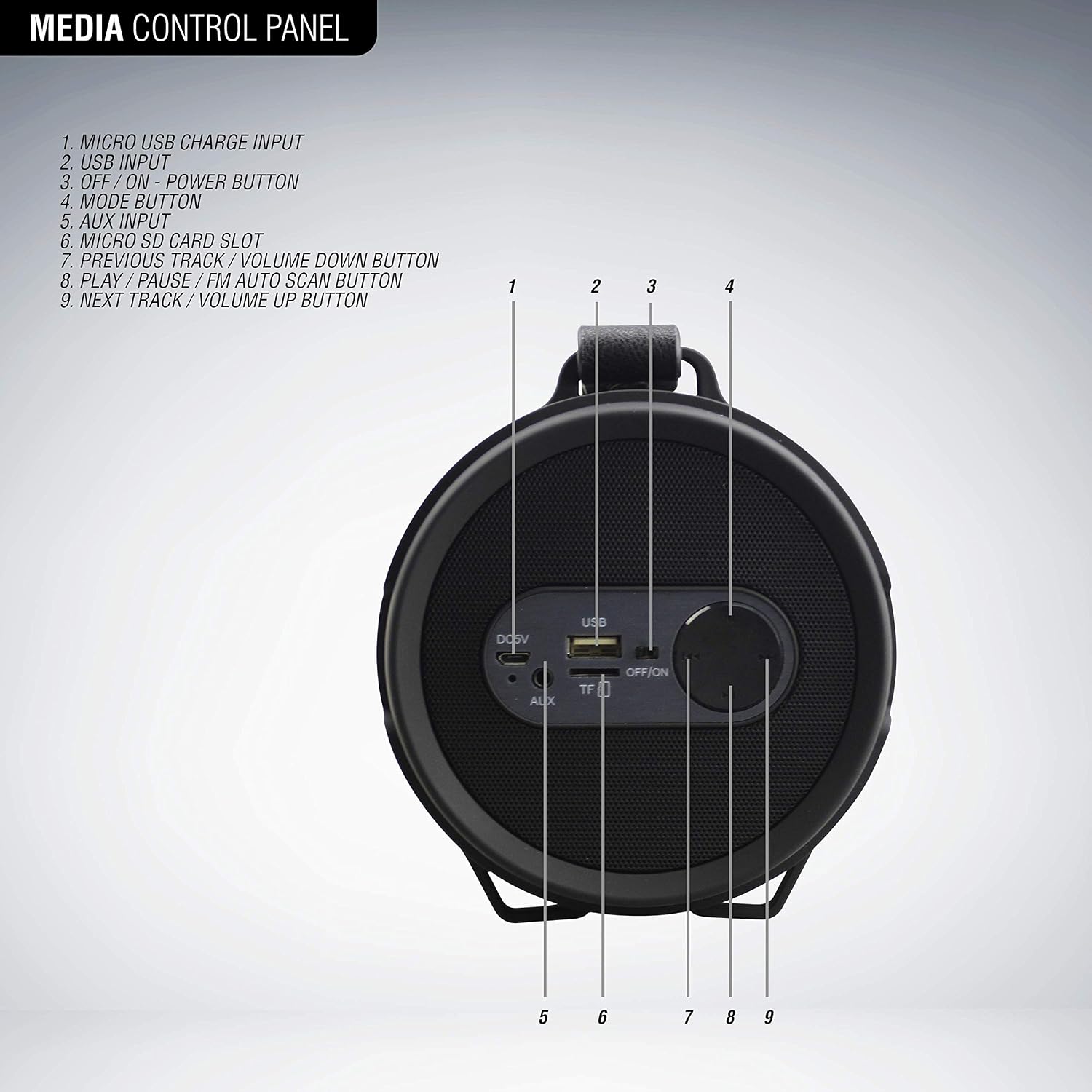
ചിത്രം 3.2: Close-up diagram of the speaker's control panel, identifying each button and input:
1. Micro USB Charge Input
2. യുഎസ്ബി ഇൻപുട്ട്
3. OFF/ON Power Button
4. മോഡ് ബട്ടൺ
5. AUX ഇൻപുട്ട്
6. മൈക്രോ എസ്ഡി കാർഡ് സ്ലോട്ട്
7. Previous Track / Volume Down Button
8. Play / Pause / FM Auto Scan Button
9. Next Track / Volume Up Button
4. സജ്ജീകരണ ഗൈഡ്
4.1. സ്പീക്കറിൽ നിന്ന് നിരക്ക് ഈടാക്കുന്നു
- Connect the Micro USB charging cable to the Micro USB Charge Input (1) on the speaker.
- Connect the other end of the cable to a standard USB charging adapter (not included) or a computer's USB port.
- The charging indicator light will illuminate during charging and turn off when fully charged. A full charge takes approximately 4 hours.
4.2. പവർ ഓൺ/ഓഫ്
- To power on the speaker, slide the OFF/ON Power Button (3) to the 'ON' position.
- To power off the speaker, slide the OFF/ON Power Button (3) to the 'OFF' position.
4.3. ബ്ലൂടൂത്ത് ജോടിയാക്കൽ
- Ensure the speaker is powered on and in Bluetooth mode. If not, press the Mode Button (4) until you hear the Bluetooth pairing prompt.
- നിങ്ങളുടെ ഉപകരണത്തിൽ (സ്മാർട്ട്ഫോൺ, ടാബ്ലെറ്റ് മുതലായവ) ബ്ലൂടൂത്ത് പ്രവർത്തനക്ഷമമാക്കുക.
- ഇതിനായി തിരയുക available Bluetooth devices and select "Volkano Tornado" from the list.
- Once paired, the speaker will emit a confirmation tone, and the Bluetooth indicator light will remain solid.
4.4. Connecting via Auxiliary Input
- Connect one end of the provided Auxiliary Cable to the AUX Input (5) on the speaker.
- കേബിളിന്റെ മറ്റേ അറ്റം നിങ്ങളുടെ ബാഹ്യ ഉപകരണത്തിന്റെ ഓഡിയോ ഔട്ട്പുട്ട് ജാക്കുമായി ബന്ധിപ്പിക്കുക.
- Press the Mode Button (4) to switch to AUX mode. Audio will now play through the speaker.
4.5. Using USB and Micro SD Card
- Insert a USB flash drive into the USB Input (2) or a Micro SD card into the Micro SD Card Slot (6).
- The speaker will automatically switch to USB/SD mode and begin playing audio files. If not, press the Mode Button (4) to select the correct input.
- പിന്തുണച്ചു file formats typically include MP3.
5. പ്രവർത്തന നിർദ്ദേശങ്ങൾ
5.1. അടിസ്ഥാന നിയന്ത്രണങ്ങൾ
- പ്ലേ/താൽക്കാലികമായി നിർത്തുക: Press the Play / Pause / FM Auto Scan Button (8) to play or pause the current track.
- വോളിയം കൂട്ടുക: Press and hold the Next Track / Volume Up Button (9) to increase the volume.
- വോളിയം താഴേക്ക്: Press and hold the Previous Track / Volume Down Button (7) to decrease the volume.
- അടുത്ത ട്രാക്ക്: Short press the Next Track / Volume Up Button (9) to skip to the next track.
- മുമ്പത്തെ ട്രാക്ക്: Short press the Previous Track / Volume Down Button (7) to go to the previous track.
- മോഡ് തിരഞ്ഞെടുക്കൽ: Press the Mode Button (4) to cycle through available input modes (Bluetooth, FM Radio, AUX, USB, Micro SD).
5.2. എഫ്എം റേഡിയോ പ്രവർത്തനം
- Press the Mode Button (4) to switch to FM Radio mode.
- To auto-scan and save available stations, press and hold the Play / Pause / FM Auto Scan Button (8). The speaker will scan and store stations automatically.
- Once scanning is complete, use the Previous Track / Volume Down Button (7) and Next Track / Volume Up Button (9) to navigate between saved stations.
5.3. ട്രൂ വയർലെസ് സ്റ്റീരിയോ (TWS) ജോടിയാക്കൽ

ചിത്രം 5.1: Two Volkano Tornado Series speakers shown together, illustrating the True Wireless Stereo (TWS) feature for synchronized audio playback.
The Volkano Tornado Series speaker supports True Wireless Stereo (TWS) functionality, allowing you to pair two Tornado Series speakers together for a synchronized stereo audio experience.
- Ensure both Volkano Tornado Series speakers are powered on and in Bluetooth mode, but not yet paired to any device.
- On one of the speakers (this will be your primary speaker), press and hold the Mode Button (4) for a few seconds until you hear a pairing tone.
- രണ്ട് സ്പീക്കറുകളും പരസ്പരം യാന്ത്രികമായി ബന്ധിപ്പിക്കും. കണക്റ്റ് ചെയ്തുകഴിഞ്ഞാൽ, നിങ്ങൾക്ക് ഒരു സ്ഥിരീകരണ ടോൺ കേൾക്കാനാകും.
- Now, connect your device (smartphone, tablet, etc.) to the primary speaker via Bluetooth as described in section 4.3.
- രണ്ട് സ്പീക്കറുകളിലും ഓഡിയോ ഇപ്പോൾ സ്റ്റീരിയോയിൽ പ്ലേ ചെയ്യും.
6. പരിപാലനം
- മൃദുവായതും ഉണങ്ങിയതുമായ തുണി ഉപയോഗിച്ച് സ്പീക്കർ വൃത്തിയാക്കുക. അബ്രസീവ് ക്ലീനറുകളോ ലായകങ്ങളോ ഉപയോഗിക്കരുത്.
- സ്പീക്കർ വെള്ളം, ഈർപ്പം, കടുത്ത താപനില എന്നിവയിൽ നിന്ന് അകറ്റി നിർത്തുക.
- സ്പീക്കർ താഴെയിടുകയോ ശക്തമായ ആഘാതങ്ങൾക്ക് വിധേയമാക്കുകയോ ചെയ്യുന്നത് ഒഴിവാക്കുക.
- ദീർഘനേരം ഉപയോഗിക്കാത്തപ്പോൾ സ്പീക്കർ തണുത്തതും വരണ്ടതുമായ സ്ഥലത്ത് സൂക്ഷിക്കുക.
7. പ്രശ്നപരിഹാരം
| പ്രശ്നം | സാധ്യമായ പരിഹാരം |
|---|---|
| സ്പീക്കർ പവർ ഓൺ ചെയ്യുന്നില്ല. | ബാറ്ററി ചാർജ്ജ് ചെയ്തിട്ടുണ്ടെന്ന് ഉറപ്പാക്കുക. മൈക്രോ യുഎസ്ബി കേബിൾ ഉപയോഗിച്ച് സ്പീക്കർ ഒരു പവർ സ്രോതസ്സുമായി ബന്ധിപ്പിക്കുക. |
| ബ്ലൂടൂത്ത് വഴി ജോടിയാക്കാൻ കഴിയില്ല. | Ensure the speaker is in Bluetooth pairing mode. Check that Bluetooth is enabled on your device and that "Volkano Tornado" is selected. Move the speaker closer to your device. |
| സ്പീക്കറിൽ നിന്ന് ശബ്ദമില്ല. | Check the volume level on both the speaker and your connected device. Ensure the correct input mode (Bluetooth, AUX, USB, SD) is selected. |
| എഫ്എം റേഡിയോ റിസപ്ഷൻ മോശമാണ്. | Try repositioning the speaker to improve signal reception. Perform an auto-scan again to find stronger stations. |
| USB/Micro SD card not playing. | Ensure the card/drive is inserted correctly. Check that the audio files are in a supported format (e.g., MP3). Press the Mode Button to select the correct input. |
8 സാങ്കേതിക സവിശേഷതകൾ
| ഫീച്ചർ | സ്പെസിഫിക്കേഷൻ |
|---|---|
| ബ്രാൻഡ് | വോൾക്കാനോ |
| മോഡലിൻ്റെ പേര് | Tornado Series |
| ബ്ലൂടൂത്ത് പതിപ്പ് | 5.0 |
| Audio Decoding Profile | A2DP/AVRCP |
| പ്രവർത്തന ദൂരം | 32 അടി / 10 മീറ്റർ |
| ബാറ്ററി ശേഷി | 1500 mAh |
| ചാർജ്ജ് സമയം | 4 മണിക്കൂർ |
| കളിസമയം | 5 മണിക്കൂർ |
| സ്പീക്കർ ഡ്രൈവർ വലുപ്പം | 4 ഇഞ്ച് |
| പ്രതിരോധം | 4 ഓം |
| പരമാവധി സ്പീക്കർ പവർ ഔട്ട്പുട്ട് | 13 വാട്ട്സ് |
| കണക്റ്റിവിറ്റി ടെക്നോളജി | Wireless (Bluetooth), Aux, USB |
| ഓഡിയോ put ട്ട്പുട്ട് മോഡ് | സ്റ്റീരിയോ |
| പ്രത്യേക സവിശേഷതകൾ | FM Radio, USB Port, Micro SD Card Reader, Carry Strap |
| നിയന്ത്രണ രീതി | ബട്ടൺ |
| നിറം | കറുപ്പ് |
9. വാറൻ്റിയും പിന്തുണയും
9.1. വാറൻ്റി വിവരങ്ങൾ
The Volkano Tornado Series Portable Bluetooth Speaker comes with a 1-year limited warranty from the date of purchase. This warranty covers manufacturing defects and workmanship. Please retain your proof of purchase for warranty claims. The warranty does not cover damage caused by misuse, accidents, unauthorized modifications, or normal wear and tear.
9.2. ഉപഭോക്തൃ പിന്തുണ
For any questions, technical assistance, or warranty inquiries, please refer to the contact information provided on the product packaging or the official Volkano website. Our customer support team is available to assist you.