
ആമുഖം
This manual provides instructions for the Extreme Networks Summit X460-24p, a high-performance, managed Layer 3 Ethernet switch designed for enterprise and data center environments. It features 24 Gigabit Ethernet ports with Power over Ethernet (PoE) capabilities, along with additional SFP and shared Gigabit SFP ports for flexible connectivity.
സുരക്ഷാ വിവരങ്ങൾ
സുരക്ഷാ മാർഗ്ഗനിർദ്ദേശങ്ങൾ
- Always disconnect all power supply inputs before removing any panel for servicing.
- This device contains a Class 1 Laser product. Avoid direct eye exposure to beam.
- ഇൻസ്റ്റാളേഷൻ സമയത്ത് ശരിയായ ഗ്രൗണ്ടിംഗ് ഉറപ്പാക്കുക.
- Refer to the installation manual for power cord selection and additional compliance markings.
പാക്കേജ് ഉള്ളടക്കം
ബോക്സിൽ എന്താണുള്ളത്
- Extreme Networks Summit X460-24p Switch
- പവർ കോർഡ് (മേഖലാ അടിസ്ഥാനത്തിൽ)
- റാക്ക് മൗണ്ടിംഗ് കിറ്റ്
- ഡോക്യുമെന്റേഷൻ (ഈ മാനുവൽ)
ഉൽപ്പന്നം കഴിഞ്ഞുview
The Summit X460-24p switch is designed for efficient network management and high-speed data transfer.
പിൻ പാനൽ

This image displays the rear panel of the Summit X460-24p switch, highlighting the power input, fan modules, and the SummitStack ports. The overall chassis is purple.

എ വിശദമായി view of the SummitStack ports (Stack Port 1 and Stack Port 2) located on the rear of the switch, used for stacking multiple switches.
ഉൽപ്പന്ന ലേബൽ
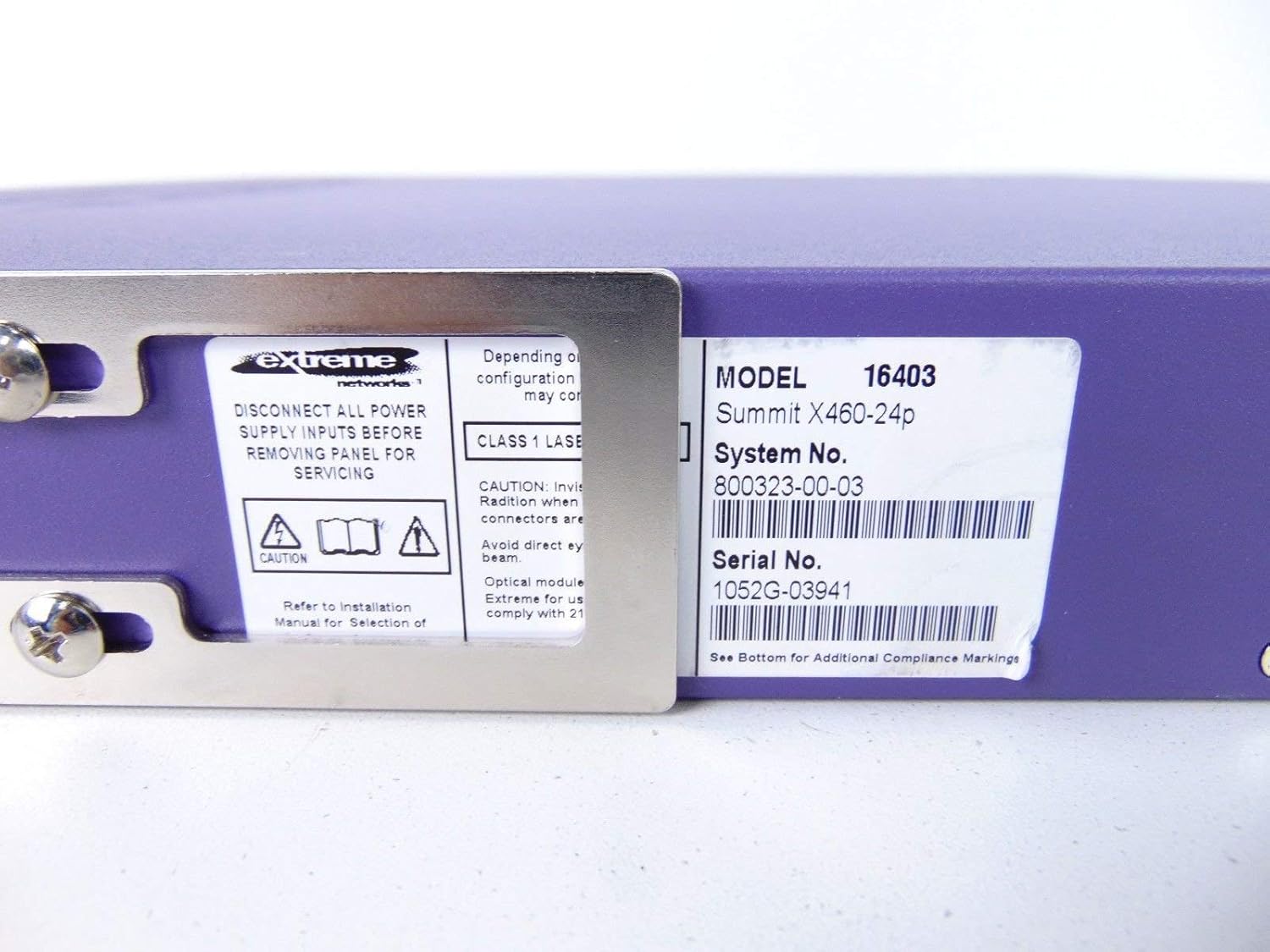
This label provides critical identification information for the switch, including Model: 16403, Summit X460-24p, System No.: 800323-00-03, and Serial No.: 1052G-03941.
ഓപ്ഷണൽ ഘടകങ്ങൾ

This image shows the label for an optional Extreme Networks Summit 750W PoE AC Power Supply Unit (PSU), Model 10931, System No. 800382-00-03, Serial No. 1053A-41986.

This image displays the label for an optional Extreme Networks SummitStack Module, Model 16419, System No. 800384-00-01, Serial No. 1122G-02565.
സജ്ജമാക്കുക
ഇൻസ്റ്റലേഷൻ ഗൈഡ്
റാക്ക് മൗണ്ടിംഗ്
The Summit X460-24p is designed for standard 19-inch rack mounting. Use the provided rack-mounting kit to secure the switch in a server rack. Ensure adequate ventilation around the unit.
പവർ ബന്ധിപ്പിക്കുന്നു
Connect the power cord to the AC power inlet on the rear of the switch and then to a grounded electrical outlet. The switch will power on automatically.
നെറ്റ്വർക്ക് കേബിളുകൾ ബന്ധിപ്പിക്കുന്നു
- Connect Ethernet cables from your network devices to the 24 10/100/1000Base-T PoE ports on the front panel.
- For uplink or fiber connections, use the SFP or shared Gigabit SFP ports.
- For stacking, connect SummitStack ports on multiple switches using appropriate stacking cables.
Initial Configuration Access
Access the switch's management interface via a console cable connected to the console port, or through a web browser if the switch has a default IP address configured. Refer to the Extreme Networks documentation for detailed initial setup procedures.
പ്രവർത്തന നിർദ്ദേശങ്ങൾ
അടിസ്ഥാന പ്രവർത്തനം
പവർ ഓൺ/ഓഫ്
The switch powers on automatically when connected to a power source. To power off, disconnect the power cord. For proper shutdown, it is recommended to use the software-based shutdown command if available.
LED സൂചകങ്ങൾ
Observe the LED indicators on the front panel for status information regarding power, system health, port activity, and PoE status. Consult the full product documentation for a detailed explanation of each LED's behavior.
മാനേജ്മെന്റ് ഇന്റർഫേസ്
The switch can be managed via a Command Line Interface (CLI) accessible through the console port or Telnet/SSH, or through a web-based graphical user interface (GUI).
മെയിൻ്റനൻസ്
പരിചരണവും പരിപാലനവും
വൃത്തിയാക്കൽ
Keep the switch clean and free of dust. Use a soft, dry cloth for external cleaning. Do not use liquid or aerosol cleaners.
ഫേംവെയർ അപ്ഡേറ്റുകൾ
എക്സ്ട്രീം നെറ്റ്വർക്കുകളുടെ പിന്തുണ ഇടയ്ക്കിടെ പരിശോധിക്കുക. website for firmware updates to ensure optimal performance and security. Follow the provided instructions for firmware upgrade procedures.
ഫാൻ, പവർ സപ്ലൈ മൊഡ്യൂളുകൾ
The switch may feature hot-swappable fan and power supply modules. Refer to the Extreme Networks documentation for instructions on replacement if necessary.
ട്രബിൾഷൂട്ടിംഗ്
പൊതുവായ പ്രശ്നങ്ങൾ
പവർ ഇല്ല
- പവർ കോർഡ് സ്വിച്ചിലേക്കും പവർ ഔട്ട്ലെറ്റിലേക്കും സുരക്ഷിതമായി ബന്ധിപ്പിച്ചിട്ടുണ്ടെന്ന് ഉറപ്പാക്കുക.
- പവർ ഔട്ട്ലെറ്റ് പ്രവർത്തനക്ഷമമാണോയെന്ന് പരിശോധിക്കുക.
Port Link Down
- രണ്ട് അറ്റത്തും ഇതർനെറ്റ് കേബിൾ കണക്ഷൻ പരിശോധിക്കുക.
- ബന്ധിപ്പിച്ചിരിക്കുന്ന ഉപകരണം ഓണാണെന്നും ശരിയായി പ്രവർത്തിക്കുന്നുണ്ടെന്നും ഉറപ്പാക്കുക.
- Check the port status via the management interface.
നെറ്റ്വർക്ക് കണക്റ്റിവിറ്റി പ്രശ്നങ്ങൾ
- Verify IP configuration and network settings.
- Check for conflicting IP addresses.
- Consult network diagnostics tools.
സ്പെസിഫിക്കേഷനുകൾ
സാങ്കേതിക സവിശേഷതകൾ
| ഫീച്ചർ | വിവരണം |
|---|---|
| മോഡൽ | Summit X460-24p (Part Number: 16403) |
| തുറമുഖങ്ങൾ | 24 x 10/100/1000Base-T PoE+ ports, 4 x shared Gigabit SFP, 4 x SFP |
| പാളി | ലെയർ 3 നിയന്ത്രിത സ്വിച്ച് |
| ബ്രാൻഡ് | എക്സ്ട്രീം നെറ്റ്വർക്കുകൾ |
| ഇൻ്റർഫേസ് തരം | പിഒഇ, എസ്എഫ്പി |
| സിസ്റ്റം നമ്പർ | 800323-00-03 |
| സീരിയൽ നമ്പർ | 1052G-03941 |
| യു.പി.സി | 683332278646 |
വാറൻ്റിയും പിന്തുണയും
വാറൻ്റി വിവരങ്ങൾ
This product typically comes with a 90-day limited warranty. For specific warranty terms and conditions, please refer to the official Extreme Networks warranty statement or contact your vendor.
സാങ്കേതിക സഹായം
For technical assistance, visit the official Extreme Networks support website or contact their customer service. Have your product model and serial number ready when seeking support.