
1. ആമുഖം
1.1 ഉൽപ്പന്നം കഴിഞ്ഞുview
The Dacom GF7 TWS (True Wireless Stereo) Bluetooth Headset offers a compact and lightweight audio solution. Designed for wireless freedom, these earbuds feature Bluetooth 4.2 technology for stable connectivity and clear sound. The intelligent charging case provides convenient power on the go, ensuring your earbuds are ready when you are.

Image: Dacom GF7 TWS True Wireless Bluetooth Headset, showing both earbuds securely placed within their charging case. The case is open, revealing the earbuds and charging indicators.
1.2 ബോക്സിൽ എന്താണുള്ളത്
അൺബോക്സിംഗ് ചെയ്യുമ്പോൾ പാക്കേജ് ഉള്ളടക്കങ്ങൾ പരിശോധിക്കുക:
- 2 x Dacom GF7 Headsets (Main and Subsidiary Earbuds)
- 1 x ചാർജിംഗ് ബോക്സ്
- 1 x USB ചാർജിംഗ് കേബിൾ
- 2 x Earbud Tips (Pairs)
- 1 x ക്യാരി ബാഗ്
- 1 x ഉപയോക്തൃ മാനുവൽ (ഈ പ്രമാണം)
2 സുരക്ഷാ വിവരങ്ങൾ
- തീവ്രമായ താപനിലയിലോ ഈർപ്പത്തിലോ ഉപകരണം തുറന്നുകാട്ടരുത്.
- ശക്തമായ ആഘാതങ്ങൾക്ക് ഉപകരണം ഇടുകയോ ഇടുകയോ ചെയ്യുന്നത് ഒഴിവാക്കുക.
- ഉപകരണം ഡിസ്അസംബ്ലിംഗ് ചെയ്യുകയോ സ്വയം നന്നാക്കാൻ ശ്രമിക്കുകയോ ചെയ്യരുത്. ഇത് വാറന്റി അസാധുവാക്കും.
- ഉപകരണം വെള്ളത്തിൽ നിന്നും മറ്റ് ദ്രാവകങ്ങളിൽ നിന്നും അകറ്റി നിർത്തുക.
- Use only the provided charging cable and a compatible power source.
- ഉച്ചത്തിലുള്ള ശബ്ദങ്ങൾ ദീർഘനേരം കേൾക്കുന്നത് കേൾവിക്ക് കേടുപാടുകൾ വരുത്തിയേക്കാം. ശബ്ദം മിതമായ അളവിൽ ക്രമീകരിക്കുക.
3. സജ്ജീകരണം
3.1 Charging the Headset and Charging Box
Before first use, fully charge both the earbuds and the charging box.
- Place the earbuds into the charging box. Ensure they are correctly seated to initiate charging.
- Connect the USB charging cable to the charging box's port and the other end to a USB power adapter (not included) or a computer's USB port.
- The indicator lights on the charging box and earbuds will show charging status. Refer to the image below for visual guidance.
- പൂർണ്ണമായി ചാർജ് ചെയ്തുകഴിഞ്ഞാൽ, ചാർജിംഗ് കേബിൾ വിച്ഛേദിക്കുക.
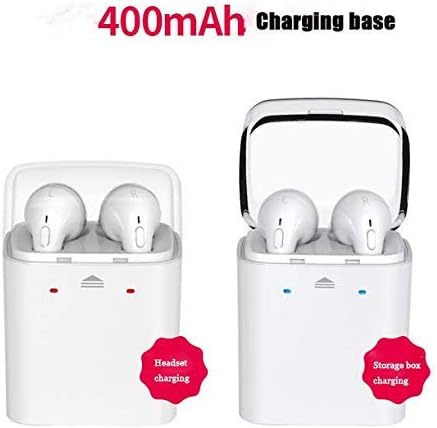
Image: Illustration of the Dacom GF7 TWS charging process. The left side shows earbuds charging within the case, indicated by red lights. The right side shows the charging case itself being charged, indicated by blue lights, with a label for its 400mAh capacity.
3.2 ഒരു ബ്ലൂടൂത്ത് ഉപകരണവുമായി ജോടിയാക്കൽ
The Dacom GF7 uses True Wireless Technology for seamless pairing. Follow these three steps:
- ഘട്ടം 1: പവർ ഓൺ
Remove both earbuds from the charging box. They will automatically power on and attempt to connect to each other. You will hear an audible prompt indicating they are connected. - Step 2: Activate Bluetooth
On your smartphone or Bluetooth-enabled device, go to the Bluetooth settings and ensure Bluetooth is turned on. - ഘട്ടം 3: ബന്ധിപ്പിക്കുക
ഇതിനായി തിരയുക available devices. Select "GF7" (or similar, e.g., "Dacom GF7") from the list. Once connected, you will hear a confirmation prompt.
കുറിപ്പ്: If pairing fails, place the earbuds back into the charging case, close the lid, then reopen and try again. For single earbud use, simply remove one earbud from the case and pair it as described above.
4. പ്രവർത്തന നിർദ്ദേശങ്ങൾ
4.1 Multi-functional Button Controls
Each earbud features a multi-functional button for easy control of music and calls.

Image: A close-up of a hand interacting with the multi-functional button on a Dacom GF7 TWS earbud, illustrating how to press the button for control.
| ഫംഗ്ഷൻ | ആക്ഷൻ |
|---|---|
| പവർ ഓൺ | Remove from charging case (automatic) or long press button. |
| പവർ ഓഫ് | Place in charging case (automatic) or long press button. |
| സംഗീതം പ്ലേ ചെയ്യുക/താൽക്കാലികമായി നിർത്തുക | Single press button. |
| ഉത്തരം / കോൾ അവസാനിപ്പിക്കുക | Single press button during an incoming call or active call. |
| കോൾ നിരസിക്കുക | Long press button during an incoming call. |
| അടുത്ത ട്രാക്ക് | Double press button (may vary by earbud/device). |
| വോളിയം നിയന്ത്രണം | Volume is controlled via the connected device. |
4.2 ഇയർബഡുകൾ ധരിക്കൽ
Gently insert the earbuds into your ears. Adjust them for a comfortable and secure fit. The correct fit helps optimize sound quality and noise isolation.
5. പരിപാലനം
5.1 വൃത്തിയാക്കൽ
- ഇയർബഡുകളും ചാർജിംഗ് കെയ്സും വൃത്തിയാക്കാൻ മൃദുവായതും ഉണങ്ങിയതും ലിന്റ് രഹിതവുമായ തുണി ഉപയോഗിക്കുക.
- അബ്രാസീവ് ക്ലീനറുകൾ, ആൽക്കഹോൾ, കെമിക്കൽ ലായകങ്ങൾ എന്നിവ ഉപയോഗിക്കരുത്.
- Regularly clean the earbud tips and charging contacts to ensure proper function and hygiene.
5.2 സംഭരണം
ഉപയോഗത്തിലില്ലാത്തപ്പോൾ, ഇയർബഡുകൾ ചാർജിംഗ് കേസിൽ സൂക്ഷിക്കുക, അതുവഴി അവയെ സംരക്ഷിക്കുകയും ചാർജ്ജ് ചെയ്ത് നിലനിർത്തുകയും ചെയ്യുക. നേരിട്ടുള്ള സൂര്യപ്രകാശത്തിൽ നിന്നും ഉയർന്ന താപനിലയിൽ നിന്നും അകറ്റി, തണുത്തതും വരണ്ടതുമായ സ്ഥലത്ത് ഉപകരണം സൂക്ഷിക്കുക.
6. പ്രശ്നപരിഹാരം
| പ്രശ്നം | സാധ്യമായ പരിഹാരം |
|---|---|
| ഇയർബഡുകൾ പരസ്പരം ജോടിയാക്കുന്നില്ല. | Place both earbuds back into the charging case, close the lid, wait a few seconds, then remove them again. They should automatically connect. |
| ഇയർബഡുകൾ ഉപകരണത്തിലേക്ക് കണക്റ്റ് ചെയ്യുന്നില്ല. |
|
| ശബ്ദമില്ല അല്ലെങ്കിൽ കുറഞ്ഞ ശബ്ദമില്ല. |
|
| ചാർജിംഗ് പ്രശ്നങ്ങൾ. |
|
7 സ്പെസിഫിക്കേഷനുകൾ
| ഫീച്ചർ | വിശദാംശങ്ങൾ |
|---|---|
| മോഡൽ | GF7 |
| ബ്ലൂടൂത്ത് പതിപ്പ് | V4.2 |
| ഡ്രൈവർ വലിപ്പം | 8 മി.മീ |
| പ്രതിരോധം | 16 ഓം |
| വർക്കിംഗ് വോളിയംtage | 3.2V-4.2V |
| സംവേദനക്ഷമത | -42dB ± 2dB |
| ഫ്രീക്വൻസി റേഞ്ച് | 2.4-2.48GHz |
| വയർലെസ് ദൂരം | <10 മീറ്റർ (തുറന്ന സ്ഥലം) |
| ബ്ലൂടൂത്ത് പ്രോfiles | A2DP/AVRCP |
| അനുയോജ്യത | ബ്ലൂടൂത്ത് പ്രവർത്തനക്ഷമമാക്കിയ ഉപകരണങ്ങൾ |
| ചാർജിംഗ് കേസ് കപ്പാസിറ്റി | 400mAh |
| ശബ്ദ നിയന്ത്രണം | Active Noise Cancellation (Note: Feature listed in specifications, actual performance may vary.) |
8. വാറൻ്റിയും പിന്തുണയും
8.1 വാറൻ്റി വിവരങ്ങൾ
Dacom products are designed and manufactured to the highest quality standards. For specific warranty terms and conditions, please refer to the warranty card included with your purchase or contact Dacom customer support. The warranty typically covers manufacturing defects for a specified period from the date of purchase.
8.2 ഉപഭോക്തൃ പിന്തുണ
If you encounter any issues or have questions regarding your Dacom GF7 TWS Headset, please contact Dacom customer support. Contact information can usually be found on the official Dacom webസൈറ്റ് അല്ലെങ്കിൽ ഉൽപ്പന്ന പാക്കേജിംഗിൽ.