
1. ആമുഖം
This manual provides detailed instructions for the safe and efficient operation of your Auna Sarah Ann multi-functional audio system. Please read this manual thoroughly before using the device and retain it for future reference.
The Auna Sarah Ann is a versatile audio system featuring a 3-speed turntable, CD player, cassette player, DAB+ and FM radio, Bluetooth connectivity, USB and SD card playback, AUX input, and headphone output. It also includes integrated stereo speakers and a remote control for convenient operation.
2. സുരക്ഷാ നിർദ്ദേശങ്ങൾ
- ഉപയോഗിക്കുന്നതിന് മുമ്പ് എല്ലാ നിർദ്ദേശങ്ങളും ശ്രദ്ധാപൂർവ്വം വായിക്കുക.
- താപ സ്രോതസ്സുകൾ, നേരിട്ടുള്ള സൂര്യപ്രകാശം, ഈർപ്പം, വെള്ളം, മറ്റ് ദ്രാവകങ്ങൾ എന്നിവയിൽ നിന്ന് യൂണിറ്റിനെ അകറ്റി നിർത്തുക.
- വൈദ്യുതാഘാതം, സ്ഫോടനം, കൂടാതെ/അല്ലെങ്കിൽ സ്വയം പരിക്കേൽക്കുന്നതും യൂണിറ്റിന് കേടുപാടുകൾ സംഭവിക്കുന്നതും തടയാൻ വെള്ളം, ഈർപ്പം അല്ലെങ്കിൽ മറ്റേതെങ്കിലും ദ്രാവകങ്ങൾ എന്നിവയുമായി സമ്പർക്കം പുലർത്തിയിട്ടുണ്ടെങ്കിൽ അത് പ്രവർത്തിപ്പിക്കരുത്.
- ഏതെങ്കിലും വിധത്തിൽ വീഴുകയോ കേടുപാടുകൾ സംഭവിക്കുകയോ ചെയ്തിട്ടുണ്ടെങ്കിൽ അത് ഉപയോഗിക്കരുത്.
- ഇലക്ട്രിക്കൽ ഉപകരണങ്ങളുടെ അറ്റകുറ്റപ്പണികൾ ഒരു യോഗ്യതയുള്ള ഇലക്ട്രീഷ്യൻ മാത്രമേ നടത്താവൂ. തെറ്റായ അറ്റകുറ്റപ്പണികൾ ഉപയോക്താവിനെ ഗുരുതരമായ അപകടത്തിലേക്ക് നയിച്ചേക്കാം.
- നനഞ്ഞ കൈകളാൽ യൂണിറ്റ് ഉപയോഗിക്കരുത്.
- ഒരു ദ്വാരത്തിലും വസ്തുക്കൾ തിരുകരുത്.
- യൂണിറ്റ് പൊടി, തുണി, രോമം മുതലായവയിൽ നിന്ന് മുക്തമായി സൂക്ഷിക്കുക.
- ഈ യൂണിറ്റ് ഉദ്ദേശിച്ച ഉപയോഗത്തിനല്ലാതെ മറ്റൊന്നിനും ഉപയോഗിക്കരുത്.
- യൂണിറ്റ് കുട്ടികൾക്ക് ലഭ്യമാകാതെ സൂക്ഷിക്കുക.
3. പാക്കേജ് ഉള്ളടക്കം
- Auna Sarah Ann Multi-functional Audio System
- റിമോട്ട് കൺട്രോൾ
- 45 ആർപിഎം അഡാപ്റ്റർ
- ഉപയോക്തൃ മാനുവൽ (ഈ പ്രമാണം)
4. ഉൽപ്പന്നം കഴിഞ്ഞുview
The Auna Sarah Ann combines classic audio playback with modern connectivity options.

ചിത്രം 4.1: മുൻഭാഗം view of the Auna Sarah Ann audio system, displaying the turntable, control panel, CD tray, and integrated speakers. A remote control and a smartphone connected via Bluetooth are also shown.
4.1 പ്രധാന സവിശേഷതകൾ
- 3-സ്പീഡ് ടേൺടേബിൾ: Supports 33 1/3, 45, and 78 RPM records. Includes a 45 RPM adapter.
- ഇന്റഗ്രേറ്റഡ് സ്റ്റീരിയോ സ്പീക്കറുകൾ: Provides clear audio output.
- ബ്ലൂടൂത്ത് കണക്റ്റിവിറ്റി: Wirelessly stream audio from compatible devices.
- സിഡി പ്ലെയർ: For playback of audio CDs.
- കാസറ്റ് പ്ലെയർ: For playback of audio cassettes.
- DAB+ and FM Radio: Digital and analog radio reception.
- USB, SD കാർഡ് സ്ലോട്ടുകൾ: For MP3 playback and recording.
- AUX ഇൻപുട്ട്: 3.5mm ജാക്ക് വഴി ബാഹ്യ ഓഡിയോ സ്രോതസ്സുകൾ ബന്ധിപ്പിക്കുക.
- ഹെഡ്ഫോൺ ഔട്ട്പുട്ട്: For private listening via 3.5mm jack.
- RCA ലൈൻ ഔട്ട്: ബാഹ്യമായി ബന്ധിപ്പിക്കുക ampലൈഫറുകൾ അല്ലെങ്കിൽ പവർ സ്പീക്കറുകൾ.
- റിമോട്ട് കൺട്രോൾ: ദൂരെ നിന്ന് സൗകര്യപ്രദമായ പ്രവർത്തനം.
- യാന്ത്രിക സ്റ്റോപ്പ് പ്രവർത്തനം: Protects vinyl records by stopping the turntable when a record finishes.
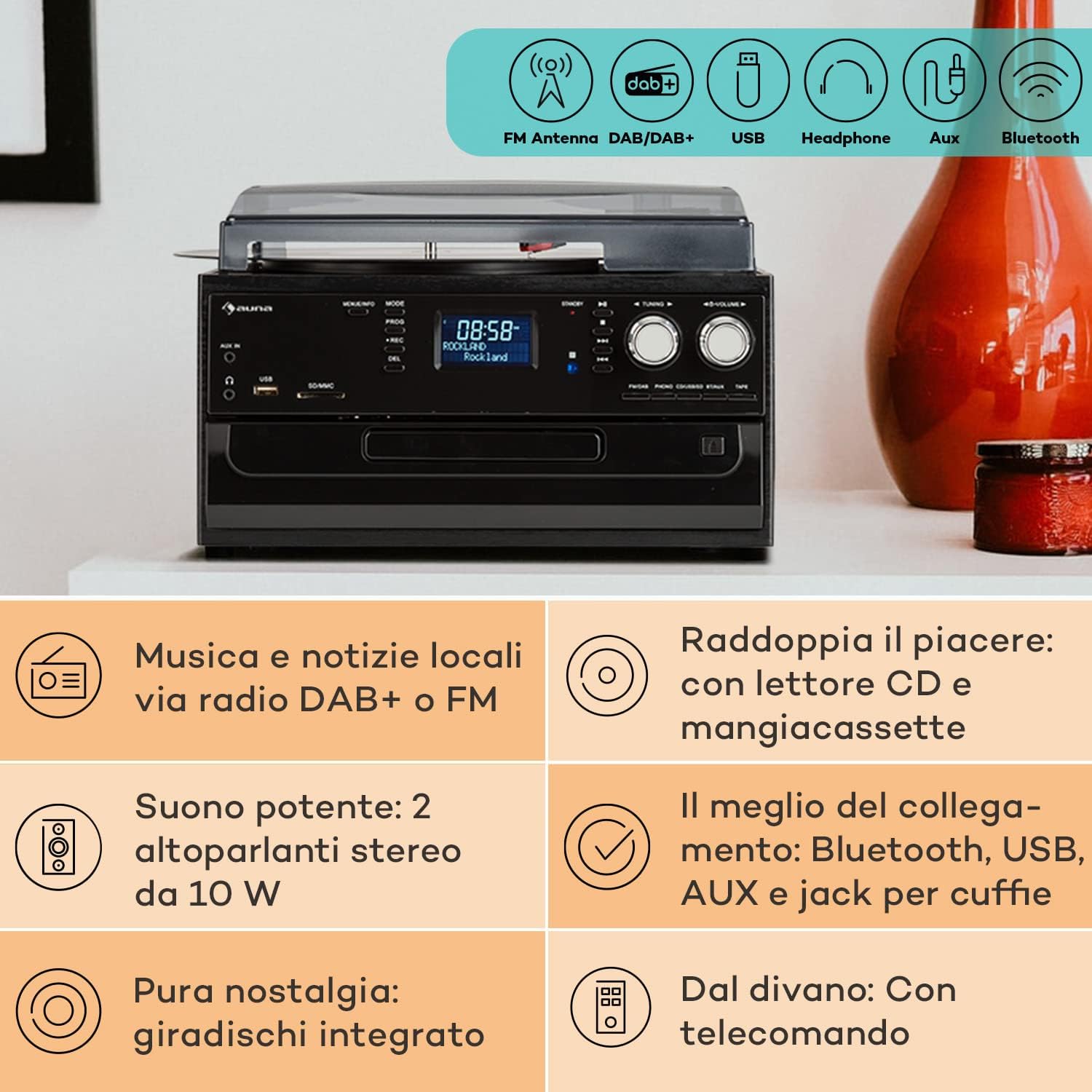
Image 4.2: Visual representation of the various connectivity options available on the Auna Sarah Ann, including FM/DAB+ radio, USB, headphone jack, AUX input, and Bluetooth.
5. സജ്ജീകരണം
5.1 അൺപാക്കിംഗും പ്ലേസ്മെന്റും
- യൂണിറ്റ് അതിന്റെ പാക്കേജിംഗിൽ നിന്ന് ശ്രദ്ധാപൂർവ്വം നീക്കം ചെയ്യുക.
- Place the unit on a stable, level surface, away from direct sunlight, heat sources, and excessive dust or moisture.
- യൂണിറ്റിന് ചുറ്റും മതിയായ വായുസഞ്ചാരം ഉറപ്പാക്കുക.
5.2 പവർ കണക്ഷൻ
Connect the power cable to the AC inlet on the back of the unit and then to a standard 230V, 50Hz wall outlet.
5.3 റിമോട്ട് കൺട്രോൾ ബാറ്ററി ഇൻസ്റ്റലേഷൻ
The remote control requires 2 x AAA batteries (not included). Open the battery compartment on the back of the remote control, insert the batteries according to the polarity indicators, and close the compartment.
5.4 ആന്റിന കണക്ഷൻ
The unit features an integrated FM antenna. For optimal DAB+ and FM radio reception, ensure the unit is placed in an area with good signal strength. Adjust the unit's position if reception is poor.
5.5 Connecting External Devices (Optional)
- ഹെഡ്ഫോണുകൾ: Plug 3.5mm headphones into the headphone jack on the front panel.
- External Audio Source (AUX IN): Connect an external audio device (e.g., MP3 player, smartphone) to the AUX IN jack on the front panel using a 3.5mm audio cable.
- ബാഹ്യ Amplifier/Speakers (RCA LINE OUT): Connect the RCA LINE OUT jacks on the rear of the unit to the audio input of an external amplifier or powered speakers using an RCA cable.
6. പ്രവർത്തന നിർദ്ദേശങ്ങൾ
6.1 അടിസ്ഥാന പ്രവർത്തനം
- അമർത്തുക പവർ യൂണിറ്റ് ഓണാക്കാനോ ഓഫാക്കാനോ ഉള്ള ബട്ടൺ.
- ഉപയോഗിക്കുക മോഡ് button on the unit or remote control to select the desired function (PHONO, CD, TAPE, USB, SD, AUX, FM, DAB, Bluetooth).
- ഉപയോഗിച്ച് വോളിയം ക്രമീകരിക്കുക വോളിയം knob on the unit or the വോൾ +/- റിമോട്ട് കൺട്രോളിലെ ബട്ടണുകൾ.
6.2 Turntable Operation (PHONO)

ചിത്രം 6.1: വിശദമായത് view of the turntable section, showing the platter, tonearm, and a vinyl record in place, highlighting the classic playback functionality.
- പൊടി കവർ ഉയർത്തുക.
- ടർടേബിൾ പ്ലാറ്ററിൽ ഒരു വിനൈൽ റെക്കോർഡ് സ്ഥാപിക്കുക.
- Select the appropriate speed (33, 45, or 78 RPM) using the speed selector switch. Use the 45 RPM adapter for singles if needed.
- ടോൺ ആം ലോക്ക് വിടുക.
- Gently lift the tonearm and position the stylus over the desired track of the record.
- ടോൺആം പതുക്കെ റെക്കോർഡിലേക്ക് താഴ്ത്തുക. പ്ലേബാക്ക് ആരംഭിക്കും.
- The automatic stop function will stop the turntable when the record finishes. To disable/enable this, refer to the specific switch on the unit (if present, usually labeled "AUTO STOP").
- At the end of playback, gently lift the tonearm, return it to its rest, and engage the tonearm lock.
6.3 CD Player Operation (CD)
- അമർത്തുക മോഡ് സിഡി മോഡ് തിരഞ്ഞെടുക്കാനുള്ള ബട്ടൺ.
- അമർത്തുക തുറക്കുക/അടയ്ക്കുക സിഡി ട്രേ തുറക്കാൻ ബട്ടൺ.
- ലേബൽ വശം മുകളിലേക്ക് അഭിമുഖീകരിക്കുന്ന തരത്തിൽ ഒരു സിഡി ട്രേയിൽ വയ്ക്കുക.
- അമർത്തുക തുറക്കുക/അടയ്ക്കുക ട്രേ അടയ്ക്കാൻ വീണ്ടും ബട്ടൺ അമർത്തുക. യൂണിറ്റ് സിഡി വായിക്കും.
- അമർത്തുക പ്ലേ/താൽക്കാലികമായി നിർത്തുക പ്ലേബാക്ക് ആരംഭിക്കുന്നതിനോ താൽക്കാലികമായി നിർത്തുന്നതിനോ.
- ഉപയോഗിക്കുക SKIP FORWARD/BACKWARD ട്രാക്കുകൾ നാവിഗേറ്റ് ചെയ്യുന്നതിനുള്ള ബട്ടണുകൾ.
- അമർത്തുക നിർത്തുക പ്ലേബാക്ക് അവസാനിപ്പിക്കാൻ.
6.4 Cassette Player Operation (TAPE)
- അമർത്തുക മോഡ് button to select TAPE mode.
- Insert a cassette tape into the side cassette slot.
- Use the cassette control buttons (PLAY, STOP/EJECT, FWD, REW) to operate the cassette player.
6.5 റേഡിയോ ഓപ്പറേഷൻ (DAB+/FM)
- അമർത്തുക മോഡ് FM അല്ലെങ്കിൽ DAB മോഡ് തിരഞ്ഞെടുക്കാനുള്ള ബട്ടൺ.
- FM മോഡിൽ, അമർത്തിപ്പിടിക്കുക ട്യൂണിംഗ് +/- buttons for automatic station search, or press briefly for manual tuning.
- In DAB mode, the unit will automatically scan for available stations. Use the ട്യൂണിംഗ് +/- buttons to navigate through the station list.
- To save a station, refer to the manual's specific instructions for preset functions (usually involving a "PROG" or "MEMORY" button).
6.6 ബ്ലൂടൂത്ത് പ്രവർത്തനം

Image 6.2: Demonstrates wireless music streaming via Bluetooth from a smartphone to the audio system, and the use of a USB drive for digital media playback.
- അമർത്തുക മോഡ് button to select Bluetooth mode. The display will show "BT" or "Bluetooth" and the unit will enter pairing mode, indicated by a flashing Bluetooth icon.
- നിങ്ങളുടെ ബ്ലൂടൂത്ത് പ്രവർത്തനക്ഷമമാക്കിയ ഉപകരണത്തിൽ (സ്മാർട്ട്ഫോൺ, ടാബ്ലെറ്റ് മുതലായവ), ബ്ലൂടൂത്ത് പ്രവർത്തനക്ഷമമാക്കി ലഭ്യമായ ഉപകരണങ്ങൾക്കായി തിരയുക.
- Select "Auna Sarah Ann" (or similar name) from the list of devices.
- Once paired, the Bluetooth icon will stop flashing, and you can play music from your device through the Auna Sarah Ann.
6.7 USB/SD Card Operation
- Insert a USB flash drive into the USB port or an SD card into the SD/MMC slot.
- അമർത്തുക മോഡ് button to select USB or SD mode. The unit will automatically detect and begin playing MP3 files.
- ഉപയോഗിക്കുക SKIP FORWARD/BACKWARD ട്രാക്കുകൾ നാവിഗേറ്റ് ചെയ്യുന്നതിനുള്ള ബട്ടണുകൾ.
- ഉപയോഗിക്കുക ഫോൾഡർ button on the remote to navigate through folders (if applicable).
- MP3 Recording: The unit supports recording from other sources (e.g., vinyl, CD, radio) to USB/SD. Press the REC button to start recording. Manual title division is available during recording. Refer to the full manual for detailed recording instructions.
6.8 AUX ഇൻപുട്ട് പ്രവർത്തനം
- Connect your external audio device to the AUX IN jack using a 3.5mm audio cable.
- അമർത്തുക മോഡ് AUX മോഡ് തിരഞ്ഞെടുക്കാൻ ബട്ടൺ.
- Control playback from your external device. The volume can be adjusted on the Auna Sarah Ann unit.
7. പരിപാലനം
7.1 യൂണിറ്റ് വൃത്തിയാക്കൽ
- വൃത്തിയാക്കുന്നതിന് മുമ്പ് എല്ലായ്പ്പോഴും പവർ ഔട്ട്ലെറ്റിൽ നിന്ന് യൂണിറ്റ് അൺപ്ലഗ് ചെയ്യുക.
- പുറംഭാഗങ്ങൾ തുടയ്ക്കാൻ മൃദുവായതും ഉണങ്ങിയതുമായ തുണി ഉപയോഗിക്കുക.
- അബ്രാസീവ് ക്ലീനറുകൾ, മെഴുക് അല്ലെങ്കിൽ ലായകങ്ങൾ എന്നിവ ഉപയോഗിക്കരുത്, കാരണം അവ ഫിനിഷിന് കേടുവരുത്തും.
- For the dust cover, use a soft cloth and a mild, non-abrasive cleaner if necessary.
7.2 Turntable Stylus Care
- സ്റ്റൈലസ് (സൂചി) ഒരു അതിലോലമായ ഘടകമാണ്. അത് വളരെ ശ്രദ്ധയോടെ കൈകാര്യം ചെയ്യുക.
- മൃദുവായ ബ്രഷ് ഉപയോഗിച്ച് സ്റ്റൈലസ് ഇടയ്ക്കിടെ വൃത്തിയാക്കുക, പിന്നിൽ നിന്ന് മുന്നിലേക്ക് സൌമ്യമായി ബ്രഷ് ചെയ്യുക.
- A worn stylus can damage records and degrade sound quality. Replace the stylus when signs of wear are apparent (e.g., distorted sound, skipping).
7.3 റെക്കോർഡ് കെയർ
- റെക്കോർഡുകൾ വൃത്തിയായും പൊടി രഹിതമായും സൂക്ഷിക്കുക. ഓരോ കളിക്കും മുമ്പ് ഒരു റെക്കോർഡ് ബ്രഷ് ഉപയോഗിക്കുക.
- Store records vertically in their sleeves, away from heat and direct sunlight.
8. പ്രശ്നപരിഹാരം
If you experience problems with your Auna Sarah Ann, please consult the following table before seeking professional service.
| പ്രശ്നം | സാധ്യമായ കാരണം | പരിഹാരം |
|---|---|---|
| ശക്തിയില്ല | പവർ കേബിൾ ബന്ധിപ്പിച്ചിട്ടില്ല; പവർ ഔട്ട്ലെറ്റ് സജീവമല്ല. | പവർ കേബിൾ സുരക്ഷിതമായി ബന്ധിപ്പിച്ചിട്ടുണ്ടെന്ന് ഉറപ്പാക്കുക; മറ്റൊരു പവർ ഔട്ട്ലെറ്റ് പരീക്ഷിക്കുക. |
| ശബ്ദമില്ല | ശബ്ദം വളരെ കുറവാണ്; തെറ്റായ മോഡ് തിരഞ്ഞെടുത്തു; ഹെഡ്ഫോണുകൾ കണക്റ്റ് ചെയ്തു. | Increase volume; Select correct input mode; Disconnect headphones if using speakers. |
| ടേണബിൾ കറങ്ങുന്നില്ല | Unit not in PHONO mode; Auto-stop engaged and no record playing. | Select PHONO mode; Place a record and lower the tonearm. |
| മോശം റേഡിയോ സ്വീകരണം | Weak signal; Antenna position. | Adjust unit position for better signal; Perform a new auto-scan for DAB+ stations. |
| ബ്ലൂടൂത്ത് ജോടിയാക്കൽ പരാജയം | Device too far; Bluetooth not enabled on external device; Unit not in pairing mode. | Ensure devices are within range; Enable Bluetooth on your device; Select Bluetooth mode on the Auna Sarah Ann. |
| റിമോട്ട് കൺട്രോൾ പ്രവർത്തിക്കുന്നില്ല | ബാറ്ററികൾ തീർന്നു അല്ലെങ്കിൽ തെറ്റായി ചേർത്തു; റിമോട്ടിനും യൂണിറ്റിനും ഇടയിലുള്ള തടസ്സം. | Replace batteries; Check battery polarity; Remove any obstructions. |
ഈ പരിഹാരങ്ങൾ പരീക്ഷിച്ചതിന് ശേഷവും പ്രശ്നം നിലനിൽക്കുകയാണെങ്കിൽ, ദയവായി ഉപഭോക്തൃ പിന്തുണയുമായി ബന്ധപ്പെടുക.
9 സ്പെസിഫിക്കേഷനുകൾ
| ഫീച്ചർ | വിശദാംശങ്ങൾ |
|---|---|
| ബ്രാൻഡ് | ഔന |
| മോഡലിൻ്റെ പേര് | Sarah Ann |
| ഉൽപ്പന്ന അളവുകൾ (L x W x H) | 30 x 32.5 x 21.5 സെ.മീ |
| ഭാരം | 4.55 കി.ഗ്രാം |
| വൈദ്യുതി വിതരണം | 230V, 50Hz |
| ടേൺ ചെയ്യാവുന്ന വേഗത | 33 1/3, 45, 78 ആർപിഎം |
| മോട്ടോർ തരം | നേരിട്ടുള്ള ഡ്രൈവ് |
| റേഡിയോ ട്യൂണർ | DAB+, FM |
| ബ്ലൂടൂത്ത് പിന്തുണ | അതെ |
| കണക്റ്റിവിറ്റി | USB Input, SD Input, AUX Input (3.5mm), Headphone Output (3.5mm), RCA Line Out |
| ഓഡിയോ put ട്ട്പുട്ട് മോഡ് | സ്റ്റീരിയോ |
| റിമോട്ട് കൺട്രോൾ ബാറ്ററികൾ | 2 x AAA (ഉൾപ്പെടുത്തിയിട്ടില്ല) |

Image 9.1: Visual representation of the unit's dimensions (length, width, height) and a summary of its various input/output connections.
10. വാറൻ്റിയും പിന്തുണയും
10.1 വാറൻ്റി വിവരങ്ങൾ
Your Auna Sarah Ann audio system comes with a manufacturer's warranty. Please refer to the warranty card or documentation included with your purchase for specific terms, conditions, and duration of the warranty. Keep your proof of purchase for warranty claims.
10.2 ഉപഭോക്തൃ പിന്തുണ
For technical assistance, troubleshooting beyond this manual, or warranty inquiries, please contact Auna customer support. Contact details can typically be found on the Auna webസൈറ്റ് അല്ലെങ്കിൽ ഉൽപ്പന്ന പാക്കേജിംഗിൽ.