
ആമുഖം
The Radiolink R6F is a 2.4Ghz 6-channel RC receiver designed for car and boat surface remote controllers. It features excellent anti-interference capabilities with a pseudo-random FHSS algorithm, offering a control distance of up to 1300 feet (400 meters). This receiver provides a superb response with a high resolution ratio of 4096, ensuring stable signal output for all 6 channels. It is suitable for various RC vehicles including rock crawlers, monster trucks, buggies, and more. The R6F also includes anti-polarity safe protection, preventing damage if polarity is accidentally reversed, and supports 3.0-15V DC for high voltage servos. Its compact size (1.38 x 0.5 x 0.78 inches) and light weight (0.21 oz) make it ideal for most RC car receiver boxes. Please note: This R6F model does not include a built-in gyroscope.

Figure 1: Radiolink R6F Receiver Key Features
സജ്ജമാക്കുക
1. റിസീവർ ഓവർview കണക്ഷനുകളും
Familiarize yourself with the receiver's layout and connection ports. Ensure all connections are made correctly to avoid damage.
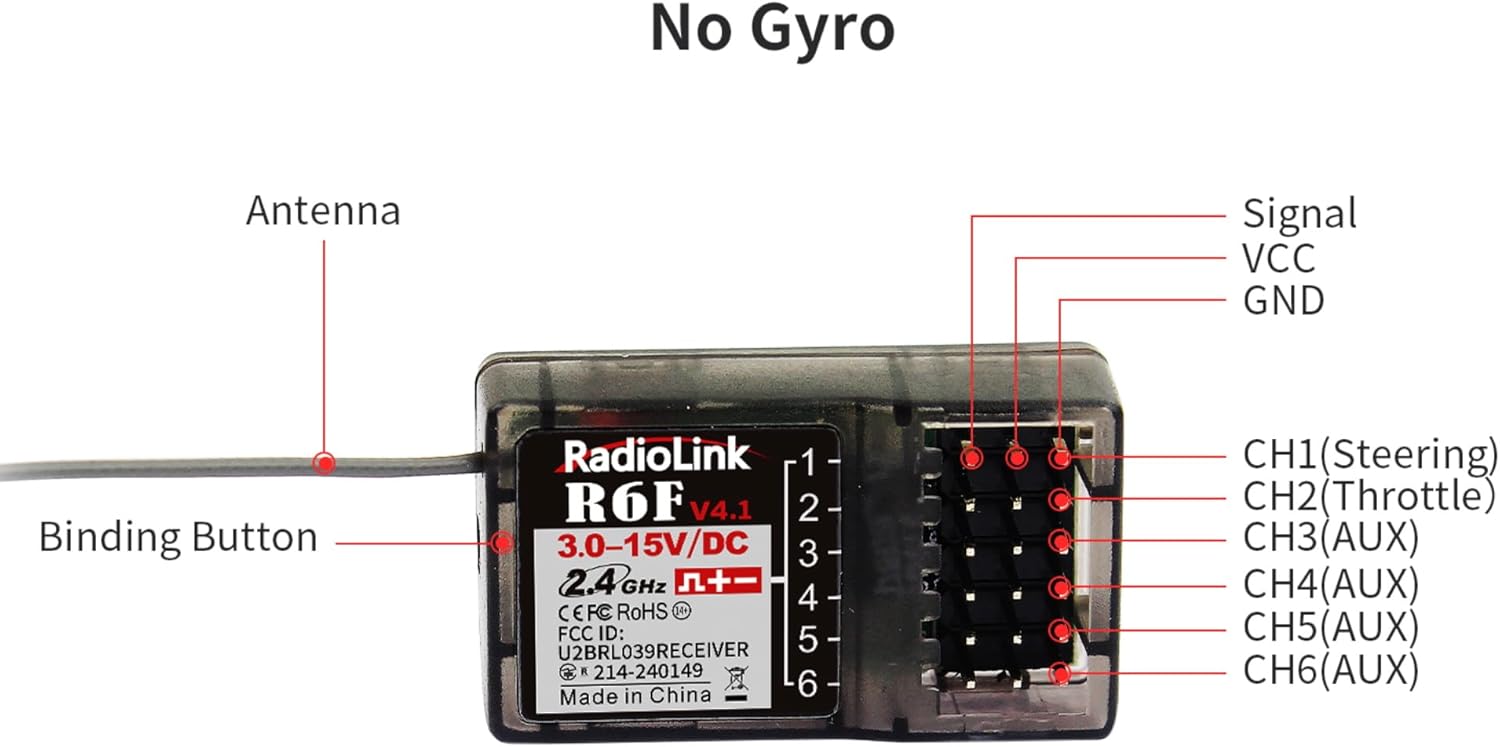
Figure 2: Radiolink R6F Receiver Pinout and Components
- ആൻ്റിന: Ensure the antenna is positioned correctly for optimal signal reception.
- Binding Button: Used to initiate the binding process with your transmitter.
- CH1 (Steering): Connect your steering servo here.
- CH2 (Throttle): Connect your ESC/throttle servo here.
- CH3-CH6 (AUX): Auxiliary channels for additional functions (e.g., lights, winches).
- Signal, VCC, GND: Standard pin configuration for servo/ESC connections.
2. Binding Process
The R6F receiver features a simple press-to-bind function, eliminating the need for a bind plug. Follow these steps to bind your receiver to a compatible Radiolink transmitter:
- Power on your Radiolink transmitter. Ensure the green LED on the transmitter is always on. If not, enter the parameter menu and turn off RF mode.
- Connect the R6F receiver to a power source (3.0-15V DC). The LED indicator on the receiver will flash slowly, indicating it is not yet bound.
- Long press the binding button on the R6F receiver (refer to Figure 2 for location) until the LED indicator flashes quickly. This means the binding process is ongoing.
- Release the binding button. Once the LED stops flashing quickly and remains solid, the binding is complete.
- Verify successful binding by checking for a signal tower icon on your transmitter's LCD screen (if applicable).

Figure 3: R6F Binding Button
Binding Demonstration Video (R6F)
Video 1: How to Bind the Radiolink R6F Receiver with Your Radio Correctly
പ്രവർത്തിക്കുന്നു
1. Signal Output Modes (PWM/SBUS)
The R6F receiver supports two signal output modes: PWM (Pulse Width Modulation) and SBUS (Serial Bus). The current signal output mode is indicated by the LED color on the receiver:
- Blue/Purple LED: Indicates SBUS signal output.
- ചുവന്ന LED: Indicates PWM signal output.
To switch between signal output modes, short press the binding button twice within one second. The LED color will change to reflect the new mode.
Signal Output Mode Change Demonstration Video (R9DS)
Video 2: How to Change Signal Output Mode (Demonstrated with R9DS receiver, process is similar for R6F)
2. Compatible Transmitters
The Radiolink R6F receiver is compatible with the following Radiolink transmitters:
- RC4GS V2/RC4GS V3
- RC6GS V2/RC6GS V3
- RC8X
- T12D/T16D
- T8S/T8FB
Note: The R6F is not compatible with non-Radiolink transmitters.

Figure 4: Compatible Radiolink Transmitter Models
മെയിൻ്റനൻസ്
To ensure the longevity and optimal performance of your Radiolink R6F receiver, follow these maintenance guidelines:
- ഉണക്കി സൂക്ഷിക്കുക: Avoid exposing the receiver to moisture or humidity, as this can damage internal components. The R6F is not waterproof.
- ശുചിത്വം: Regularly clean the receiver and its connections to prevent dust and debris buildup. Use a soft, dry brush or compressed air.
- കണക്ഷൻ പരിശോധന: Periodically inspect all wiring and connectors for signs of wear, corrosion, or loose connections. Secure any loose wires.
- ആൻ്റിന പ്ലേസ്മെൻ്റ്: Ensure the receiver antenna is not bent sharply or obstructed by metal parts of your RC vehicle, which can reduce range and signal quality.
- വാല്യംtagഇ ശ്രേണി: Always operate the receiver within its specified voltagഇ റേഞ്ച് 3.0-15V DC.
ട്രബിൾഷൂട്ടിംഗ്
If you encounter issues with your Radiolink R6F receiver, consider the following troubleshooting steps:
- Receiver LED Not Solid After Binding: If the LED continues to flash slowly, repeat the binding process carefully. Ensure your transmitter is in the correct mode and powered on.
- No Control/Intermittent Signal:
- Check all wiring connections between the receiver, ESC, and servos.
- Ensure the receiver antenna is not damaged, properly extended, and free from obstruction.
- Verify that the transmitter and receiver are within the specified control range (up to 1300 feet).
- Check for potential sources of interference (e.g., other 2.4Ghz devices, large metal objects).
- തെറ്റായ സെർവോ ചലനം: Check the signal output mode (PWM/SBUS) of the receiver and ensure it matches your setup. Refer to the
Ask a question about this manual
Ask about setup, troubleshooting, compatibility, parts, safety, or missing instructions. Manuals+ will review the question and use this page’s manual context to help answer it.