
ആമുഖം
This manual provides essential information for setting up, operating, maintaining, and troubleshooting your vivo V30 5G smartphone. Please read this guide thoroughly to ensure proper use and to maximize the device's capabilities. The vivo V30 5G features a powerful Qualcomm Snapdragon 7 Gen 3 processor, a vibrant 6.78-inch FHD+ AMOLED display, advanced dual 50MP rear cameras, and a long-lasting 5000 mAh battery with 80W fast charging.
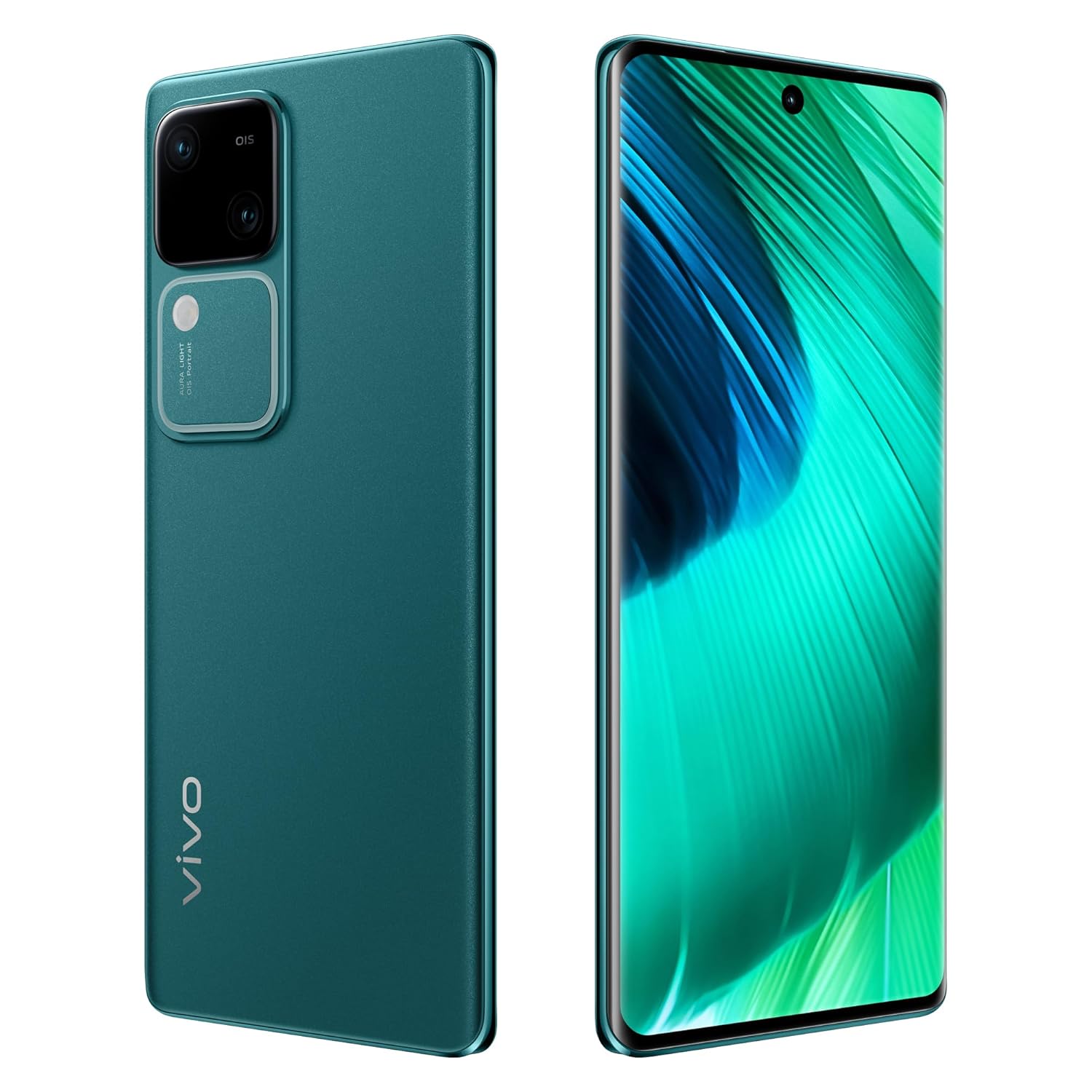
Image: The vivo V30 5G smartphone in Peacock Green, showcasing its sleek design, large display, and the prominent dual camera system on the rear.
സജ്ജീകരണ ഗൈഡ്
1. അൺബോക്സിംഗും പ്രാരംഭ പരിശോധനയും
പാക്കേജിംഗിൽ നിന്ന് എല്ലാ ഇനങ്ങളും ശ്രദ്ധാപൂർവ്വം നീക്കം ചെയ്യുക. ഇനിപ്പറയുന്ന ഘടകങ്ങൾ ഉണ്ടെന്ന് ഉറപ്പാക്കുക:
- vivo V30 5G Smartphone
- അഡാപ്റ്റർ
- USB കേബിൾ (ടൈപ്പ്-സി)
- ഫോൺ കേസ്
- സ്ക്രീൻ പ്രൊട്ടക്ടർ (മുമ്പ് പ്രയോഗിച്ചതോ ബോക്സിൽ ഉള്ളതോ)
- സിം ട്രേ എജക്ടർ
2. സിം കാർഡ് ഇൻസ്റ്റാളേഷൻ
- നിങ്ങളുടെ ഉപകരണത്തിന്റെ വശത്ത് സിം കാർഡ് ട്രേ കണ്ടെത്തുക.
- ട്രേയുടെ അടുത്തുള്ള ചെറിയ ദ്വാരത്തിലേക്ക് സിം ട്രേ എജക്റ്റർ ഉപകരണം തിരുകുക, ട്രേ പുറത്തേക്ക് വരുന്നത് വരെ സൌമ്യമായി അമർത്തുക.
- Place your Nano-SIM cards into the designated slots on the tray. This device supports Dual SIM functionality.
- സിം ട്രേ ഫോണിലേക്ക് ക്ലിക്ക് ചെയ്യുന്നത് വരെ ശ്രദ്ധാപൂർവ്വം വീണ്ടും ചേർക്കുക.
3. പ്രാരംഭ പവർ ഓണും സജ്ജീകരണവും
- Press and hold the Power button on the side of the phone until the vivo logo appears.
- Follow the on-screen instructions to complete the initial setup, including language selection, Wi-Fi connection, Google account setup, and Funtouch OS 14 preferences.
4 ഉപകരണം ചാർജ് ചെയ്യുന്നു
Connect the USB Type-C cable to the phone's charging port and the adapter. Plug the adapter into a power outlet. The vivo V30 5G supports 80W fast charging. It is recommended to fully charge the device before first use.
നിങ്ങളുടെ ഉപകരണം പ്രവർത്തിപ്പിക്കുന്നു
1. അടിസ്ഥാന നാവിഗേഷൻ
- ടച്ച്സ്ക്രീൻ ആംഗ്യങ്ങൾ: Swipe, tap, pinch-to-zoom, and long-press are standard gestures for navigating the Funtouch OS 14 interface.
- പവർ ബട്ടൺ: Press to wake/sleep the screen. Long-press to power off or restart.
- വോളിയം ബട്ടണുകൾ: മീഡിയ വോളിയം, കോൾ വോളിയം, അറിയിപ്പ് വോളിയം എന്നിവ ക്രമീകരിക്കുക.
2. ക്യാമറ ഉപയോഗം
The vivo V30 5G features a versatile camera system:
- പിൻ ക്യാമറകൾ: Dual 50MP + 50MP sensors for high-resolution photos and videos. Optical Image Stabilization (OIS) enhances clarity.
- മുൻ ക്യാമറ: 50MP sensor for clear selfies and video calls.
- Aura Light: Utilize the integrated Aura Light for improved portrait photography in low-light conditions.
- ഷൂട്ടിംഗ് മോഡുകൾ: Access various modes like Portrait, Night, Panorama, and Pro mode through the camera application.
3. കണക്റ്റിവിറ്റി
- വൈഫൈ: ക്രമീകരണങ്ങൾ > നെറ്റ്വർക്കും ഇന്റർനെറ്റും > വൈ-ഫൈ വഴി വയർലെസ് നെറ്റ്വർക്കുകളിലേക്ക് കണക്റ്റുചെയ്യുക.
- ബ്ലൂടൂത്ത്: ക്രമീകരണങ്ങൾ > കണക്റ്റഡ് ഉപകരണങ്ങൾ > ബ്ലൂടൂത്ത് വഴി ഹെഡ്ഫോണുകൾ അല്ലെങ്കിൽ സ്പീക്കറുകൾ പോലുള്ള ബ്ലൂടൂത്ത് ഉപകരണങ്ങളുമായി ജോടിയാക്കുക.
- മൊബൈൽ ഡാറ്റ: Enable or disable cellular data via Quick Settings or Settings > Network & internet > SIMs.
- യുഎസ്ബി ടൈപ്പ്-സി: Use the USB-C port for charging, data transfer, and connecting accessories.
4. സുരക്ഷാ സവിശേഷതകൾ
The device includes Face Recognition for secure unlocking. Set it up via Settings > Security > Face.
പരിപാലനവും പരിചരണവും
1. നിങ്ങളുടെ ഉപകരണം വൃത്തിയാക്കൽ
നിങ്ങളുടെ ഫോണിന്റെ സ്ക്രീനും ബോഡിയും വൃത്തിയാക്കാൻ മൃദുവായ, ലിന്റ് രഹിത തുണി ഉപയോഗിക്കുക. കഠിനമായ രാസവസ്തുക്കളോ ഉരച്ചിലുകളോ ഉള്ള വസ്തുക്കൾ ഉപയോഗിക്കുന്നത് ഒഴിവാക്കുക. ഉപകരണത്തിൽ അമിതമായ ഈർപ്പം ഉണ്ടാകരുത്.
2. സോഫ്റ്റ്വെയർ അപ്ഡേറ്റുകൾ
മികച്ച പ്രകടനം, സുരക്ഷ, പുതിയ സവിശേഷതകളിലേക്കുള്ള ആക്സസ് എന്നിവ ഉറപ്പാക്കാൻ സോഫ്റ്റ്വെയർ അപ്ഡേറ്റുകൾ പതിവായി പരിശോധിച്ച് ഇൻസ്റ്റാൾ ചെയ്യുക. ക്രമീകരണങ്ങൾ > സിസ്റ്റം > സിസ്റ്റം അപ്ഡേറ്റ് എന്നതിലേക്ക് പോകുക.
3. ബാറ്ററി പരിചരണം
- ബാറ്ററിയുടെ ആയുസ്സ് കുറയ്ക്കുമെന്നതിനാൽ തീവ്രമായ താപനില ഒഴിവാക്കുക.
- Use only the original vivo charger and cable for optimal charging and safety.
- 100% ചാർജ് ആയതിനു ശേഷവും ഫോൺ കൂടുതൽ നേരം ചാർജ് ചെയ്യാൻ വയ്ക്കരുത്.
ട്രബിൾഷൂട്ടിംഗ്
If you encounter issues with your vivo V30 5G, try the following solutions:
- ഉപകരണം ഓണാക്കുന്നില്ല: ബാറ്ററി ചാർജ്ജ് ചെയ്തിട്ടുണ്ടെന്ന് ഉറപ്പാക്കുക. ചാർജർ കണക്റ്റ് ചെയ്ത് വീണ്ടും പവർ ചെയ്യാൻ ശ്രമിക്കുന്നതിന് മുമ്പ് കുറച്ച് മിനിറ്റ് കാത്തിരിക്കുക.
- സ്ക്രീൻ പ്രതികരിക്കുന്നില്ല: Try restarting the device by holding the Power button for approximately 10-15 seconds.
- ആപ്പുകൾ ക്രാഷാകുന്നു: പ്രശ്നമുള്ള ആപ്പിന്റെ കാഷെ മായ്ക്കുക (ക്രമീകരണങ്ങൾ > ആപ്പുകൾ > [ആപ്പ് നാമം] > സംഭരണവും കാഷെയും > കാഷെ മായ്ക്കുക). പ്രശ്നം നിലനിൽക്കുകയാണെങ്കിൽ, ആപ്പ് വീണ്ടും ഇൻസ്റ്റാൾ ചെയ്യാൻ ശ്രമിക്കുക.
- മോശം നെറ്റ്വർക്ക് സിഗ്നൽ: Check your SIM card installation. Try restarting the phone or toggling Airplane Mode on and off. Ensure you are in an area with network coverage.
- ചാർജിംഗ് പ്രശ്നങ്ങൾ: Verify that the charging cable and adapter are securely connected and undamaged. Try a different power outlet.
For more complex issues, refer to the official vivo support webസൈറ്റ് അല്ലെങ്കിൽ ഉപഭോക്തൃ സേവനവുമായി ബന്ധപ്പെടുക.
സാങ്കേതിക സവിശേഷതകൾ
| ഫീച്ചർ | സ്പെസിഫിക്കേഷൻ |
|---|---|
| ബ്രാൻഡ് | vivo |
| മോഡൽ | V30 5G |
| ഓപ്പറേറ്റിംഗ് സിസ്റ്റം | Funtouch OS 14 Global (Based on Android 14) |
| പ്രോസസ്സർ | ക്വാൽകോം സ്നാപ്ഡ്രാഗൺ 7 ജെൻ 3 |
| സിപിയു വേഗത | 2.2 GHz |
| റാം | 8 ജിബി |
| ആന്തരിക സംഭരണം | 128 ജിബി |
| ഡിസ്പ്ലേ വലിപ്പം | 17.22 സെ.മീ (6.78 ഇഞ്ച്) |
| ഡിസ്പ്ലേ തരം | FHD+ AMOLED |
| ഡിസ്പ്ലേ റെസല്യൂഷൻ | 2800 x 1260 പിക്സലുകൾ |
| പിൻ ക്യാമറ | Dual 50MP + 50MP (with OIS) |
| മുൻ ക്യാമറ | 50 എം.പി |
| ബാറ്ററി ശേഷി | 5000 mAh |
| ചാർജിംഗ് | 80W ഫാസ്റ്റ് ചാർജിംഗ് |
| സിം കാർഡ് സ്ലോട്ട് | ഡ്യുവൽ സിം |
| കണക്റ്റർ തരം | യുഎസ്ബി ടൈപ്പ് സി |
| ബയോമെട്രിക് സുരക്ഷ | മുഖം തിരിച്ചറിയൽ |
| അളവുകൾ (L x W x H) | 16.4 x 7.5 x 0.7 സെൻ്റീമീറ്റർ |
| ഭാരം | 186 ഗ്രാം |
| മോഡൽ വർഷം | 2024 |
വാറൻ്റി വിവരങ്ങൾ
The vivo V30 5G comes with a 1 വർഷത്തെ നിർമ്മാതാവിൻ്റെ വാറൻ്റി from the date of purchase. This warranty covers manufacturing defects. Please retain your proof of purchase for warranty claims. For detailed terms and conditions, refer to the warranty card included in your product packaging or visit the official vivo webസൈറ്റ്.
ഉപഭോക്തൃ പിന്തുണ
For technical assistance, service, or further inquiries, please contact vivo customer support using the following information:
നിർമ്മാതാവ്: vivo Mobile India Pvt Ltd
വിലാസം: Tech-1 and Tech-2, World Trade Centre, Plot no-TZ-13A, Techzone (I.T. Park), Greater Noida, Uttar Pradesh, India. Pin - 201308
Please visit the official vivo website for the most up-to-date contact details, service center locations, and online support resources.