
Gigaset E290A
Gigaset E290A Cordless Phone with Answering Machine User Manual
Model: E290A | Brand: Gigaset
ആമുഖം
The Gigaset E290A is a cordless telephone designed for ease of use, featuring an integrated answering machine. It combines a modern design with functions specifically developed for users with visual, auditory, or tactile needs. The large keys, highly readable backlit display, and ergonomic handset shape ensure comfortable operation for all ages. This manual provides essential information for setting up, operating, and maintaining your Gigaset E290A.
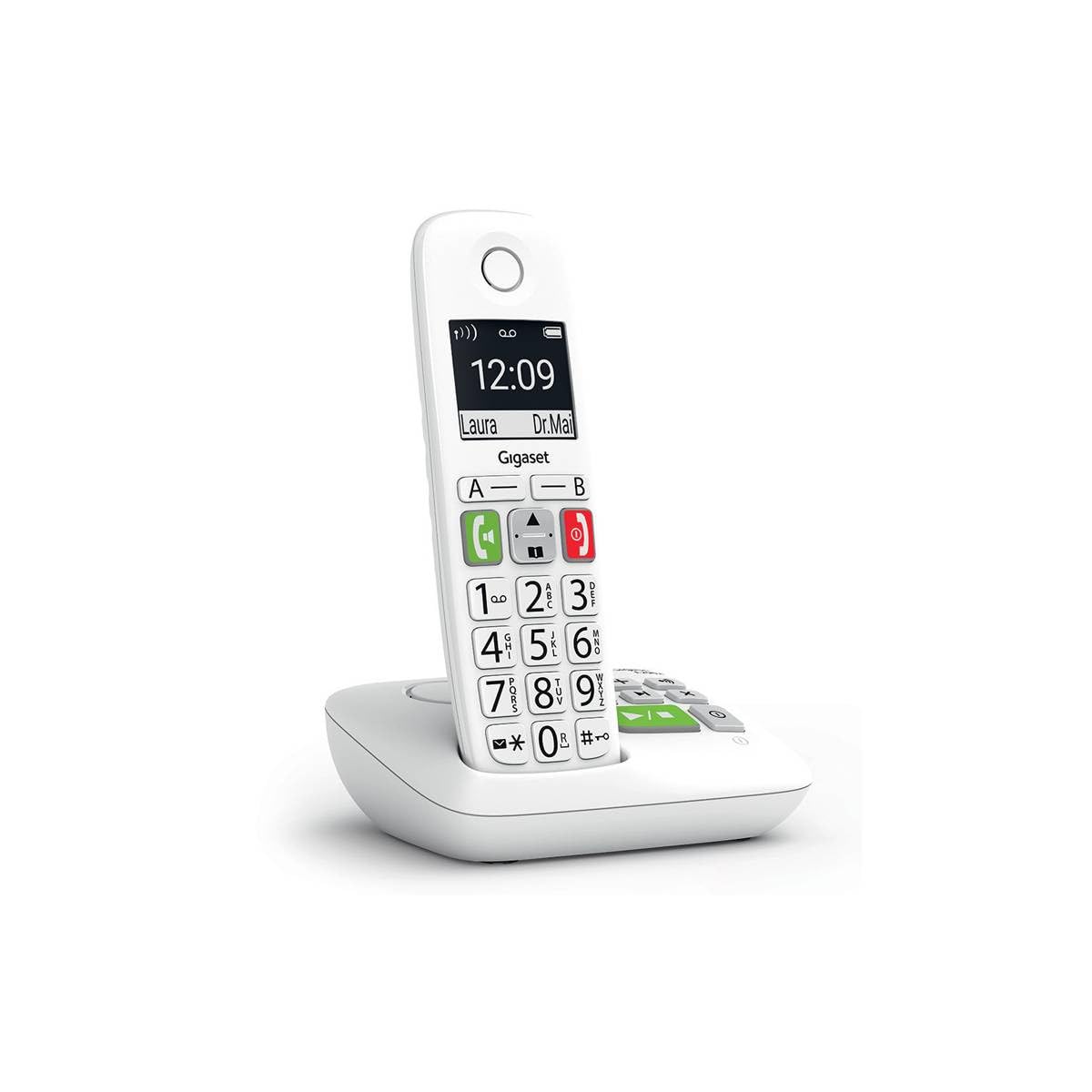
Image: The Gigaset E290A cordless phone, showing the handset and base station.
സുരക്ഷാ വിവരങ്ങൾ
- Use only the power adapter and telephone cord supplied with the device.
- ഉയർന്ന താപനില, നേരിട്ടുള്ള സൂര്യപ്രകാശം, ഉയർന്ന ഈർപ്പം എന്നിവയ്ക്ക് ഫോൺ വിധേയമാക്കരുത്.
- Avoid placing the phone near heat sources or in areas with strong electromagnetic fields.
- Use only approved rechargeable batteries. Do not dispose of batteries in fire.
- ഉപകരണം തുറക്കരുത് casing. Repairs should only be performed by authorized service personnel.
- ഫോൺ കുട്ടികൾക്ക് ലഭ്യമാകാതെ സൂക്ഷിക്കുക.
പാക്കേജ് ഉള്ളടക്കം
നിങ്ങളുടെ പാക്കേജിൽ ഇനിപ്പറയുന്ന ഇനങ്ങൾ അടങ്ങിയിട്ടുണ്ടെന്ന് പരിശോധിക്കുക:
- 1 Gigaset E290A Handset
- 1 Gigaset E290A Base Station with integrated answering machine
- 1 Power Adapter for the base station
- 1 ടെലിഫോൺ ലൈൻ കോർഡ്
- 2 AAA റീചാർജ് ചെയ്യാവുന്ന ബാറ്ററികൾ
- 1 ബാറ്ററി കവർ
- ഈ ഉപയോക്തൃ മാനുവൽ
സജ്ജമാക്കുക
1 ബേസ് സ്റ്റേഷൻ ബന്ധിപ്പിക്കുന്നു
- Connect the power adapter to the base station and plug it into a wall outlet.
- Connect the telephone line cord to the base station and plug the other end into your telephone wall socket.
- Place the base station on a flat, stable surface, away from other electronic devices that might cause interference.

Image: The Gigaset E290A base station, illustrating the connection points for power and telephone line.
2. Inserting Batteries into the Handset
- ഹാൻഡ്സെറ്റിന്റെ പിൻഭാഗത്തുള്ള ബാറ്ററി കമ്പാർട്ട്മെന്റ് കവർ തുറക്കുക.
- ശരിയായ പോളാരിറ്റി (+/-) ഉറപ്പാക്കിക്കൊണ്ട്, വിതരണം ചെയ്ത രണ്ട് AAA റീചാർജ് ചെയ്യാവുന്ന ബാറ്ററികൾ ഇടുക.
- ബാറ്ററി കമ്പാർട്ട്മെൻ്റ് കവർ അടയ്ക്കുക.
- Place the handset on the base station to charge. The display will indicate charging status. Allow at least 8 hours for the initial charge.
3. ഹാൻഡ്സെറ്റ് രജിസ്റ്റർ ചെയ്യൽ
The handset is usually pre-registered to the base station. If not, or if you are adding an additional handset:
- On the base station, press and hold the registration/paging key for approximately 3 seconds. The base station will enter registration mode.
- On the handset, navigate to the menu, select ക്രമീകരണങ്ങൾ, പിന്നെ രജിസ്ട്രേഷൻ, and follow the on-screen prompts. You may need to enter a PIN (default is 0000).
- Once registered, the handset display will show the internal number (e.g., "HS 1").
പ്രവർത്തന നിർദ്ദേശങ്ങൾ
കോളുകൾ ചെയ്യലും സ്വീകരിക്കലും
- ഒരു കോൾ ചെയ്യുന്നു: Enter the phone number using the large keypad and press the green call key (📞).
- ഒരു കോൾ സ്വീകരിക്കുന്നു: When the phone rings, press the green call key (📞) ഉത്തരം നൽകാൻ.
- ഒരു കോൾ അവസാനിപ്പിക്കുന്നു: Press the red end call key (⛔).
- ഹാൻഡ്സ് ഫ്രീ കോളിംഗ്: During a call, press the hands-free key (🔊) to activate the speakerphone.

Image: Close-up of the Gigaset E290A handset, highlighting the large, easy-to-read keys for dialing.
Using the Answering Machine
The Gigaset E290A features an integrated digital answering machine with up to 30 minutes of recording time.
- സജീവമാക്കൽ/നിർജ്ജീവമാക്കൽ: Access the answering machine menu on the handset or press the dedicated key on the base station.
- സന്ദേശങ്ങൾ പ്ലേ ചെയ്യുന്നു: Press the play key on the base station or navigate through the handset menu.
- ഒരു പ്രഖ്യാപനം റെക്കോർഡുചെയ്യുന്നു: Follow the menu prompts to record your personal greeting.
ഫോൺബുക്ക്
Store up to 150 contacts in the phonebook.
- ഒരു കോൺടാക്റ്റ് ചേർക്കുന്നു: Go to the phonebook menu, select "New Entry," and enter the name and number.
- Quick Dial Keys: The phone has two direct access keys (A and B) for quickly calling two pre-stored numbers. Assign these numbers via the phonebook settings.
കോൾ തടയൽ
Block unwanted calls by adding up to 32 numbers to a blacklist. You can also block anonymous calls.
- Adding to Blacklist: From the call list or phonebook, select a number and choose the "Block" option.
- Blocking Anonymous Calls: Enable this feature in the call blocking settings to automatically reject calls from hidden numbers.

Image: Illustration of the call blocking feature on the Gigaset E290A, showing how to manage unwanted calls.
ഓഡിയോ ക്രമീകരണങ്ങൾ
- Audio Boost Mode: Activate this mode for an even louder volume, facilitating high-definition listening.
- ശ്രവണസഹായി അനുയോജ്യത: The phone is compatible with hearing aids. You can also adjust the frequency range to suit personal hearing capabilities.
പ്രദർശന ക്രമീകരണങ്ങൾ
- Jumbo Mode: In Jumbo mode, all dialed digits appear in large characters on the 34 x 37 mm backlit black and white display, which has increased contrast for optimal readability.
- മെനു നാവിഗേഷൻ: Menu navigation is also simplified with an adapted character size.

Image: The Gigaset E290A display showing large characters in Jumbo Mode for enhanced readability.
മെയിൻ്റനൻസ്
- വൃത്തിയാക്കൽ: ഒരു സോഫ്റ്റ്, ഡി ക്ലീനർ ഉപയോഗിച്ച് ഹാൻഡ്സെറ്റും ബേസ് സ്റ്റേഷനും വൃത്തിയാക്കുക.amp തുണി. ഉരച്ചിലുകളുള്ള ക്ലീനറുകളോ ലായകങ്ങളോ ഉപയോഗിക്കരുത്.
- ബാറ്ററി കെയർ: To maintain battery life, fully discharge and recharge the handset batteries periodically. If the phone will not be used for an extended period, remove the batteries.
- സംഭരണം: ഉപയോഗത്തിലില്ലാത്തപ്പോൾ ഫോൺ തണുത്തതും വരണ്ടതുമായ സ്ഥലത്ത് സൂക്ഷിക്കുക.
ട്രബിൾഷൂട്ടിംഗ്
| പ്രശ്നം | സാധ്യമായ കാരണം | പരിഹാരം |
|---|---|---|
| ഹാൻഡ്സെറ്റിൽ ഡിസ്പ്ലേ ഇല്ല | Batteries are empty or incorrectly inserted. | Charge batteries for at least 8 hours. Check battery polarity. |
| ഡയൽ ടോൺ ഇല്ല | ടെലിഫോൺ ലൈൻ കോർഡ് ബന്ധിപ്പിച്ചിട്ടില്ല അല്ലെങ്കിൽ തകരാറിലായി. | Check telephone line connection to base and wall socket. Try a different cord. |
| Handset cannot register | Base station not in registration mode or incorrect PIN. | Ensure base is in registration mode. Re-enter default PIN (0000). |
| മോശം ശബ്ദ നിലവാരം | Handset too far from base, interference, or low battery. | Move closer to the base. Avoid other electronic devices. Charge handset. |
| Difficulty programming features | Complex menu navigation or unfamiliarity with settings. | Refer to the specific section in this manual for detailed steps. Contact support if issues persist. |
സ്പെസിഫിക്കേഷനുകൾ
| ബ്രാൻഡ് | ജിഗാസെറ്റ് |
| മോഡൽ നമ്പർ | എക്സനുമ്ക്സഅ |
| നിറം | വെള്ള |
| ഫോൺ തരം | കോർഡ്ലെസ്സ് |
| ഉത്തരം നൽകുന്ന സിസ്റ്റം തരം | ഡിജിറ്റൽ |
| അനുയോജ്യമായ ഉപകരണങ്ങൾ | Telephone networks (PSTN, ISDN), external communication devices |
| ബാറ്ററികൾ ആവശ്യമാണ് | 2 AAA (Alkaline) |
| മെറ്റീരിയൽ | പ്ലാസ്റ്റിക് |
| പവർ ഉറവിടം | ഇലക്ട്രിക്കൽ കേബിൾ |
| ഇനത്തിന്റെ അളവുകൾ (LxWxH) | 22.4 x 16.6 x 8.8 സെ.മീ |
| ഇനത്തിൻ്റെ ഭാരം | 169 ഗ്രാം |
വാറൻ്റിയും പിന്തുണയും
For warranty information, please refer to the warranty card included with your product or visit the official Gigaset webസൈറ്റ്. സ്പെയർ പാർട്സ് ലഭ്യത, സോഫ്റ്റ്വെയർ അപ്ഡേറ്റുകൾ എന്നിവയെക്കുറിച്ചുള്ള വിവരങ്ങൾ ഈ മാനുവലിൽ നൽകിയിട്ടില്ല.
For technical support, frequently asked questions, or to download the full detailed manual, please visit the Gigaset Communication Store or the official Gigaset support webസൈറ്റ്.
Ask a question about this manual
Ask about setup, troubleshooting, compatibility, parts, safety, or missing instructions. Manuals+ will review the question and use this page’s manual context to help answer it.