
1. ആമുഖം
വാങ്ങിയതിന് നന്ദി.asing the MUSE M-10 Red Radio Alarm Clock. This manual provides essential information for the safe and efficient operation of your device. Please read these instructions carefully before use and retain them for future reference.

Figure 1: MUSE M-10 Red Radio Alarm Clock. This image shows the front view of the red alarm clock with its digital LED display showing '12:00' and various control buttons on the top panel.
2. സുരക്ഷാ നിർദ്ദേശങ്ങൾ
- ഉപകരണം പ്രവർത്തിപ്പിക്കുന്നതിന് മുമ്പ് എല്ലാ നിർദ്ദേശങ്ങളും വായിക്കുക.
- Do not expose this appliance to rain or moisture to prevent fire or shock hazards.
- പവർ അഡാപ്റ്റർ എളുപ്പത്തിൽ ആക്സസ് ചെയ്യാവുന്നതാണെന്ന് ഉറപ്പാക്കുക.
- നിർമ്മാതാവ് വ്യക്തമാക്കിയ അറ്റാച്ച്മെൻ്റുകൾ/ആക്സസറികൾ മാത്രം ഉപയോഗിക്കുക.
- ഉൽപ്പന്നം നേരിട്ട് സൂര്യപ്രകാശം ഏൽക്കുന്ന സ്ഥലത്തോ താപ സ്രോതസ്സുകൾക്ക് സമീപമോ സ്ഥാപിക്കരുത്.
- Avoid placing the product on surfaces that are unstable or subject to vibration.
- സി തുറക്കരുത്.asing; എല്ലാ സേവനങ്ങളും യോഗ്യതയുള്ള ഉദ്യോഗസ്ഥർക്ക് റഫർ ചെയ്യുക.
- പ്രാദേശിക നിയന്ത്രണങ്ങൾ പാലിച്ച്, ഉപയോഗിച്ച ബാറ്ററികൾ ഉത്തരവാദിത്തത്തോടെ വിനിയോഗിക്കുക.
3. ഉൽപ്പന്നം കഴിഞ്ഞുview
3.1 ഫ്രണ്ട് പാനലും ഡിസ്പ്ലേയും
The front panel features a clear 0.6-inch white LED display for time and alarm indicators.
3.2 മുകളിലെ പാനൽ നിയന്ത്രണങ്ങൾ
The top panel houses all control buttons for easy access:
- MEM: Memory button for saving and recalling radio presets.
- സജ്ജമാക്കുക: Button for setting time and alarm parameters.
- AL1: Alarm 1 setting button.
- AL2: Alarm 2 setting button.
- << HR: Hour adjustment button (backward).
- MIN >>: Minute adjustment button (forward).
- സ്നൂസ്: Activates the snooze function during an alarm.
- ഉറക്കം: സ്ലീപ്പ് ടൈമർ ഫംഗ്ഷൻ സജീവമാക്കുന്നു.
- ചെറുത്: ഡിസ്പ്ലേ തെളിച്ചം ക്രമീകരിക്കുന്നു.

ചിത്രം 2: ഓവർview of the MUSE M-10 Red Radio Alarm Clock's functions, including its 0.6-inch white LED display, PLL radio, 20 FM presets, dimmer, dual alarm, snooze, and sleep features.
4. സജ്ജീകരണം
4.1 പവർ കണക്ഷൻ
Connect the provided AC adapter to the DC IN jack on the rear of the unit and then plug it into a standard wall outlet. The unit will power on and the display will light up.
4.2 ബാറ്ററി ബാക്കപ്പ് ഇൻസ്റ്റാളേഷൻ
For time and alarm settings backup during a power outage, install 2 x AAA batteries (not included) into the battery compartment located on the bottom of the unit. Ensure correct polarity (+/-) when inserting batteries.
5. പ്രവർത്തന നിർദ്ദേശങ്ങൾ
5.1 സമയം ക്രമീകരിക്കുന്നു
- അമർത്തിപ്പിടിക്കുക സെറ്റ് മണിക്കൂർ അക്കങ്ങൾ മിന്നുന്നത് വരെ ബട്ടൺ അമർത്തുക.
- ഉപയോഗിക്കുക << HR or MIN >> മണിക്കൂർ ക്രമീകരിക്കാനുള്ള ബട്ടണുകൾ.
- അമർത്തുക സെറ്റ് വീണ്ടും, മിനിറ്റ് അക്കങ്ങൾ മിന്നിമറയും.
- ഉപയോഗിക്കുക << HR or MIN >> മിനിറ്റ് ക്രമീകരിക്കാൻ ബട്ടണുകൾ.
- അമർത്തുക സെറ്റ് സമയ ക്രമീകരണ മോഡ് സ്ഥിരീകരിച്ച് പുറത്തുകടക്കാൻ ഒരിക്കൽ കൂടി.
5.2 അലാറങ്ങൾ സജ്ജീകരിക്കൽ (അലാറം 1 ഉം അലാറം 2 ഉം)
യൂണിറ്റിൽ രണ്ട് സ്വതന്ത്ര അലാറങ്ങൾ ഉണ്ട്.
- അമർത്തിപ്പിടിക്കുക AL1 (അല്ലെങ്കിൽ AL2) button until the alarm hour digits flash.
- ഉപയോഗിക്കുക << HR or MIN >> ആവശ്യമുള്ള അലാറം മണിക്കൂർ സജ്ജമാക്കാൻ ബട്ടണുകൾ.
- അമർത്തുക AL1 (അല്ലെങ്കിൽ AL2) again, and the alarm minute digits will flash.
- ഉപയോഗിക്കുക << HR or MIN >> ആവശ്യമുള്ള അലാറം മിനിറ്റ് സജ്ജമാക്കാൻ ബട്ടണുകൾ.
- അമർത്തുക AL1 (അല്ലെങ്കിൽ AL2) വീണ്ടും അലാറം ഉറവിടം തിരഞ്ഞെടുക്കാൻ: ബസർ or റേഡിയോ.
- അമർത്തുക AL1 (അല്ലെങ്കിൽ AL2) once more to confirm and activate the alarm. An alarm icon will appear on the display.
5.3 എഫ്എം റേഡിയോ പ്രവർത്തനം
The unit has a PLL FM radio with 20 preset stations.
- ട്യൂണിംഗ്: അമർത്തുക << HR or MIN >> buttons to manually tune the radio frequency. Press and hold these buttons for automatic scanning to the next available station.
- പ്രീസെറ്റുകൾ സംരക്ഷിക്കുന്നു: നിങ്ങൾക്ക് ആവശ്യമുള്ള സ്റ്റേഷനിലേക്ക് ട്യൂൺ ചെയ്യുക. അമർത്തിപ്പിടിക്കുക എം.ഇ.എം button until 'P01' (or the next available preset number) flashes. Use << HR or MIN >> ഒരു പ്രീസെറ്റ് നമ്പർ തിരഞ്ഞെടുക്കാൻ, തുടർന്ന് അമർത്തുക എം.ഇ.എം സംരക്ഷിക്കാൻ വീണ്ടും.
- പ്രീസെറ്റുകൾ തിരിച്ചുവിളിക്കുന്നു: ചുരുക്കത്തിൽ അമർത്തുക എം.ഇ.എം സംരക്ഷിച്ച പ്രീസെറ്റ് സ്റ്റേഷനുകളിലൂടെ സൈക്കിൾ ചെയ്യാൻ ബട്ടൺ.
5.4 സ്നൂസ് ഫംഗ്ഷൻ
അലാറം മുഴങ്ങുമ്പോൾ, അമർത്തുക സ്നൂസ് ചെയ്യുക ഏകദേശം 9 മിനിറ്റ് നേരത്തേക്ക് അലാറം താൽക്കാലികമായി നിശബ്ദമാക്കാൻ ബട്ടൺ അമർത്തുക. ഈ കാലയളവിനുശേഷം അലാറം വീണ്ടും മുഴങ്ങും.
5.5 സ്ലീപ്പ് ടൈമർ ഫംഗ്ഷൻ
അമർത്തുക ഉറങ്ങുക button repeatedly to set a sleep timer (e.g., 90, 60, 30, 15 minutes, or OFF). The radio will play for the selected duration and then automatically turn off.
5.6 ഡിസ്പ്ലേ ഡിമ്മർ
അമർത്തുക ഡിമ്മർ button repeatedly to cycle through display brightness levels: High, Low, or Off.

Figure 3: Key features of the MUSE M-10 Red Radio Alarm Clock, including snooze, radio or buzzer alarm, dimmable display, and FM PLL radio with 20 presets.
6. പരിപാലനം
- വൃത്തിയാക്കൽ: മൃദുവായതും ഉണങ്ങിയതുമായ തുണി ഉപയോഗിച്ച് യൂണിറ്റ് തുടയ്ക്കുക. അബ്രാസീവ് ക്ലീനറുകളോ ലായകങ്ങളോ ഉപയോഗിക്കരുത്.
- ബാറ്ററി മാറ്റിസ്ഥാപിക്കൽ: ബാക്കപ്പ് ബാറ്ററികൾ വർഷം തോറും മാറ്റിസ്ഥാപിക്കുക അല്ലെങ്കിൽ വൈദ്യുതി വിതരണത്തിനിടയിൽ ഡിസ്പ്ലേ മങ്ങുന്നതിന്റെ ലക്ഷണങ്ങൾ കാണിക്കുമ്പോൾtages.
- സംഭരണം: യൂണിറ്റ് ദീർഘനേരം സൂക്ഷിക്കുകയാണെങ്കിൽ, ചോർച്ച തടയാൻ ബാക്കപ്പ് ബാറ്ററികൾ നീക്കം ചെയ്യുക.
7. പ്രശ്നപരിഹാരം
| പ്രശ്നം | സാധ്യമായ കാരണം | പരിഹാരം |
|---|---|---|
| പവർ/ഡിസ്പ്ലേ ഓഫല്ല | പവർ അഡാപ്റ്റർ ബന്ധിപ്പിച്ചിട്ടില്ല അല്ലെങ്കിൽ തകരാറുണ്ട്. | Check power adapter connection. Try a different outlet. |
| അലാറം മുഴങ്ങുന്നില്ല | അലാറം സജീവമാക്കിയിട്ടില്ല അല്ലെങ്കിൽ തെറ്റായി സജ്ജീകരിച്ചിട്ടില്ല. | Ensure alarm icon is visible on display. Re-check alarm time and source settings. |
| മോശം റേഡിയോ സ്വീകരണം | എഫ്എം ആന്റിന വികസിതമല്ല അല്ലെങ്കിൽ മോശം സിഗ്നൽ ഏരിയ. | Fully extend the FM wire antenna. Adjust its position for better reception. |
| പവർ OU ന് ശേഷം നഷ്ടപ്പെട്ട സമയം/ക്രമീകരണങ്ങൾtage | ബാക്കപ്പ് ബാറ്ററികൾ ഇൻസ്റ്റാൾ ചെയ്തിട്ടില്ല അല്ലെങ്കിൽ തീർന്നുപോയിട്ടില്ല. | Install new AAA batteries for backup. |
8 സ്പെസിഫിക്കേഷനുകൾ
- മോഡൽ: എം-10 ചുവപ്പ്
- ബ്രാൻഡ്: മ്യൂസ്
- ഡിസ്പ്ലേ: 0.6-inch White LED, Digital
- റേഡിയോ: FM PLL Radio with 20 Presets
- അലാറം: ഡ്യുവൽ അലാറം (ബസർ അല്ലെങ്കിൽ റേഡിയോ)
- പ്രത്യേക സവിശേഷതകൾ: Snooze, Sleep Timer, Display Dimmer (High/Low/Off)
- ഊർജ്ജ സ്രോതസ്സ്: AC Adapter (included), 2 x AAA batteries for backup (not included)
- അളവുകൾ (L x W x H): 12 x 7 x 10.9 സെ.മീ (ഏകദേശം 4.7 x 2.8 x 4.3 ഇഞ്ച്)
- ഭാരം: 200 ഗ്രാം (ഏകദേശം 0.44 പൗണ്ട്)
- മെറ്റീരിയൽ: പ്ലാസ്റ്റിക്
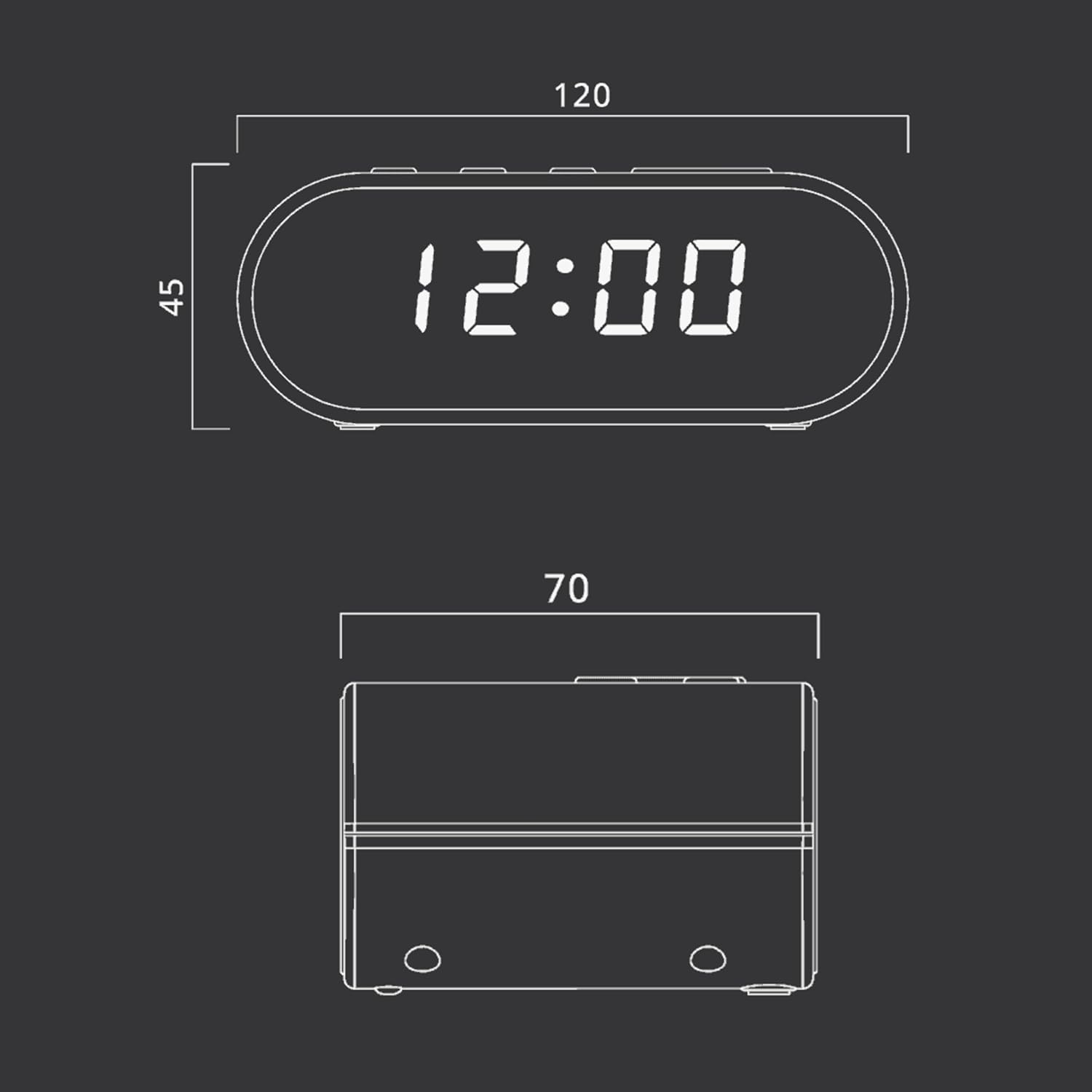
Figure 4: Dimensional drawing of the MUSE M-10 Red Radio Alarm Clock, showing its length (120mm), width (70mm), and height (45mm).
9. വാറൻ്റിയും പിന്തുണയും
For warranty information or technical support, please refer to the warranty card included with your product or contact your local MUSE distributor. Keep your purchase receipt as proof of purchase.