
1. ആമുഖം
The SAMOTECH Zigbee Hub SM310 is a smart gateway designed to be the core of your Internet of Things (IoT) network. It bridges your IP network with various Zigbee-connected devices, enabling seamless communication and control. This hub is fully compatible with the Tuya platform, allowing you to connect and manage a wide range of Zigbee devices for home automation, smart energy management, healthcare applications, and home security systems.
2. ഉൽപ്പന്ന സവിശേഷതകൾ
- വിശാലമായ അനുയോജ്യത: The Zigbee gateway hub is compatible with Tuya WiFi devices and Zigbee 3.0 smart products, offering flexibility to customize your smart home system based on individual needs and security requirements.
- പൂർണ്ണ നിയന്ത്രണം: The hub supports various smart application functionalities including adding devices, device reset, third-party control, and group control. Control your remote security kit system and connected devices anytime, anywhere using your smartphone.
- Stable and Reliable Connection: Provides a stable and reliable WiFi signal that covers a wide range of areas, ensuring consistent operation for all connected devices.
- കോംപാക്റ്റ് ഡിസൈൻ: Features a compact design with no wiring required for setup. It offers an extremely quick and simple WiFi setup process, requiring no professional technical skills. A wired version is also available, which includes a network cable for connection to a WiFi router.
3. പാക്കേജ് ഉള്ളടക്കം
നിങ്ങളുടെ പാക്കേജിൽ എല്ലാ ഇനങ്ങളും ഉണ്ടെന്ന് ദയവായി പരിശോധിക്കുക:
- 1 x SAMOTECH Zigbee Hub SM310
- 1 x Power Adapter (Type G - British standard square plug)
- 1 x ഉപയോക്തൃ മാനുവൽ (ഈ പ്രമാണം)
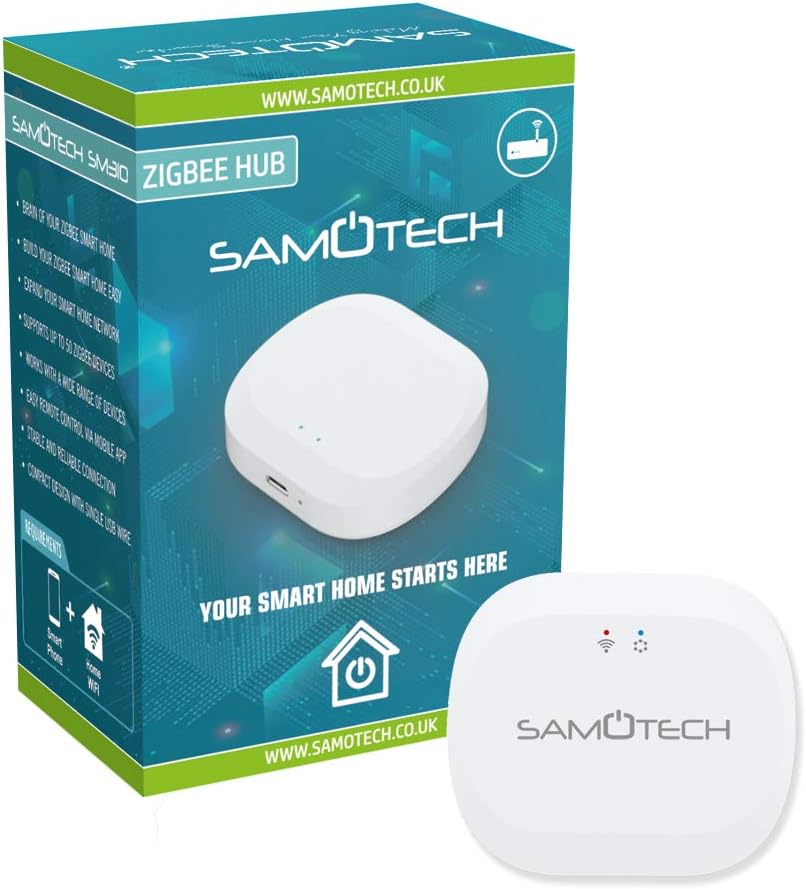
4. സജ്ജീകരണ നിർദ്ദേശങ്ങൾ
Follow these steps to set up your SAMOTECH Zigbee Hub SM310:
- പവർ ഓൺ: Plug the provided power adapter into the hub's power input port and then into a standard wall outlet. The hub will power on, and an indicator light will illuminate.
- അപ്ലിക്കേഷൻ ഡൗൺലോഡുചെയ്യുക: Download the Tuya Smart or Smart Life app from your smartphone's app store (available for iOS and Android).
- ഉപകരണം ചേർക്കുക: Open the app, register or log in, and then tap the '+' icon to add a new device. Select 'Gateway' or 'Control Hub' and follow the on-screen instructions to connect the SM310 hub to your 2.4GHz Wi-Fi network. Ensure your smartphone is connected to the same 2.4GHz Wi-Fi network during setup.
- Pair Zigbee Devices: Once the hub is successfully connected, you can begin pairing your Zigbee 3.0 compatible sensors and devices through the Tuya Smart app. Refer to the specific device's manual for its pairing mode instructions.

5. പ്രവർത്തന നിർദ്ദേശങ്ങൾ
After successful setup, you can manage your smart home devices using the Tuya Smart app:
- ഉപകരണ മാനേജ്മെൻ്റ്: ആപ്പിൽ, നിങ്ങൾക്ക് കഴിയും view all connected Zigbee devices. Tap on a device to access its specific controls and settings.
- ഓട്ടോമേഷനും ദൃശ്യങ്ങളും: Create custom automation rules and scenes to control multiple devices simultaneously or based on specific conditions (e.g., turn on lights when a motion sensor is triggered).
- ഗ്രൂപ്പ് നിയന്ത്രണം: Group similar devices together (e.g., all lights in a room) for unified control.
- വിദൂര ആക്സസ്: Control your devices from anywhere with an internet connection using your smartphone.
- ഉപകരണം റീസെറ്റ്: To reset a connected Zigbee device, follow the specific reset procedure for that device, usually involving pressing a button for a certain duration. To reset the hub itself, consult the app or manufacturer's support.

6. പരിപാലനം
To ensure optimal performance and longevity of your SAMOTECH Zigbee Hub SM310:
- വൃത്തിയാക്കൽ: മൃദുവായതും ഉണങ്ങിയതുമായ തുണി ഉപയോഗിച്ച് ഉപകരണം തുടയ്ക്കുക. ലിക്വിഡ് ക്ലീനറുകളോ ഉരച്ചിലുകളുള്ള വസ്തുക്കളോ ഉപയോഗിക്കരുത്.
- പരിസ്ഥിതി: Keep the hub in a dry environment, away from direct sunlight, extreme temperatures, and high humidity.
- ഫേംവെയർ അപ്ഡേറ്റുകൾ: Regularly check the Tuya Smart app for any available firmware updates for the hub to ensure you have the latest features and security enhancements.
- നെറ്റ്വർക്ക് സ്ഥിരത: Ensure your home Wi-Fi network is stable and provides good coverage to the hub for reliable operation.
7. പ്രശ്നപരിഹാരം
If you encounter issues with your SAMOTECH Zigbee Hub SM310, refer to the following common troubleshooting steps:
- ഹബ് Wi-Fi-ലേക്ക് കണക്റ്റുചെയ്യുന്നില്ല:
- Ensure your Wi-Fi network is 2.4GHz. The hub does not support 5GHz Wi-Fi.
- നിങ്ങളുടെ വൈഫൈ പാസ്വേഡ് ശരിയാണെന്ന് പരിശോധിക്കുക.
- സിഗ്നൽ ശക്തി മെച്ചപ്പെടുത്തുന്നതിന് ഹബ് നിങ്ങളുടെ Wi-Fi റൂട്ടറിന് അടുത്തേക്ക് നീക്കുക.
- Restart your Wi-Fi router and the hub.
- Zigbee Devices Not Pairing:
- Ensure the Zigbee device is in pairing mode (refer to the device's manual).
- Make sure the device is within range of the Zigbee hub.
- Check if the hub has reached its maximum device capacity.
- സിഗ്ബീ ഉപകരണം പുനഃസജ്ജമാക്കി വീണ്ടും ജോടിയാക്കാൻ ശ്രമിക്കുക.
- Intermittent Connection/Unresponsive Devices:
- Check the stability of your home Wi-Fi network.
- Ensure the hub and Zigbee devices are not obstructed by large metal objects or other sources of interference.
- ഹബ് പുനരാരംഭിക്കുക.
8 സ്പെസിഫിക്കേഷനുകൾ
| നിർമ്മാതാവ് | സമോടെക് |
| മോഡൽ | SM310 Tuya Wireless Zigbee Gateway |
| ഇനത്തിൻ്റെ ഭാരം | 100 ഗ്രാം |
| പാക്കേജ് അളവുകൾ | 8.4 x 6.7 x 5.3 സെ.മീ |
| നിറം | വെള്ള |
| ഇനത്തിൻ്റെ പാക്കേജ് അളവ് | 1 |
| പ്ലഗ് പ്രോfile | മതിൽ മൗണ്ട് |
| പ്ലഗ് ഫോർമാറ്റ് | G - Square plugs. British type. |
| പ്രത്യേക സവിശേഷതകൾ | ആക്സസ് പോയിൻറ് മോഡ് |
| ബാറ്ററികൾ ഉൾപ്പെടുത്തിയിട്ടുണ്ടോ? | ഇല്ല |
| ബാറ്ററികൾ ആവശ്യമുണ്ടോ? | ഇല്ല |
9. വാറൻ്റിയും പിന്തുണയും
For warranty information, please refer to the documentation included with your product or visit the official SAMOTECH website. For technical support, product inquiries, or further assistance, please contact SAMOTECH customer service through their official channels.