
ആമുഖം
The Vera Ezlo Atom is a compact and affordable home control hub designed to simplify smart home management. It allows users to control various Z-Wave devices, enhancing convenience and security within their homes. This manual provides essential information for setting up, operating, and maintaining your Ezlo Atom hub.
സജ്ജീകരണ നിർദ്ദേശങ്ങൾ
Setting up your Ezlo Atom is a straightforward process. Follow these steps to get your hub operational:
- പവർ കണക്ഷൻ: Plug the Ezlo Atom directly into any standard USB adapter (not included) and then into an electrical outlet. The device is designed to be powered via USB.
- ആപ്പ് ഡൗൺലോഡ്: Download the official Vera mobile application from your device's app store (available for iOS and Android).
- അക്കൗണ്ട് സൃഷ്ടിക്കൽ/ലോഗിൻ: Open the Vera app and either create a new account or log in with your existing Vera credentials.
- ഇൻ-ആപ്പ് നിർദ്ദേശങ്ങൾ പാലിക്കുക: The app will guide you through the remaining step-by-step instructions to connect your Ezlo Atom to your home network and begin adding Z-Wave devices.
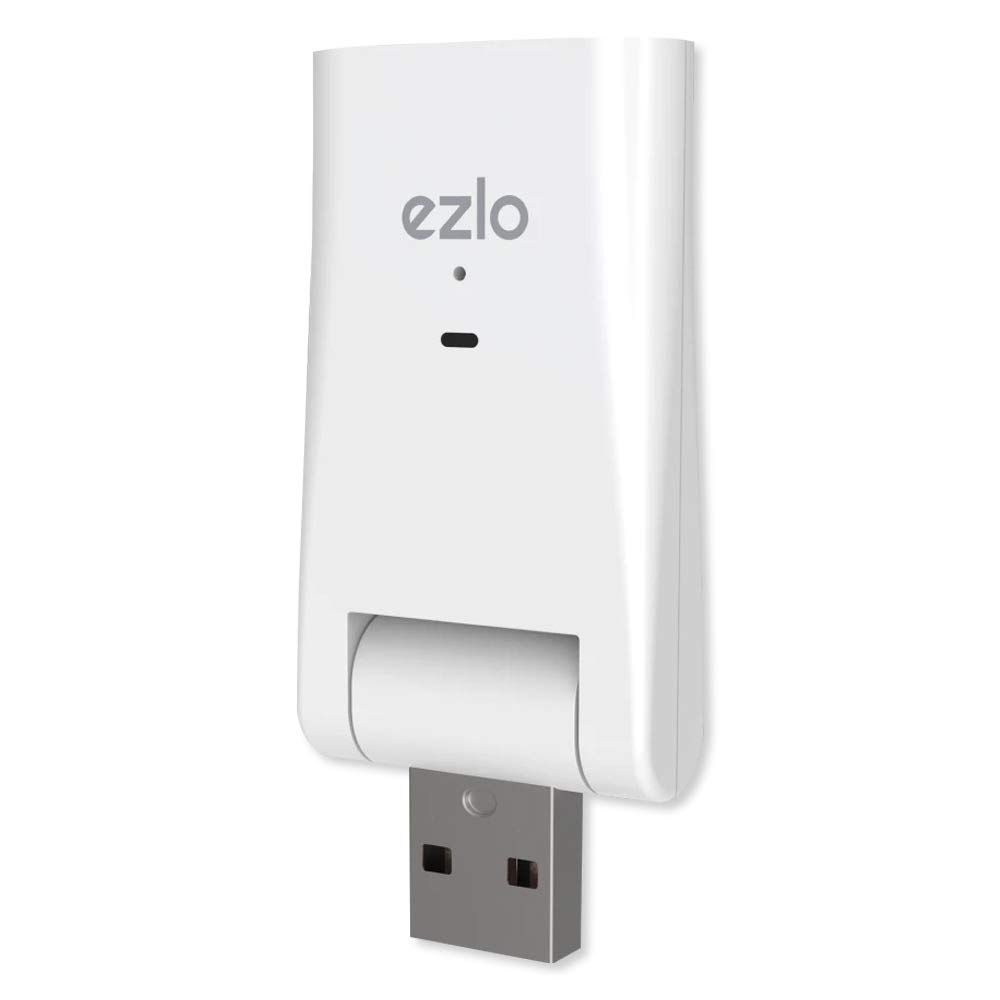
ചിത്രം 1: The Vera Ezlo Atom Home Control Hub. This image shows the compact, white USB-stick-like device with the 'ezlo' logo and an indicator light on its front, and a USB-A connector at the bottom, ready to be plugged into a USB power adapter.
Operating Your Ezlo Atom
Once set up, the Ezlo Atom allows you to control and automate various aspects of your home. The primary interface for operation is the Vera mobile app.
- റിമോട്ട് കൺട്രോൾ: Use the Vera app to control your connected Z-Wave devices from anywhere. This includes turning lights on/off, adjusting thermostats, locking/unlocking doors, and managing sensors.
- അലേർട്ടുകളും അറിയിപ്പുകളും: Configure the app to receive alerts on your phone for specific events, such as a door opening, motion detection, or water leaks (with compatible sensors).
- Home Automation Scenes: Create custom automation scenes to manage your home automatically. For example, set outdoor lights to activate at dusk, lower shades in the afternoon, or adjust your thermostat before you wake up.
- ഉപകരണ അനുയോജ്യത: The Ezlo Atom supports popular Z-Wave devices. Ensure your devices are Z-Wave compatible for seamless integration.
- സുരക്ഷാ സവിശേഷതകൾ: The hub incorporates Z-Wave’s cutting-edge S2 security platform to protect your personal data and ensure secure communication between devices.
മെയിൻ്റനൻസ്
The Ezlo Atom is designed for minimal maintenance. To ensure optimal performance:
- സോഫ്റ്റ്വെയർ അപ്ഡേറ്റുകൾ: Regularly check the Vera app for firmware updates for your Ezlo Atom. Keeping the software updated ensures access to the latest features and security enhancements.
- ശുചിത്വം: ഉപകരണം വൃത്തിയായും പൊടിയില്ലാതെയും സൂക്ഷിക്കുക. വൃത്തിയാക്കാൻ മൃദുവായതും ഉണങ്ങിയതുമായ തുണി ഉപയോഗിക്കുക. ലിക്വിഡ് ക്ലീനറുകൾ ഉപയോഗിക്കരുത്.
- പരിസ്ഥിതി വ്യവസ്ഥകൾ: Ensure the hub is placed in a location with adequate ventilation and away from extreme temperatures or humidity.
ട്രബിൾഷൂട്ടിംഗ്
If you encounter issues with your Ezlo Atom, consider the following troubleshooting steps:
- കണക്റ്റിവിറ്റി പ്രശ്നങ്ങൾ:
- Ensure the Ezlo Atom is securely plugged into a working USB power adapter and outlet.
- നിങ്ങളുടെ വീട്ടിലെ വൈഫൈ നെറ്റ്വർക്ക് സജീവവും സ്ഥിരതയുള്ളതുമാണെന്ന് പരിശോധിക്കുക.
- If the hub frequently goes offline, try moving it closer to your Wi-Fi router or ensuring there are no significant obstructions.
- Restart the Ezlo Atom by unplugging it for 10 seconds and plugging it back in.
- Device Pairing Problems:
- Ensure the Z-Wave device you are trying to pair is within range of the Ezlo Atom.
- Follow the specific pairing instructions for your Z-Wave device as well as the in-app instructions.
- Perform a Z-Wave network heal or reset if devices are not communicating correctly.
- Scene Programming Errors:
- When editing scenes, carefully review all steps and actions before saving to prevent unintended changes.
- If scenes disappear after a power failure, this may indicate a configuration saving issue. Ensure the hub has a stable power supply and network connection.
- ഫാക്ടറി പുന et സജ്ജമാക്കുക: If persistent issues occur, a factory reset may be necessary. Consult the Vera app or support resources for specific instructions on how to perform a factory reset, as this will erase all configurations and paired devices.
സ്പെസിഫിക്കേഷനുകൾ
| ബ്രാൻഡ് | വെരാ |
| മോഡൽ | Ezlo Atom Home Control Hub |
| ASIN | B07XGVW2BW |
| ജിടിഐഎൻ (യുപിസി) | 851886006316 |
| നിറം | വെള്ള |
| വാല്യംtage | 5 വോൾട്ട് |
| മെറ്റീരിയൽ | പ്ലാസ്റ്റിക് |
| ഉൾപ്പെടുത്തിയ ഘടകങ്ങൾ | Ezlo Atom, Quick Start Guide |
| നിർമ്മാതാവ് | Ezlo ഇന്നൊവേഷൻ LLC |
വാറൻ്റി വിവരങ്ങൾ
The Vera Ezlo Atom Home Control Hub comes with a 1 വർഷത്തെ വാറൻ്റി. For detailed terms and conditions, please refer to the official Vera webസൈറ്റ് അല്ലെങ്കിൽ ഉപഭോക്തൃ പിന്തുണയുമായി ബന്ധപ്പെടുക.
പിന്തുണ
For further assistance or inquiries, please utilize the following resources:
- Vera Mobile App: The app provides in-depth guides, FAQs, and direct access to support features.
- Vera Customer Care Team: Live help is available through Vera’s Customer Care Team for personalized setup assistance and troubleshooting. Refer to the Vera webബന്ധപ്പെടാനുള്ള വിവരങ്ങൾക്കുള്ള സൈറ്റ്.
- ഓൺലൈൻ ഉറവിടങ്ങൾ: Visit the official Vera website for product documentation, community forums, and additional support materials.