
ആമുഖം
This manual provides instructions for the Speedlink PIAVO Wireless Ergonomic Vertical Mouse (Model SL-630019-BK-01). This ergonomic mouse is designed to promote a natural, relaxed wrist posture, reducing strain on the hand, arm, shoulder, and neck during extended computer use. It features 5 buttons, adjustable DPI settings, and wireless 2.4 GHz connectivity.

ചിത്രം 1: Speedlink PIAVO Wireless Ergonomic Vertical Mouse, front view. This image shows the overall ergonomic design of the mouse.
പാക്കേജ് ഉള്ളടക്കം
പാക്കേജിൽ എല്ലാ ഇനങ്ങളും ഉണ്ടെന്ന് ദയവായി പരിശോധിക്കുക:
- Speedlink PIAVO Wireless Ergonomic Vertical Mouse
- USB-A റിസീവർ
- ബാറ്ററി (മുൻകൂട്ടി ഇൻസ്റ്റാൾ ചെയ്തതോ പ്രത്യേകം ഉൾപ്പെടുത്തിയതോ)
- നിർദ്ദേശ മാനുവൽ (ഈ പ്രമാണം)

ചിത്രം 2: Packaging of the Speedlink PIAVO Wireless Ergonomic Vertical Mouse. The box indicates "Wireless Vertical Mouse" and "10m Range".
സജ്ജമാക്കുക
- ബാറ്ററി ചേർക്കുക: If the battery is not pre-installed, open the battery compartment on the underside of the mouse and insert the included battery, ensuring correct polarity.
- USB റിസീവർ ബന്ധിപ്പിക്കുക: Locate an available USB-A port on your computer or laptop. Insert the USB-A receiver into the port.
- മൗസ് പവർ ഓൺ ചെയ്യുക: മൗസിന്റെ അടിഭാഗത്ത് ഓൺ/ഓഫ് സ്വിച്ച് കണ്ടെത്തുക. സ്വിച്ച് "ഓൺ" സ്ഥാനത്തേക്ക് സ്ലൈഡ് ചെയ്യുക.
- ഡ്രൈവർ ഇൻസ്റ്റാളേഷൻ: The mouse is designed for plug-and-play operation. Your operating system (e.g., Windows) should automatically detect and install the necessary drivers. This process typically takes a few seconds.
- പരിശോധന: Once installed, move the mouse to test cursor movement. If the cursor does not respond, ensure the mouse is powered on and the USB receiver is securely connected.

ചിത്രം 3: Underside of the mouse, illustrating the battery compartment and the On/Off switch. Ensure the switch is in the 'On' position for operation.
പ്രവർത്തന നിർദ്ദേശങ്ങൾ
The Speedlink PIAVO mouse features 5 buttons and adjustable DPI settings for optimal control.
- ഇടത് ക്ലിക്ക് ബട്ടൺ: സ്റ്റാൻഡേർഡ് പ്രൈമറി ക്ലിക്ക് ഫംഗ്ഷൻ.
- റൈറ്റ് ക്ലിക്ക് ബട്ടൺ: സ്റ്റാൻഡേർഡ് സെക്കൻഡറി ക്ലിക്ക് ഫംഗ്ഷൻ.
- സ്ക്രോൾ വീൽ: പ്രമാണങ്ങളിലൂടെ സ്ക്രോൾ ചെയ്യുന്നതിനും web പേജുകൾ. ഒരു മിഡിൽ-ക്ലിക്ക് ഫംഗ്ഷനും അമർത്താം.
- ഡിപിഐ സ്വിച്ച് ബട്ടൺ: Located near the scroll wheel. Press this button to cycle through the available DPI settings (800, 1200, 1600 DPI). This adjusts the cursor speed and sensitivity.
- ഫോർവേഡ്/ബാക്ക്വേർഡ് ബട്ടണുകൾ: Located on the side of the mouse, typically used for navigation in web ബ്രൗസറുകൾ അല്ലെങ്കിൽ file പര്യവേക്ഷകർ.
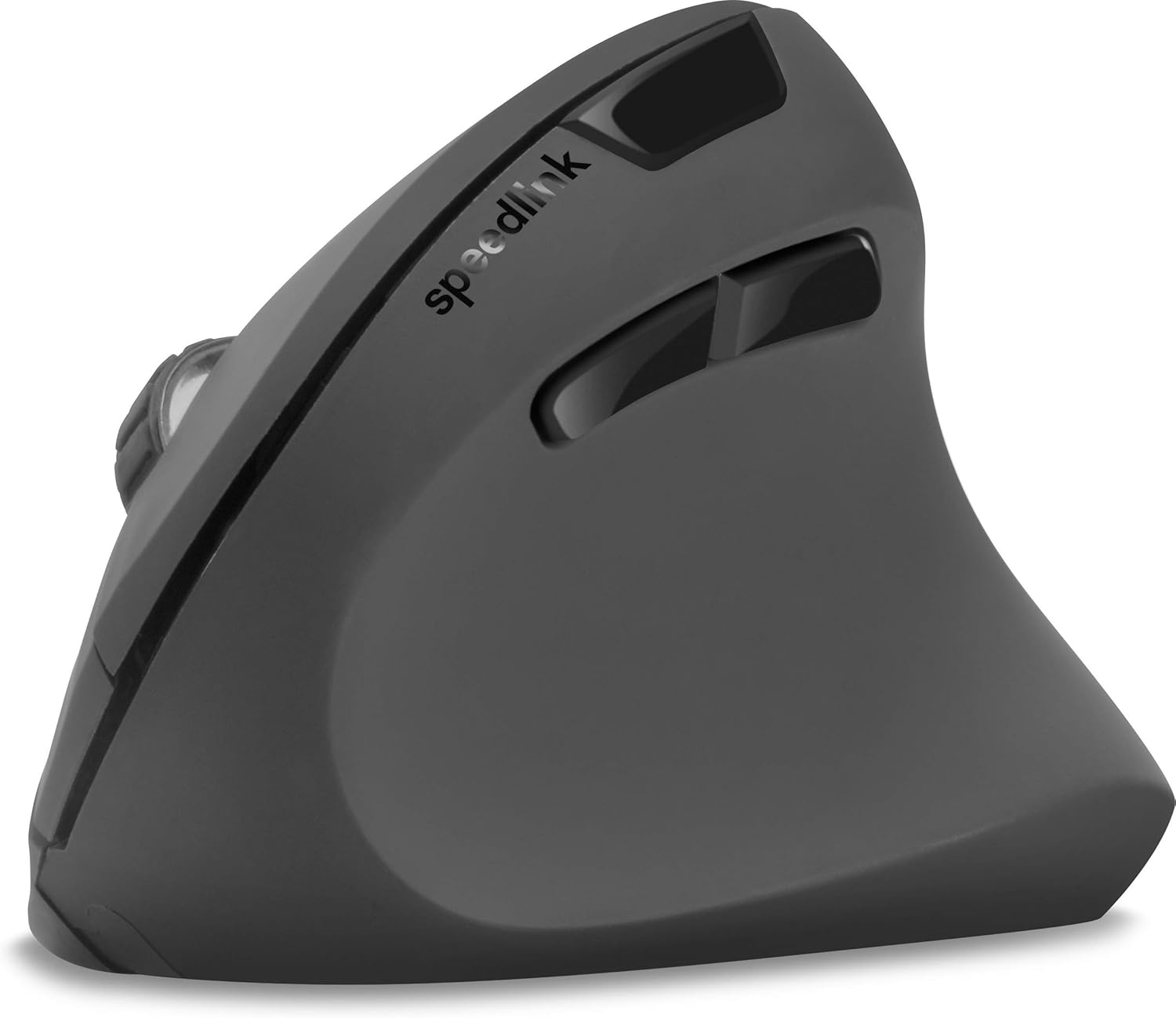
ചിത്രം 4: ടോപ്പ് ഡൗൺ view of the mouse, highlighting the left/right click buttons, scroll wheel, and DPI switch button.

ചിത്രം 5: വശം view of the mouse, illustrating the ergonomic grip and the forward/backward navigation buttons.
ഊർജ്ജ സംരക്ഷണ മോഡ്
The mouse features an energy-saving mode to conserve battery life. If the mouse is inactive for a period, it will enter a sleep state. To wake it up, simply move the mouse or press any button.
മെയിൻ്റനൻസ്
To ensure the longevity and optimal performance of your Speedlink PIAVO mouse, follow these maintenance guidelines:
- വൃത്തിയാക്കൽ: മൗസിന്റെ പുറംഭാഗം വൃത്തിയാക്കാൻ മൃദുവായതും ഉണങ്ങിയതുമായ ഒരു തുണി ഉപയോഗിക്കുക. കഠിനമായ അഴുക്കിന്, അല്പം ഡി.amp cloth can be used, but ensure no moisture enters the mouse. Avoid using harsh chemicals or abrasive cleaners.
- സെൻസർ ക്ലീനിംഗ്: Occasionally, dust or debris may accumulate around the optical sensor on the underside of the mouse. Use a soft brush or compressed air to gently clean the sensor area.
- ബാറ്ററി മാറ്റിസ്ഥാപിക്കൽ: When the mouse performance degrades or it stops responding, it may be time to replace the battery. Open the battery compartment, remove the old battery, and insert a new one of the same type, observing polarity.
- സംഭരണം: When not in use for extended periods, it is recommended to switch off the mouse using the On/Off switch to conserve battery life. Store the mouse and USB receiver in a dry, dust-free environment.
ട്രബിൾഷൂട്ടിംഗ്
| പ്രശ്നം | സാധ്യമായ കാരണം | പരിഹാരം |
|---|---|---|
| മൗസ് പ്രതികരിക്കുന്നില്ല / കഴ്സർ അനങ്ങുന്നില്ല. |
|
|
| ക്രമരഹിതമായ കഴ്സർ ചലനം. |
|
|
| DPI setting resets after sleep/reboot. | This is a known characteristic for some mice; the DPI setting may revert to default. | Press the DPI switch button to select your preferred sensitivity after waking the mouse or restarting the computer. |
സ്പെസിഫിക്കേഷനുകൾ
| മോഡൽ നമ്പർ | SL-630019-BK-01 |
| കണക്റ്റിവിറ്റി | Wireless 2.4 GHz via USB-A Receiver |
| ചലനം കണ്ടെത്തൽ | ഒപ്റ്റിക്കൽ |
| ബട്ടണുകളുടെ എണ്ണം | 5 |
| ഡിപിഐ ക്രമീകരണങ്ങൾ | 800, 1200, 1600 DPI (Adjustable) |
| കൈ ഓറിയൻ്റേഷൻ | വലംകൈയ്യൻ |
| വയർലെസ് ശ്രേണി | 10 മീറ്റർ വരെ |
| പവർ ഉറവിടം | Battery-powered (Battery included) |
| അനുയോജ്യമായ ഓപ്പറേറ്റിംഗ് സിസ്റ്റങ്ങൾ | വിൻഡോസ് |
| ഭാരം | 106 ഗ്രാം |
| നിറം | കറുപ്പ് |
വാറൻ്റിയും പിന്തുണയും
നൽകിയിരിക്കുന്ന ഉൽപ്പന്ന ഡാറ്റയിൽ നിർദ്ദിഷ്ട വാറന്റി നിബന്ധനകളെയും ഉപഭോക്തൃ പിന്തുണയുമായി ബന്ധപ്പെട്ട കോൺടാക്റ്റ് വിശദാംശങ്ങളെയും കുറിച്ചുള്ള വിവരങ്ങൾ ലഭ്യമല്ല. ഉൽപ്പന്ന പാക്കേജിംഗോ നിർമ്മാതാവിന്റെ ഔദ്യോഗിക വിലാസമോ പരിശോധിക്കുക. website for the most current warranty information and support options.
കൂടുതൽ സഹായത്തിന്, നിങ്ങൾക്ക് സന്ദർശിക്കാവുന്നതാണ് Speedlink official webസൈറ്റ്.