
1. ആമുഖം
The TechniSat TECHNIRADIO RDR is a portable digital and FM radio designed for on-the-go listening. It features DAB+ digital radio reception for clear, noise-free audio, as well as traditional FM radio with RDS. The device supports MP3 playback from USB storage devices and includes an AUX-IN interface for connecting external audio sources. Its compact design, replaceable battery, and integrated LED torch make it a versatile companion for various environments.
2. ബോക്സിൽ എന്താണുള്ളത്?
- TechniSat TECHNIRADIO RDR Portable Radio
- മിനി യുഎസ്ബി ചാർജിംഗ് കേബിൾ
- Rechargeable Lithium-Ion Battery (3.7 V / 800 mAh)
- ഇൻസ്ട്രക്ഷൻ മാനുവൽ
3. ഉൽപ്പന്ന സവിശേഷതകൾ
- DAB+ ഡിജിറ്റൽ റേഡിയോ: Enjoy a wide range of digital radio programs with robust, noise-free reception.
- FM Radio with RDS: Tune into traditional FM stations and receive broadcast information via RDS.
- LCD ഡിസ്പ്ലേ: A two-line LCD provides information about the current radio program and settings.
- Favorite Memory: Store up to 20 DAB+ and 20 FM stations for quick access.
- നേരിട്ടുള്ള ഡയൽ ബട്ടണുകൾ: Four freely assignable buttons for instant access to preferred stations.
- യുഎസ്ബി പ്ലേബാക്ക്: MP3 സംഗീതം പ്ലേ ചെയ്യുക files directly from a connected USB data carrier.
- AUX-IN Interface: Connect external audio sources like smartphones or MP3 players.
- ഹെഡ്ഫോൺ ജാക്ക്: സ്വകാര്യ ശ്രവണത്തിനായി.
- Integrated LED Torch: ഇരുണ്ട ചുറ്റുപാടുകളിൽ പ്രകാശം നൽകുന്നു.
- Changeable and Rechargeable Battery: Offers up to 10 hours of portable music enjoyment.
- ഒതുക്കമുള്ളതും പോർട്ടബിൾ ഡിസൈൻ: Easy to carry with dimensions of 12.7 cm x 2.3 cm x 5.8 cm and a weight of 124g.
4. നിയന്ത്രണങ്ങളും കണക്ഷനുകളും
ഫ്രണ്ട് പാനൽ നിയന്ത്രണങ്ങൾ

ചിത്രം: മുൻഭാഗം view of the TechniSat TECHNIRADIO RDR. This image displays the LCD screen, the speaker grille on the left, and the control buttons on the right. Buttons include navigation arrows (<, OK, >), numbered direct dial buttons (1-4), and function buttons (MOD, M, I, LED).
- LCD ഡിസ്പ്ലേ: സ്റ്റേഷൻ വിവരങ്ങൾ, സമയം, മെനു ഓപ്ഷനുകൾ എന്നിവ കാണിക്കുന്നു.
- സ്പീക്കർ: ഓഡിയോ ഔട്ട്പുട്ട്.
- < / > Buttons: Navigate menus, change stations, or adjust settings.
- ശരി ബട്ടൺ: തിരഞ്ഞെടുക്കലുകൾ സ്ഥിരീകരിക്കുക.
- 1-4 ബട്ടണുകൾ: Direct access to preset favorite stations.
- MOD (മോഡ്) ബട്ടൺ: Switch between DAB+, FM, USB, and AUX modes.
- M (Menu/Memory) Button: Access menu options or save/recall presets.
- I (Info) Button: Display additional information (e.g., RDS data).
- LED ബട്ടൺ: Activate/deactivate the LED torch.
Side and Rear Connections

ചിത്രം: ആംഗിൾഡ് view of the TechniSat TECHNIRADIO RDR, highlighting the side panel. This image shows the USB port, AUX-in jack, and headphone jack. The wrist strap attachment point is also visible.
- USB Port (Type-A): For connecting USB storage devices to play MP3 files.
- AUX-IN Jack (3.5mm): ബാഹ്യ ഓഡിയോ ഉപകരണങ്ങൾ ബന്ധിപ്പിക്കുക.
- ഹെഡ്ഫോൺ ജാക്ക് (3.5 മിമി): സ്വകാര്യ ഓഡിയോ ശ്രവണത്തിനായി.
- Mini-USB Port (DC 5V): ആന്തരിക ബാറ്ററി ചാർജ് ചെയ്യുന്നതിന്.
- ബാറ്ററി കമ്പാർട്ട്മെൻ്റ്: Located on the rear, for the replaceable Li-ion battery.
5. സജ്ജീകരണം
5.1. ബാറ്ററി ഇൻസ്റ്റാളേഷനും ചാർജിംഗും
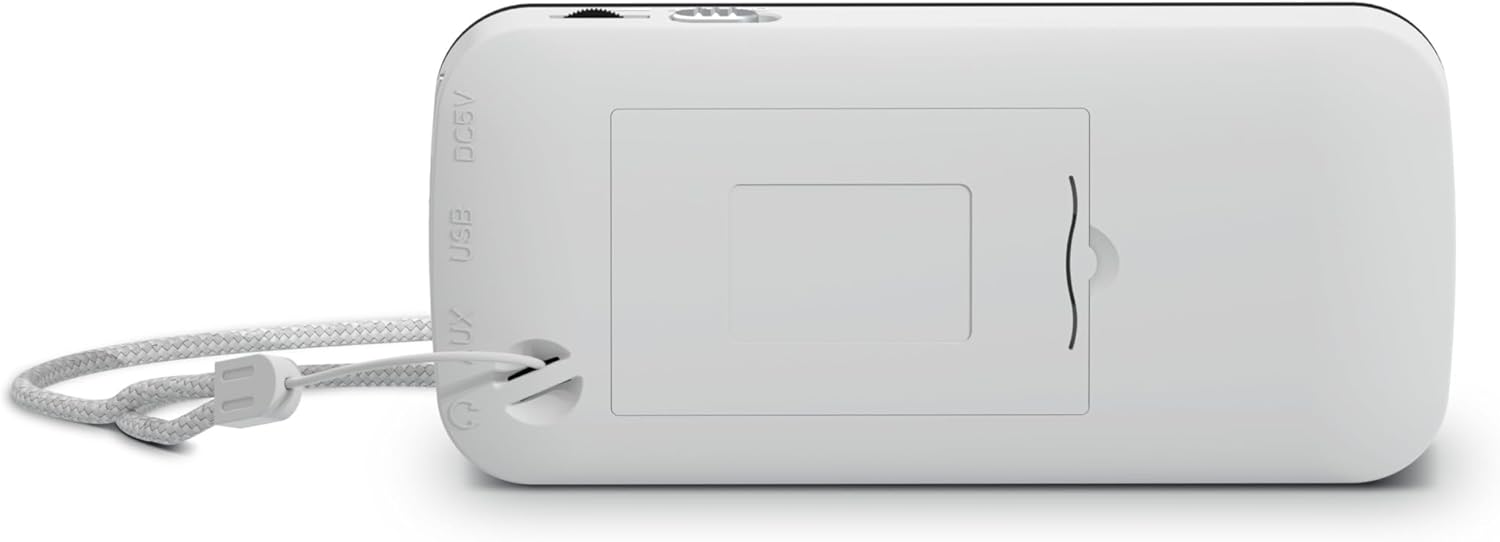
ചിത്രം: പിൻഭാഗം view of the TechniSat TECHNIRADIO RDR. This image shows the battery compartment cover, which can be opened to insert or replace the rechargeable Lithium-Ion battery. The DC 5V and USB labels are also visible on the side.
- ഉപകരണത്തിന്റെ പിൻഭാഗത്ത് ബാറ്ററി കമ്പാർട്ട്മെന്റ് കണ്ടെത്തുക.
- ബാറ്ററി കമ്പാർട്ട്മെൻ്റ് കവർ തുറക്കുക.
- Insert the provided Lithium-Ion battery, ensuring correct polarity.
- ബാറ്ററി കമ്പാർട്ട്മെൻ്റ് കവർ സുരക്ഷിതമായി അടയ്ക്കുക.
- Connect the mini USB charging cable to the mini-USB port on the side of the radio and to a suitable USB power adapter (not included) or a computer USB port.
- ഡിസ്പ്ലേയിലെ ബാറ്ററി ഇൻഡിക്കേറ്റർ ചാർജിംഗ് സ്റ്റാറ്റസ് കാണിക്കും. പൂർണ്ണമായി ചാർജ് ചെയ്യാൻ സാധാരണയായി നിരവധി മണിക്കൂറുകൾ എടുക്കും.
5.2. പ്രാരംഭ പവർ ഓൺ
- After charging, disconnect the USB cable.
- Press and hold the power button (usually integrated with the MOD button or a dedicated button, refer to specific button layout if available) to turn on the radio.
- Upon first use, the radio may automatically initiate a DAB+ scan.
6. പ്രവർത്തന നിർദ്ദേശങ്ങൾ
6.1. മോഡ് തിരഞ്ഞെടുക്കൽ
അമർത്തുക MOD button repeatedly to cycle through available modes: DAB+, FM, USB, and AUX.
6.2. DAB+ റേഡിയോ പ്രവർത്തനം
- ഉപയോഗിച്ച് DAB+ മോഡിലേക്ക് മാറുക MOD ബട്ടൺ.
- If it's the first time or if stations need to be updated, perform a full scan:
- അമർത്തുക M (മെനു) ബട്ടൺ.
- ഉപയോഗിക്കുക </> buttons to navigate to "Full Scan" and press OK.
- The radio will scan for available DAB+ stations and store them.
- To select a station, use the </> buttons to browse the station list. Press OK സ്ഥിരീകരിക്കാൻ.
- To save a favorite station:
- ആവശ്യമുള്ള സ്റ്റേഷനിലേക്ക് ട്യൂൺ ചെയ്യുക.
- അമർത്തിപ്പിടിക്കുക M button until "Preset Store" appears.
- ഉപയോഗിക്കുക </> ഒരു പ്രീസെറ്റ് നമ്പർ (1-20) തിരഞ്ഞെടുത്ത് അമർത്താൻ OK.
- To recall a favorite station, briefly press the M ബട്ടൺ, ഉപയോഗിക്കുക </> to select the preset, and press OK. Alternatively, use the direct dial buttons 1-4 if assigned.
- അമർത്തുക I (Info) button to cycle through different information displays (e.g., program type, signal strength).
6.3. എഫ്എം റേഡിയോ പ്രവർത്തനം
- ഉപയോഗിച്ച് FM മോഡിലേക്ക് മാറുക MOD ബട്ടൺ.
- To auto-scan for stations:
- അമർത്തിപ്പിടിക്കുക < or > button to automatically search for the next available station.
- സ്വമേധയാ ട്യൂൺ ചെയ്യാൻ, ഹ്രസ്വമായി അമർത്തുക < or > button to adjust the frequency step by step.
- To save a favorite station, follow the same procedure as DAB+ (press and hold M, select preset, OK).
- To recall a favorite station, briefly press M, select preset, OK, or use direct dial buttons 1-4.
- The radio supports RDS (Radio Data System), which displays station name and other information. Press the I (Info) button to cycle through available RDS data.
6.4. USB MP3 Playback
- MP3 അടങ്ങിയ ഒരു USB സ്റ്റോറേജ് ഉപകരണം (ഉദാ. USB സ്റ്റിക്ക്) ഇടുക. files into the USB Type-A port.
- ഉപയോഗിച്ച് USB മോഡിലേക്ക് മാറുക MOD ബട്ടൺ.
- The radio will automatically detect and start playing MP3 files.
- ഉപയോഗിക്കുക </> ട്രാക്കുകൾ ഒഴിവാക്കാനുള്ള ബട്ടണുകൾ.
- ദി OK button may function as Play/Pause.
6.5. AUX-IN Usage
- Connect an external audio device (e.g., smartphone, MP3 player) to the AUX-IN jack using a 3.5mm audio cable (not included).
- ഉപയോഗിച്ച് AUX മോഡിലേക്ക് മാറുക MOD ബട്ടൺ.
- നിങ്ങളുടെ ബന്ധിപ്പിച്ച ബാഹ്യ ഉപകരണത്തിൽ നിന്ന് നേരിട്ട് പ്ലേബാക്കും വോളിയവും നിയന്ത്രിക്കുക.
6.6. LED Torch Function
അമർത്തുക എൽഇഡി button to turn the integrated LED torch on or off.
7. ബാറ്ററി വിവരങ്ങൾ
- The TECHNIRADIO RDR uses a replaceable 3.7V / 800 mAh Lithium-Ion battery.
- A fully charged battery provides up to 10 hours of operation, depending on usage and volume level.
- Charge the battery using the supplied mini USB cable connected to a 5V USB power source.
- To prolong battery life, avoid fully discharging the battery frequently and store the device with a partial charge if not used for extended periods.
- If the battery needs replacement, use only genuine TechniSat replacement batteries or compatible alternatives with the same specifications.
8. പരിപാലനം
- വൃത്തിയാക്കൽ: റേഡിയോയുടെ പുറംഭാഗം വൃത്തിയാക്കാൻ മൃദുവായതും ഉണങ്ങിയതുമായ തുണി ഉപയോഗിക്കുക. അബ്രസീവ് ക്ലീനറുകൾ, മെഴുക് അല്ലെങ്കിൽ ലായകങ്ങൾ ഉപയോഗിക്കരുത്.
- സംഭരണം: നേരിട്ടുള്ള സൂര്യപ്രകാശത്തിൽ നിന്നും കടുത്ത താപനിലയിൽ നിന്നും അകലെ തണുത്തതും വരണ്ടതുമായ സ്ഥലത്ത് റേഡിയോ സൂക്ഷിക്കുക.
- വാട്ടർ എക്സ്പോഷർ: ഈ ഉപകരണം വാട്ടർപ്രൂഫ് അല്ല. വെള്ളത്തിലോ ഉയർന്ന ആർദ്രതയിലോ സമ്പർക്കം ഒഴിവാക്കുക.
- ബാറ്ററി കെയർ: Refer to Section 7 for battery maintenance guidelines.
9. പ്രശ്നപരിഹാരം
| പ്രശ്നം | സാധ്യമായ കാരണം / പരിഹാരം |
|---|---|
| പവർ ഇല്ല / ഉപകരണം ഓണാകുന്നില്ല. |
|
| No DAB+ stations found. |
|
| Poor FM reception / Static. |
|
| യുഎസ്ബി പ്ലേബാക്ക് പ്രവർത്തിക്കുന്നില്ല. |
|
| AUX-IN-ൽ നിന്ന് ശബ്ദമൊന്നുമില്ല. |
|
10 സ്പെസിഫിക്കേഷനുകൾ
ജനറൽ
- മോഡലിൻ്റെ പേര്: TECHNIRADIO RDR
- മോഡൽ നമ്പർ: 0001/3922
- ബ്രാൻഡ്: ടെക്നിസാറ്റ്
- നിറം: വെള്ള
- ഡിസ്പ്ലേ തരം: LCD (Two-line)
ഓഡിയോ
- RMS പവർ: 1 വാട്ട്
- Speaker Output Channel Quantity: 1 (മോണോ)
- Headphone Connectivity: 3.5 mm ജാക്ക്
ട്യൂണർ
- ട്യൂണർ സാങ്കേതികവിദ്യ: DAB+ / FM
- പിന്തുണയ്ക്കുന്ന റേഡിയോ ബാൻഡുകൾ: DAB+, UKW (FM)
- ഫീച്ചറുകൾ: RDS (Radio Data System) for FM, Favourite Memory (20 DAB+/20 FM)
കണക്റ്റിവിറ്റി
- USB കണക്റ്റിവിറ്റി: Yes (USB Type-A for MP3 playback, Mini-USB for charging)
- AUX ഇൻപുട്ട്: Yes (3.5 mm Jack)
- മൊത്തം USB പോർട്ടുകൾ: 1 (Type-A for media, Mini-USB for power)
ശക്തി
- ഊർജ്ജ സ്രോതസ്സ്: ബാറ്ററി പവർ
- ബാറ്ററി തരം: Lithium Ion (3.7 V / 800 mAh)
- ബാറ്ററികൾ ഉൾപ്പെടുന്നു: അതെ
- റീചാർജ് ചെയ്യാവുന്ന ബാറ്ററി: അതെ
- പ്രവർത്തന സമയം: 10 മണിക്കൂർ വരെ (ഏകദേശം)
ശാരീരികം
- ഉൽപ്പന്ന അളവുകൾ (W x D x H): 12.7 സെ.മീ x 2.3 സെ.മീ x 5.8 സെ.മീ
- ഇനത്തിൻ്റെ ഭാരം: 124 ഗ്രാം
- പ്രത്യേക സവിശേഷതകൾ: LED ടോർച്ച്
11. വാറൻ്റിയും പിന്തുണയും
For warranty information and technical support, please refer to the warranty card included with your product or visit the official TechniSat webസൈറ്റ്. ഏതെങ്കിലും വാറന്റി ക്ലെയിമുകൾക്ക് നിങ്ങളുടെ വാങ്ങലിന്റെ തെളിവ് സൂക്ഷിക്കുക.