
TechniSat DIGITRADIO 4 C
ടെക്നിസാറ്റ് ഡിജിട്രാഡിയോ 4 സി ഡിജിറ്റൽ സ്റ്റീരിയോ റേഡിയോ യൂസർ മാനുവൽ
Model: DIGITRADIO 4 C
1. ആമുഖം
This manual provides comprehensive instructions for the TechniSat DIGITRADIO 4 C digital stereo radio. It covers setup, operation, maintenance, and troubleshooting for its various functionalities, including DAB+, FM, Bluetooth audio streaming, and AUX input. Please read this manual thoroughly before using the device to ensure proper operation and to maximize your listening experience.
പാക്കേജ് ഉള്ളടക്കം
- DIGITRADIO 4 C unit
- ടെലിസ്കോപ്പിക് ആൻ്റിന
- F-plug tool (for removable antenna)
- വിദൂര നിയന്ത്രണം
- പവർ അഡാപ്റ്റർ
- ഉപയോക്തൃ മാനുവൽ
2. സജ്ജീകരണം
2.1 അൺപാക്കിംഗും പ്ലേസ്മെന്റും
Carefully remove all components from the packaging. Place the radio on a stable, flat surface away from direct sunlight, heat sources, and moisture. Ensure adequate ventilation around the unit.
2.2 ആൻ്റിന ബന്ധിപ്പിക്കുന്നു
The DIGITRADIO 4 C comes with a telescopic antenna for DAB+ and FM reception. Extend the antenna fully for optimal signal reception. For areas with weak reception, an external antenna can be connected to the F-type connector on the rear of the unit. Use the provided F-plug tool if necessary to secure the connection.
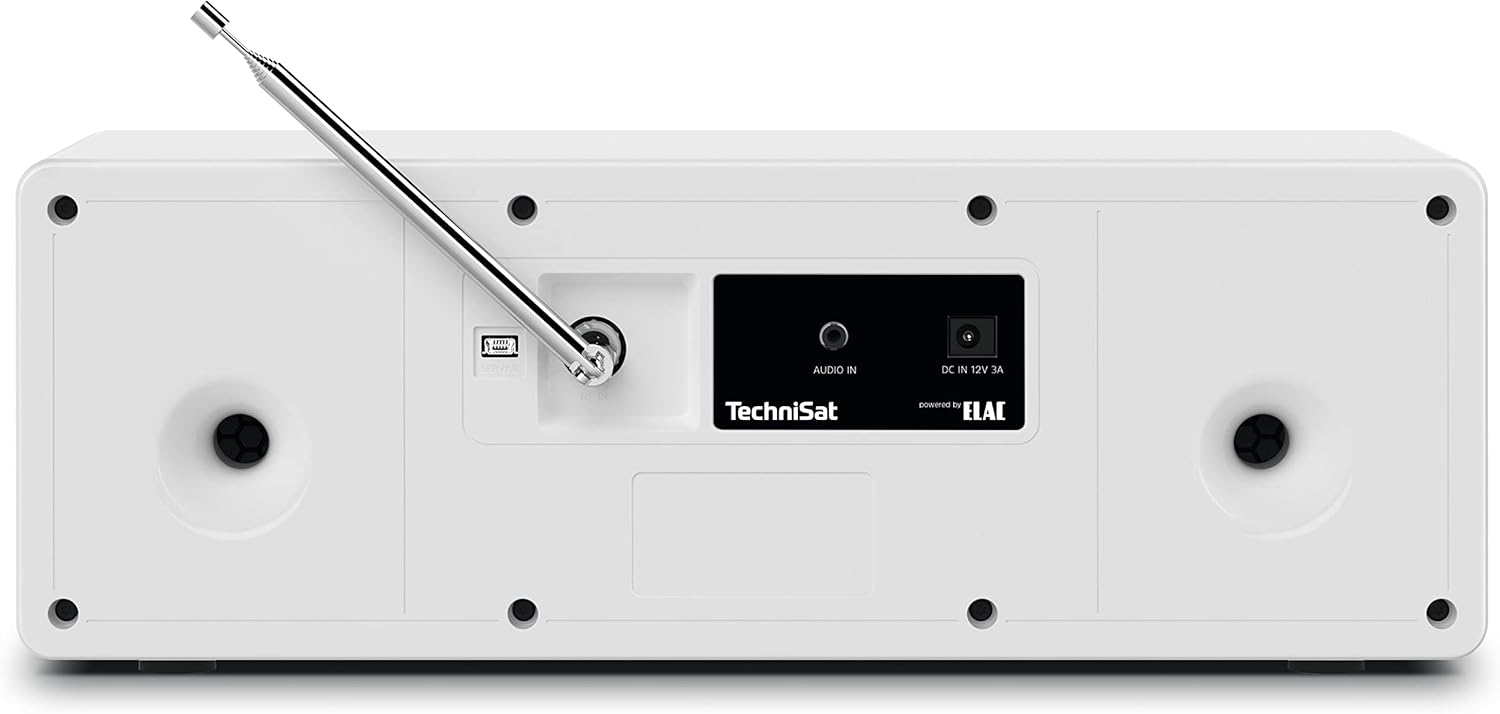
ചിത്രം 2.2.1: Rear panel connections, including the F-type antenna connector, AUX IN, and DC power input.
2.3 പവർ കണക്ഷൻ
Connect the supplied power adapter to the DC IN 12V 3A port on the rear of the radio. Plug the adapter into a suitable wall outlet. The unit will enter standby mode.
2.4 Initial Power On and Scan
അമർത്തുക വോളിയം / സ്റ്റാൻഡ്ബൈ knob to turn on the radio. Upon first use, the radio may automatically initiate a scan for available DAB+ stations. This process can take a few minutes. Once complete, the radio will tune to the first available station.
3. പ്രവർത്തന നിർദ്ദേശങ്ങൾ

ചിത്രം 3.0.1: ഫ്രണ്ട് പാനൽ കഴിഞ്ഞുview showing the display, controls, and headphone jack.
3.1 അടിസ്ഥാന നിയന്ത്രണങ്ങൾ
- VOL / STANDBY Knob: Rotate to adjust volume. Press to switch between ON and Standby mode.
- SELECT / SNOOZE Knob: Rotate to navigate menus or change stations. Press to confirm selections or activate snooze during an alarm.
- മോഡ് ബട്ടൺ: Press to switch between DAB+, FM, Bluetooth, and AUX input modes.
- മെനു ബട്ടൺ: Press to access the main menu for settings and options.
- FAV ബട്ടൺ: Press to access or save favorite stations.
- Navigation Buttons (◀◀, ▶▶, ■, ►►): Used for track control in Bluetooth mode or navigating lists.
3.2 DAB+ Radio Operation
In DAB+ mode, the radio receives digital broadcasts. The 2.8-inch color display shows station information, program details, and potentially album art.

ചിത്രം 3.2.1: The 2.8-inch TFT color display showing current DAB+ broadcast information.
- അമർത്തുക മോഡ് until DAB+ is selected.
- If a scan is needed, navigate to "Full Scan" in the menu and press തിരഞ്ഞെടുക്കുക.
- തിരിക്കുക തിരഞ്ഞെടുക്കുക knob to browse available stations. Press to select a station.
- To save a favorite station, press and hold the FAV ബട്ടൺ, തുടർന്ന് ഉപയോഗിക്കുക തിരഞ്ഞെടുക്കുക knob to choose a preset number (1-20) and press to confirm.
3.3 എഫ്എം റേഡിയോ പ്രവർത്തനം
In FM mode, the radio receives analog broadcasts. RDS (Radio Data System) information may be displayed if available.
- അമർത്തുക മോഡ് until FM is selected.
- തിരിക്കുക തിരഞ്ഞെടുക്കുക ഒരു ഫ്രീക്വൻസിയിലേക്ക് സ്വമേധയാ ട്യൂൺ ചെയ്യുന്നതിനുള്ള നോബ്.
- ലഭ്യമായ അടുത്ത സ്റ്റേഷനായി യാന്ത്രികമായി സ്കാൻ ചെയ്യാൻ, അമർത്തിപ്പിടിക്കുക തിരഞ്ഞെടുക്കുക മുട്ട്.
- To save a favorite station, press and hold the FAV ബട്ടൺ, തുടർന്ന് ഉപയോഗിക്കുക തിരഞ്ഞെടുക്കുക knob to choose a preset number (1-20) and press to confirm.
3.4 ബ്ലൂടൂത്ത് ഓഡിയോ സ്ട്രീമിംഗ്
The DIGITRADIO 4 C can receive audio from Bluetooth-enabled devices such as smartphones or tablets.

ചിത്രം 3.4.1: Bluetooth audio streaming from a smartphone to the radio.
- അമർത്തുക മോഡ് until Bluetooth is selected. The display will show "Pairing" or "Waiting for connection".
- On your mobile device, enable Bluetooth and search for "DIGITRADIO 4 C".
- Select "DIGITRADIO 4 C" from the list of available devices to pair.
- Once paired, you can play audio from your device, and control playback (play/pause, skip tracks) using the radio's navigation buttons.
3.5 AUX ഇൻപുട്ട്
Connect external audio devices (e.g., MP3 players, CD players) using a 3.5mm audio cable to the AUX IN port on the rear of the radio.
- Connect your external device to the AUX IN port.
- അമർത്തുക മോഡ് until AUX is selected.
- Control playback from your external device. The radio's volume control will still function.
3.6 അലാറം ക്ലോക്കും സ്ലീപ്പ് ടൈമറും
The radio includes an alarm clock and a sleep timer function.
- അലാറം: Access the alarm settings via the മെനു button. You can set multiple alarms, choose the alarm source (buzzer, DAB+, FM), and adjust volume. Press SELECT / SNOOZE to snooze an active alarm.
- സ്ലീപ്പ് ടൈമർ: Set a sleep timer from the മെനു to automatically turn off the radio after a specified duration.
3.7 സമനില
സൗണ്ട് പ്രോ ക്രമീകരിക്കുകfile using the built-in equalizer. Access equalizer settings through the മെനു to select from preset modes or customize bass and treble levels.

ചിത്രം 3.7.1: The radio features two 10W stereo speakers, optimized for sound quality.
4. പരിപാലനം
4.1 വൃത്തിയാക്കൽ
To clean the radio, disconnect it from the power supply. Use a soft, dry cloth to wipe the surfaces. For stubborn marks, a slightly damp cloth can be used, followed by a dry cloth. Do not use abrasive cleaners, solvents, or chemical sprays, as these can damage the finish.
4.2 ആന്റിന പരിചരണം
Handle the telescopic antenna with care to prevent bending or breakage. When not in use, it can be retracted. If using an external antenna, ensure its connection is secure and the cable is not damaged.
5. പ്രശ്നപരിഹാരം
| പ്രശ്നം | സാധ്യമായ കാരണം | പരിഹാരം |
|---|---|---|
| ശക്തിയില്ല | Power adapter not connected; power outlet not active. | Ensure power adapter is securely connected to the radio and a working power outlet. |
| മോശം DAB+/FM റിസപ്ഷൻ | ആന്റിന നീട്ടിയിട്ടില്ല; ദുർബലമായ സിഗ്നൽ ഏരിയ; ഇടപെടൽ. | Fully extend the telescopic antenna. Reposition the radio. Consider connecting an external antenna. |
| ബ്ലൂടൂത്ത് ജോടിയാക്കൽ പരാജയം | Bluetooth not enabled on device; radio not in pairing mode; device too far. | Ensure Bluetooth is enabled on your device and the radio is in Bluetooth mode. Move device closer to the radio. Try re-pairing. |
| ശബ്ദമില്ല | Volume too low; mute activated; incorrect input mode. | Increase volume. Check if mute is active. Ensure correct input mode (DAB+, FM, Bluetooth, AUX) is selected. |
| റിമോട്ട് കൺട്രോൾ പ്രവർത്തിക്കുന്നില്ല | Batteries depleted; obstruction between remote and radio. | Replace remote control batteries (2x AAA). Ensure no obstructions are blocking the signal path. |
6 സ്പെസിഫിക്കേഷനുകൾ
| ഫീച്ചർ | വിശദാംശങ്ങൾ |
|---|---|
| ബ്രാൻഡ് | ടെക്നിസാറ്റ് |
| മോഡൽ നമ്പർ | 0001/3937 |
| കണക്റ്റിവിറ്റി ടെക്നോളജി | Auxiliary, Bluetooth, External Antenna Connection (F-type) |
| റേഡിയോ ബാൻഡുകൾ പിന്തുണയ്ക്കുന്നു | DAB+, FM (with RDS and PLL) |
| പ്രദർശിപ്പിക്കുക | 2.8-inch TFT Color Display (dimmable) |
| ഓഡിയോ ഔട്ട്പുട്ട് | 2 x 10W RMS stereo speakers (Powered by ELAC), Headphone jack (3.5mm) |
| പ്രത്യേക സവിശേഷതകൾ | Bluetooth audio streaming (reception), Equalizer, Favorite memory (20 for DAB+, 20 for FM), Alarm clock, Sleep timer, Snooze function |
| പവർ ഉറവിടം | ബാഹ്യ പവർ അഡാപ്റ്റർ |
| ഉൽപ്പന്ന അളവുകൾ (L x W x H) | 38 cm x 16.5 cm x 13.5 cm (14.96 in x 6.5 in x 5.31 in) |
| റിമോട്ട് കൺട്രോൾ ബാറ്ററികൾ | 2 x AAA (not included with main unit, typically for remote) |
7. വാറൻ്റി വിവരങ്ങൾ
The TechniSat DIGITRADIO 4 C comes with a 2 വർഷത്തെ നിർമ്മാതാവിന്റെ വാറന്റി. Please retain your proof of purchase for warranty claims. For detailed terms and conditions, refer to the warranty card included with your product or visit the official TechniSat webസൈറ്റ്.
8. പിന്തുണ
For further assistance, technical support, or to download the latest version of this manual, please visit the official TechniSat webസൈറ്റ്:
You may also contact TechniSat customer service directly. Contact details can typically be found on the manufacturer's webസൈറ്റ് അല്ലെങ്കിൽ ഉൽപ്പന്ന പാക്കേജിംഗിൽ.
Ask a question about this manual
Ask about setup, troubleshooting, compatibility, parts, safety, or missing instructions. Manuals+ will review the question and use this page’s manual context to help answer it.