
1. ആമുഖം
വാങ്ങിയതിന് നന്ദി.asing the Beetel M53N Landline Phone. This basic corded telephone is designed for reliable communication, featuring Caller ID and a double speaker for enhanced audio. Please read this manual carefully to ensure proper installation and operation of your new phone.
2. ആരംഭിക്കുന്നു
2.1 പാക്കേജ് ഉള്ളടക്കം
പാക്കേജിൽ ഇനിപ്പറയുന്ന ഇനങ്ങൾ ഉണ്ടോ എന്ന് പരിശോധിക്കുക:
- Beetel M53N Telephone Base Unit
- ഹാൻഡ്സെറ്റ്
- കോയിൽഡ് ഹാൻഡ്സെറ്റ് കോർഡ്
- ടെലിഫോൺ ലൈൻ കോർഡ്
2.2 സജ്ജീകരണം
Follow these steps to set up your Beetel M53N phone:
- ഹാൻഡ്സെറ്റ് ബന്ധിപ്പിക്കുക: Plug one end of the coiled handset cord into the handset and the other end into the jack labeled with a handset icon on the side or back of the telephone base unit.
- ടെലിഫോൺ ലൈൻ ബന്ധിപ്പിക്കുക: Plug one end of the telephone line cord into the jack labeled with a telephone line icon (or 'LINE') on the back of the telephone base unit. Plug the other end into your wall telephone jack.
- പവർ കണക്ഷൻ: This phone typically draws power from the telephone line and does not require an external power adapter. Ensure the line cord is securely connected.
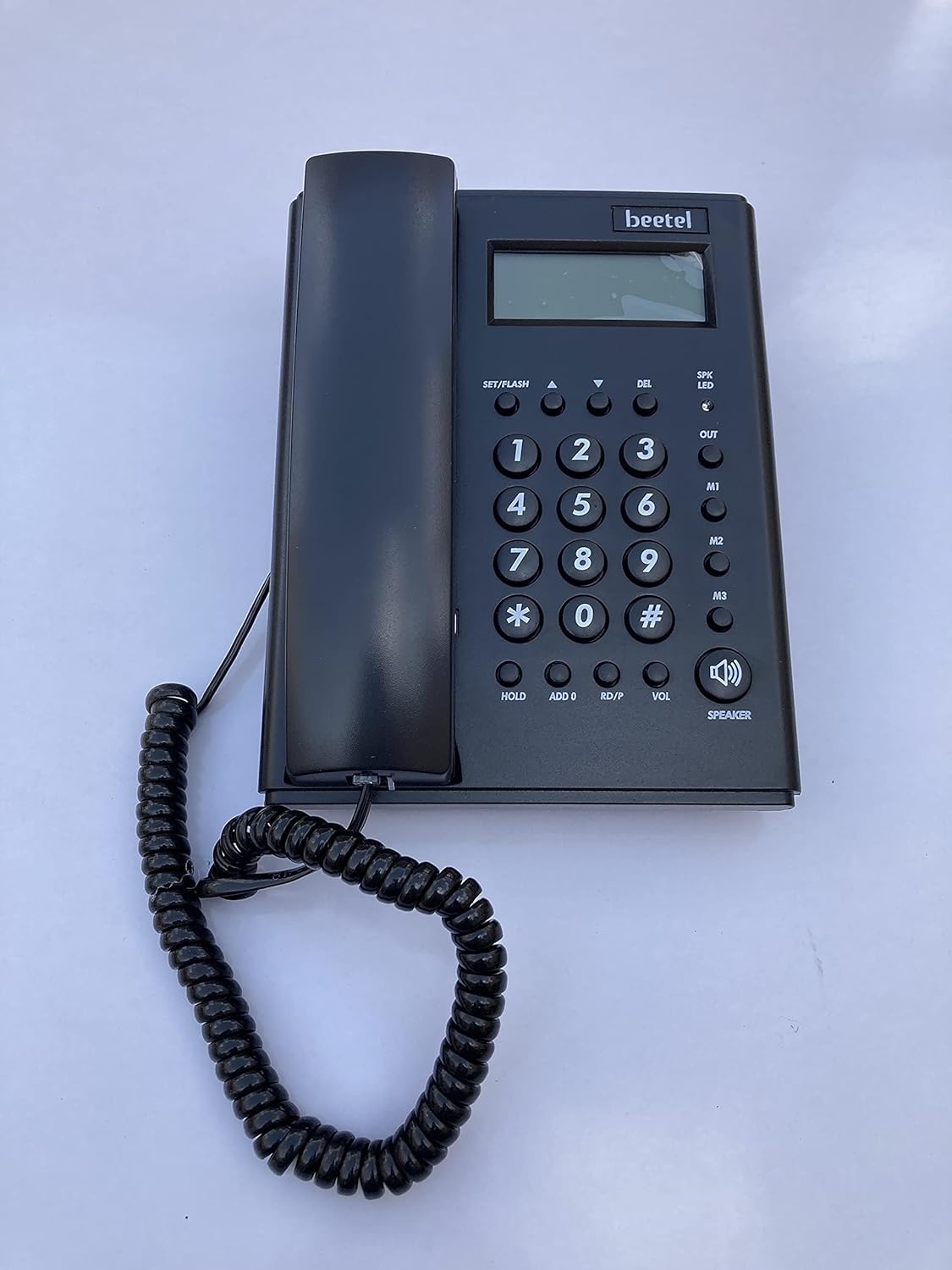
ചിത്രം 1: മുകളിൽ view of the Beetel M53N phone, highlighting the keypad, display, and function buttons.
3. പ്രവർത്തന നിർദ്ദേശങ്ങൾ
3.1 ഒരു കോൾ ചെയ്യുന്നു
- ഹാൻഡ്സെറ്റ് ഉയർത്തുക അല്ലെങ്കിൽ അമർത്തുക സ്പീക്കർ button to get a dial tone.
- കീപാഡ് ഉപയോഗിച്ച് ആവശ്യമുള്ള ഫോൺ നമ്പർ ഡയൽ ചെയ്യുക.
- കോൾ കണക്റ്റുചെയ്യുന്നതിനായി കാത്തിരിക്കുക.
- കോൾ അവസാനിപ്പിക്കാൻ, ഹാൻഡ്സെറ്റ് മാറ്റിസ്ഥാപിക്കുക അല്ലെങ്കിൽ അമർത്തുക സ്പീക്കർ button again if on speakerphone.
3.2 ഒരു കോൾ സ്വീകരിക്കുന്നു
ഫോൺ റിംഗ് ചെയ്യുമ്പോൾ:
- കോളിന് മറുപടി നൽകാൻ ഹാൻഡ്സെറ്റ് ഉയർത്തുക.
- പകരമായി, അമർത്തുക സ്പീക്കർ button to answer in speakerphone mode.
3.3 Using Caller ID
The Beetel M53N supports Caller ID. When an incoming call is received, the caller's number (and name, if available and subscribed to the service) will be displayed on the screen before you answer.
- ഉപയോഗിക്കുക UP (▲) കൂടാതെ താഴേക്ക് (▼) arrow buttons to scroll through the Caller ID log.
- അമർത്തുക DEL to delete an entry from the log.
3.4 സ്പീക്കർഫോൺ പ്രവർത്തനം
The phone features a double speaker for clear hands-free communication.
- To activate speakerphone during a call, press the സ്പീക്കർ ബട്ടൺ.
- ഹാൻഡ്സെറ്റിലേക്ക് തിരികെ മാറാൻ, ഹാൻഡ്സെറ്റ് ഉയർത്തുക.
- ഒരു സ്പീക്കർഫോൺ കോൾ അവസാനിപ്പിക്കാൻ, അമർത്തുക സ്പീക്കർ വീണ്ടും ബട്ടൺ.
3.5 വോളിയം ക്രമീകരണം
Adjust the speakerphone volume using the VOL button. Repeatedly press the button to cycle through available volume levels.
3.6 Memory Dialing (M1, M2, M3)
The phone includes three one-touch memory buttons (M1, M2, M3) for frequently dialed numbers.
ഒരു നമ്പർ സംഭരിക്കാൻ:
- ഹാൻഡ്സെറ്റ് ഉയർത്തുക അല്ലെങ്കിൽ അമർത്തുക സ്പീക്കർ.
- അമർത്തുക SET/FLASH.
- നിങ്ങൾ സൂക്ഷിക്കാൻ ആഗ്രഹിക്കുന്ന ഫോൺ നമ്പർ ഡയൽ ചെയ്യുക.
- അമർത്തുക SET/FLASH വീണ്ടും.
- Press the desired memory button (M1, M2, അല്ലെങ്കിൽ M3). The number is now stored.
സംഭരിച്ചിരിക്കുന്ന ഒരു നമ്പർ ഡയൽ ചെയ്യാൻ:
- ഹാൻഡ്സെറ്റ് ഉയർത്തുക അല്ലെങ്കിൽ അമർത്തുക സ്പീക്കർ.
- Press the desired memory button (M1, M2, അല്ലെങ്കിൽ M3). The phone will automatically dial the stored number.
4. പരിചരണവും പരിപാലനവും
- സോഫ്റ്റ്, ഡി ക്ലീനർ ഉപയോഗിച്ച് ഫോൺ വൃത്തിയാക്കുക.amp തുണി. ഉരച്ചിലുകളുള്ള ക്ലീനറുകളോ ലായകങ്ങളോ ഉപയോഗിക്കരുത്.
- Avoid exposing the phone to direct sunlight, excessive moisture, or extreme temperatures.
- Do not disassemble the phone. Refer servicing to qualified personnel.
5. ട്രബിൾഷൂട്ടിംഗ് ഗൈഡ്
| പ്രശ്നം | സാധ്യമായ കാരണം | പരിഹാരം |
|---|---|---|
| ഡയൽ ടോൺ ഇല്ല | ടെലിഫോൺ ലൈൻ കോഡ് അയഞ്ഞിരിക്കുന്നു അല്ലെങ്കിൽ വിച്ഛേദിക്കപ്പെട്ടിരിക്കുന്നു. | Check and securely plug in the telephone line cord into both the phone and the wall jack. |
| സ്ക്രീനിൽ ഡിസ്പ്ലേ ഇല്ല | No power from the telephone line. | Ensure the telephone line cord is properly connected. Test with another phone if possible to verify line service. |
| വിളിക്കുന്നയാൾക്ക് കേൾക്കാൻ കഴിയുന്നില്ല / വിളിക്കുന്നയാൾക്ക് എന്നെ കേൾക്കാൻ കഴിയുന്നില്ല. | Handset cord is loose or damaged. Volume is too low. | Check handset cord connection. Adjust volume using the VOL ബട്ടൺ. |
| കോളർ ഐഡി പ്രവർത്തിക്കുന്നില്ല | Caller ID service not subscribed. | നിങ്ങളുടെ ലൈനിൽ കോളർ ഐഡി സേവനം സജീവമാണെന്ന് ഉറപ്പാക്കാൻ നിങ്ങളുടെ ടെലിഫോൺ സേവന ദാതാവിനെ ബന്ധപ്പെടുക. |
6 സാങ്കേതിക സവിശേഷതകൾ
| ഫീച്ചർ | സ്പെസിഫിക്കേഷൻ |
|---|---|
| മോഡൽ | M53N |
| ബ്രാൻഡ് | ബീറ്റൽ |
| നിറം | കറുപ്പ് |
| ടെലിഫോൺ തരം | കോർഡഡ് |
| മെറ്റീരിയൽ | പ്ലാസ്റ്റിക് |
| ഉൽപ്പന്ന അളവുകൾ | 21 x 7 x 20 സെ.മീ |
| ഇനത്തിൻ്റെ ഭാരം | 610 ഗ്രാം |
| നിർമ്മാതാവ് | വണ്ട് |
| മാതൃരാജ്യം | ഇന്ത്യ |
7. വാറണ്ടിയും ഉപഭോക്തൃ പിന്തുണയും
For warranty information and customer support, please contact Beetel customer service. Keep your purchase receipt as proof of purchase.
Manufacturer: beetel
For service inquiries, please refer to the contact information provided with your product packaging or visit the official Beetel webസൈറ്റ്.