
ആമുഖം
The ElectraStim Flux is a versatile electro-stimulator designed for a wide range of applications. It features powerful outputs, an intuitive interface, and advanced control options including audio processing. This manual provides comprehensive instructions for the safe and effective use of your Flux device, covering setup, operation, maintenance, and troubleshooting.
സുരക്ഷാ വിവരങ്ങൾ
Always follow the instructions provided in this guide. Keep the device away from water and do not use it while bathing or showering. Do not use the device if you have a pacemaker or any other electronic medical device. Consult a healthcare professional before use if you have any health concerns or are pregnant. Clean the device and accessories after each use with mild soap and warm water, and store them properly to maintain hygiene and prevent damage.
ഡയറ്ററി സപ്ലിമെൻ്റുകളെക്കുറിച്ചുള്ള പ്രസ്താവനകൾ FDA വിലയിരുത്തിയിട്ടില്ല, അവ ഏതെങ്കിലും രോഗമോ ആരോഗ്യസ്ഥിതിയോ നിർണ്ണയിക്കാനോ ചികിത്സിക്കാനോ സുഖപ്പെടുത്താനോ തടയാനോ ഉദ്ദേശിച്ചുള്ളതല്ല.
പാക്കേജ് ഉള്ളടക്കം
നിങ്ങളുടെ പാക്കേജിൽ താഴെ പറയുന്ന എല്ലാ ഇനങ്ങളും ഉണ്ടെന്ന് ഉറപ്പാക്കുക:
- ElectraStim Flux Unit
- പ്രൊട്ടക്റ്റീവ് കാരിയിംഗ് കേസ്
- Electrode Pads (multiple pairs)
- Electrode Cables (2x)
- യുഎസ്ബി ചാർജിംഗ് കേബിൾ
- Audio Line-In Cable
- ദ്രുത ആരംഭ ഗൈഡ് (പ്രത്യേക പ്രമാണം)

Figure 1: ElectraStim Flux complete package contents.
സജ്ജമാക്കുക
ഉപകരണം ചാർജ് ചെയ്യുന്നു
The Flux unit is powered by a high-capacity rechargeable lithium-ion battery. Before first use, or when the battery indicator shows low charge, connect the device to a USB power source using the provided USB charging cable.
- Locate the micro-USB port on the bottom of the Flux unit.
- Insert the small end of the USB cable into the Flux unit and the larger end into a USB wall adapter or computer USB port.
- The OLED display will show a battery charging indicator. The device charges to 80% in under an hour.
- A full charge provides up to 8 hours of play, depending on the selected mode and intensity.
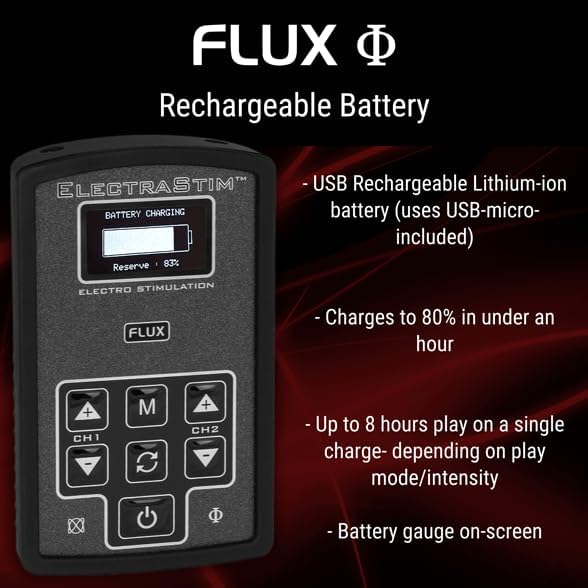
Figure 2: Battery charging display on the Flux unit.
ആക്സസറികൾ ബന്ധിപ്പിക്കുന്നു
The Flux unit features twin outputs, allowing for a wide variety of accessory configurations. Ensure the device is turned off before connecting or disconnecting accessories.
- Connect the electrode cables to the two output ports located on the top edge of the Flux unit. These are labeled CH1 and CH2.
- Attach the electrode pads to the other end of the electrode cables.
- ഉപകരണം ഓണാക്കുന്നതിന് മുമ്പ് എല്ലാ കണക്ഷനുകളും സുരക്ഷിതമാണെന്ന് ഉറപ്പാക്കുക.

ചിത്രം 3: മുകളിൽ view showing output ports for electrode cables.
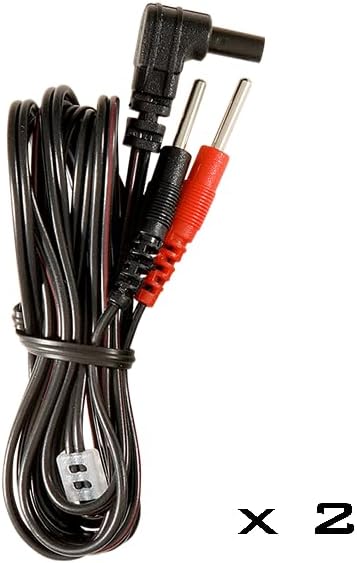
Figure 4: Electrode cables for connecting to pads.
പ്രവർത്തന നിർദ്ദേശങ്ങൾ
നിയന്ത്രിക്കുന്നുview
The Flux unit features a clear OLED display and intuitive button controls:

ചിത്രം 5: മുൻഭാഗം view of the ElectraStim Flux with controls.
- പവർ ബട്ടൺ (⑂): ഉപകരണം ഓണാക്കാനോ ഓഫാക്കാനോ അമർത്തിപ്പിടിക്കുക.
- മോഡ് ബട്ടൺ (M): Cycles through the available play modes.
- Channel 1 Intensity (+/-): Adjusts the intensity for Channel 1.
- Channel 2 Intensity (+/-): Adjusts the intensity for Channel 2.
- Cycle/Rotate Button (↻): Cycles through pre-programmed patterns within a selected mode or changes orientation in Tilt mode.
പവർ ചെയ്യുന്നത് ഓൺ/ഓഫ്
To turn on the Flux unit, press and hold the Power button (⑂) until the display illuminates. To turn off, press and hold the Power button again until the display shuts down.
തീവ്രത ക്രമീകരിക്കുന്നു
The Flux offers 99 intensity levels for precise control. Use the Channel 1 (+/-) and Channel 2 (+/-) buttons to increase or decrease the stimulation intensity for each respective channel. The current intensity level will be displayed on the OLED screen.
Selecting Play Modes and Patterns
The Flux comes with 6 distinct play modes and over 40 pre-programmed wave/pulse patterns. Press the Mode (M) button to cycle through the main play modes. Once a mode is selected, use the Cycle/Rotate (↻) button to switch between the available patterns within that mode.
ഓഡിയോ മോഡുകൾ
The Flux features advanced audio-processing controls, allowing external audio to influence the stimulation patterns. There are two primary audio modes:
- Stereo Line-In Mode: Connect an audio source (e.g., smartphone, MP3 player) to the 3.5mm audio jack on the bottom of the Flux unit using the provided audio line-in cable. The device will respond to the music or stereo-stim tracks, creating unique sensations.
- മൈക്രോഫോൺ മോഡ്: Utilize the built-in microphone to allow ambient noise, including voices or environmental sounds, to control the stimulation.

Figure 6: Flux unit displaying audio mode information.
മെയിൻ്റനൻസ്
വൃത്തിയാക്കൽ
To ensure hygiene and longevity of your device, clean the Flux unit and all accessories after each use. Use a soft cloth dampened with mild soap and warm water. Do not submerge the unit in water. Ensure the device is completely dry before storage or next use.
സംഭരണം
Store the ElectraStim Flux and its accessories in the provided protective carrying case when not in use. This protects the device from dust, moisture, and physical damage, ensuring its optimal performance over time.

Figure 7: Protective carrying case for the ElectraStim Flux.
ട്രബിൾഷൂട്ടിംഗ്
If you encounter any issues with your ElectraStim Flux, please refer to the table below for common problems and their solutions.
| പ്രശ്നം | സാധ്യമായ കാരണം / പരിഹാരം |
|---|---|
| Device turns off unexpectedly during use. | Battery may be low. Recharge the device fully. Ensure electrode cables are securely connected. |
| ഉപകരണം മരവിക്കുന്നു അല്ലെങ്കിൽ പ്രതികരിക്കുന്നില്ല. | Try restarting the device by holding the power button. If the issue persists, contact customer support for potential firmware updates. |
| Limited variation in pre-programmed patterns. | Ensure you are cycling through all available patterns within each mode using the Cycle/Rotate button. Experiment with audio input modes for dynamic stimulation. |
| ഉത്തേജനം അനുഭവപ്പെട്ടില്ല അല്ലെങ്കിൽ ദുർബലമായ ഉത്തേജനം ഉണ്ടായില്ല. | Check intensity levels for both channels. Ensure electrode pads are properly applied and making good contact. Verify electrode cables are securely connected to both the unit and pads. |
സ്പെസിഫിക്കേഷനുകൾ
| ഫീച്ചർ | വിശദാംശങ്ങൾ |
|---|---|
| മോഡൽ നമ്പർ | EM180 |
| ഉൽപ്പന്ന അളവുകൾ | 3.94 x 0.79 x 2.76 ഇഞ്ച് |
| ഭാരം | 10.58 ഔൺസ് |
| ബാറ്ററി തരം | 1 ലിഥിയം അയൺ ബാറ്ററി (റീചാർജ് ചെയ്യാവുന്നത്) |
| തീവ്രത ലെവലുകൾ | 99 |
| പ്ലേ മോഡുകൾ | 6 (including accelerometer and audio control) |
| Pre-programmed Patterns | 40+ |
| ഔട്ട്പുട്ടുകൾ | Twin outputs |
| നിർമ്മാതാവ് | ElectraStim |
| ആദ്യ തീയതി ലഭ്യമാണ് | ഒക്ടോബർ 7, 2019 |
വാറൻ്റിയും പിന്തുണയും
For warranty information, technical support, or any inquiries not covered in this manual, please refer to the official ElectraStim webസൈറ്റിൽ ബന്ധപ്പെടുകയോ അവരുടെ ഉപഭോക്തൃ സേവനവുമായി നേരിട്ട് ബന്ധപ്പെടുകയോ ചെയ്യുക. വാറന്റി ക്ലെയിമുകൾക്കായി നിങ്ങളുടെ വാങ്ങിയതിന്റെ തെളിവ് സൂക്ഷിക്കുക.