
ആമുഖം
This manual provides detailed instructions for the safe and efficient use of your FONESTAR DOTS-N Bluetooth TWS Speaker. Please read this manual thoroughly before operating the device and retain it for future reference.
The FONESTAR DOTS-N is a portable Bluetooth TWS speaker featuring Bluetooth 4.2 and NFC connectivity. It offers powerful sound with enhanced bass, playback controls, and hands-free calling. Equipped with a rechargeable Li-Ion battery providing up to 10 hours of autonomy, it also includes a 3.5mm auxiliary input. Its compact design makes it suitable for home use.
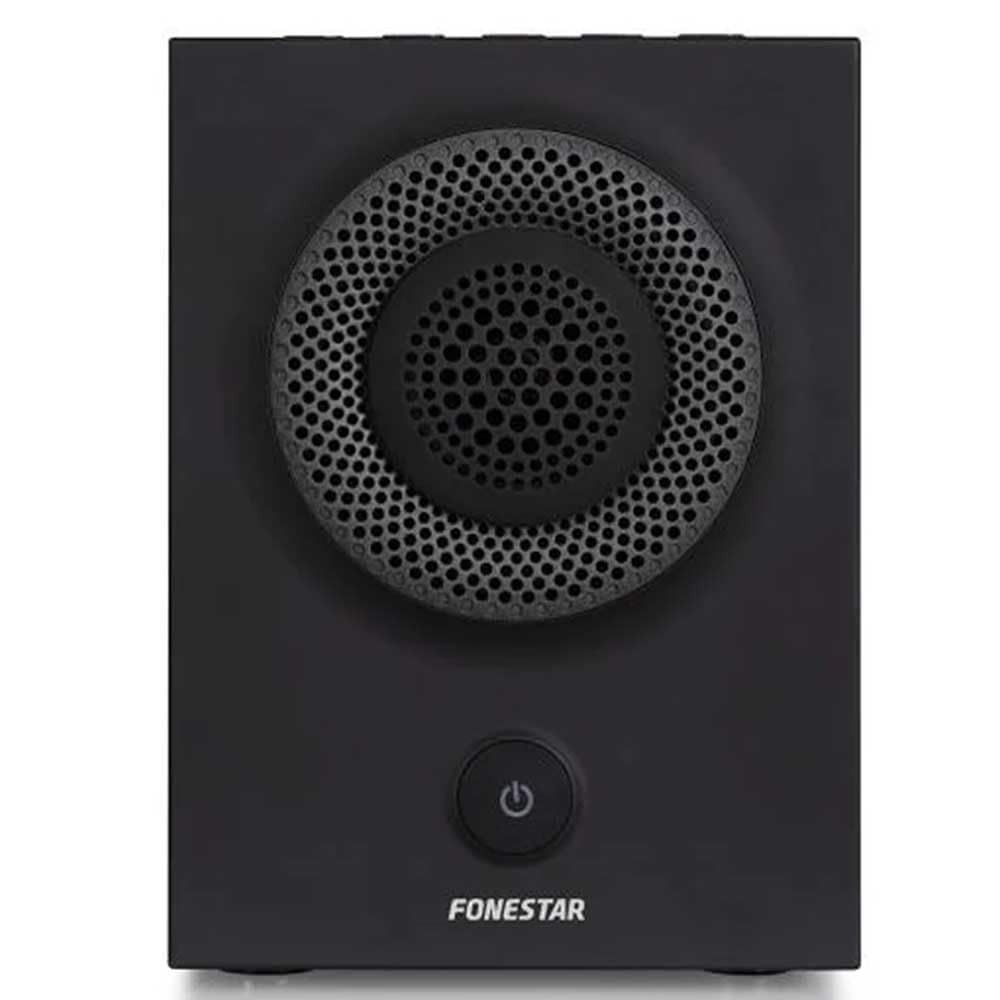
ചിത്രം 1: മുൻഭാഗം view of the FONESTAR DOTS-N Bluetooth TWS Speaker.
സജ്ജമാക്കുക
1 അൺപാക്ക് ചെയ്യുന്നു
പാക്കേജിംഗിൽ നിന്ന് എല്ലാ ഘടകങ്ങളും ശ്രദ്ധാപൂർവ്വം നീക്കം ചെയ്യുക. താഴെ പട്ടികപ്പെടുത്തിയിരിക്കുന്ന എല്ലാ ഇനങ്ങളും ഉണ്ടെന്ന് ഉറപ്പാക്കുക:
- FONESTAR DOTS-N Bluetooth TWS Speaker
- USB മുതൽ മൈക്രോ USB ചാർജിംഗ് കേബിൾ
- 3.5mm സ്റ്റീരിയോ ഓഡിയോ കേബിൾ
- ഉപയോക്തൃ മാനുവൽ (ഈ പ്രമാണം)
2. സ്പീക്കറിൽ നിന്ന് നിരക്ക് ഈടാക്കുന്നു
Before first use, fully charge the speaker. Connect the Micro USB end of the charging cable to the speaker's charging port and the USB-A end to a compatible USB power adapter (not included) or a computer's USB port.
- ചാർജ് ചെയ്യുമ്പോൾ ചാർജിംഗ് ഇൻഡിക്കേറ്റർ ലൈറ്റ് പ്രകാശിക്കും.
- ഒരു ഫുൾ ചാർജിന് ഏകദേശം 3 മണിക്കൂറാണ് ചാർജ്ജിംഗ് സമയം.
- ചാർജിംഗ് പൂർത്തിയായിക്കഴിഞ്ഞാൽ ഇൻഡിക്കേറ്റർ ലൈറ്റ് മാറുകയോ ഓഫാകുകയോ ചെയ്യും.
3. പവർ ഓൺ/ഓഫ്
To power on the speaker, press and hold the power button (usually indicated by a ⏻ symbol) for a few seconds until you hear an audible prompt or see an indicator light. To power off, repeat the process.
പ്രവർത്തന നിർദ്ദേശങ്ങൾ
1. ബ്ലൂടൂത്ത് ജോടിയാക്കൽ
The speaker supports Bluetooth 4.2 for wireless audio streaming.
- Ensure the speaker is powered on and in pairing mode (usually indicated by a flashing LED). If not, press the Bluetooth pairing button or power button briefly to enter pairing mode.
- നിങ്ങളുടെ സ്മാർട്ട്ഫോണിലോ, ടാബ്ലെറ്റിലോ, അല്ലെങ്കിൽ മറ്റ് ബ്ലൂടൂത്ത് പ്രവർത്തനക്ഷമമാക്കിയ ഉപകരണത്തിലോ, ബ്ലൂടൂത്ത് ക്രമീകരണങ്ങളിലേക്ക് പോകുക.
- ഇതിനായി തിരയുക available devices and select "FONESTAR DOTS-N" from the list.
- Once paired, the speaker will emit an audible confirmation, and the LED indicator will typically become solid.
2. NFC ജോടിയാക്കൽ (നിയർ ഫീൽഡ് കമ്മ്യൂണിക്കേഷൻ)
For devices with NFC, pairing can be done quickly:
- Ensure NFC is enabled on your device and the speaker is powered on.
- Tap your NFC-enabled device gently against the NFC area on the speaker (refer to product diagram for exact location, if available).
- Confirm the pairing request on your device.
3. ട്രൂ വയർലെസ് സ്റ്റീരിയോ (TWS) ഫംഗ്ഷൻ
The TWS function allows you to pair two FONESTAR DOTS-N speakers together for a stereo sound experience.
- Ensure both DOTS-N speakers are powered on and not connected to any other Bluetooth device.
- On one speaker (this will be the primary speaker), press and hold the TWS button (if available) or a designated button for TWS pairing.
- പ്രാഥമിക സ്പീക്കർ സെക്കൻഡറി സ്പീക്കറിനായി തിരയും. കണക്റ്റ് ചെയ്തുകഴിഞ്ഞാൽ, രണ്ട് സ്പീക്കറുകളും ഒരു സ്ഥിരീകരണ ശബ്ദം പുറപ്പെടുവിക്കും.
- ഇനി, "Bluetooth Pairing" വിഭാഗത്തിൽ വിവരിച്ചിരിക്കുന്നതുപോലെ നിങ്ങളുടെ Bluetooth ഉപകരണം പ്രാഥമിക സ്പീക്കറുമായി ബന്ധിപ്പിക്കുക. രണ്ട് സ്പീക്കറുകളിലൂടെയും ഓഡിയോ സ്റ്റീരിയോയിൽ പ്ലേ ചെയ്യും.
4. ഓക്സിലറി ഇൻപുട്ട് (AUX)
For non-Bluetooth devices, use the included 3.5mm stereo audio cable.
- 3.5mm ഓഡിയോ കേബിളിന്റെ ഒരറ്റം സ്പീക്കറിലെ AUX-ഇൻ പോർട്ടുമായി ബന്ധിപ്പിക്കുക.
- മറ്റേ അറ്റം നിങ്ങളുടെ ഉപകരണത്തിന്റെ ഹെഡ്ഫോൺ ജാക്കിലേക്കോ ഓഡിയോ ഔട്ട്പുട്ടിലേക്കോ ബന്ധിപ്പിക്കുക.
- The speaker will automatically switch to AUX mode or may require manual selection via a mode button.
5. Playback Control and Hands-Free Calls
The speaker features integrated controls for music playback and managing calls:
- പ്ലേ/താൽക്കാലികമായി നിർത്തുക: Press the Play/Pause button (often combined with the power button or a dedicated button).
- വോളിയം കൂട്ടുക/താഴ്ത്തുക: Use the volume buttons (+ / -) on the speaker.
- അടുത്തത് / മുമ്പത്തെ ട്രാക്ക്: Long press or double-press the volume buttons, or use dedicated track skip buttons if present.
- ഉത്തരം/അവസാന കോൾ: Press the Play/Pause button during an incoming call to answer, and again to end the call.
- കോൾ നിരസിക്കുക: Press and hold the Play/Pause button during an incoming call.
മെയിൻ്റനൻസ്
1. വൃത്തിയാക്കൽ
- വൃത്തിയാക്കുന്നതിന് മുമ്പ് എപ്പോഴും സ്പീക്കർ ഓഫ് ചെയ്യുക.
- പുറംഭാഗങ്ങൾ തുടയ്ക്കാൻ മൃദുവായതും ഉണങ്ങിയതും ലിന്റ് രഹിതവുമായ ഒരു തുണി ഉപയോഗിക്കുക.
- അബ്രാസീവ് ക്ലീനറുകൾ, മെഴുക് അല്ലെങ്കിൽ ലായകങ്ങൾ എന്നിവ ഉപയോഗിക്കരുത്, കാരണം അവ ഫിനിഷിന് കേടുവരുത്തും.
- ഏതെങ്കിലും ദ്വാരങ്ങളിൽ ഈർപ്പം കയറുന്നത് ഒഴിവാക്കുക.
2. സംഭരണം
- നേരിട്ടുള്ള സൂര്യപ്രകാശത്തിൽ നിന്നും കടുത്ത താപനിലയിൽ നിന്നും മാറി തണുത്തതും വരണ്ടതുമായ സ്ഥലത്ത് സ്പീക്കർ സൂക്ഷിക്കുക.
- ദീർഘനേരം സൂക്ഷിക്കുകയാണെങ്കിൽ, ബാറ്ററിയുടെ ആരോഗ്യം നിലനിർത്താൻ ഓരോ ഏതാനും മാസത്തിലും ഏകദേശം 50% വരെ ബാറ്ററി ചാർജ് ചെയ്യുക.
3. ബാറ്ററി പരിചരണം
- Do not expose the battery to excessive heat, fire, or direct sunlight.
- ബാറ്ററി ഇടയ്ക്കിടെ പൂർണ്ണമായും ഡിസ്ചാർജ് ചെയ്യുന്നത് ഒഴിവാക്കുക, കാരണം ഇത് അതിന്റെ ആയുസ്സ് കുറയ്ക്കും.
- നൽകിയിരിക്കുന്ന ചാർജിംഗ് കേബിളോ സാക്ഷ്യപ്പെടുത്തിയ തത്തുല്യമായതോ മാത്രം ഉപയോഗിക്കുക.
ട്രബിൾഷൂട്ടിംഗ്
| പ്രശ്നം | സാധ്യമായ കാരണം | പരിഹാരം |
|---|---|---|
| സ്പീക്കർ പവർ ഓൺ ചെയ്യുന്നില്ല. | ബാറ്ററി തീർന്നു. | നൽകിയിരിക്കുന്ന USB കേബിൾ ഉപയോഗിച്ച് സ്പീക്കർ ചാർജ് ചെയ്യുക. |
| ബ്ലൂടൂത്ത് വഴി ജോടിയാക്കാൻ കഴിയില്ല. | സ്പീക്കർ ജോടിയാക്കൽ മോഡിലല്ല; ഉപകരണം വളരെ അകലെയാണ്; ഇടപെടൽ. | Ensure speaker is in pairing mode. Move device closer (within 10m). Turn off other Bluetooth devices. |
| ശബ്ദമില്ല അല്ലെങ്കിൽ കുറഞ്ഞ ശബ്ദമില്ല. | Volume too low on speaker or source device; incorrect input mode. | Increase volume on both speaker and source device. Check if the correct input (Bluetooth/AUX) is selected. |
| TWS ജോടിയാക്കൽ പരാജയപ്പെടുന്നു. | Speakers are already paired to another device; incorrect TWS pairing procedure. | രണ്ട് സ്പീക്കറുകളും മറ്റ് ഉപകരണങ്ങളിൽ നിന്ന് വിച്ഛേദിക്കപ്പെട്ടിട്ടുണ്ടെന്ന് ഉറപ്പാക്കുക. TWS ജോടിയാക്കൽ ഘട്ടങ്ങൾ ശ്രദ്ധാപൂർവ്വം പാലിക്കുക. |
| ശബ്ദ വികൃതത. | Volume too high; low battery; poor signal. | Reduce volume. Charge the speaker. Move source device closer to the speaker. |
സാങ്കേതിക സവിശേഷതകൾ

Figure 2: Dimensions of the FONESTAR DOTS-N Bluetooth TWS Speaker.
| മോഡലിൻ്റെ പേര് | DOTS-N |
| ബ്രാൻഡ് | ഫോൺസ്റ്റാർ |
| കണക്റ്റിവിറ്റി ടെക്നോളജി | ബ്ലൂടൂത്ത് 4.2, എൻഎഫ്സി, 3.5 എംഎം ഓയുഎക്സ് |
| വയർലെസ് ശ്രേണി | 10 മീറ്റർ വരെ (33 അടി) |
| ഓഡിയോ put ട്ട്പുട്ട് മോഡ് | സ്റ്റീരിയോ (TWS ഉള്ളത്) |
| സ്പീക്കർ തരം | 3" Coaxial Woofer with Tweeter, 3" Subwoofer, 4" Passive Radiator |
| പരമാവധി സ്പീക്കർ ഔട്ട്പുട്ട് പവർ | 12 വാട്ട്സ് ആർഎംഎസ് |
| ഫ്രീക്വൻസി പ്രതികരണം | 80 - 20,000 ഹെർട്സ് |
| സിഗ്നൽ-ടു-നോയിസ് അനുപാതം | ≥ 75 ഡിബി |
| പവർ ഉറവിടം | Battery Powered (Rechargeable Li-ion) |
| ബാറ്ററി ശേഷി | 2200 mAh, 7.4 V |
| ബാറ്ററി സ്വയംഭരണം | 10 മണിക്കൂർ വരെ (50% വോളിയത്തിൽ) |
| ചാർജിംഗ് സമയം | ഏകദേശം 3 മണിക്കൂർ |
| നിയന്ത്രണ രീതി | സ്പർശനം (സ്പർശം) |
| പ്രത്യേക സവിശേഷതകൾ | High-res audio, Bluetooth, Integrated microphone, USB port (for charging) |
| അനുയോജ്യമായ ഉപകരണങ്ങൾ | സ്മാർട്ട്ഫോണുകൾ, ടാബ്ലെറ്റുകൾ |
| ശുപാർശ ചെയ്യുന്ന ഉപയോഗം | For home |
| നിറം | കറുപ്പ് |
| അളവുകൾ (W x H x D) | 125 x 175 x 158 മിമി (ഏകദേശം 4.9 x 6.9 x 6.2 ഇഞ്ച്) |
| ഇനത്തിൻ്റെ ഭാരം | 1.82 കി.ഗ്രാം (ഏകദേശം. 4.01 പൗണ്ട്) |
| വാട്ടർപ്രൂഫ് | ഇല്ല |
Note: Specifications are subject to change without prior notice. Battery autonomy may vary depending on usage, volume level, and music type.
വാറൻ്റി വിവരങ്ങൾ
FONESTAR products are designed and manufactured to the highest quality standards. This product is covered by a limited warranty against manufacturing defects from the date of purchase. The specific terms and duration of the warranty may vary by region and retailer.
Please retain your proof of purchase (receipt or invoice) as it will be required for any warranty claims. The warranty does not cover damage caused by misuse, accident, unauthorized modification, or normal wear and tear.
For detailed warranty terms and conditions, please refer to the warranty card included with your product or contact your local FONESTAR distributor or retailer.
ഉപഭോക്തൃ പിന്തുണ
If you encounter any issues that are not resolved by the troubleshooting guide, or if you require further assistance, please contact FONESTAR customer support or your authorized retailer.
When contacting support, please be prepared to provide the following information:
- Product Model: FONESTAR DOTS-N
- വാങ്ങിയ തീയതി
- പ്രശ്നത്തിന്റെ വിവരണം
- നിങ്ങളുടെ ബന്ധപ്പെടാനുള്ള വിവരങ്ങൾ
For the most up-to-date support information, including contact details and FAQs, please visit the official FONESTAR webസൈറ്റ്.