
1. ആമുഖം
Thank you for choosing the ISDT 608AC Lipo Charger. This manual provides essential information for the safe and efficient operation of your charger. Please read it thoroughly before use to ensure proper setup, operation, and maintenance. The ISDT 608AC is a versatile AC/DC charger designed for various battery types, offering intelligent charging solutions for hobbyists and professionals.
2 സുരക്ഷാ വിവരങ്ങൾ
Always prioritize safety when operating battery chargers. Failure to follow these guidelines can result in property damage, injury, or death.
- മാനുവൽ വായിക്കുക: Always read and understand the entire instruction manual before using the charger.
- വെൻ്റിലേഷൻ: Operate the charger in a well-ventilated area, away from flammable materials.
- ശരിയായ ബാറ്ററി തരം: Ensure the charger settings match the battery type and cell count. Charging incorrect battery types or with incorrect settings can cause fire or explosion.
- മേൽനോട്ടം: ഉപയോഗത്തിലിരിക്കുമ്പോൾ ചാർജർ ഒരിക്കലും ശ്രദ്ധിക്കാതെ വിടരുത്.
- നാശനഷ്ട പരിശോധന: Do not use the charger or batteries if they appear damaged.
- ഊർജ്ജ സ്രോതസ്സ്: Use only the specified AC or DC power sources.
- കുട്ടികളും വളർത്തുമൃഗങ്ങളും: ചാർജറും ബാറ്ററികളും കുട്ടികൾക്കും വളർത്തുമൃഗങ്ങൾക്കും ലഭ്യമാകാതെ സൂക്ഷിക്കുക.
- നീക്കം ചെയ്യൽ: Dispose of batteries and electronic waste according to local regulations.
3. ഉൽപ്പന്ന സവിശേഷതകൾ
- AC/DC Dual Mode: The charger features a removable power supply, allowing quick switching between AC and DC input modes to suit various charging environments.
- സ്മാർട്ട് ഐഡന്റിഫിക്കേഷൻ: Equipped with intelligent battery technology, the charger automatically identifies battery types and adjusts charging parameters for safe and efficient operation, extending battery life.
- സൗകര്യപ്രദമായ പ്രവർത്തനം: The intuitive 'roll and press' shuttle control simplifies navigation and selection, providing a user-friendly experience.
- Adjustable Digital Power Supply: In digital power supply mode, the charger offers AC 50W/DC 200W charging power with adjustable current (0.2~5A) and voltagഇ (2~30V).
- One-Key Shuttle Control: This feature streamlines the user interface, replacing complex button sequences with a single, smooth control for ease of use.
4. ഉൽപ്പന്നം കഴിഞ്ഞുview ഘടകങ്ങളും
Familiarize yourself with the main components and ports of your ISDT 608AC charger.

- എസി ഇൻപുട്ട് പോർട്ട്: For connecting to mains power (100V-240V).
- ഡിസി ഇൻപുട്ട് പോർട്ട്: For connecting to a DC power source (1V-30V).
- Knob Wheel: മെനുകൾ നാവിഗേറ്റ് ചെയ്യുന്നതിനും ക്രമീകരണങ്ങൾ ക്രമീകരിക്കുന്നതിനും ഉപയോഗിക്കുന്നു.
- മൈക്രോ യുഎസ്ബി പോർട്ട്: For firmware updates and data connection.
- ഔട്ട്പുട്ട് പോർട്ട്: Main charging output for connecting to batteries.
- Balance Port: For connecting battery balance leads to monitor individual cell voltages.
- കൂളിംഗ് ഫാൻ: Ensures optimal operating temperature during charging.

5. സജ്ജീകരണം
Follow these steps to set up your ISDT 608AC charger:
- അൺപാക്ക്: പാക്കേജിംഗിൽ നിന്ന് എല്ലാ ഘടകങ്ങളും ശ്രദ്ധാപൂർവ്വം നീക്കം ചെയ്യുക.
- പവർ കണക്ഷൻ:
- എസി മോഡ്: Connect the AC power cable to the AC input port on the charger, then plug it into a suitable wall outlet (100V-240V).
- DC മോഡ്: If using DC power, detach the AC power module. Connect your DC power source (e.g., a power supply or car battery) to the DC input port (1V-30V).
- പ്രാരംഭ പവർ ഓൺ: The charger will power on automatically once connected to a power source. The display will show the startup screen.
6. പ്രവർത്തന നിർദ്ദേശങ്ങൾ
The ISDT 608AC uses a single shuttle roll knob for all operations.

6.1. അടിസ്ഥാന നാവിഗേഷൻ
- തിരിക്കുക: Turn the knob left or right to scroll through menu options or adjust values.
- അമർത്തുക: Press the knob to select an option or confirm a setting.
6.2. ബാറ്ററി ചാർജ് ചെയ്യുന്നു
The charger supports various battery types including LiFe, Lilon, LiPo, LiHv (1-6S), Pb (1-12S), and NiMH (1-16S).
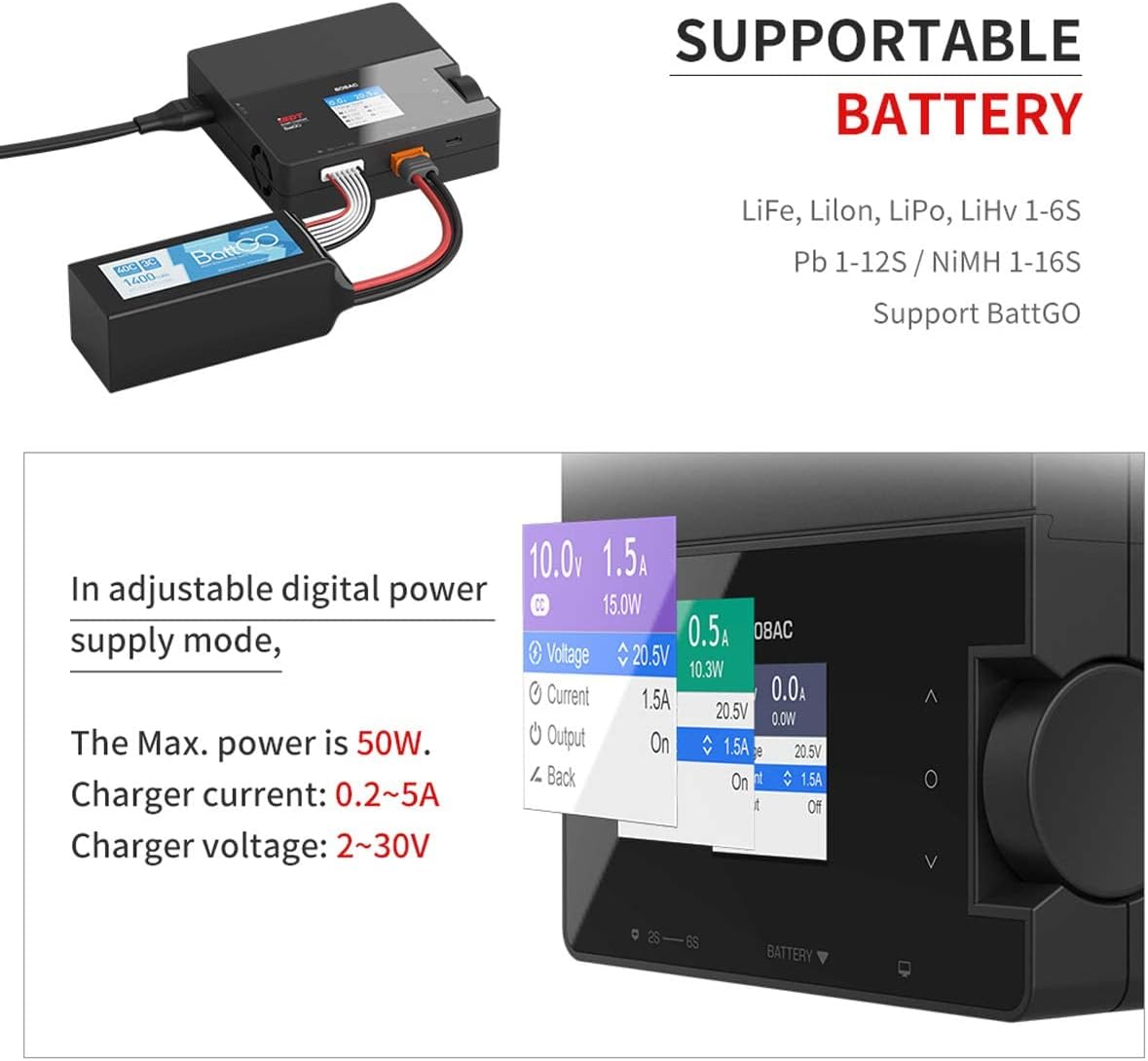
- ബാറ്ററി ബന്ധിപ്പിക്കുക: Connect your battery's main discharge lead to the charger's output port. If it's a LiPo/LiFe/LiIon/LiHv battery, also connect its balance lead to the balance port.
- ബാറ്ററി തരം തിരഞ്ഞെടുക്കുക: The charger's smart identification feature will attempt to detect the battery type. Verify this on the screen. If incorrect, use the knob to manually select the correct battery type (e.g., LiPo, LiFe, NiMH).
- പാരാമീറ്ററുകൾ സജ്ജമാക്കുക: Adjust the charging current (Amps) and cell count (S) as required for your battery. Refer to your battery's specifications for recommended charging rates.
- ചാർജിംഗ് ആരംഭിക്കുക: Once all settings are confirmed, press the knob to start the charging process. The screen will display real-time charging status.
- നിരീക്ഷിക്കുക: Always monitor the charging process. If any abnormality occurs (e.g., overheating, swelling), immediately disconnect the battery.
- ചാർജിംഗ് അവസാനിപ്പിക്കുക: The charger will automatically stop when the battery is fully charged. Disconnect the battery from the charger.
7. Adjustable Digital Power Supply Mode
The ISDT 608AC can function as an adjustable digital power supply, providing a stable output for various applications.

- മോഡ് നൽകുക: Navigate through the main menu using the knob to select the 'Digital Power Supply' mode.
- ഔട്ട്പുട്ട് വോളിയം സജ്ജമാക്കുകtage: Use the knob to adjust the desired output voltage (CV: 2~30V).
- Set Output Current: Use the knob to adjust the desired output current limit (CC: 0.2~5A).
- ഔട്ട്പുട്ട് സജീവമാക്കുക: Confirm settings to activate the power supply output. The maximum power output is 50W in AC mode and 200W in DC mode.
8. പരിപാലനം
- വൃത്തിയാക്കൽ: Keep the charger clean and free from dust and debris. Use a soft, dry cloth for cleaning. Do not use solvents or abrasive cleaners.
- സംഭരണം: ഉപയോഗത്തിലില്ലാത്തപ്പോൾ തണുത്തതും ഉണങ്ങിയതുമായ സ്ഥലത്ത് ചാർജർ സൂക്ഷിക്കുക.
- കേബിൾ പരിശോധന: Regularly inspect all cables and connectors for signs of wear or damage. Replace any damaged components immediately.
- ഫേംവെയർ അപ്ഡേറ്റുകൾ: Check the official ISDT website for any available firmware updates to ensure optimal performance and access to new features. Use the Micro USB port for updates.
9. പ്രശ്നപരിഹാരം
If you encounter issues with your ISDT 608AC charger, refer to the following common problems and solutions:
| പ്രശ്നം | സാധ്യമായ കാരണം | പരിഹാരം |
|---|---|---|
| ചാർജർ പവർ ഓണാക്കുന്നില്ല | No power connection; Faulty power cable/adapter | Check power connections; Try a different power outlet or cable. |
| Charging error message | Incorrect battery type/settings; Damaged battery; Poor connection | Verify battery type and settings; Inspect battery for damage; Ensure all connections are secure. |
| Battery not balancing | Balance lead not connected; Damaged balance lead/port | Ensure balance lead is fully inserted; Check balance lead for damage. |
| ചാർജർ അമിതമായി ചൂടാക്കുന്നു | Poor ventilation; Excessive charging current | Ensure adequate airflow around the charger; Reduce charging current. |
If the problem persists, contact ISDT customer support for further assistance.
10 സ്പെസിഫിക്കേഷനുകൾ
Technical specifications for the ISDT 608AC Lipo Charger.

| ഫീച്ചർ | വിശദാംശങ്ങൾ |
|---|---|
| ബ്രാൻഡ് | ISDT |
| മോഡൽ നമ്പർ | 46684 |
| നിറം | കറുപ്പ് |
| ഉൽപ്പന്ന അളവുകൾ (LxWxH) | 11.1 x 11.1 x 3.1 സെ.മീ |
| ഇനത്തിൻ്റെ ഭാരം | 350 ഗ്രാം |
| ചാർജിംഗ് പവർ | AC 50W / DC 200W |
| ചാർജിംഗ് കറൻ്റ് | 0.1A ~ 8.0A |
| ഡിസ്ചാർജിംഗ് പവർ | 10W |
| കറന്റ് ഡിസ്ചാർജ് ചെയ്യുന്നു | 0.1A ~ 1.0A |
| ഇൻപുട്ട് വോളിയംtage | എസി 100V~240V / ഡിസി 10V~30V |
| Putട്ട്പുട്ട് വോളിയംtage | DC 1V~26.4V |
| തുറമുഖങ്ങളുടെ എണ്ണം | 2 |
| പിന്തുണയ്ക്കുന്ന ബാറ്ററി തരങ്ങൾ | LiFe, Lilon, LiPo, LiHv (1-6S) / Pb (1-12S) / NiMH (1-16S) |
| പവർ സ്പെസിഫിക്കേഷനുകൾ | CE |
| മാതൃരാജ്യം | ചൈന |
| EU സ്പെയർ പാർട്സ് ലഭ്യത | 10 വർഷം |
11. വാറൻ്റിയും പിന്തുണയും
ISDT provides product assistance for the 608AC charger. In case the product does not function as expected or if you require assistance with its use, support options are available. These may include online assistance, chat with a support representative, manufacturer contact information, repair services, step-by-step troubleshooting guides, and free replacement of missing or broken parts.
The EU spare parts availability for this product is 10 years. For specific warranty terms and to access support, please refer to the official ISDT webസൈറ്റ് അല്ലെങ്കിൽ നിങ്ങളുടെ റീട്ടെയിലറെ ബന്ധപ്പെടുക.