
1. ആമുഖം
Thank you for choosing the iClever BK10 Bluetooth Keyboard. This manual provides essential information for setting up, operating, maintaining, and troubleshooting your new wireless keyboard. Please read it carefully to ensure optimal performance and longevity of your device.
ബോക്സിൽ എന്താണുള്ളത്
- iClever BK10 ബ്ലൂടൂത്ത് കീബോർഡ്
- USB-C ചാർജിംഗ് കേബിൾ
- ഉപയോക്തൃ മാനുവൽ
- Protective Silicone Cover (for key protection)

Figure 1: Included items with the iClever BK10 Bluetooth Keyboard.
2 പ്രധാന സവിശേഷതകൾ
- Sleek & Wireless Design: Constructed with stainless steel and ABS, featuring a 10-degree tilt for comfortable desktop use.
- Multi-Device & Multi-OS Compatibility: Seamlessly switch between up to 3 devices using Bluetooth 5.1 technology. Automatically recognizes and adapts to Windows, macOS, iPadOS, Android, iPhone, and Chromebooks.
- Responsive & Low-Profile കീകൾ: Scissor-key mechanism provides enhanced feedback, stability, and quiet typing (below 50 dB). Optimized key-travel and anti-slip tapes ensure comfort and precision.
- Compact & Efficient: Full-size layout with a standard numeric keypad. Includes hotkeys for Calculator, Fn lock, Mute, Volume up/down, and more to boost productivity.
- USB-C Rechargeable & Energy Saving: Built-in rechargeable battery offers up to 45 days of use after a 2-hour charge. Features an automatic power-saving sleep mode after 30 minutes of inactivity.
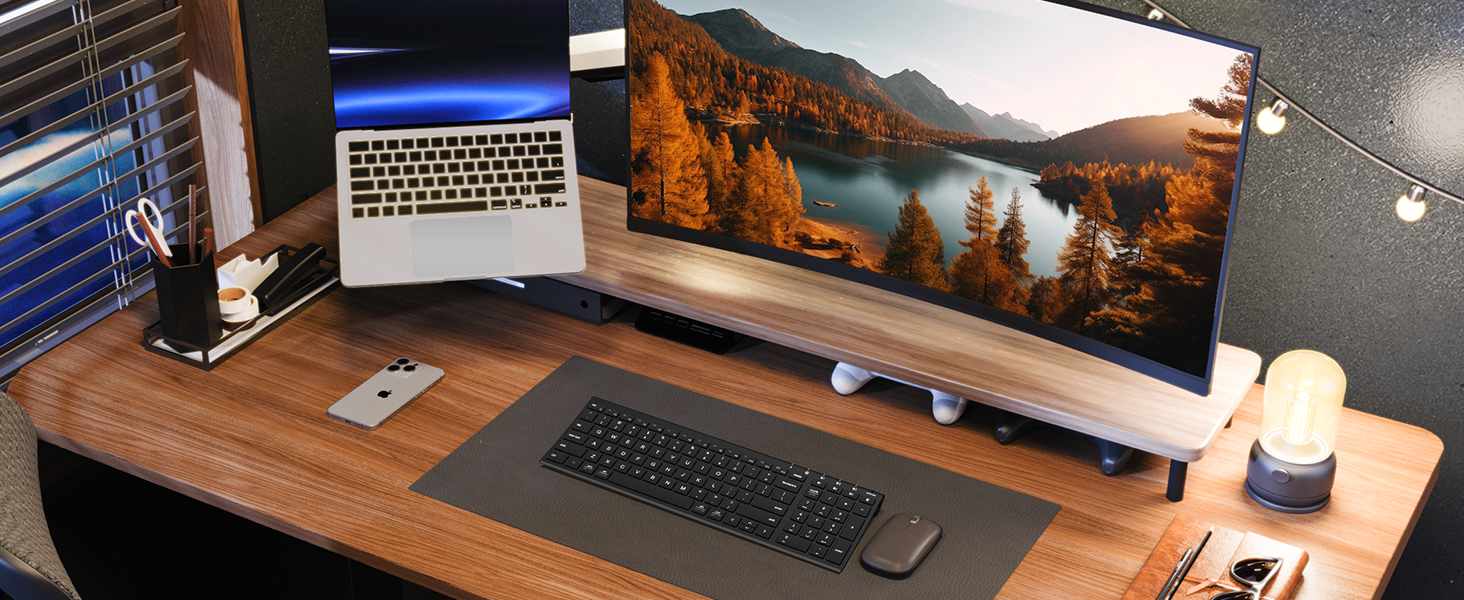
Figure 2: The sleek and wireless design of the iClever BK10 keyboard.
3. സജ്ജീകരണം
3.1 കീബോർഡ് ചാർജ് ചെയ്യുന്നു
Before initial use, fully charge the keyboard using the provided USB-C cable. Connect the USB-C end to the keyboard's charging port (located on the right side) and the USB-A end to a power source (e.g., computer USB port, USB wall adapter). The charging indicator light will illuminate during charging and turn off when fully charged.

Figure 3: USB-C charging port on the iClever BK10 keyboard.
3.2 പവർ ഓൺ/ഓഫ്
Locate the ON/OFF switch on the top right side of the keyboard. Slide the switch to the 'ON' position to power on the keyboard. Slide it to 'OFF' when not in use to conserve battery life.
3.3 ബ്ലൂടൂത്ത് ജോടിയാക്കൽ
The iClever BK10 keyboard supports pairing with up to three devices simultaneously. Follow these steps to pair your devices:
- ഓൺ/ഓഫ് സ്വിച്ച് ഉപയോഗിച്ച് കീബോർഡ് ഓണാക്കുക.
- Press and hold one of the Bluetooth channel keys (B1, B2, or B3) for 3-5 seconds until its indicator light starts flashing rapidly. This indicates the keyboard is in pairing mode.
- On your device (computer, tablet, smartphone), go to Bluetooth settings and search for available devices.
- Select "iClever BK10" from the list of found devices.
- ജോടിയാക്കൽ പ്രക്രിയ പൂർത്തിയാക്കാൻ സ്ക്രീനിലെ ഏതെങ്കിലും നിർദ്ദേശങ്ങൾ പാലിക്കുക. കീബോർഡിലെ ഇൻഡിക്കേറ്റർ ലൈറ്റ് മിന്നുന്നത് നിർത്തി കുറച്ച് സെക്കൻഡ് നേരത്തേക്ക് ഉറച്ചുനിൽക്കും, തുടർന്ന് ഓഫാകും, ഇത് ജോടിയാക്കൽ വിജയകരമാണെന്ന് സൂചിപ്പിക്കുന്നു.
- Repeat these steps for up to two additional devices using the other Bluetooth channel keys (B2 and B3).

Figure 4: Multi-device connectivity of the iClever BK10 keyboard.
4. പ്രവർത്തന നിർദ്ദേശങ്ങൾ
4.1 ഉപകരണങ്ങൾക്കിടയിൽ മാറൽ
To switch between paired devices, simply press the corresponding Bluetooth channel key (B1, B2, or B3) once. The keyboard will connect to the selected device automatically.
4.2 Function Keys and Hotkeys
The iClever BK10 keyboard features a row of function keys (F1-F12) that also serve as hotkeys for various media and system controls. To use the hotkey functions, press the 'Fn' key simultaneously with the desired function key. Some common hotkeys include:
- Fn+F1: വീട്
- Fn+F2: തിരയൽ
- Fn+F3: എല്ലാം തിരഞ്ഞെടുക്കുക
- Fn+F4: പകർത്തുക
- Fn+F5: ഒട്ടിക്കുക
- Fn+F6: മുറിക്കുക
- Fn+F7: മുമ്പത്തെ ട്രാക്ക്
- Fn+F8: പ്ലേ/താൽക്കാലികമായി നിർത്തുക
- Fn+F9: അടുത്ത ട്രാക്ക്
- Fn+F10: നിശബ്ദമാക്കുക
- Fn+F11: വോളിയം ഡൗൺ
- Fn+F12: വോളിയം കൂട്ടുക
The keyboard also includes dedicated keys for Calculator, Fn lock, and a standard numeric keypad for efficient data entry.

ചിത്രം 5: ഓവർview of keyboard layout and multi-OS features.
4.3 Operating System Layout Recognition
The keyboard automatically recognizes different operating systems (Windows, macOS, iPadOS, Android) and adjusts its key layout accordingly. For example, the 'Win' key functions as 'Alt' on Mac, and 'Alt' functions as 'Cmd'.
5. പരിപാലനം
5.1 വൃത്തിയാക്കൽ
നിങ്ങളുടെ കീബോർഡ് വൃത്തിയാക്കാൻ, അത് ഓഫ് ചെയ്ത് എല്ലാ കേബിളുകളും വിച്ഛേദിക്കുക. മൃദുവായ, ലിന്റ് രഹിത തുണി ഉപയോഗിച്ച് അൽപ്പം വൃത്തിയാക്കുക.ampened with water or a mild cleaning solution. Avoid excessive moisture and harsh chemicals. The included silicone cover can be removed and washed with mild soap and water.
5.2 ബാറ്ററി കെയർ
ബാറ്ററി ആയുസ്സ് പരമാവധിയാക്കാൻ:
- ബാറ്ററി ഇടയ്ക്കിടെ പൂർണ്ണമായും ഡിസ്ചാർജ് ചെയ്യുന്നത് ഒഴിവാക്കുക.
- ബാറ്ററി ഇൻഡിക്കേറ്റർ കുറവായിരിക്കുമ്പോൾ കീബോർഡ് ചാർജ് ചെയ്യുക.
- കീബോർഡ് ദീർഘനേരം ഉപയോഗിച്ചിട്ടില്ലെങ്കിൽ തണുത്തതും വരണ്ടതുമായ സ്ഥലത്ത് സൂക്ഷിക്കുക.
- The keyboard enters a power-saving sleep mode after 30 minutes of inactivity. Press any key to wake it up.
6. പ്രശ്നപരിഹാരം
6.1 കീബോർഡ് കണക്റ്റുചെയ്യുന്നില്ല/ജോടിയാക്കുന്നില്ല
- കീബോർഡ് ഓണാക്കിയിട്ടുണ്ടെന്നും പൂർണ്ണമായും ചാർജ് ചെയ്തിട്ടുണ്ടെന്നും ഉറപ്പാക്കുക.
- നിങ്ങളുടെ ഉപകരണത്തിൽ ബ്ലൂടൂത്ത് പ്രവർത്തനക്ഷമമാക്കിയിട്ടുണ്ടെന്ന് ഉറപ്പാക്കുക.
- Place the keyboard within the effective range (typically 10 meters) of your device.
- If already paired, try unpairing the keyboard from your device's Bluetooth settings and then re-pairing it.
- കീബോർഡും നിങ്ങളുടെ ഉപകരണവും പുനരാരംഭിക്കാൻ ശ്രമിക്കുക.
6.2 കീകൾ പ്രതികരിക്കുന്നില്ല
- Check if the keyboard is connected to the correct device (verify the active Bluetooth channel).
- Ensure the battery is not critically low.
- Clean any debris from around the affected keys.
6.3 Connectivity Issues/Lag
- മറ്റ് വയർലെസ് ഉപകരണങ്ങളിൽ നിന്ന് (ഉദാ: വൈ-ഫൈ റൂട്ടറുകൾ, കോർഡ്ലെസ് ഫോണുകൾ) മാറി ഇടപെടൽ കുറയ്ക്കുക.
- നിങ്ങളുടെ ഉപകരണത്തിന്റെ ബ്ലൂടൂത്ത് ഡ്രൈവറുകൾ കാലികമാണെന്ന് ഉറപ്പാക്കുക.
- Try connecting to a different Bluetooth channel on the keyboard.
7 സ്പെസിഫിക്കേഷനുകൾ
| ഫീച്ചർ | വിശദാംശങ്ങൾ |
|---|---|
| മോഡൽ നമ്പർ | BK10 |
| കണക്റ്റിവിറ്റി ടെക്നോളജി | ബ്ലൂടൂത്ത് 5.1 |
| അനുയോജ്യമായ ഉപകരണങ്ങൾ | Windows laptops/desktops, MacBook/iMac, iPad/iPhone, Android tablets/phones, Chromebooks |
| കീകളുടെ എണ്ണം | 104 |
| കീ സ്വിച്ച് തരം | കത്രിക-സ്വിച്ച് |
| ശബ്ദ നില | <50 ഡിബി |
| പവർ ഉറവിടം | റീചാർജ് ചെയ്യാവുന്ന ബാറ്ററി (USB-C) |
| ബാറ്ററി ലൈഫ് | Up to 45 days (after 2 hours charging) |
| ഉൽപ്പന്ന അളവുകൾ (L x W x H) | 14.41" x 4.92" x 0.63" |
| മെറ്റീരിയൽ | അക്രിലോണിട്രൈൽ ബ്യൂട്ടാഡിയൻ സ്റ്റൈറീൻ, അലുമിനിയം |
8. വാറണ്ടിയും പിന്തുണയും
8.1 വാറൻ്റി വിവരങ്ങൾ
The iClever BK10 Bluetooth Keyboard comes with a 12-മാസ വാറന്റി വാങ്ങിയ തീയതി മുതൽ. ഈ വാറന്റി നിർമ്മാണ വൈകല്യങ്ങൾ ഉൾക്കൊള്ളുന്നു, കൂടാതെ സാധാരണ ഉപയോഗത്തിൽ നിങ്ങളുടെ ഉൽപ്പന്നം മെറ്റീരിയൽ, വർക്ക്മാൻഷിപ്പ് വൈകല്യങ്ങളിൽ നിന്ന് മുക്തമാണെന്ന് ഉറപ്പാക്കുന്നു.
8.2 ഉപഭോക്തൃ പിന്തുണ
If you encounter any issues or have questions regarding your iClever BK10 Bluetooth Keyboard, please refer to the contact information provided in your product packaging or visit the official iClever support webസഹായത്തിനുള്ള സൈറ്റ്.