
ആമുഖം
This manual provides detailed instructions for the setup, operation, and maintenance of your LIGE BW0223 Smart Watch. Please read this guide thoroughly to ensure proper use and to maximize the features of your device. The LIGE BW0223 Smart Watch is designed to assist with fitness tracking, health monitoring, and smart notifications, compatible with both iOS and Android devices.
1. സജ്ജീകരണം
1.1 ഉപകരണം ചാർജ് ചെയ്യുന്നു
Before initial use, fully charge your LIGE BW0223 Smart Watch. Connect the magnetic charging cable to the charging contacts on the back of the watch and plug the USB end into a standard USB power adapter (5V/1A recommended). The watch display will indicate charging status. A full charge typically takes approximately 2 hours.

The back of the LIGE Smart Watch features a magnetic charging interface and advanced optical sensors for continuous monitoring of heart rate, blood pressure, and blood oxygen levels.
1.2 ആപ്പ് ഇൻസ്റ്റാളേഷനും ജോടിയാക്കലും
- കമ്പാനിയൻ ആപ്പ് ഡൗൺലോഡ് ചെയ്യുക: Scan the QR code provided in the watch packaging or search for the designated companion app (e.g., 'FitPro' or 'LIGE Smart') in your smartphone's app store (App Store for iOS, Google Play Store for Android).
- ബ്ലൂടൂത്ത് പ്രവർത്തനക്ഷമമാക്കുക: നിങ്ങളുടെ സ്മാർട്ട്ഫോണിൽ ബ്ലൂടൂത്ത് പ്രവർത്തനക്ഷമമാക്കിയിട്ടുണ്ടെന്ന് ഉറപ്പാക്കുക.
- ആപ്പ് തുറക്കുക: ഇൻസ്റ്റാൾ ചെയ്ത ആപ്പ് ലോഞ്ച് ചെയ്ത് സ്ക്രീനിലെ നിർദ്ദേശങ്ങൾ പാലിച്ച് ഒരു അക്കൗണ്ട് സൃഷ്ടിക്കുക അല്ലെങ്കിൽ ലോഗിൻ ചെയ്യുക.
- വാച്ച് ജോടിയാക്കുക: Within the app, navigate to the device management section (often labeled 'Device', 'My Device', or 'Add Device'). The app will search for available Bluetooth devices. Select 'BW0223' or 'LIGE Smart Watch' from the list to initiate pairing. Confirm the pairing request on both your phone and the watch if prompted.
1.3 പ്രാരംഭ ക്രമീകരണങ്ങൾ
വിജയകരമായ ജോടിയാക്കലിന് ശേഷം, നിങ്ങളുടെ പേഴ്സണൽ പ്രോ പൂർത്തിയാക്കുകfile within the app, including gender, age, height, and weight. This information helps improve the accuracy of fitness and health data. You can also set preferences for units of measurement (metric/imperial) and time format (12/24-hour).
2. പ്രവർത്തന നിർദ്ദേശങ്ങൾ
2.1 ഡിസ്പ്ലേയും നാവിഗേഷനും
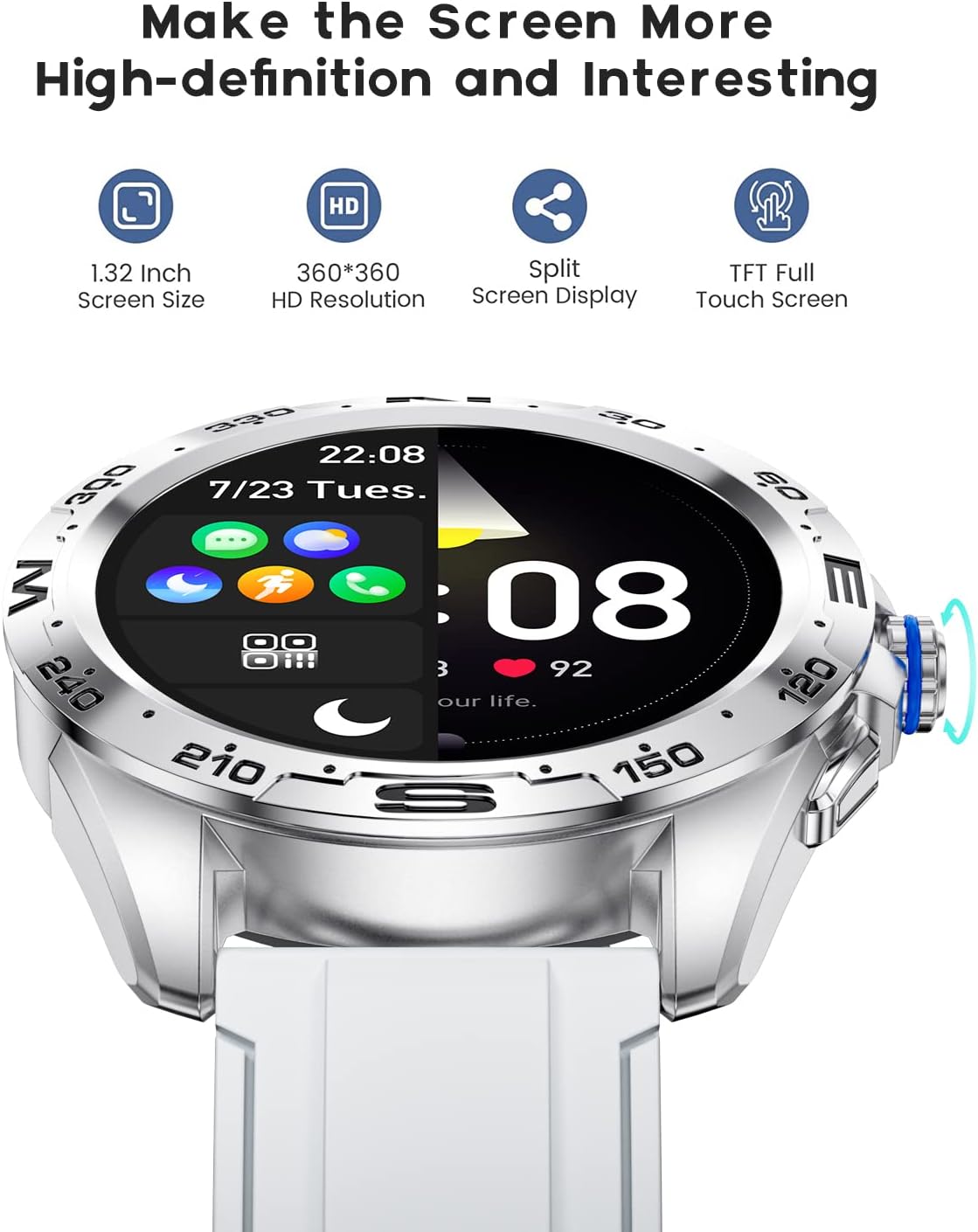
The LIGE BW0223 Smart Watch features a 1.28-inch full touch screen with 360x360 HD resolution. Navigate the watch interface using touch gestures:
- മുകളിലേക്കും താഴേക്കും സ്വൈപ്പ് ചെയ്യുക: മെനുകളിലൂടെയോ അറിയിപ്പുകളിലൂടെയോ സ്ക്രോൾ ചെയ്യുക.
- ഇടത്തേക്ക്/വലത്തേക്ക് സ്വൈപ്പ് ചെയ്യുക: Access quick functions or different data screens.
- ടാപ്പ് ചെയ്യുക: ഒരു ഇനം തിരഞ്ഞെടുക്കുക അല്ലെങ്കിൽ ഒരു പ്രവർത്തനം സ്ഥിരീകരിക്കുക.
- സൈഡ് ബട്ടൺ അമർത്തുക: Return to the home screen or power on/off the device.

The LIGE Smart Watch features a 1.28-inch full touch screen with 360x360 HD resolution, offering clear visuals and responsive interaction. It supports a split-screen display for quick access to functions.
2.2 സ്പോർട്സ് മോഡുകൾ
The watch supports 7 sports modes, including walking, running, cycling, and climbing. To access:
- Swipe on the watch face to find the 'Sports' or 'Workout' icon.
- Tap to select your desired activity.
- Tap 'Start' to begin tracking. The watch will record duration, steps, calories burned, and distance.
- To end a workout, swipe right or press the side button, then select 'End' or 'Pause'.
2.3 ആരോഗ്യ നിരീക്ഷണം
The LIGE BW0223 Smart Watch provides 24/7 heart rate tracking, blood pressure, and blood oxygen monitoring. These measurements are for reference only and should not be used for medical diagnosis.
- ഹൃദയമിടിപ്പ്: Swipe to the heart rate interface to view your current heart rate. The watch continuously monitors your heart rate throughout the day.
- Blood Pressure/Blood Oxygen: Swipe to the respective interfaces and tap to initiate a measurement. Ensure the watch is snug on your wrist for accurate readings.
- ഉറക്ക നിരീക്ഷണം: ഉറങ്ങാൻ പോകുമ്പോൾ വാച്ച് ധരിക്കുക, അത് നിങ്ങളുടെ ഉറക്ക രീതികൾ യാന്ത്രികമായി ട്രാക്ക് ചെയ്യും, ഗാഢനിദ്ര, നേരിയ ഉറക്കം, ഉണരുന്ന സമയങ്ങൾ എന്നിവയുൾപ്പെടെ. View detailed sleep data in the companion app.
2.4 ബ്ലൂടൂത്ത് കോളുകൾ
After pairing your watch with the app and enabling the Bluetooth call function (usually a separate Bluetooth connection in your phone's settings, e.g., 'BW0223_CALL'), you can make and receive calls directly from your watch.
- കോളുകൾ ചെയ്യുന്നു: Access the 'Dialer' or 'Contacts' function on your watch to dial a number or select a contact.
- കോളുകൾ സ്വീകരിക്കുന്നു: ഒരു കോൾ വരുമ്പോൾ, വാച്ച് കോളർ ഐഡി പ്രദർശിപ്പിക്കും. മറുപടി നൽകാൻ പച്ച ഐക്കണിൽ ടാപ്പ് ചെയ്യുക അല്ലെങ്കിൽ നിരസിക്കാൻ ചുവപ്പ് ഐക്കണിൽ ടാപ്പ് ചെയ്യുക.
- The watch features a built-in microphone and speaker for hands-free communication.

With the LIGE Smart Watch, you can make and receive Bluetooth calls directly from your wrist. It includes a built-in microphone and speaker for convenient communication.
2.5 സന്ദേശ അറിയിപ്പുകൾ
Enable message notifications through the companion app to receive alerts for SMS, calls, and various social media applications (e.g., Facebook, Twitter, WhatsApp, LinkedIn, Instagram) directly on your watch.
- Ensure the app has necessary permissions to access notifications on your smartphone.
- Configure which apps send notifications to your watch within the companion app settings.
- Swipe down on the watch face to view സമീപകാല അറിയിപ്പുകൾ.

The LIGE Smart Watch provides call and message reminders, displaying notifications from SMS, Facebook, Twitter, WhatsApp, LinkedIn, and Instagram directly on your wrist.
2.6 ഇഷ്ടാനുസൃതമാക്കൽ
Personalize your watch by changing watch faces. Many options are available directly on the watch or through the companion app.
- വാച്ചിൽ: Long-press the watch face, then swipe left or right to browse available faces. Tap to select.
- ആപ്പ് വഴി: Open the companion app, navigate to 'Dial Market' or 'Watch Faces' to explore and download additional designs.
Personalize your LIGE Smart Watch with a variety of customizable watch faces and a rich user interface. Choose from different styles to match your preference and occasion.
3. പരിപാലനം
3.1 വാച്ച് വൃത്തിയാക്കൽ
Regularly clean your watch to ensure optimal performance and hygiene. Use a soft, lint-free cloth to wipe the screen and watch body. For stubborn dirt, slightly dampen the cloth with water. Avoid using harsh chemicals, abrasive materials, or strong detergents.
3.2 ജല പ്രതിരോധം (IP68)
The LIGE BW0223 Smart Watch is IP68 waterproof, meaning it is resistant to dust and can withstand immersion in water up to 1.5 meters for 30 minutes. It is suitable for daily use, such as hand washing, rain, and splashes.
Important Limitations:
- Do not wear the watch in hot showers, saunas, or steam rooms, as steam and hot water can compromise the seals.
- Avoid diving or high-pressure water activities.
- Do not operate buttons or the touchscreen underwater.
- If the watch gets wet, dry it thoroughly before charging or operating.
3.3 ബാറ്ററി കെയർ
ബാറ്ററി ആയുസ്സ് വർദ്ധിപ്പിക്കാൻ:
- തീവ്രമായ താപനില ഒഴിവാക്കുക.
- വാച്ച് പതിവായി ചാർജ് ചെയ്യുക, എന്നാൽ ദീർഘനേരം പൂർണ്ണമായും ഡിസ്ചാർജ് ചെയ്യുന്നത് ഒഴിവാക്കുക.
- Reduce screen brightness and disable unnecessary notifications or features if battery life is a concern.
4. പ്രശ്നപരിഹാരം
4.1 Watch Not Turning On or Charging
- ചാർജിംഗ് കേബിൾ വാച്ചിലേക്കും പവർ സ്രോതസ്സിലേക്കും സുരക്ഷിതമായി ബന്ധിപ്പിച്ചിട്ടുണ്ടെന്ന് ഉറപ്പാക്കുക.
- Verify the power adapter and USB port are functional.
- വാച്ചിലെയും കേബിളിലെയും ചാർജിംഗ് കോൺടാക്റ്റുകൾ പൊടിയോ അവശിഷ്ടങ്ങളോ നീക്കം ചെയ്യാൻ വൃത്തിയാക്കുക.
- Allow the watch to charge for at least 30 minutes before attempting to power it on.
4.2 ബ്ലൂടൂത്ത് കണക്ഷൻ പ്രശ്നങ്ങൾ
- നിങ്ങളുടെ സ്മാർട്ട്ഫോണിലും വാച്ചിലും ബ്ലൂടൂത്ത് പ്രവർത്തനക്ഷമമാക്കിയിട്ടുണ്ടെന്ന് ഉറപ്പാക്കുക.
- Keep the watch within the Bluetooth range of your smartphone (typically 10 meters).
- നിങ്ങളുടെ സ്മാർട്ട്ഫോണും വാച്ചും പുനരാരംഭിക്കുക.
- Unpair the watch from your phone's Bluetooth settings and re-pair it through the companion app.
- Ensure the companion app is running in the background and has necessary permissions.
4.3 Notifications Not Working
- Verify the watch is successfully paired with the companion app.
- Check notification settings within the companion app to ensure desired apps are enabled.
- Ensure your smartphone's notification access is granted to the companion app (check phone settings: Apps & notifications > Special app access > Notification access).
- നിങ്ങളുടെ ഫോണിലും വാച്ചിലും 'ശല്യപ്പെടുത്തരുത്' മോഡ് പ്രവർത്തനരഹിതമാക്കുക.
4.4 Inaccurate Health Readings
- Ensure the watch is worn snugly on your wrist, about one finger's width from the wrist bone.
- Keep the sensor clean and free from sweat or dirt.
- Remain still during measurements for best accuracy.
- Remember that health data from smartwatches is for reference and not intended for medical use.
5 സ്പെസിഫിക്കേഷനുകൾ
| മോഡൽ നമ്പർ | BW0223 |
| ബ്രാൻഡ് | ലൈഗ് |
| സ്ക്രീൻ വലിപ്പം | 1.28 ഇഞ്ച് |
| ഹ്യൂമൻ ഇന്റർഫേസ് ഇൻപുട്ട് | ടച്ച് സ്ക്രീൻ |
| കണക്റ്റിവിറ്റി ടെക്നോളജി | ബ്ലൂടൂത്ത് |
| വാട്ടർ റെസിസ്റ്റൻസ് റേറ്റിംഗ് | IP68 |
| ബാറ്ററി തരം | ലിഥിയം പോളിമർ |
| ആകൃതി | വൃത്താകൃതി |
| ഇനത്തിൻ്റെ ഭാരം | 7 ഔൺസ് |
6. വാറൻ്റി വിവരങ്ങൾ
The LIGE BW0223 Smart Watch comes with a standard limited warranty against manufacturing defects. The warranty period typically covers 12 months from the date of purchase. This warranty does not cover damage caused by misuse, accidents, unauthorized modifications, or failure to follow the instructions in this manual. Please retain your proof of purchase for warranty claims.
7. ഉപഭോക്തൃ പിന്തുണ
If you encounter any issues or have questions not covered in this manual, please contact LIGE customer support. Refer to the contact information provided with your product packaging or visit the official LIGE webസഹായത്തിനുള്ള സൈറ്റ്.