
1. ആമുഖം
Thank you for choosing the Oasser P2A Cordless Air Compressor. This manual provides essential information for the safe and efficient operation, maintenance, and troubleshooting of your device. Please read this manual thoroughly before use and retain it for future reference.
The Oasser P2A is a portable, rechargeable electric air compressor designed for inflating tires on cars, motorcycles, bicycles, and other inflatable items. It features a built-in 2000 mAh lithium battery, a maximum pressure of 120 PSI, an LED light for dark conditions, and an LCD screen for precise pressure monitoring.
2. സുരക്ഷാ നിർദ്ദേശങ്ങൾ
To ensure safe operation, always follow these precautions:
- ഉപകരണം ഉപയോഗിക്കുന്നതിന് മുമ്പ് എല്ലാ നിർദ്ദേശങ്ങളും ശ്രദ്ധാപൂർവ്വം വായിക്കുക.
- ഉപകരണം കുട്ടികൾക്ക് ലഭ്യമാകാതെ സൂക്ഷിക്കുക.
- Do not operate the compressor in wet conditions or near flammable liquids or gases.
- Ensure the air hose is securely connected to both the compressor and the item being inflated before starting.
- Do not over-inflate items. Always refer to the manufacturer's recommended pressure for the item being inflated.
- Monitor the pressure gauge during inflation to prevent over-inflation. The device features automatic shut-off, but manual monitoring is still recommended.
- പ്രവർത്തന സമയത്ത് കംപ്രസർ ശ്രദ്ധിക്കാതെ വിടരുത്.
- Avoid directing the air stream at people or animals.
- Charge the battery in a well-ventilated area. Do not charge if the device or charger is damaged.
- If the device becomes unusually hot during use or charging, discontinue use immediately and contact customer support.
- Always disconnect the air hose and store the device properly after use.
3. പാക്കേജ് ഉള്ളടക്കം
നിങ്ങളുടെ പാക്കേജിൽ എല്ലാ ഇനങ്ങളും ഉണ്ടെന്ന് ഉറപ്പാക്കുക:
- 1 x Oasser P2A Air Pump
- 1 x Short Air Hose
- 1 x Long Air Hose
- 1 x ബോൾ സൂചി
- 1 x Plastic Nozzle
- 1 x പ്രെസ്റ്റ വാൽവ് അഡാപ്റ്റർ
- 1 x USB Charging Cable (USB charger not included)
- 1 x സ്റ്റോറേജ് ബാഗ്
- 1 x ഉപയോക്തൃ മാനുവൽ

Image: Oasser P2A Cordless Air Compressor with all included accessories, such as air hoses, nozzles, and charging cable.
4. ഉൽപ്പന്നം കഴിഞ്ഞുview
Familiarize yourself with the components of your Oasser P2A air compressor:

Image: Diagram illustrating the main components of the Oasser P2A, including the LED light, digital LCD display, and rechargeable lithium battery.
- LED ലൈറ്റ്: Provides illumination for use in low-light conditions.
- ഡിജിറ്റൽ എൽസിഡി ഡിസ്പ്ലേ: Shows real-time and preset pressure values.
- നിയന്ത്രണ ബട്ടണുകൾ: Power, unit selection, and pressure adjustment (+/-).
- എയർ ഹോസ് കണക്ഷൻ: എയർ ഹോസ് ഘടിപ്പിക്കുന്നതിനുള്ള പോയിന്റ്.
- Trigger/Start Button: Initiates the inflation process.
- Rechargeable Lithium Battery (2000 mAh): കോർഡ്ലെസ് പവർ നൽകുന്നു.
- യുഎസ്ബി ചാർജിംഗ് പോർട്ട്: For recharging the device.
5 ഉപകരണം ചാർജ് ചെയ്യുന്നു
Before first use, fully charge the air compressor. It takes approximately 4 hours for a complete charge.
- Connect the provided USB charging cable to the USB charging port on the compressor.
- Connect the other end of the USB cable to a compatible USB power adapter (not included) or a USB port.
- The charging indicator light will illuminate. Once fully charged, the light may change color or turn off depending on the model.
Important: Please charge the battery completely within 3 days after each use to maintain battery health.
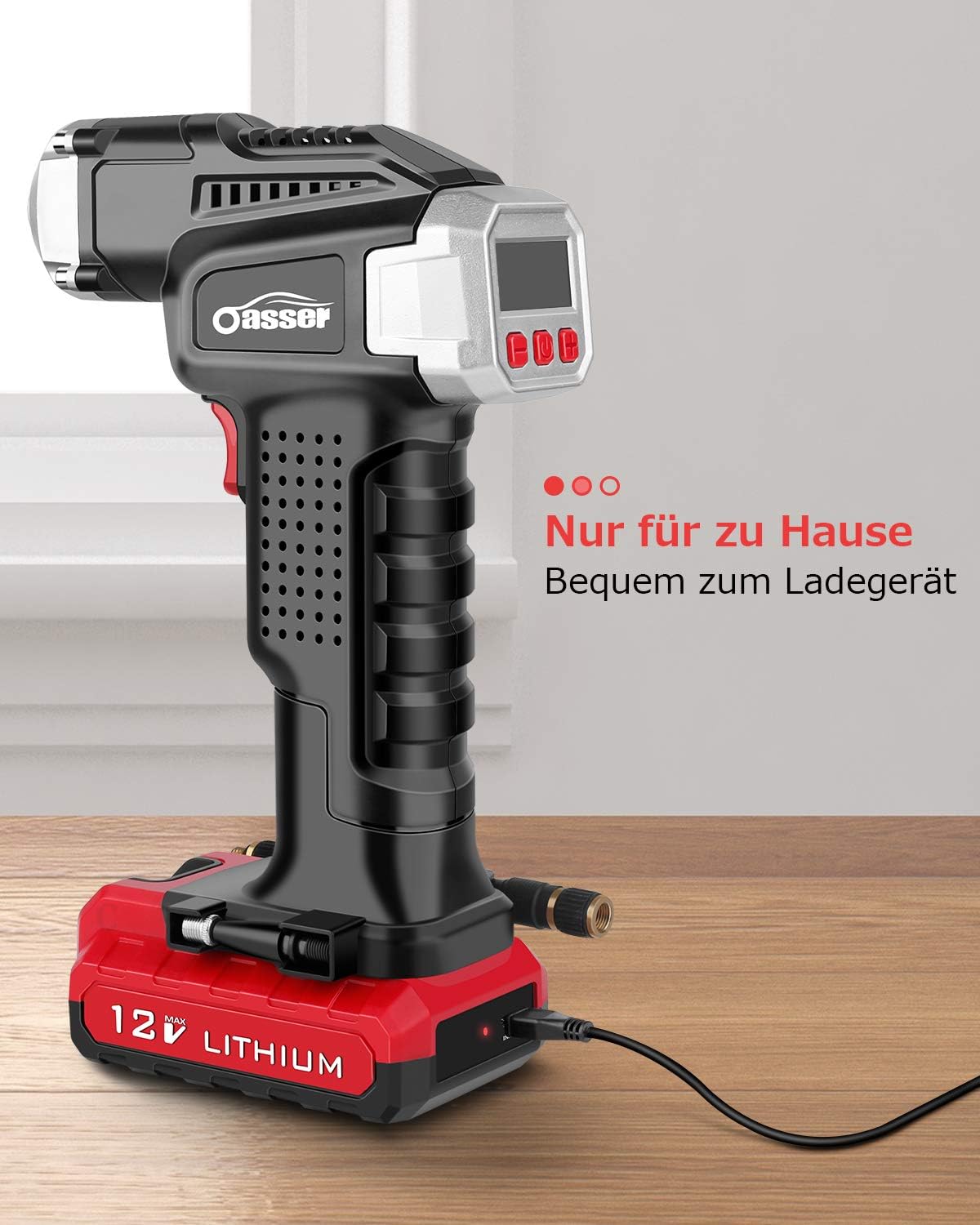
Image: The Oasser P2A air compressor connected to a USB charging cable, indicating the charging process.
6. സജ്ജീകരണം
Prepare your air compressor for inflation:
- എയർ ഹോസ് ഘടിപ്പിക്കുക: Screw the desired air hose (short or long) onto the air hose connection port at the front of the compressor until secure.
- ശരിയായ അഡാപ്റ്റർ തിരഞ്ഞെടുക്കുക: Choose the appropriate nozzle or adapter for the item you wish to inflate (e.g., Presta valve adapter for bicycles, ball needle for sports balls, plastic nozzle for inflatable toys). Attach it to the end of the air hose.
7. പ്രവർത്തന നിർദ്ദേശങ്ങൾ
Follow these steps to inflate an item:
- പവർ ഓൺ: Press the middle button on the control panel to turn on the device. The LCD display will illuminate.
- വാൽവുമായി ബന്ധിപ്പിക്കുക: Securely connect the air hose adapter to the valve of the item you intend to inflate. The current pressure will be displayed on the LCD screen.
- ആവശ്യമുള്ള മർദ്ദം സജ്ജമാക്കുക: Use the '+' and '-' buttons to adjust the target pressure. You can cycle through pressure units (PSI, BAR, KPA, kg/cm²) by pressing the unit selection button (often the power button briefly).
- പണപ്പെരുപ്പം ആരംഭിക്കുക: Press the red trigger/start button on the handle to begin inflation. The compressor will operate, and the real-time pressure will be shown on the display.
- യാന്ത്രിക ഷട്ട്-ഓഫ്: മുൻകൂട്ടി നിശ്ചയിച്ച ലക്ഷ്യ മർദ്ദം എത്തിക്കഴിഞ്ഞാൽ കംപ്രസർ യാന്ത്രികമായി നിർത്തും.
- വിച്ഛേദിക്കുക: Carefully disconnect the air hose from the item's valve.
- പവർ ഓഫ്: Press and hold the middle button to turn off the device.
LED ലൈറ്റ് ഉപയോഗിക്കുന്നത്: Press the dedicated LED light button (if available, often integrated with another button) to turn the light on or off for visibility in dark environments.
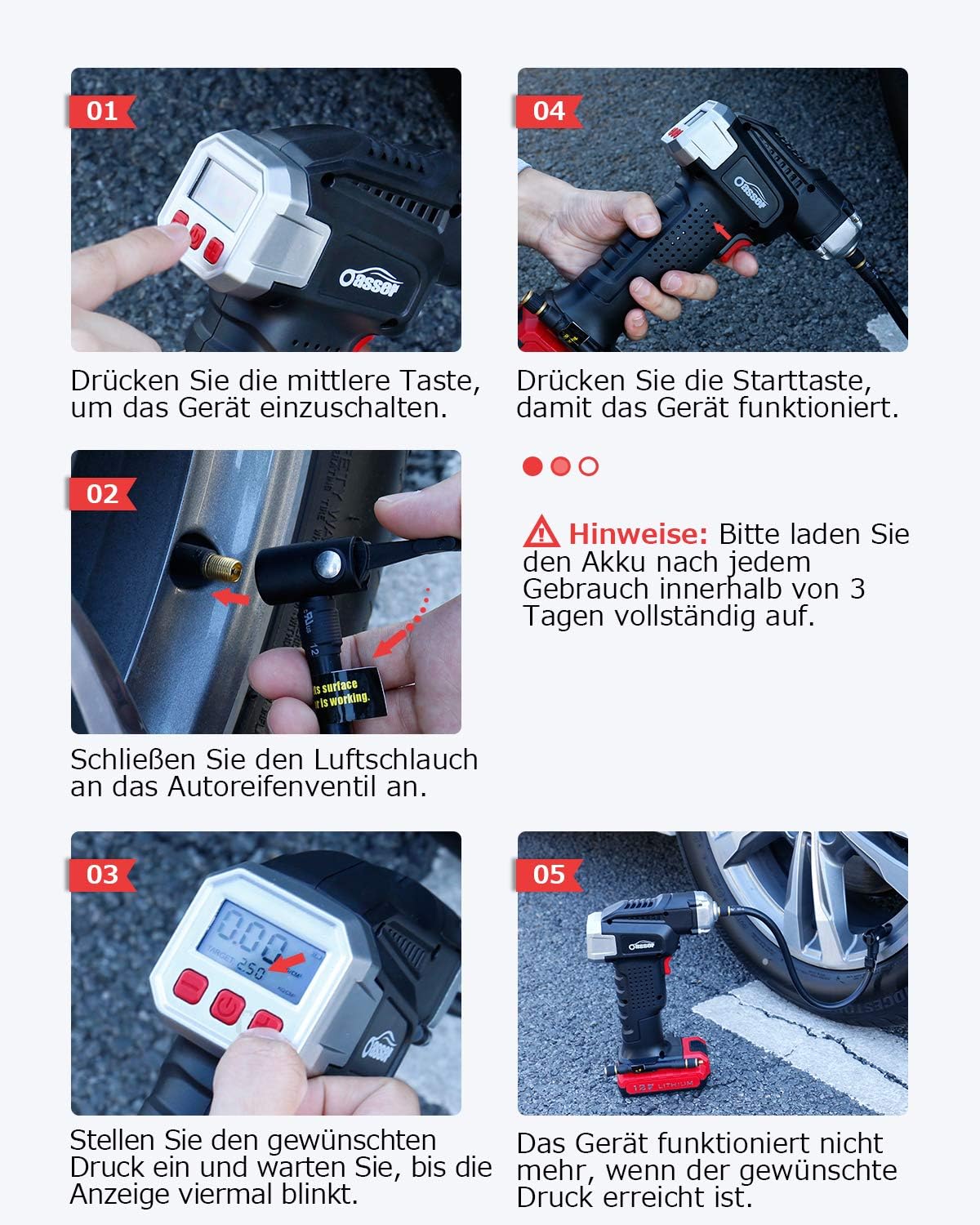
Image: Visual guide demonstrating the operational steps: powering on, connecting the hose, setting pressure, and starting inflation.

Image: The Oasser P2A air compressor actively inflating a car tire, demonstrating its practical application.

ചിത്രം: വിശദമായ ഒരു ചിത്രം view of the Oasser P2A's digital LCD display, clearly showing pressure readings and unit selection.
8. പരിപാലനം
Proper maintenance ensures the longevity and performance of your air compressor:
- വൃത്തിയാക്കൽ: സോഫ്റ്റ്, ഡി ഉപയോഗിച്ച് ഉപകരണം തുടയ്ക്കുകamp തുണി. കഠിനമായ രാസവസ്തുക്കളോ അബ്രാസീവ് ക്ലീനറുകളോ ഉപയോഗിക്കരുത്. സൂക്ഷിക്കുന്നതിനുമുമ്പ് ഉപകരണം ഉണങ്ങിയെന്ന് ഉറപ്പാക്കുക.
- സംഭരണം: Store the compressor in a cool, dry place, away from direct sunlight and extreme temperatures. Use the provided storage bag to protect it from dust and damage.
- ബാറ്ററി കെയർ: Recharge the battery regularly, especially if the device has not been used for an extended period. Avoid completely draining the battery frequently to prolong its lifespan.
- ഹോസ്, നോസൽ പരിശോധന: Periodically check the air hoses and nozzles for any signs of wear, cracks, or damage. Replace them if necessary to ensure a proper seal and efficient inflation.
9. പ്രശ്നപരിഹാരം
If you encounter issues with your Oasser P2A, refer to the following common problems and solutions:
| പ്രശ്നം | സാധ്യമായ കാരണം | പരിഹാരം |
|---|---|---|
| ഉപകരണം ഓണാക്കില്ല. | ബാറ്ററി തീർന്നു. | ഉപകരണം പൂർണ്ണമായും ചാർജ് ചെയ്യുക. |
| Device turns on but does not inflate. | Air hose not securely connected. Incorrect pressure setting. | Ensure air hose is tightly screwed on. Check that the target pressure is set above the current pressure. |
| കൃത്യമല്ലാത്ത മർദ്ദ വായന. | വാൽവുമായുള്ള അയഞ്ഞ കണക്ഷൻ. | Ensure the nozzle is firmly attached to the item's valve without air leaks. |
| ഉപകരണം അകാലത്തിൽ നിർത്തുന്നു. | Target pressure reached. Battery low. | This is normal if target pressure is met. If not, recharge the battery. |
| Device is very loud during operation. | Normal operation noise. | Air compressors generate noise during operation. This is generally normal. |
10 സ്പെസിഫിക്കേഷനുകൾ
| ഫീച്ചർ | സ്പെസിഫിക്കേഷൻ |
|---|---|
| മോഡൽ നമ്പർ | P2A |
| ബ്രാൻഡ് | ഒസ്സർ |
| ബാറ്ററി തരം | 1 ലിഥിയം-അയൺ (ഉൾപ്പെടുത്തിയിരിക്കുന്നു) |
| ബാറ്ററി ശേഷി | 2000 mAh |
| പരമാവധി മർദ്ദം | 120 പി.എസ്.ഐ |
| വാല്യംtage | 12 വോൾട്ട് |
| പവർ ഉറവിടം | ബാറ്ററി പവർ |
| ഇനത്തിൻ്റെ ഭാരം | 1.08 കിലോഗ്രാം |
| പാക്കേജ് അളവുകൾ | 26 x 17.6 x 8.4 സെ.മീ |
| ഡിസ്പ്ലേ തരം | 1.5" Digital LCD |
| Inflation Units | PSI, BAR, KPA, കിലോഗ്രാം/സെ.മീ² |
11. വാറൻ്റിയും പിന്തുണയും
Oasser is committed to providing high-quality products and excellent customer service. If you have any questions, concerns, or require assistance with your Oasser P2A Cordless Air Compressor, please refer to the contact information provided with your purchase or visit the official Oasser webപിന്തുണയ്ക്കുള്ള സൈറ്റ്.