
ആമുഖം
The Power Dynamics PDM25 is a compact and versatile 100V amplifier designed for small installations such as shops, restaurants, and offices. It offers easy operation, reliable performance, and a range of features including Bluetooth connectivity, an integrated MP3 player, USB input, AUX input, and a wireless remote control. This manual provides essential information for the safe and efficient use of your PDM25 ampജീവൻ.
സുരക്ഷാ നിർദ്ദേശങ്ങൾ
- ഉൽപ്പന്നം ഉപയോഗിക്കുന്നതിന് മുമ്പ് ഈ മാനുവൽ നന്നായി വായിക്കുക.
- ഭാവി റഫറൻസിനായി ഈ മാനുവൽ സൂക്ഷിക്കുക.
- എല്ലാ മുന്നറിയിപ്പുകളും നിരീക്ഷിക്കുകയും എല്ലാ നിർദ്ദേശങ്ങളും പാലിക്കുകയും ചെയ്യുക.
- വെള്ളത്തിനടുത്ത് ഈ ഉപകരണം ഉപയോഗിക്കരുത്.
- ഉണങ്ങിയ തുണി ഉപയോഗിച്ച് മാത്രം വൃത്തിയാക്കുക.
- വെന്റിലേഷൻ തുറസ്സുകളൊന്നും തടയരുത്. നിർമ്മാതാവിന്റെ നിർദ്ദേശങ്ങൾക്കനുസൃതമായി ഇൻസ്റ്റാൾ ചെയ്യുക.
- റേഡിയറുകൾ, ഹീറ്റ് രജിസ്റ്ററുകൾ, സ്റ്റൗകൾ, അല്ലെങ്കിൽ മറ്റ് ഉപകരണങ്ങൾ (ഉൾപ്പെടെ) പോലെയുള്ള താപ സ്രോതസ്സുകൾക്ക് സമീപം ഇൻസ്റ്റാൾ ചെയ്യരുത്. ampലൈഫയറുകൾ) ചൂട് ഉത്പാദിപ്പിക്കുന്നത്.
- പോളറൈസ്ഡ് അല്ലെങ്കിൽ ഗ്രൗണ്ടിംഗ്-ടൈപ്പ് പ്ലഗിൻ്റെ സുരക്ഷാ ഉദ്ദേശ്യത്തെ പരാജയപ്പെടുത്തരുത്. ധ്രുവീകരിക്കപ്പെട്ട പ്ലഗിന് രണ്ട് ബ്ലേഡുകൾ ഉണ്ട്, ഒന്ന് മറ്റൊന്നിനേക്കാൾ വീതിയുള്ളതാണ്. ഒരു ഗ്രൗണ്ടിംഗ്-ടൈപ്പ് പ്ലഗിന് രണ്ട് ബ്ലേഡുകളും മൂന്നാമത്തെ ഗ്രൗണ്ടിംഗ് പ്രോംഗും ഉണ്ട്. നിങ്ങളുടെ സുരക്ഷയ്ക്കായി വിശാലമായ ബ്ലേഡ് അല്ലെങ്കിൽ മൂന്നാമത്തെ പ്രോംഗ് നൽകിയിരിക്കുന്നു. നൽകിയിരിക്കുന്ന പ്ലഗ് നിങ്ങളുടെ ഔട്ട്ലെറ്റിൽ ചേരുന്നില്ലെങ്കിൽ, കാലഹരണപ്പെട്ട ഔട്ട്ലെറ്റ് മാറ്റിസ്ഥാപിക്കുന്നതിന് ഒരു ഇലക്ട്രീഷ്യനെ സമീപിക്കുക.
- പ്രത്യേകിച്ച് പ്ലഗുകൾ, കൺവീനിയൻസ് റെസെപ്റ്റക്കിളുകൾ, ഉപകരണത്തിൽ നിന്ന് പുറത്തുകടക്കുന്ന ഇടം എന്നിവയിൽ നടക്കുകയോ നുള്ളുകയോ ചെയ്യുന്നതിൽ നിന്ന് പവർ കോർഡ് സംരക്ഷിക്കുക.
- നിർമ്മാതാവ് വ്യക്തമാക്കിയ അറ്റാച്ച്മെൻ്റുകൾ/ആക്സസറികൾ മാത്രം ഉപയോഗിക്കുക.
- മിന്നൽ കൊടുങ്കാറ്റുകളുടെ സമയത്തോ ദീർഘനേരം ഉപയോഗിക്കാത്ത സമയത്തോ ഈ ഉപകരണം അൺപ്ലഗ് ചെയ്യുക.
- എല്ലാ സേവനങ്ങളും യോഗ്യതയുള്ള സേവന ഉദ്യോഗസ്ഥർക്ക് റഫർ ചെയ്യുക. പവർ സപ്ലൈ കോർഡ് അല്ലെങ്കിൽ പ്ലഗ് കേടാകുക, ദ്രാവകം ഒഴുകുകയോ ഉപകരണങ്ങൾ ഉപകരണത്തിലേക്ക് വീഴുകയോ ചെയ്യുക, ഉപകരണം മഴയോ ഈർപ്പമോ സമ്പർക്കം പുലർത്തുക, സാധാരണയായി പ്രവർത്തിക്കാത്തത് എന്നിങ്ങനെയുള്ള ഏതെങ്കിലും വിധത്തിൽ ഉപകരണത്തിന് കേടുപാടുകൾ സംഭവിക്കുമ്പോൾ സേവനം ആവശ്യമാണ്. , അല്ലെങ്കിൽ ഉപേക്ഷിച്ചു.
- മുന്നറിയിപ്പ്: തീയോ വൈദ്യുതാഘാതമോ ഉണ്ടാകാനുള്ള സാധ്യത കുറയ്ക്കുന്നതിന്, ഈ ഉപകരണം മഴയിലോ ഈർപ്പത്തിലോ തുറന്നുകാട്ടരുത്.
- ജാഗ്രത: Do not open the cover. No user-serviceable parts inside. Refer servicing to qualified personnel only.
ഉൽപ്പന്നം കഴിഞ്ഞുview
The PDM25 amplifier features a user-friendly front panel with controls for various audio sources and volume adjustments, along with a clear digital display. The rear panel provides all necessary connections for speakers, external audio sources, and power.

ചിത്രം 1: മുൻവശത്തെ പാനൽ മുകളിൽview of the PDM25 Ampജീവൻ.

Figure 2: Rear Panel Connections of the PDM25 Ampജീവൻ.
സജ്ജമാക്കുക
1 അൺപാക്ക് ചെയ്യുന്നു
ശ്രദ്ധാപൂർവ്വം നീക്കം ചെയ്യുക amplifier from its packaging. Inspect the unit for any signs of damage during transit. Retain the original packaging for future transport or storage.
2. പ്ലേസ്മെന്റ്
സ്ഥാപിക്കുക amplifier on a stable, flat surface. Ensure adequate ventilation around the unit to prevent overheating. Avoid placing it near heat sources or in direct sunlight.
3 സ്പീക്കർ കണക്ഷൻ
The PDM25 supports both 100V line speakers and low impedance (4-16 Ohm) speakers.
- For 100V Line Speakers: Connect the positive (+) terminal of your 100V speaker system to the "100V" terminal on the amplifier's rear panel. Connect the negative (-) terminal to the "COM" terminal.
- For Low Impedance Speakers (4-16 Ohm): Connect the positive (+) terminal of your speaker to the "4-16 Ohm" terminal on the amplifier's rear panel. Connect the negative (-) terminal to the "COM" terminal.
Ensure correct polarity (+ to + and - to -) for optimal sound quality. Do not connect both 100V and low impedance speakers simultaneously to the same output.
4. ഓഡിയോ സോഴ്സ് കണക്ഷൻ
- AUX ഇൻപുട്ട്: Connect external audio devices (e.g., CD player, mixer) to the RCA "AUX" input jacks on the rear panel using an RCA cable.
- മൈക്രോഫോൺ ഇൻപുട്ട്: Connect a microphone to the 6.3mm jack on the front panel.
- യുഎസ്ബി ഇൻപുട്ട്: MP3 അടങ്ങിയ യുഎസ്ബി ഫ്ലാഷ് ഡ്രൈവ് ചേർക്കുക fileമുൻ പാനലിലെ USB പോർട്ടിലേക്ക് s.
5. പവർ കണക്ഷൻ
വിതരണം ചെയ്ത പവർ കേബിൾ പിൻ പാനലിലുള്ള എസി ഇൻലെറ്റുമായി ബന്ധിപ്പിക്കുക. amplifier and then to a suitable mains power outlet (230 Vac/50 Hz).
പ്രവർത്തന നിർദ്ദേശങ്ങൾ
1. പവർ ഓൺ/ഓഫ്
Press the "ON/OFF" switch on the front panel to power on or off the ampജീവൻ.
2. ഉറവിടം തിരഞ്ഞെടുക്കൽ
Use the "MODE" button on the front panel or the remote control to cycle through available input sources: Bluetooth, USB/MP3, AUX, and Radio. The selected mode will be displayed on the digital screen.

Figure 3: Front Panel Controls and USB Input.
3. വോളിയം നിയന്ത്രണം
- മാസ്റ്റർ വോളിയം: Adjust the main output volume using the large "VOLUME" knob on the front panel.
- Individual Source Volume: Adjust the volume for MP3, AUX, and MIC inputs using their respective smaller "VOLUME" knobs.
4. ടോൺ നിയന്ത്രണം
Use the "TREBLE" and "BASS" knobs on the front panel to adjust the high and low frequencies of the audio output.
5. ബ്ലൂടൂത്ത് പ്രവർത്തനം
- Select "Bluetooth" mode using the "MODE" button. The display will show "BLUE".
- On your Bluetooth-enabled device (smartphone, tablet, etc.), search for available devices and select "PDM25".
- ജോടിയാക്കിക്കഴിഞ്ഞാൽ, നിങ്ങൾക്ക് വയർലെസ് ആയി ഓഡിയോ സ്ട്രീം ചെയ്യാൻ കഴിയും ampജീവൻ.
6. USB/MP3 Player Operation
- Insert a USB flash drive into the USB port. The amplifier will automatically switch to USB mode and begin playing MP3 files.
- Use the play/pause, next, and previous track buttons on the front panel or remote control to manage playback.
7. റേഡിയോ ഓപ്പറേഷൻ
In Radio mode, use the control buttons to scan for and select radio stations.
8. റിമോട്ട് കൺട്രോൾ
The included remote control provides convenient access to power, mode selection, volume, track control, and equalizer presets.
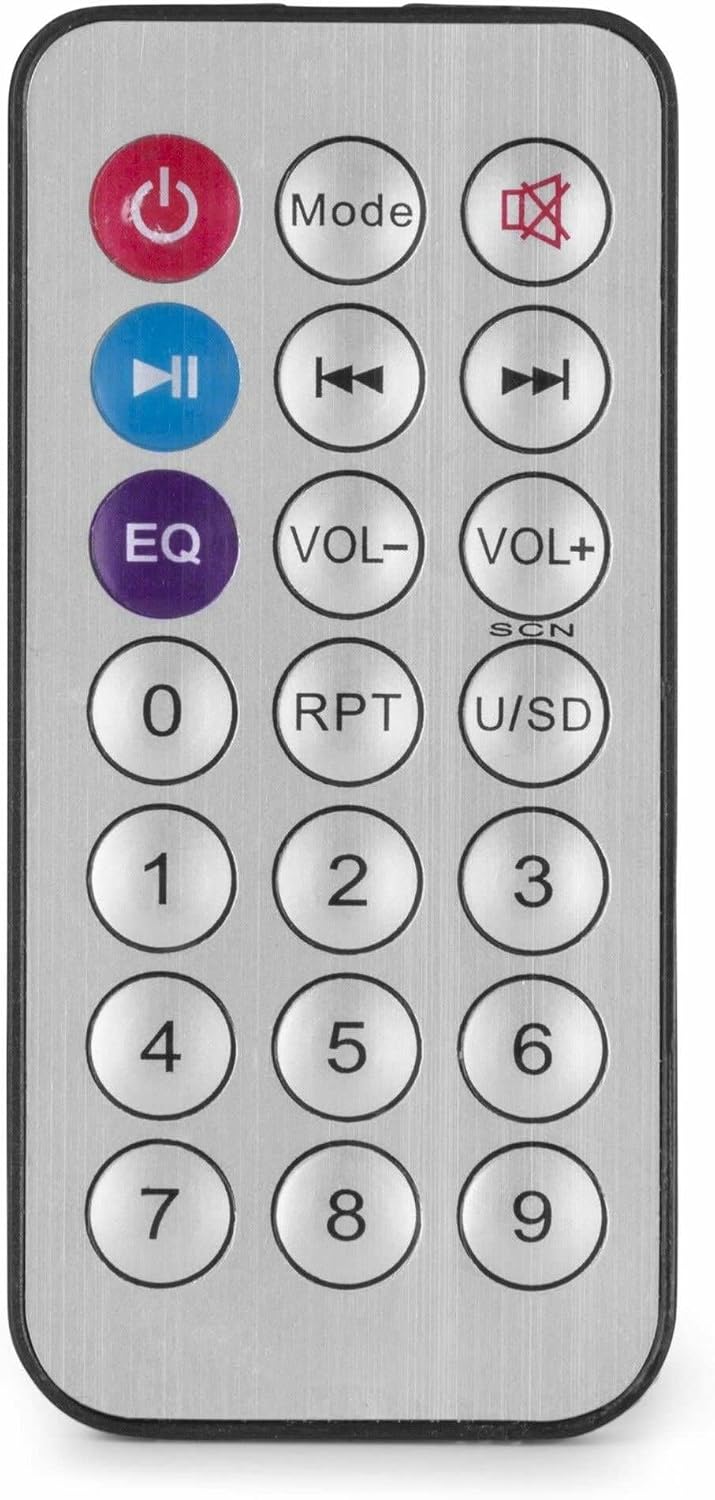
Figure 4: Wireless Remote Control.
മെയിൻ്റനൻസ്
- വൃത്തിയാക്കൽ: വൃത്തിയാക്കുന്നതിന് മുമ്പ് വൈദ്യുതി ബന്ധം വിച്ഛേദിക്കുക. പുറംഭാഗം തുടയ്ക്കാൻ മൃദുവായതും ഉണങ്ങിയതുമായ തുണി ഉപയോഗിക്കുക. ampലിഫയർ. ലിക്വിഡ് ക്ലീനറുകളോ എയറോസോളുകളോ ഉപയോഗിക്കരുത്.
- വെൻ്റിലേഷൻ: Ensure that the ventilation openings are clear of dust and debris to maintain proper airflow.
- സംഭരണം: യൂണിറ്റ് ദീർഘനേരം സൂക്ഷിക്കുകയാണെങ്കിൽ, അത് വൈദ്യുതിയിൽ നിന്ന് വിച്ഛേദിച്ച് തണുത്തതും വരണ്ടതുമായ സ്ഥലത്ത്, വെയിലത്ത് അതിന്റെ യഥാർത്ഥ പാക്കേജിംഗിൽ സൂക്ഷിക്കുക.
ട്രബിൾഷൂട്ടിംഗ്
| പ്രശ്നം | സാധ്യമായ കാരണം | പരിഹാരം |
|---|---|---|
| ശക്തിയില്ല | പവർ കേബിൾ ബന്ധിപ്പിച്ചിട്ടില്ല; പവർ ഔട്ട്ലെറ്റ് തകരാറിലായി; Ampലൈഫയർ സ്വിച്ച് ഓഫ്. | Check power cable connection; Test power outlet; Ensure amplifier switch is ON. |
| ശബ്ദ ഔട്ട്പുട്ട് ഇല്ല | Incorrect source selected; Volume too low; Speaker connections faulty; Mute activated. | Select correct input source; Increase master and source volume; Check speaker wiring; Deactivate mute function on remote. |
| ബ്ലൂടൂത്ത് കണക്റ്റ് ചെയ്യുന്നില്ല | Ampലൈഫയർ ബ്ലൂടൂത്ത് മോഡിൽ ഇല്ല; ഉപകരണം വളരെ അകലെയാണ്; ഉപകരണം ഇതിനകം മറ്റൊരു യൂണിറ്റുമായി ജോടിയാക്കി. | ഉറപ്പാക്കുക amplifier is in Bluetooth mode ("BLUE" displayed); Move device closer; Disconnect from other devices and try again. |
| USB പ്ലേബാക്ക് പ്രശ്നങ്ങൾ | USB ഡ്രൈവ് ശരിയായി ഫോർമാറ്റ് ചെയ്തിട്ടില്ല; അനുയോജ്യമല്ല. file ഫോർമാറ്റ്; യുഎസ്ബി ഡ്രൈവ് തകരാറിലായി. | Ensure USB drive is FAT32 formatted; Use MP3 files; Try a different USB drive. |
| വികലമായ ശബ്ദം | Volume too high; Incorrect impedance matching for speakers; Faulty audio source. | Reduce volume; Verify speaker impedance matches amplifier output; Test with a different audio source. |
സ്പെസിഫിക്കേഷനുകൾ
- ഔട്ട്പുട്ട് പവർ: 25 W
- സ്പീക്കർ ഔട്ട്പുട്ട്: 100V and 4-16 Ohm
- ഫ്രീക്വൻസി ശ്രേണി: 50 ഹെർട്സ് - 18 കിലോ ഹെർട്സ്
- സിഗ്നൽ-ടു-നോയിസ് അനുപാതം: >75 ഡിബി
- കണക്ഷൻ വോളിയംtage: 230 Vac/50 Hz
- അളവുകൾ (L x W x H): 205 x 285 x 65 മിമി
- ഭാരം: 1.5 കി.ഗ്രാം
- ഫീച്ചറുകൾ: Bluetooth, USB MP3 Player, Radio, AUX Input, Microphone Input, Bass/Treble Control, Integrated Equalizer, Remote Control
- മോഡൽ നമ്പർ: PDM25
- നിർമ്മാതാവ്: ട്രോണിയോസ് ബി.വി
വാറൻ്റിയും പിന്തുണയും
For warranty information and technical support, please refer to the documentation provided with your purchase or visit the official Power Dynamics webസൈറ്റ്. ഏതെങ്കിലും വാറന്റി ക്ലെയിമുകൾക്ക് നിങ്ങളുടെ വാങ്ങലിന്റെ തെളിവ് സൂക്ഷിക്കുക.
നിർമ്മാതാവ്: ട്രോണിയോസ് ബി.വി
Webസൈറ്റ്: www.power-dynamics.eu