
1. ആമുഖം
This manual provides comprehensive instructions for the setup, operation, and maintenance of your Beetel X91 2.4 GHz Digital Cordless Phone. Please read this manual thoroughly before using your new phone to ensure proper functionality and to maximize its features.
2. ഉൽപ്പന്നം കഴിഞ്ഞുview
The Beetel X91 is a 2.4 GHz digital cordless phone designed for clear communication and convenience. It features Caller ID, a phonebook, a two-way speakerphone, and multiple ringtone options.
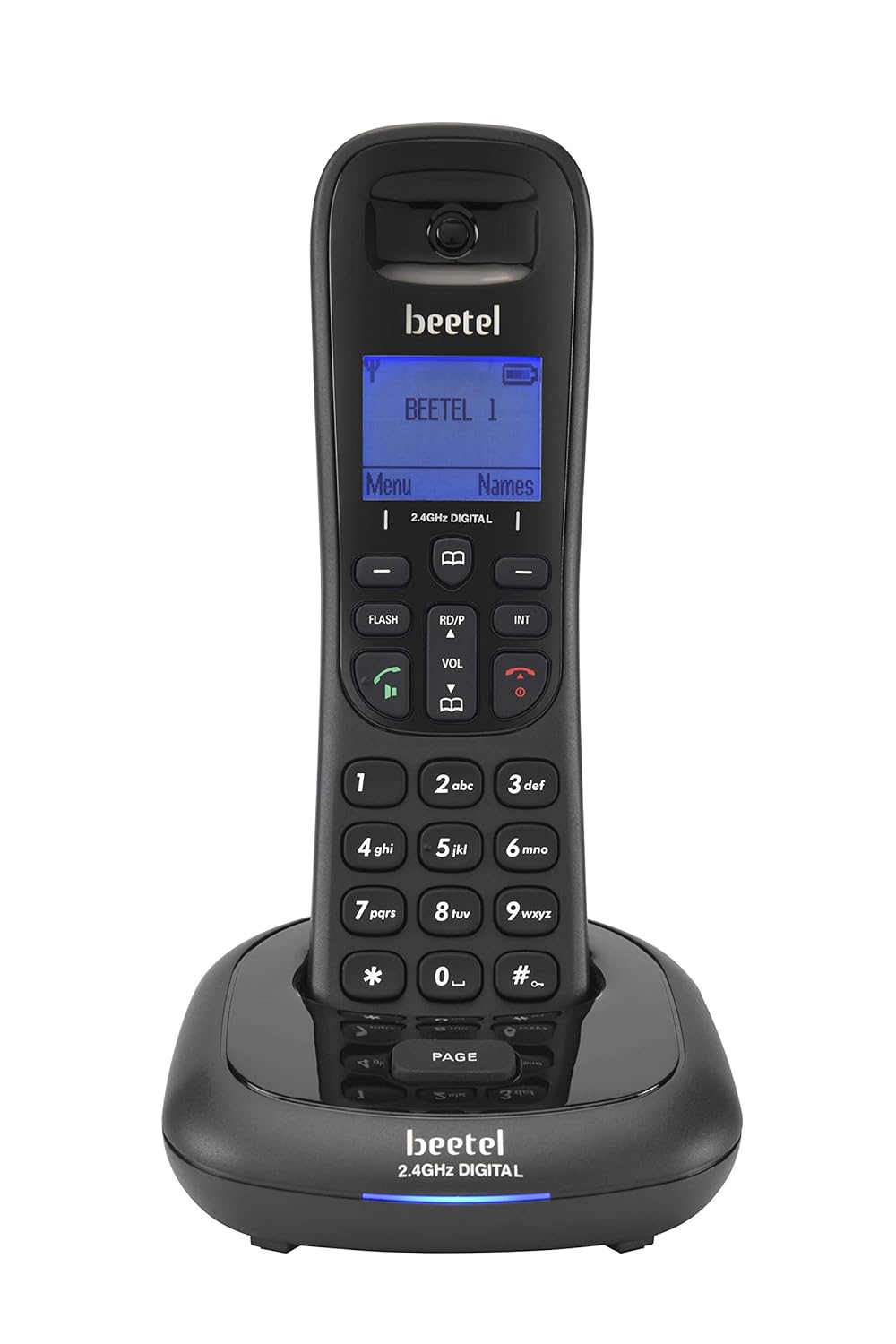
ചിത്രം 2.1: Beetel X91 Cordless Phone Handset and Base Unit. The image displays the black cordless handset securely placed on its charging base, showcasing the display screen and keypad.
പാക്കേജ് ഉള്ളടക്കം:
- കോർഡ്ലെസ്സ് ഹാൻഡ്സെറ്റ്
- അടിസ്ഥാന യൂണിറ്റ്
- ടെലിഫോൺ ലൈൻ കോർഡ്
- പവർ അഡാപ്റ്റർ
- ഉപയോക്തൃ മാനുവൽ (ഈ പ്രമാണം)
- റീചാർജ് ചെയ്യാവുന്ന ലിഥിയം അയോൺ ബാറ്ററി
ഹാൻഡ്സെറ്റ് സവിശേഷതകൾ:
- ഡിസ്പ്ലേ സ്ക്രീൻ: 1.4-inch LCD for caller ID, menu navigation, and status indicators.
- കീപാഡ്: Standard numeric keys (0-9), navigation keys, call/end keys, speakerphone key, and menu access.
- സ്പീക്കർഫോൺ: Integrated two-way speakerphone for hands-free conversations.
- വോളിയം നിയന്ത്രണം: Dedicated buttons for adjusting call volume.
- ഫോണ്നമ്പറുകള് അടങ്ങിയ പുസ്തകം: Stores up to 100 contacts with names.
- റിംഗ്ടോണുകൾ: 20 monophonic and polyphonic ringtone options.
3. സജ്ജീകരണം
3.1. അൺപാക്കിംഗും ബാറ്ററി ഇൻസ്റ്റാളേഷനും
- പാക്കേജിംഗിൽ നിന്ന് എല്ലാ ഘടകങ്ങളും ശ്രദ്ധാപൂർവ്വം നീക്കം ചെയ്യുക.
- ഹാൻഡ്സെറ്റിന്റെ പിൻഭാഗത്തുള്ള ബാറ്ററി കമ്പാർട്ട്മെന്റ് കണ്ടെത്തുക.
- നൽകിയിരിക്കുന്ന റീചാർജ് ചെയ്യാവുന്ന ബാറ്ററി ഇടുക, ശരിയായ പോളാരിറ്റി ഉറപ്പാക്കുക.
- ബാറ്ററി കമ്പാർട്ട്മെൻ്റ് കവർ അടയ്ക്കുക.
3.2. ബേസ് യൂണിറ്റ് ബന്ധിപ്പിക്കുന്നു.
- ടെലിഫോൺ ലൈൻ കോഡിന്റെ ഒരറ്റം ബേസ് യൂണിറ്റിലെ LINE പോർട്ടുമായി ബന്ധിപ്പിക്കുക.
- ടെലിഫോൺ ലൈൻ കോഡിന്റെ മറ്റേ അറ്റം നിങ്ങളുടെ ടെലിഫോൺ വാൾ ജാക്കുമായി ബന്ധിപ്പിക്കുക.
- Connect the power adapter to the DC IN port on the base unit.
- പവർ അഡാപ്റ്റർ ഒരു സാധാരണ ഇലക്ട്രിക്കൽ ഔട്ട്ലെറ്റിലേക്ക് പ്ലഗ് ചെയ്യുക.

ചിത്രം 3.1: Beetel X91 Handset and Base Unit. The image shows the cordless handset detached from its base, with the base unit positioned beside it, illustrating the separate components.
3.3. പ്രാരംഭ ചാർജിംഗ്
Place the handset on the base unit. The handset will begin charging. For optimal battery performance, allow the handset to charge continuously for at least 12-15 hours before its first use, even if the display indicates a full charge sooner.
4. പ്രവർത്തന നിർദ്ദേശങ്ങൾ
4.1. ഒരു കോൾ ചെയ്യുന്നു
- ഹാൻഡ്സെറ്റ് അടിത്തട്ടിൽ നിന്ന് ഉയർത്തുക അല്ലെങ്കിൽ അമർത്തുക വിളിക്കുക ബട്ടൺ.
- കീപാഡ് ഉപയോഗിച്ച് ആവശ്യമുള്ള ഫോൺ നമ്പർ ഡയൽ ചെയ്യുക.
- അമർത്തുക വിളിക്കുക button again to initiate the call.
- കോൾ അവസാനിപ്പിക്കാൻ, അമർത്തുക അവസാനിക്കുന്നു ബട്ടൺ അമർത്തുക അല്ലെങ്കിൽ ഹാൻഡ്സെറ്റ് ബേസിൽ തിരികെ വയ്ക്കുക.
4.2. ഒരു കോൾ സ്വീകരിക്കുന്നു
ഫോൺ റിംഗ് ചെയ്യുമ്പോൾ, ഹാൻഡ്സെറ്റ് ബേസിൽ നിന്ന് ഉയർത്തുക അല്ലെങ്കിൽ അമർത്തുക വിളിക്കുക ഉത്തരം നൽകാനുള്ള ബട്ടൺ.
4.3. സ്പീക്കർഫോൺ ഉപയോഗം
ഒരു കോൾ സമയത്ത്, അമർത്തുക സ്പീക്കർ button to activate the two-way speakerphone function. Press it again to switch back to handset mode.
4.4. വോളിയം ക്രമീകരിക്കുന്നു
ഒരു കോൾ സമയത്ത്, ഉപയോഗിക്കുക വോള്യ ▲ ഒപ്പം വോളിയം ▼ buttons on the handset to adjust the earpiece or speakerphone volume.
4.5. ഫോൺബുക്ക്
ഫോൺബുക്കിൽ 100 പേരുകളും നമ്പറുകളും വരെ സൂക്ഷിക്കാൻ കഴിയും.
ഒരു കോൺടാക്റ്റ് ചേർക്കുന്നു:
- അമർത്തുക മെനു ബട്ടൺ.
- Navigate to "Phonebook" and select "Add New".
- Enter the name using the keypad (refer to the keypad for character input).
- ഫോൺ നമ്പർ നൽകുക.
- എൻട്രി സംരക്ഷിക്കുക.
ഫോൺബുക്കിൽ നിന്ന് ഡയൽ ചെയ്യുന്നു:
- അമർത്തുക ഫോണ്നമ്പറുകള് അടങ്ങിയ പുസ്തകം button (or navigate via MENU).
- Scroll through the contacts using the navigation keys.
- അമർത്തുക വിളിക്കുക button to dial the selected contact.
4.6. കോളർ ഐഡി
When a call is received, the caller's number and name (if stored in the phonebook) will be displayed on the handset screen, provided you have subscribed to Caller ID service from your telephone service provider.
4.7. റിംഗ്ടോണുകൾ
You can select from 20 monophonic and polyphonic ringtones. Access the ringtone settings through the മെനു to customize your preference.
4.8. Event Reminder & Clock Screensaver
The phone includes an event reminder function, accessible via the menu, to set alarms or reminders. A clock screensaver can also be enabled to display the time when the handset is idle.
5. പരിപാലനം
5.1. വൃത്തിയാക്കൽ
ഒരു സോഫ്റ്റ്, ഡി ക്ലീനർ ഉപയോഗിച്ച് ഹാൻഡ്സെറ്റും ബേസ് യൂണിറ്റും തുടയ്ക്കുക.amp തുണി. അബ്രാസീവ് ക്ലീനറുകളോ ലായകങ്ങളോ ഉപയോഗിക്കരുത്. ഫോൺ വൃത്തിയാക്കുന്നതിന് മുമ്പ് വൈദ്യുതിയിൽ നിന്ന് വിച്ഛേദിക്കപ്പെട്ടുവെന്ന് ഉറപ്പാക്കുക.
5.2. ബാറ്ററി പരിചരണം
- Always use the original rechargeable battery provided with the phone.
- ഫോൺ കൂടുതൽ നേരം ഉപയോഗിക്കാൻ കഴിയുന്നില്ലെങ്കിൽ, ചോർച്ച തടയാൻ ബാറ്ററി ഊരിമാറ്റുക.
- പ്രാദേശിക നിയന്ത്രണങ്ങൾ അനുസരിച്ച് പഴയ ബാറ്ററികൾ ഉത്തരവാദിത്തത്തോടെ നീക്കം ചെയ്യുക.
6. പ്രശ്നപരിഹാരം
If you experience issues with your Beetel X91 phone, please refer to the following common problems and solutions:
| പ്രശ്നം | സാധ്യമായ പരിഹാരം |
|---|---|
| ഡയൽ ടോൺ ഇല്ല |
|
| ഹാൻഡ്സെറ്റ് ചാർജ് ചെയ്യുന്നില്ല |
|
| മോശം കോൾ നിലവാരം / സ്റ്റാറ്റിക് |
|
| കോളർ ഐഡി പ്രദർശിപ്പിച്ചിട്ടില്ല. |
|
7 സ്പെസിഫിക്കേഷനുകൾ
| ഫീച്ചർ | വിശദാംശങ്ങൾ |
|---|---|
| മോഡൽ | X91 |
| ബ്രാൻഡ് | ബീറ്റൽ |
| ആവൃത്തി | 2.4 GHz ഡിജിറ്റൽ |
| ഡിസ്പ്ലേ തരം | എൽസിഡി |
| സ്ക്രീൻ വലിപ്പം | 1.4 ഇഞ്ച് |
| ഫോൺബുക്ക് ശേഷി | 100 എൻട്രികൾ |
| റിംഗ്ടോണുകൾ | 20 Monophonic & Polyphonic |
| ബാറ്ററി തരം | റീചാർജ് ചെയ്യാവുന്ന ലിഥിയം അയോൺ |
| പവർ ഉറവിടം | Battery Powered (with AC adapter for base) |
| അളവുകൾ (ഹാൻഡ്സെറ്റും ബേസും) | 19 x 9.9 x 10.6 സെ.മീ |
| ഇനത്തിൻ്റെ ഭാരം | 300 ഗ്രാം |
| മെറ്റീരിയൽ | പ്ലാസ്റ്റിക് |
| അനുയോജ്യമായ ഉപകരണങ്ങൾ | Standard Landline Networks, Some VoIP Services |
8. വാറൻ്റിയും പിന്തുണയും
8.1. വാറൻ്റി വിവരങ്ങൾ
The Beetel X91 Cordless Phone comes with a 1 വർഷത്തെ നിർമ്മാതാവിൻ്റെ വാറൻ്റി for the device from the date of purchase. In-box accessories, including batteries, are covered by a 6 മാസത്തെ നിർമ്മാതാവിന്റെ വാറന്റി വാങ്ങിയ തീയതി മുതൽ. വാറന്റി ക്ലെയിമുകൾക്കായി നിങ്ങളുടെ വാങ്ങൽ രസീത് സൂക്ഷിക്കുക.
8.2. ഉപഭോക്തൃ പിന്തുണ
For technical assistance, service, or warranty claims, please contact Beetel customer support. Refer to the contact information provided on the product packaging or the official Beetel webസൈറ്റ്.