
1. ആമുഖം
Thank you for choosing the Tolsen TL35074 Laser Distance Meter. This device is designed for precise and efficient distance measurement, offering various functions including single measurement, continuous measurement, area, volume, Pythagorean calculation, and angle measurement. Please read this manual carefully before using the device to ensure safe and optimal operation.
2 സുരക്ഷാ വിവരങ്ങൾ
This device emits a Class 2 laser. Adherence to safety guidelines is crucial to prevent injury.
- ലേസർ ബീമിലേക്ക് നേരിട്ട് നോക്കരുത്. Direct eye exposure can cause permanent eye damage.
- Avoid pointing the laser beam at people or animals.
- Do not disassemble or modify the device. Unauthorized modifications can lead to hazardous laser radiation exposure.
- ഉപകരണം കുട്ടികൾക്ക് ലഭ്യമാകാതെ സൂക്ഷിക്കുക.
- ഈ മാനുവലിൽ വിവരിച്ചിരിക്കുന്നതുപോലെ ഉപകരണം അതിന്റെ ഉദ്ദേശ്യത്തിനായി മാത്രം ഉപയോഗിക്കുക.
- Do not operate the device in explosive environments or near flammable materials.
3. ഉൽപ്പന്നം കഴിഞ്ഞുview
The Tolsen TL35074 is a compact and durable laser distance meter. It features an easy-to-read display and intuitive controls. The device is rated IP40 for resistance against dust and splashes, making it suitable for various indoor and light outdoor applications.
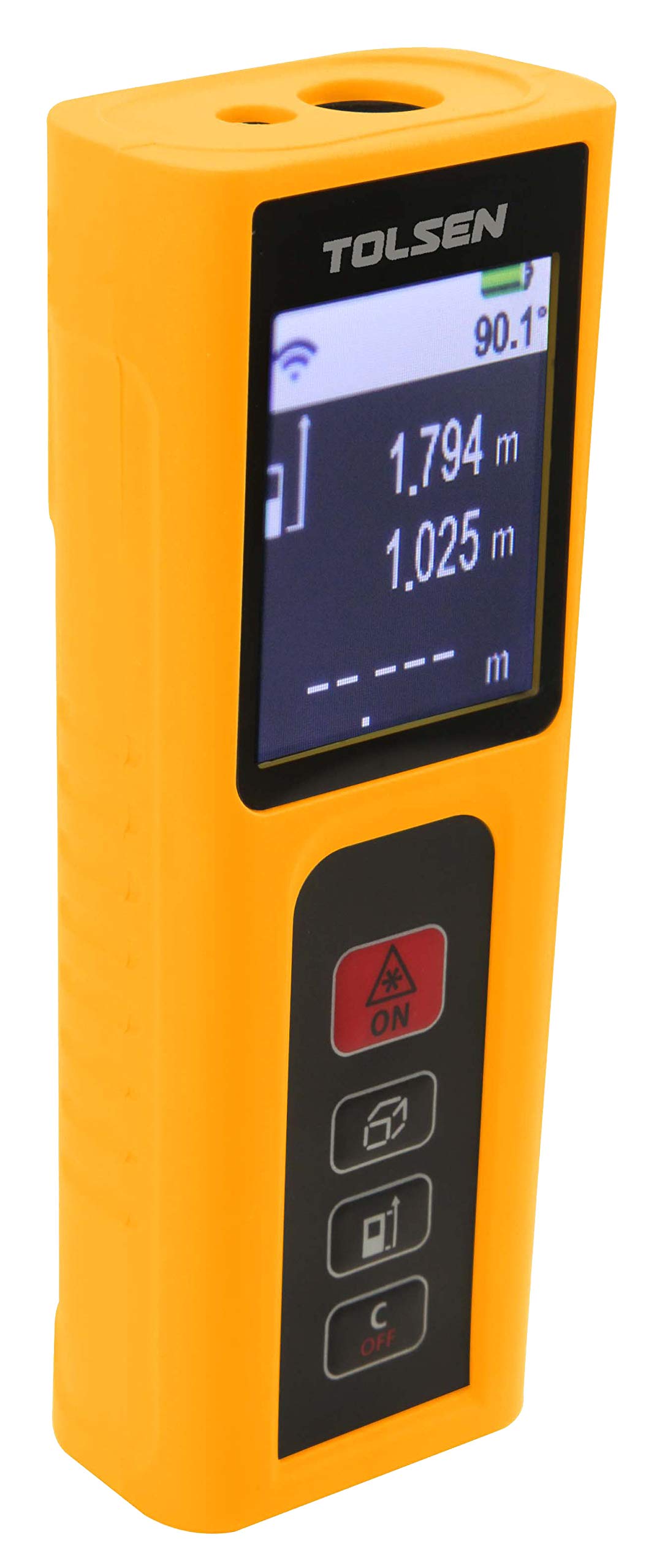
ചിത്രം 1: മുൻഭാഗം view of the Tolsen TL35074 Laser Distance Meter, showing the display, control buttons, and laser aperture.
3.1 ഘടകങ്ങൾ
- ലേസർ എമിറ്റർ/റിസീവർ: ഉപകരണത്തിന്റെ മുകളിൽ സ്ഥിതിചെയ്യുന്നു, ലേസർ സിഗ്നലുകൾ അയയ്ക്കുന്നതിനും സ്വീകരിക്കുന്നതിനും ഉത്തരവാദിയാണ്.
- LCD ഡിസ്പ്ലേ: Shows measurement results, mode indicators, battery status, and other relevant information.
- നിയന്ത്രണ ബട്ടണുകൾ: For power on/off, measurement activation, mode selection, and unit conversion.
- ബാറ്ററി കമ്പാർട്ട്മെൻ്റ്: Located at the rear, for AAA batteries.
4. സജ്ജീകരണം
4.1 ബാറ്ററി ഇൻസ്റ്റാളേഷൻ
- ഉപകരണത്തിന്റെ പിൻഭാഗത്ത് ബാറ്ററി കമ്പാർട്ട്മെന്റ് കവർ കണ്ടെത്തുക.
- കവർ തുറക്കുക.
- Insert two (2) AAA alkaline batteries, ensuring correct polarity (+/-). The device includes batteries.
- ബാറ്ററി കമ്പാർട്ട്മെൻ്റ് കവർ സുരക്ഷിതമായി അടയ്ക്കുക.
5. പ്രവർത്തന നിർദ്ദേശങ്ങൾ
5.1 പവർ ഓൺ/ഓഫ്
- പവർ ഓണാക്കാൻ: അമർത്തുക [MEAS] button. The laser will activate.
- പവർ ഓഫ് ചെയ്യാൻ: അമർത്തിപ്പിടിക്കുക [ഓഫ്] കുറച്ച് സെക്കൻഡ് നേരത്തേക്ക് ബട്ടൺ അമർത്തിപ്പിടിക്കുക. ബാറ്ററി ലാഭിക്കുന്നതിനായി, കുറച്ചു നേരം നിഷ്ക്രിയമായി നിന്നതിന് ശേഷം ഉപകരണം യാന്ത്രികമായി ഓഫാകും.
5.2 മെഷർമെന്റ് മോഡുകൾ
അമർത്തുക [FUNC] button to cycle through the different measurement modes.
5.2.1 സിംഗിൾ മെഷർമെന്റ്
- Point the device at the target.
- അമർത്തുക [MEAS] ലേസർ സജീവമാക്കാൻ ഒരിക്കൽ ബട്ടൺ അമർത്തുക.
- അമർത്തുക [MEAS] button again to take a single measurement. The result will appear on the display.
5.2.2 തുടർച്ചയായ അളവ് (ട്രാക്കിംഗ്)
- Select continuous measurement mode using the [FUNC] ബട്ടൺ.
- അമർത്തുക [MEAS] button. The device will continuously measure and display the distance as you move it.
- അമർത്തുക [MEAS] തുടർച്ചയായ അളവ് നിർത്താൻ വീണ്ടും.
5.2.3 ഏരിയ അളവ്
- Select area measurement mode.
- Measure the first side (e.g., length) by pressing [MEAS].
- Measure the second side (e.g., width) by pressing [MEAS] വീണ്ടും.
- ഉപകരണം സ്വയമേവ വിസ്തീർണ്ണം കണക്കാക്കുകയും പ്രദർശിപ്പിക്കുകയും ചെയ്യും.
5.2.4 വോളിയം അളവ്
- Select volume measurement mode.
- Measure the length, width, and height sequentially by pressing [MEAS] ഓരോ അളവെടുപ്പിനും ശേഷം.
- The device will calculate and display the volume.
5.2.5 Pythagorean Calculation (Indirect Measurement)
This mode allows indirect measurement of heights or distances using the Pythagorean theorem.
- Select Pythagorean mode (e.g., for two-point or three-point measurement).
- Follow the on-screen prompts to measure the required sides (e.g., hypotenuse and one leg for height).
- ഉപകരണം അജ്ഞാത വശം കണക്കാക്കുകയും പ്രദർശിപ്പിക്കുകയും ചെയ്യും.
5.2.6 ആംഗിൾ അളവ്
This mode allows for the measurement of angles, often in conjunction with indirect height measurements.
- Select angle measurement mode.
- Follow the on-screen instructions to position the device and take the necessary measurements.
- The angle will be displayed.
6. പരിപാലനം
- വൃത്തിയാക്കൽ: ഒരു സോഫ്റ്റ് ഉപയോഗിക്കുക, ഡിamp cloth to clean the device. Do not use abrasive cleaners or solvents. Pay special attention to keeping the laser lens clean.
- സംഭരണം: ഉപകരണം വരണ്ടതും തണുത്തതുമായ സ്ഥലത്ത് സൂക്ഷിക്കുക, നേരിട്ടുള്ള സൂര്യപ്രകാശത്തിൽ നിന്നും കടുത്ത താപനിലയിൽ നിന്നും അകറ്റി നിർത്തുക. കൂടുതൽ നേരം സൂക്ഷിക്കുകയാണെങ്കിൽ, ബാറ്ററികൾ ചോർച്ച തടയാൻ അവ നീക്കം ചെയ്യുക.
- ബാറ്ററി മാറ്റിസ്ഥാപിക്കൽ: ഡിസ്പ്ലേയിൽ ബാറ്ററി കുറവാണെന്ന് കാണിക്കുമ്പോൾ ബാറ്ററികൾ മാറ്റി സ്ഥാപിക്കുക.
7. പ്രശ്നപരിഹാരം
| പ്രശ്നം | സാധ്യമായ കാരണം | പരിഹാരം |
|---|---|---|
| ഉപകരണം പവർ ഓണാക്കുന്നില്ല | Low or dead batteries; incorrect battery polarity | ബാറ്ററികൾ മാറ്റിസ്ഥാപിക്കുക; ബാറ്ററി ഓറിയൻ്റേഷൻ പരിശോധിക്കുക |
| കൃത്യമല്ലാത്ത അളവുകൾ | Dirty laser lens; unstable measurement surface; extreme environmental conditions | Clean lens; ensure stable measurement; avoid extreme conditions |
| ലേസർ ദൃശ്യമല്ല | തിളക്കമുള്ള ആംബിയന്റ് ലൈറ്റ്; ലേസർ സജീവമാക്കിയിട്ടില്ല. | Measure in dimmer conditions; press [MEAS] to activate laser |
| ഡിസ്പ്ലേയിൽ പിശക് സന്ദേശം | Measurement out of range; internal error | Ensure target is within 0.2m-60m range; restart device. If error persists, contact support. |
8 സ്പെസിഫിക്കേഷനുകൾ
- ബ്രാൻഡ്: ടോൾസെൻ
- മോഡൽ: TL35074
- അളക്കൽ ശ്രേണി: 0.2 മീ - 60 മീ
- അളക്കൽ കൃത്യത: ± 2.0 മി.മീ
- IP റേറ്റിംഗ്: IP40 (പൊടി, തെറിക്കൽ പ്രതിരോധം)
- പ്രവർത്തനങ്ങൾ: Single measurement, Continuous measurement, Area, Volume, Pythagorean calculation, Angle measurement
- ബാറ്ററി തരം: 2 x AAA Alkaline batteries (Included)
- Approximate Product Dimensions: 18 x 12 x 6 cm (Shipping dimensions, actual product may be smaller)
- ഉൽപ്പന്നത്തിന്റെ ഏകദേശ ഭാരം: 250g (Shipping weight, actual product may be lighter)
- ഉത്ഭവം: ചൈന
9. വാറൻ്റിയും പിന്തുണയും
For warranty information or technical support, please refer to the documentation provided with your purchase or contact your retailer. Keep your proof of purchase for any warranty claims.