
ആമുഖം
This manual provides detailed instructions for the setup, operation, and maintenance of your Awei A500BL Wireless Bluetooth Headphone. Please read this guide thoroughly before using the product to ensure proper functionality and to maximize your listening experience.

ചിത്രം: മുൻഭാഗം view of the Awei A500BL Wireless Bluetooth Headphone, showcasing its over-ear design and color scheme.
പാക്കേജ് ഉള്ളടക്കം
താഴെ ലിസ്റ്റ് ചെയ്തിരിക്കുന്ന എല്ലാ ഇനങ്ങളും നിങ്ങളുടെ പാക്കേജിൽ ഉൾപ്പെടുത്തിയിട്ടുണ്ടെന്ന് ഉറപ്പാക്കുക:
- 1x Awei A500BL Wireless Bluetooth Headphone
- 1x യുഎസ്ബി ചാർജിംഗ് കേബിൾ
- 1x 3.5 മിമി ഓഡിയോ കേബിൾ
ഉൽപ്പന്നം കഴിഞ്ഞുview
Familiarize yourself with the various components and controls of your Awei A500BL headphones.
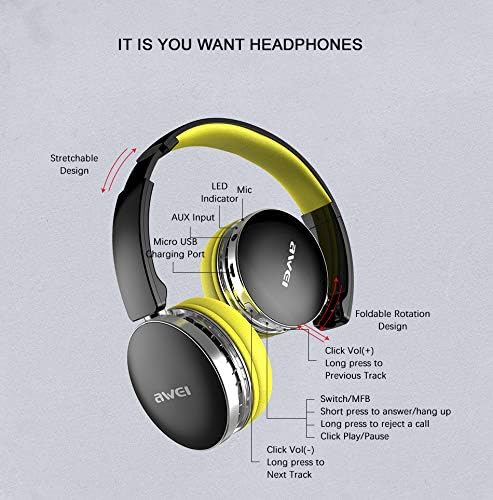
Image: Detailed diagram illustrating the location of buttons, ports, and indicators on the Awei A500BL headphone, including LED indicator, microphone, AUX input, Micro USB charging port, volume controls, multi-function button (MFB), and foldable rotation design.
പ്രധാന സവിശേഷതകളിൽ ഇവ ഉൾപ്പെടുന്നു:
- വലിച്ചുനീട്ടാവുന്ന ഡിസൈൻ: സുഖകരമായ ഫിറ്റിംഗിനായി.
- Foldable Rotation Design: എളുപ്പത്തിലുള്ള സംഭരണത്തിനും പോർട്ടബിലിറ്റിക്കും വേണ്ടി.
- LED സൂചകം: പവറും കണക്ഷൻ നിലയും കാണിക്കുന്നു.
- മൈക്രോഫോൺ: ഹാൻഡ്സ് ഫ്രീ കോളുകൾക്കായി.
- AUX ഇൻപുട്ട്: വയർഡ് കണക്ഷനായി.
- മൈക്രോ യുഎസ്ബി ചാർജിംഗ് പോർട്ട്: ബാറ്ററി ചാർജ് ചെയ്യുന്നതിന്.
- വോളിയം കൂട്ടുക/അടുത്ത ട്രാക്ക് ബട്ടൺ: Click for volume up, long press for next track.
- മൾട്ടി-ഫംഗ്ഷൻ ബട്ടൺ (MFB): Short press to answer/hang up calls, long press to reject a call, click for play/pause.
- വോളിയം കുറയ്ക്കൽ/മുമ്പത്തെ ട്രാക്ക് ബട്ടൺ: Click for volume down, long press for previous track.
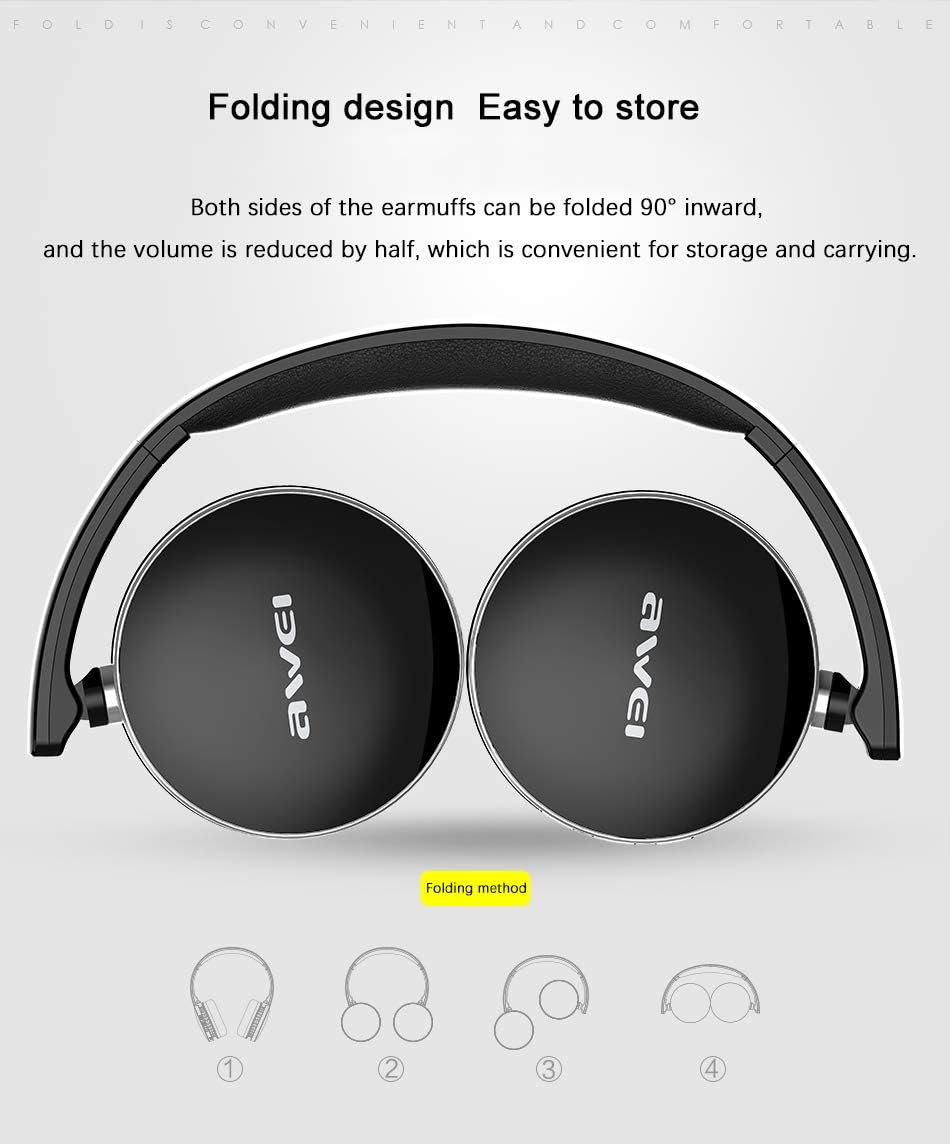
Image: Illustration demonstrating the 90-degree inward folding capability of the Awei A500BL headphone earcups, highlighting its compact storage design.
സജ്ജമാക്കുക
1. ഹെഡ്ഫോൺ ചാർജ് ചെയ്യുന്നു
Before first use, fully charge the headphone. Use the provided USB charging cable.
- Connect the Micro USB end of the charging cable to the charging port on the headphone.
- ചാർജിംഗ് കേബിളിന്റെ USB-A അറ്റം ഒരു USB പവർ അഡാപ്റ്ററുമായി (ഉൾപ്പെടുത്തിയിട്ടില്ല) അല്ലെങ്കിൽ ഒരു കമ്പ്യൂട്ടറിന്റെ USB പോർട്ടുമായി ബന്ധിപ്പിക്കുക.
- The LED indicator will illuminate during charging. It will change color or turn off once charging is complete.
- ചാർജ് ചെയ്യാൻ സാധാരണയായി 2-4 മണിക്കൂർ എടുക്കും.
2. ബ്ലൂടൂത്ത് ജോടിയാക്കൽ
To connect your headphone to a Bluetooth-enabled device:
- Ensure the headphone is fully charged and turned off.
- Press and hold the Multi-Function Button (MFB) for approximately 5-7 seconds until the LED indicator flashes red and blue alternately, indicating pairing mode.
- നിങ്ങളുടെ ഉപകരണത്തിൽ (സ്മാർട്ട്ഫോൺ, ടാബ്ലെറ്റ്, കമ്പ്യൂട്ടർ), ബ്ലൂടൂത്ത് പ്രവർത്തനക്ഷമമാക്കി ലഭ്യമായ ഉപകരണങ്ങൾക്കായി തിരയുക.
- Select "Awei A500BL" from the list of found devices.
- ജോടിയാക്കിക്കഴിഞ്ഞാൽ, LED ഇൻഡിക്കേറ്റർ സാവധാനം നീല നിറത്തിൽ മിന്നിമറയും അല്ലെങ്കിൽ കടും നീലയായി തുടരും.
- പാസ്വേഡ് ആവശ്യപ്പെടുകയാണെങ്കിൽ, "0000" എന്ന് നൽകുക.
3. വയർഡ് കണക്ഷൻ (AUX മോഡ്)
You can also use the headphone with a wired connection:
- Connect one end of the 3.5mm audio cable to the AUX input port on the headphone.
- 3.5mm ഓഡിയോ കേബിളിന്റെ മറ്റേ അറ്റം നിങ്ങളുടെ ഉപകരണത്തിന്റെ ഓഡിയോ ഔട്ട്പുട്ട് ജാക്കുമായി ബന്ധിപ്പിക്കുക.
- The headphone will automatically switch to wired mode. Bluetooth functionality will be disabled.
പ്രവർത്തന നിർദ്ദേശങ്ങൾ
പവർ ഓൺ/ഓഫ്
- പവർ ഓൺ: Press and hold the MFB for approximately 3 seconds until the LED indicator flashes blue.
- പവർ ഓഫ്: Press and hold the MFB for approximately 3 seconds until the LED indicator flashes red and then turns off.
സംഗീത പ്ലേബാക്ക്
- പ്ലേ/താൽക്കാലികമായി നിർത്തുക: MFB ചെറുതായി അമർത്തുക.
- വോളിയം കൂട്ടുക: Short press the "Vol+" button.
- വോളിയം താഴേക്ക്: Short press the "Vol-" button.
- അടുത്ത ട്രാക്ക്: Long press the "Vol+" button.
- മുമ്പത്തെ ട്രാക്ക്: Long press the "Vol-" button.
കോൾ മാനേജുമെന്റ്
- മറുപടി കോൾ: Short press the MFB when an incoming call rings.
- കോൾ അവസാനിപ്പിക്കുക: ഒരു കോൾ സമയത്ത് MFB ഷോർട്ട് പ്രസ്സ് ചെയ്യുക.
- കോൾ നിരസിക്കുക: Long press the MFB when an incoming call rings.
- അവസാന നമ്പർ വീണ്ടും ഡയൽ ചെയ്യുക: MFB രണ്ടുതവണ അമർത്തുക.
പരിപാലനവും പരിചരണവും
- Keep the headphone dry. Avoid exposure to moisture or extreme temperatures.
- Clean the headphone with a soft, dry cloth. Do not use harsh chemicals or abrasive cleaners.
- Store the headphone in a cool, dry place when not in use. The foldable design allows for compact storage.
- Avoid dropping or subjecting the headphone to strong impacts.
- Do not attempt to disassemble or modify the headphone, as this will void the warranty.
ട്രബിൾഷൂട്ടിംഗ്
| പ്രശ്നം | പരിഹാരം |
|---|---|
| Headphone does not power on. | Ensure the headphone is fully charged. Connect it to a power source using the USB cable. |
| ഒരു ബ്ലൂടൂത്ത് ഉപകരണവുമായി ജോടിയാക്കാൻ കഴിയില്ല. |
|
| ശബ്ദമില്ല അല്ലെങ്കിൽ കുറഞ്ഞ ശബ്ദമില്ല. |
|
| മോശം ശബ്ദ നിലവാരം. |
|
സ്പെസിഫിക്കേഷനുകൾ
| ഫീച്ചർ | വിശദാംശങ്ങൾ |
|---|---|
| ബ്രാൻഡ് | അവേയ് |
| മോഡൽ | A500BL |
| ധരിക്കുന്ന തരം | ഓവർ-ചെവി |
| മൊത്തം ഭാരം | 139 ഗ്രാം |
| മൈക്രോഫോൺ | അതെ |
| ബ്ലൂടൂത്ത് പതിപ്പ് | V4.0 + EDR |
| ട്രാൻസ്മിഷൻ ദൂരം | 10മീ |
| സംവേദനക്ഷമത സ്വീകരിക്കുക | 111dB |
| പ്രതിരോധം | 32Ω |
| ഫ്രീക്വൻസി പ്രതികരണം | 20-20kHz |
| ബാറ്ററി ശേഷി | 300mAh, 3.7V |
| ചാർജിംഗ് സമയം | 2-4 മണിക്കൂർ |
| ജോലി സമയം | 7-10 മണിക്കൂർ |
| സ്റ്റാൻഡ്ബൈ സമയം | 300-450 മണിക്കൂർ |
| ശബ്ദ നിയന്ത്രണം | Active Noise Cancellation (CVC6.0) |
| കണക്റ്റിവിറ്റി ടെക്നോളജി | വയർലെസ്സ് (ബ്ലൂടൂത്ത്), വയർഡ് (3.5mm AUX) |
| മെറ്റീരിയൽ | പ്ലാസ്റ്റിക് |
വാറൻ്റി വിവരങ്ങൾ
Awei products are manufactured to the highest quality standards. This product is covered by a limited warranty against manufacturing defects from the date of purchase. Please retain your proof of purchase for warranty claims. The warranty does not cover damage caused by misuse, accident, unauthorized modification, or normal wear and tear. For specific warranty terms and conditions, please refer to the warranty card included with your product or contact customer support.
ഉപഭോക്തൃ പിന്തുണ
If you encounter any issues or have questions not covered in this manual, please contact Awei customer support. Visit the official Awei webബന്ധപ്പെടാനുള്ള വിശദാംശങ്ങൾ, പതിവുചോദ്യങ്ങൾ, അധിക ഉറവിടങ്ങൾ എന്നിവയ്ക്കായി സൈറ്റ്.
Webസൈറ്റ്: www.awei.com (ഉദാampലിങ്ക്, യഥാർത്ഥ ലിങ്ക് വ്യത്യാസപ്പെടാം)