
Orion Motor Tech OMT-BTC-S002
Orion Motor Tech 2PC 12V Battery Charger and Maintainer
Model: OMT-BTC-S002
ആമുഖം
This manual provides essential information for the safe and efficient operation, maintenance, and troubleshooting of your Orion Motor Tech 2PC 12V Battery Charger and Maintainer. This device is designed to charge and maintain various types of 12V lead-acid batteries, including flooded, sealed maintenance-free, AGM, and gel batteries, ensuring optimal performance and longevity for your vehicle's battery.
സജ്ജമാക്കുക
ചാർജർ ബന്ധിപ്പിക്കുന്നതിന് മുമ്പ്, പ്രദേശം നന്നായി വായുസഞ്ചാരമുള്ളതാണെന്നും കത്തുന്ന വസ്തുക്കളിൽ നിന്ന് മുക്തമാണെന്നും ഉറപ്പാക്കുക. സുരക്ഷാ ഗ്ലാസുകൾ, കയ്യുറകൾ പോലുള്ള ഉചിതമായ വ്യക്തിഗത സംരക്ഷണ ഉപകരണങ്ങൾ എപ്പോഴും ധരിക്കുക.
- ചാർജർ പരിശോധിക്കുക: Before each use, check the charger, cables, and clampഏതെങ്കിലും തകരാറിന്റെ ലക്ഷണങ്ങൾ ഉണ്ടെങ്കിൽ s. കേടുപാടുകൾ സംഭവിച്ചിട്ടുണ്ടെങ്കിൽ ഉപയോഗിക്കരുത്.
- ബാറ്ററിയുമായി ബന്ധിപ്പിക്കുക:
- ചുവന്ന പോസിറ്റീവ് (+) cl ബന്ധിപ്പിക്കുകamp ബാറ്ററിയുടെ പോസിറ്റീവ് (+) ടെർമിനലിലേക്ക്.
- ബ്ലാക്ക് നെഗറ്റീവ് (-) cl ബന്ധിപ്പിക്കുകamp ബാറ്ററിയുടെ നെഗറ്റീവ് (-) ടെർമിനലിലേക്ക്.
- Ensure a secure connection to prevent sparks.
- പവർ ഔട്ട്ലെറ്റിലേക്ക് ബന്ധിപ്പിക്കുക: ഒരിക്കൽ clamps are securely connected to the battery terminals, plug the charger's power cord into a standard 120V AC electrical outlet.
- പ്രാരംഭ പരിശോധന: The charging indicator light will illuminate, indicating the charging status.

Image: The Orion Motor Tech 12V Battery Charger, showing its compact design, standard power plug, and robust battery clamps.

ചിത്രം: ഒരു ക്ലോസ്-അപ്പ് view of the heavy-duty battery clamps, featuring red and black insulation for positive and negative terminals, designed for secure gripping and superior conductivity.
പ്രവർത്തന നിർദ്ദേശങ്ങൾ
The Orion Motor Tech battery charger employs a smart 2-stage charging process to optimize battery health and efficiency.
ചാർജിംഗ് പ്രക്രിയ:
- Stage1: ബൾക്ക് ചാർജ്
ഈ പ്രാരംഭ എസ്tage provides a constant high current to the battery, maximizing charging efficiency and quickly bringing the battery to a significant charge level. - Stage 2: Float Mode
Once the battery is nearly full, the charger transitions to Float Mode. In this stage, a safe trickle current is applied to maintain a complete charge without the risk of overcharging, making it ideal for long-term maintenance.
ചാർജിംഗ് സൂചകം:
The charging indicator light on the unit provides visual feedback on the charging status:
- ചുവന്ന വെളിച്ചം: ബാറ്ററി നിലവിൽ ചാർജ്ജ് ചെയ്യുന്നുവെന്ന് സൂചിപ്പിക്കുന്നു.
- ഗ്രീൻ ലൈറ്റ്: Indicates the battery is fully charged or in float mode.
പ്രധാന കുറിപ്പ്:
- Do not plug in this charger without connecting to a battery first.
- Disconnect the charger immediately if charging is not working as expected.
- If the indicator stays red for 12 hours, check the battery for potential issues.
- For 7-12Ah batteries, stop charging after 8-10 hours to prevent overcharging.
- For car batteries, charging time should not exceed 12 hours for optimal battery health.
വിശാലമായ അനുയോജ്യത:
This charger is suitable for a broad range of 12V lead-acid batteries, including flooded, sealed maintenance-free (AGM, Gel) types. It is ideal for charging and maintaining batteries in:
- ബോട്ടുകൾ
- മോട്ടോർസൈക്കിളുകൾ
- എടിവികൾ
- റൈഡിംഗ് മൂവേഴ്സ്
- കാറുകൾ
- ട്രക്കുകൾ
- എസ്.യു.വി
- ആർ.വി

Image: The Orion Motor Tech battery charger connected to a large blue lead-acid battery, demonstrating its multipurpose charging capability.

Image: An illustration highlighting the wide application of the charger, suitable for charging and maintaining batteries in a variety of vehicles such as boats, motorcycles, ATVs, lawn tractors, cars, trucks, SUVs, and RVs.

Image: A graphical representation of the smart 2-stage charging process, showing the transition from "Bulk Charge" (high constant current for efficiency) to "Float Mode" (trickle current for maintaining full charge without overcharging).
മെയിൻ്റനൻസ്
Proper maintenance of your battery charger will ensure its longevity and reliable performance.
- വൃത്തിയാക്കൽ: Disconnect the charger from both the power outlet and the battery before cleaning. Use a dry, soft cloth to wipe down the unit. Do not use liquid cleaners or solvents.
- സംഭരണം: Store the charger in a cool, dry place away from direct sunlight and moisture when not in use. Ensure cables are neatly coiled and not kinked.
- കേബിളും Clamp പരിശോധന: പവർ കോർഡും ബാറ്ററി ക്ലീനറും പതിവായി പരിശോധിക്കുക.amps for any cuts, fraying, or corrosion. Replace the unit if significant damage is found.
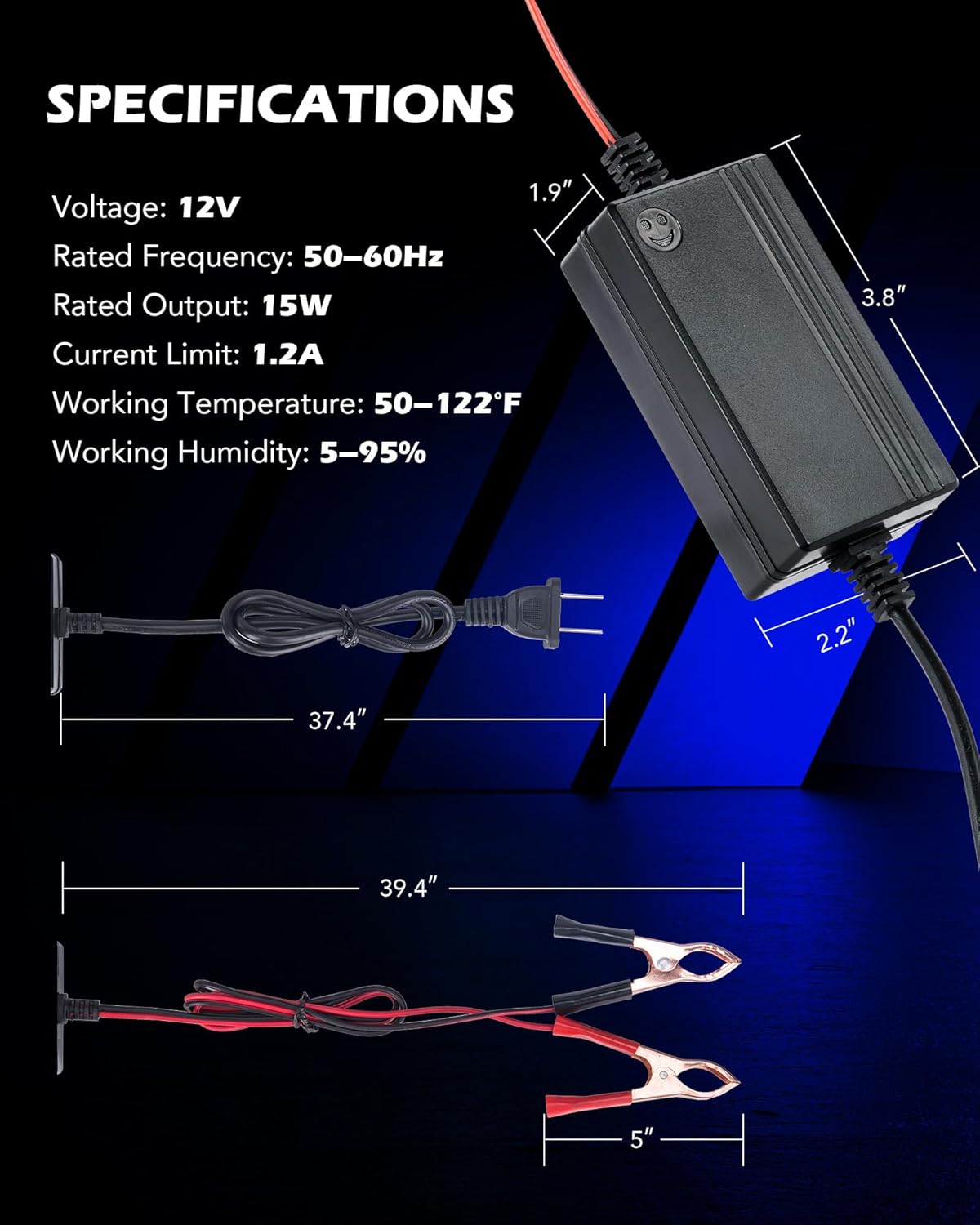
Image: Detail showing the pure copper core of the charger's cables, which ensures stable and efficient charging, alongside the sturdy battery clamps designed for secure holding and superior conductivity.
ട്രബിൾഷൂട്ടിംഗ്
നിങ്ങളുടെ ചാർജറിൽ പ്രശ്നങ്ങൾ നേരിടുകയാണെങ്കിൽ, ഇനിപ്പറയുന്ന പൊതുവായ പ്രശ്നങ്ങളും പരിഹാരങ്ങളും പരിശോധിക്കുക:
| പ്രശ്നം | സാധ്യമായ കാരണം | പരിഹാരം |
|---|---|---|
| Charger not turning on / No indicator light | Not connected to power, faulty outlet, or damaged charger. | Ensure charger is properly plugged into a working outlet. Check connections to the battery. If still no power, the unit may be faulty. |
| Indicator light stays red for extended period (e.g., 12 hours) | Battery deeply discharged, faulty battery, or incorrect battery type. | Check the battery's voltage. If extremely low, it may take longer to initiate charging or the battery might be beyond recovery. Verify battery type is 12V lead-acid. |
| Charger gets excessively hot | Overload, poor ventilation, or internal fault. | Ensure adequate ventilation around the charger. Disconnect immediately if overheating. This unit has overheating protection, but continuous overheating indicates an issue. |
| Battery not charging or not holding charge | Poor connection, faulty battery, or charger malfunction. | Verify secure connections to battery terminals. Test the battery with a multimeter to confirm its condition. If the battery is healthy, the charger may be faulty. |
സുരക്ഷാ പരിരക്ഷകൾ:
The Orion Motor Tech charger is equipped with multiple safety features to protect both the user and the battery:
- ഷോർട്ട് സർക്യൂട്ട് സംരക്ഷണം: ആകസ്മികമായ ഷോർട്ട് സർക്യൂട്ടുകളിൽ നിന്നുള്ള കേടുപാടുകൾ തടയുന്നു.
- ഓവർകറന്റ് സംരക്ഷണം: അമിതമായ വൈദ്യുത പ്രവാഹത്തിനെതിരായ സംരക്ഷണങ്ങൾ.
- അമിത ചൂടാക്കൽ സംരക്ഷണം: Automatically shuts down if the unit gets too hot.
- ഓവർ വോൾtagഇ സംരക്ഷണം: Protects the battery from being charged at too high a voltage.
- കുറഞ്ഞ വോള്യംtage Dropout Protection: Ensures stable operation even with voltagഇ ഏറ്റക്കുറച്ചിലുകൾ.

Image: An illustration detailing the comprehensive safety features of the charger, including protection against short-circuits, overcurrent, overheating, and overvoltage, ensuring safe operation.
സ്പെസിഫിക്കേഷനുകൾ
| ഫീച്ചർ | മൂല്യം |
|---|---|
| മോഡൽ നമ്പർ | OMT-BTC-S002 |
| Putട്ട്പുട്ട് വോളിയംtage | 12 വോൾട്ട് |
| റേറ്റുചെയ്ത ഫ്രീക്വൻസി | 50-60Hz |
| റേറ്റുചെയ്ത ഔട്ട്പുട്ട് | 15W |
| നിലവിലെ പരിധി | 1.2എ |
| പ്രവർത്തന താപനില | 50-122°F (10-50°C) |
| പ്രവർത്തന ഈർപ്പം | 5-95% |
| Product Dimensions (Charger Unit) | 1.9" (Depth) x 2.2" (Width) x 3.8" (Height) |
| ഇനത്തിൻ്റെ ഭാരം | 0.71 പൗണ്ട് (ഏകദേശം 11.3 ഔൺസ്) |
Image: A visual guide to the charger's physical specifications, including the dimensions of the main unit and the lengths of the power and battery cables.
വാറൻ്റിയും പിന്തുണയും
Information regarding product warranty and customer support is not provided within this manual. For warranty details or technical assistance, please refer to the product packaging, the manufacturer's official website, or contact Orion Motor Tech customer service directly.
Ask a question about this manual
Ask about setup, troubleshooting, compatibility, parts, safety, or missing instructions. Manuals+ will review the question and use this page’s manual context to help answer it.