
1. ആമുഖം
Thank you for choosing the Silvergear Lollipop Kids Camera. This digital camera is designed for children, featuring a durable silicone case, 5.0-megapixel photo resolution, and video recording capabilities. It also includes built-in games for entertainment. This manual provides essential information for the safe and effective use of your camera.
2. ഉൽപ്പന്നം കഴിഞ്ഞുview
Familiarize yourself with the components of your Silvergear Lollipop Kids Camera.
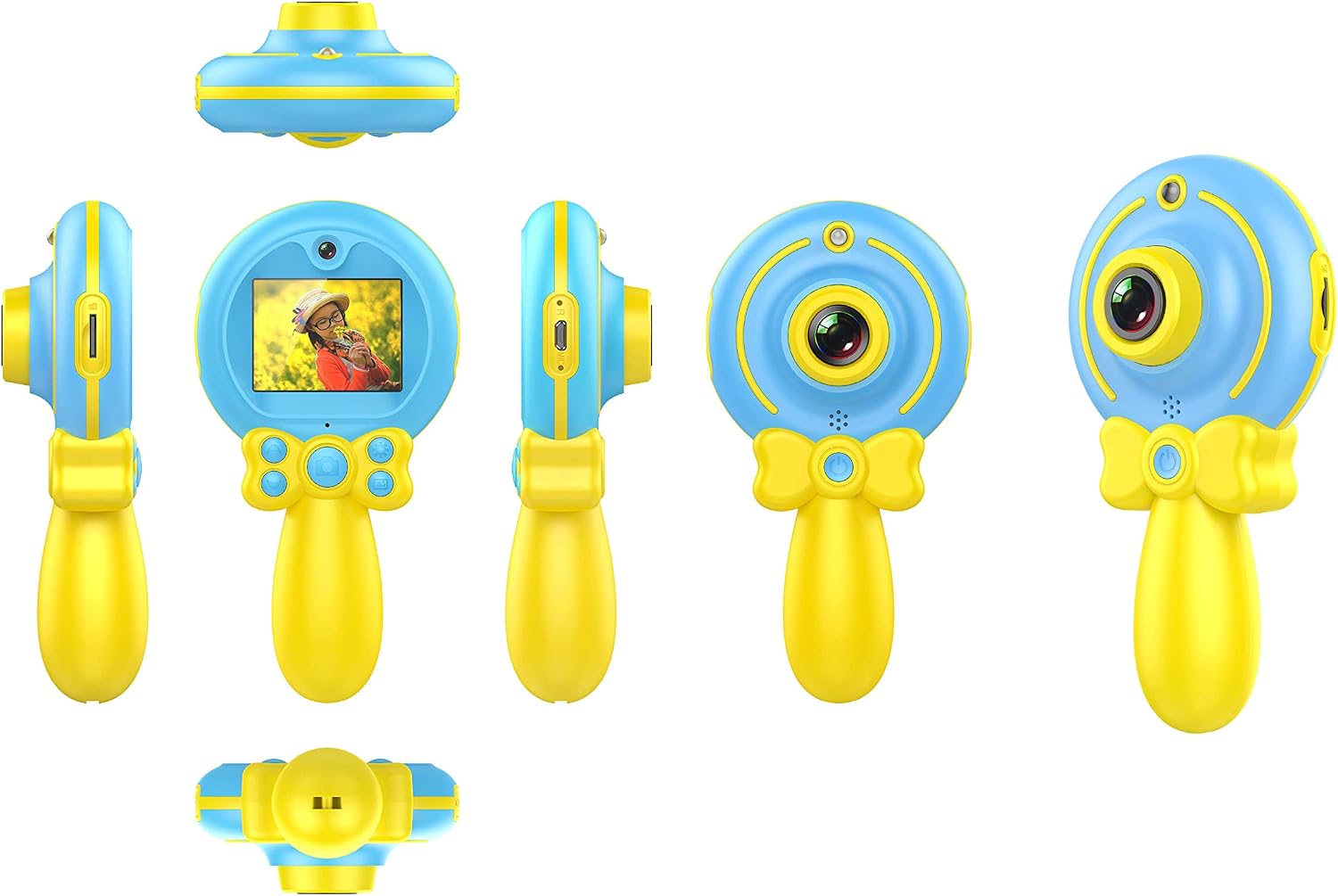
ചിത്രം 2.1: വിവിധ views of the Silvergear Lollipop Kids Camera, illustrating its compact design, front and rear lenses, 2-inch display, and control buttons. The camera features a yellow handle and blue body with a silicone protective case.
- ഫ്രണ്ട് ലെൻസ്: ഫോട്ടോകളും വീഡിയോകളും എടുക്കുന്നതിന്.
- പിൻ ലെൻസ്: For selfies.
- 2-ഇഞ്ച് ഡിസ്പ്ലേ സ്ക്രീൻ: വേണ്ടി viewing photos, videos, and navigating menus.
- നിയന്ത്രണ ബട്ടണുകൾ: For power, navigation, and selection.
- മൈക്രോ യുഎസ്ബി പോർട്ട്: ചാർജിംഗിനും ഡാറ്റ കൈമാറ്റത്തിനും.
- മൈക്രോ എസ്ഡി കാർഡ് സ്ലോട്ട്: വികസിപ്പിക്കാവുന്ന സംഭരണത്തിനായി.
- Wrist Strap Attachment Point: For securing the camera.
3. സജ്ജീകരണം
3.1 ബാറ്ററി ചാർജ് ചെയ്യുന്നു
The camera is equipped with a built-in rechargeable Lithium-polymer battery. Before first use, fully charge the camera.
- Connect the included Micro USB cable to the camera's Micro USB port.
- കേബിളിന്റെ മറ്റേ അറ്റം ഒരു USB പവർ അഡാപ്റ്ററുമായി (ഉൾപ്പെടുത്തിയിട്ടില്ല) അല്ലെങ്കിൽ ഒരു കമ്പ്യൂട്ടറിന്റെ USB പോർട്ടുമായി ബന്ധിപ്പിക്കുക.
- ചാർജിംഗ് ഇൻഡിക്കേറ്റർ ലൈറ്റ് പ്രകാശിക്കും. പൂർണ്ണമായി ചാർജ് ചെയ്തുകഴിഞ്ഞാൽ, ലൈറ്റ് നിറം മാറുകയോ ഓഫാകുകയോ ചെയ്യാം.
3.2 ഒരു മൈക്രോ എസ്ഡി കാർഡ് ചേർക്കുന്നു
A Micro SD card (not included) is required to save photos and videos. The camera supports cards up to 32GB.
- ക്യാമറയിൽ മൈക്രോ എസ്ഡി കാർഡ് സ്ലോട്ട് കണ്ടെത്തുക.
- മെറ്റൽ കോൺടാക്റ്റുകൾ താഴേക്ക് അഭിമുഖമായി വരുന്ന തരത്തിൽ, അത് ക്ലിക്കായി ഉറപ്പിക്കുന്നത് വരെ മൈക്രോ എസ്ഡി കാർഡ് സ്ലോട്ടിലേക്ക് സൌമ്യമായി തിരുകുക.
- നീക്കം ചെയ്യാൻ, കാർഡ് പുറത്തേക്ക് വരുന്നത് വരെ ചെറുതായി ഉള്ളിലേക്ക് തള്ളുക.
3.3 പവർ ഓൺ/ഓഫ്
- പവർ ഓണാക്കാൻ: സ്ക്രീൻ പ്രകാശിക്കുന്നത് വരെ പവർ ബട്ടൺ കുറച്ച് സെക്കൻഡ് അമർത്തിപ്പിടിക്കുക.
- പവർ ഓഫ് ചെയ്യാൻ: സ്ക്രീൻ ഓഫാകുന്നത് വരെ പവർ ബട്ടൺ കുറച്ച് സെക്കൻഡ് അമർത്തിപ്പിടിക്കുക.
4. പ്രവർത്തന നിർദ്ദേശങ്ങൾ
4.1 ഫോട്ടോ എടുക്കൽ
The camera features a 5.0-megapixel resolution for still images.

ചിത്രം 4.1: A child demonstrating the use of the Silvergear Lollipop Kids Camera for taking photographs.
- Ensure the camera is powered on and in photo mode. Use the navigation buttons to select photo mode if necessary.
- 2 ഇഞ്ച് ഡിസ്പ്ലേ സ്ക്രീൻ ഉപയോഗിച്ച് നിങ്ങളുടെ ഷോട്ട് ഫ്രെയിം ചെയ്യുക.
- Press the Shutter button to capture the photo. The camera has autofocus for clear images.
4.2 വീഡിയോ റെക്കോർഡിംഗ്
The camera can record videos at 640 x 480 pixels resolution at 30 frames per second in MP4 format.
- Switch the camera to video recording mode using the mode selection button.
- Press the Record button to start recording. A timer or indicator will appear on the screen.
- റെക്കോർഡിംഗ് നിർത്താൻ വീണ്ടും റെക്കോർഡ് ബട്ടൺ അമർത്തുക.
4.3 ഗെയിമുകൾ കളിക്കൽ
The camera includes three built-in games for entertainment.

ചിത്രം 4.2: A child interacting with the Silvergear Lollipop Kids Camera, viewing content on its screen.
- Navigate to the 'Games' menu option using the navigation buttons.
- Select one of the three available games.
- Use the camera's control buttons to play the game.
4.4 കൈമാറ്റം Files
To transfer photos and videos to a computer:
- Connect the camera to a computer using the Micro USB cable.
- The camera should appear as a removable disk drive on your computer.
- Open the camera's folder to access and copy your files.
5. പരിപാലനം
- വൃത്തിയാക്കൽ: Use a soft, dry cloth to clean the camera body and screen. Do not use liquid cleaners or abrasive materials.
- സംഭരണം: നേരിട്ടുള്ള സൂര്യപ്രകാശവും ഉയർന്ന താപനിലയും ഏൽക്കാത്ത തണുത്തതും വരണ്ടതുമായ സ്ഥലത്ത് ക്യാമറ സൂക്ഷിക്കുക.
- ബാറ്ററി കെയർ: For optimal battery life, avoid fully discharging the battery frequently. Charge the camera regularly, even if not in use for extended periods.
- ജല പ്രതിരോധം: ഈ ക്യാമറയാണ് വാട്ടർപ്രൂഫ് അല്ലവെള്ളത്തിലോ ഉയർന്ന ആർദ്രതയിലോ സമ്പർക്കം ഒഴിവാക്കുക.
6. പ്രശ്നപരിഹാരം
- ക്യാമറ ഓണാകുന്നില്ല: Ensure the battery is charged. Connect the camera to a power source and try again.
- ഫോട്ടോകൾ/വീഡിയോകൾ എടുക്കാൻ കഴിയില്ല: Check if a Micro SD card is inserted correctly and has sufficient free space.
- മോശം ചിത്ര നിലവാരം: ലെൻസ് വൃത്തിയുള്ളതും അഴുക്കില്ലാത്തതുമാണെന്ന് ഉറപ്പാക്കുക. ലൈറ്റിംഗ് അവസ്ഥ പരിശോധിക്കുക.
- ക്യാമറ മരവിക്കുന്നു: Press and hold the Power button to force a shutdown, then restart the camera.
- കമ്പ്യൂട്ടർ ക്യാമറ തിരിച്ചറിയുന്നില്ല: Ensure the USB cable is properly connected. Try a different USB port or cable.
7 സ്പെസിഫിക്കേഷനുകൾ
| ഫീച്ചർ | സ്പെസിഫിക്കേഷൻ |
|---|---|
| മോഡൽ നമ്പർ | 1087-ബി |
| ബ്രാൻഡ് | സിൽവർഗിയർ |
| അളവുകൾ (L x W x H) | 9 x 5 x 15 സെ.മീ |
| ഭാരം | 140 ഗ്രാം |
| സ്റ്റിൽ ഇമേജ് മിഴിവ് | 5 മെഗാപിക്സലുകൾ |
| വീഡിയോ റെസല്യൂഷൻ | 640 x 480 pixels (30 FPS) |
| വീഡിയോ ഫോർമാറ്റ് | MP4 |
| ഇമേജ് ഫോർമാറ്റ് | JPEG |
| സ്ക്രീൻ വലിപ്പം | 2 ഇഞ്ച് |
| സംഭരണം | Micro SD card support up to 32 GB |
| ബാറ്ററി | 1 ലിഥിയം-പോളിമർ (ഉൾപ്പെടുത്തിയിരിക്കുന്നു) |
| കണക്റ്റിവിറ്റി | USB |
| ഓട്ടോഫോക്കസ് | അതെ |
| ജല പ്രതിരോധം | വാട്ടർപ്രൂഫ് അല്ല |
| പ്രത്യേക സവിശേഷതകൾ | Video recording, filters, 3 built-in games |
8. ബോക്സ് ഉള്ളടക്കം
- Silvergear Lollipop Kids Camera (Blue)
- സിലിക്കൺ പ്രൊട്ടക്റ്റീവ് കേസ്
- മൈക്രോ യുഎസ്ബി ചാർജിംഗ് കേബിൾ
- റിസ്റ്റ് സ്ട്രാപ്പ്
9. വാറൻ്റിയും പിന്തുണയും
Information regarding product warranty and customer support is not available in the provided product data. Please refer to the product packaging or the manufacturer's official webവാറന്റി കവറേജിനെക്കുറിച്ചും ഉപഭോക്തൃ പിന്തുണയുമായി എങ്ങനെ ബന്ധപ്പെടാം എന്നതിനെക്കുറിച്ചും വിശദാംശങ്ങൾക്ക് സൈറ്റ് സന്ദർശിക്കുക.