
1. ആമുഖം
The ANENG V01B is a battery-powered, true-RMS, auto-ranging digital multimeter designed for accurate electrical measurements. It features a 4000-count LCD display with backlight and a built-in flashlight for enhanced visibility in various working conditions.
This manual provides essential information for the safe and effective use of your ANENG V01B multimeter, including setup, operation, maintenance, and troubleshooting.

ചിത്രം 1: ANENG V01B Digital Multimeter with display dimensions (44.5mm / 1.75in width, 27mm / 1.06in height) and test leads (790mm / 31.1in length).
2 സുരക്ഷാ വിവരങ്ങൾ
മുന്നറിയിപ്പ്: To avoid electric shock or personal injury, read and understand all safety information before using this product.
- വോളിയം ഇൻപുട്ട് ചെയ്യരുത്tage when the multimeter is set to Current Mode, Resistance Mode, Diode Mode, Continuity Mode, or Temperature Mode.
- വോളിയം ഇൻപുട്ട് ചെയ്യരുത്tage exceeding 36V DC or 25V AC when measuring current.
- Always ensure the test leads are properly connected and the function dial is set to the correct measurement range before testing.
- ഓരോ ഉപയോഗത്തിനും മുമ്പ് ടെസ്റ്റ് ലീഡുകൾക്ക് കേടുപാടുകൾ ഉണ്ടോ എന്ന് പരിശോധിക്കുക. ഇൻസുലേഷന് കേടുപാടുകൾ സംഭവിച്ചാലോ അല്ലെങ്കിൽ വെറും ലോഹം തുറന്നുകിടക്കുന്നെങ്കിലോ ഉപയോഗിക്കരുത്.
- മീറ്റർ കേടായതായി തോന്നുകയോ ശരിയായി പ്രവർത്തിക്കുന്നില്ലെങ്കിലോ അത് പ്രവർത്തിപ്പിക്കരുത്.
- പ്രാദേശികവും ദേശീയവുമായ സുരക്ഷാ കോഡുകൾ പാലിക്കുക.
3. സജ്ജീകരണം
3.1 ബാറ്ററി ഇൻസ്റ്റാളേഷൻ
The ANENG V01B multimeter requires batteries for operation. Follow these steps to install or replace the batteries:
- മൾട്ടിമീറ്റർ ഓഫാക്കിയിട്ടുണ്ടെന്ന് ഉറപ്പാക്കുക.
- Locate the battery slot on the back of the product.
- ബാറ്ററി കവർ തുറക്കുക.
- Insert the required batteries, observing the correct polarity (+ and -).
- ബാറ്ററി കവർ സുരക്ഷിതമായി അടയ്ക്കുക.

ചിത്രം 2: Battery slot and product back shell with retractable bracket and flashlight.
3.2 ടെസ്റ്റ് ലീഡുകൾ ബന്ധിപ്പിക്കുന്നു
കൃത്യവും സുരക്ഷിതവുമായ അളവുകൾക്ക് ടെസ്റ്റ് ലീഡുകളുടെ ശരിയായ കണക്ഷൻ നിർണായകമാണ്.
- "COM" (കോമൺ) ഇൻപുട്ട് ജാക്കിലേക്ക് കറുത്ത ടെസ്റ്റ് ലീഡ് തിരുകുക.
- മിക്ക വോള്യങ്ങൾക്കുംtage, resistance, capacitance, frequency, and diode measurements, insert the red test lead into the "VΩHz" input jack.
- For current measurements up to 400mA, insert the red test lead into the "mA" input jack.
- For current measurements up to 10A, insert the red test lead into the "10A" input jack.

ചിത്രം 3: Test lead input interfaces: COM, VΩHz, mA, and 10A.
4. പ്രവർത്തന നിർദ്ദേശങ്ങൾ
4.1 പാനൽ ഫംഗ്ഷൻ ആമുഖം
Familiarize yourself with the multimeter's controls and display elements:

ചിത്രം 4: Multimeter panel with labeled functions.
- റോട്ടറി ഡയൽ: Selects the primary measurement function (e.g., V for voltage, Ω for resistance, A for current).
- SEL ബട്ടൺ: Used for function conversion (e.g., switching between AC/DC voltage, or different sub-functions within a dial setting).
- ഓട്ടോ പവർ ഓഫ്: Indicates automatic power-off feature.
- ബട്ടൺ അമർത്തിപ്പിടിക്കുക: Data retention (freezes the current reading on the display) and activates/deactivates the backlight.
- NCV: നോൺ-കോൺടാക്റ്റ് വോളിയംtagഇ കണ്ടെത്തൽ.
- LCD ഡിസ്പ്ലേ: അളവെടുപ്പ് റീഡിംഗുകൾ, യൂണിറ്റുകൾ, വിവിധ സൂചകങ്ങൾ എന്നിവ കാണിക്കുന്നു.
- പവർ ഓൺ/ഓഫ്: Integrated into the rotary dial (OFF position).
4.2 അടിസ്ഥാന അളവെടുപ്പ് പ്രവർത്തനങ്ങൾ
The ANENG V01B offers various measurement capabilities:
- ഡിസി വോളിയംtagഇ അളവ്: Turn the rotary dial to the 'V' position. Connect the red test lead to the positive terminal and the black test lead to the negative terminal of the circuit or component. The display will show the DC voltagഇ വായന.

ചിത്രം 5: Example of measuring DC voltagഒരു 9V ബാറ്ററിയിൽ നിന്ന്.
- എസി വോളിയംtagഇ അളവ്: Turn the rotary dial to the 'V' position. Press the 'SEL' button to switch to AC voltage mode if necessary. Connect the test leads across the AC voltagഇ ഉറവിടം.
- പ്രതിരോധ അളവ് (Ω): Turn the rotary dial to the 'Ω' position. Ensure the circuit is de-energized before measuring resistance. Connect the test leads across the component.
- കപ്പാസിറ്റൻസ് അളക്കൽ: Turn the rotary dial to the capacitance symbol. Ensure the capacitor is discharged before measurement.
- Current Measurement (A/mA): Select the appropriate 'A' or 'mA' range on the rotary dial. Connect the multimeter in series with the circuit. Observe safety warnings regarding maximum input voltage.
- Frequency (Hz) and Duty Cycle: Select the 'Hz' position.
- Diode Test and Continuity: Select the diode/continuity position. Use 'SEL' to switch between modes.
- നോൺ-കോൺടാക്റ്റ് വോളിയംtagഇ (എൻസിവി): Select the 'NCV' position. Bring the top of the multimeter near an AC voltagനേരിട്ടുള്ള സമ്പർക്കമില്ലാതെ അതിന്റെ സാന്നിധ്യം കണ്ടെത്തുന്നതിനുള്ള e ഉറവിടം.
4.3 പ്രത്യേക സവിശേഷതകൾ
- ബാക്ക്ലൈറ്റ്/ഫ്ലാഷ്ലൈറ്റ്: Press and hold the 'HOLD/*' button to activate the backlight. The flashlight is located on the back of the unit and can be used in low-light conditions.

ചിത്രം 6: Back of the product showing the high brightness flashlight and NCV sensing point.
- സ്വയമേവ റേഞ്ചിംഗ്: The multimeter automatically selects the appropriate measurement range, simplifying operation.
- ഡാറ്റ ഹോൾഡ്: Press the 'HOLD/*' button briefly to freeze the current reading on the display. Press again to release.
5. പരിപാലനം
5.1 വൃത്തിയാക്കൽ
പരസ്യം ഉപയോഗിച്ച് കേസ് തുടയ്ക്കുകamp തുണിയും നേരിയ ഡിറ്റർജന്റും. അബ്രാസീവ്സുകളോ ലായകങ്ങളോ ഉപയോഗിക്കരുത്. ഇൻപുട്ട് ടെർമിനലുകൾ അഴുക്കും ഈർപ്പവും ഇല്ലാതെ സൂക്ഷിക്കുക.
5.2 ബാറ്ററി മാറ്റിസ്ഥാപിക്കൽ
When the battery indicator appears on the display, replace the batteries as described in Section 3.1. Always use the specified battery type.
5.3 ഫ്യൂസ് മാറ്റിസ്ഥാപിക്കൽ
If the current measurement function stops working, the fuse may need replacement. Refer to the specifications for the correct fuse type and rating. Fuse replacement should only be performed by qualified personnel.
6. പ്രശ്നപരിഹാരം
6.1 Millivolt Value Jump
It is a normal phenomenon for the millivolt (mV) range of the multimeter to show a non-zero reading when the test leads are not connected to a circuit. This can be caused by:
- അന്തരീക്ഷ താപനിലയിലും ഈർപ്പത്തിലും അമിതമായ മാറ്റങ്ങൾ.
- Strong electric or magnetic field interference.
To verify if the meter returns to zero, dial the multimeter to the mV range, insert the corresponding input hole into the red and black pen line, and short-circuit the red and black test leads. The display should then show zero or a very small, stable value.
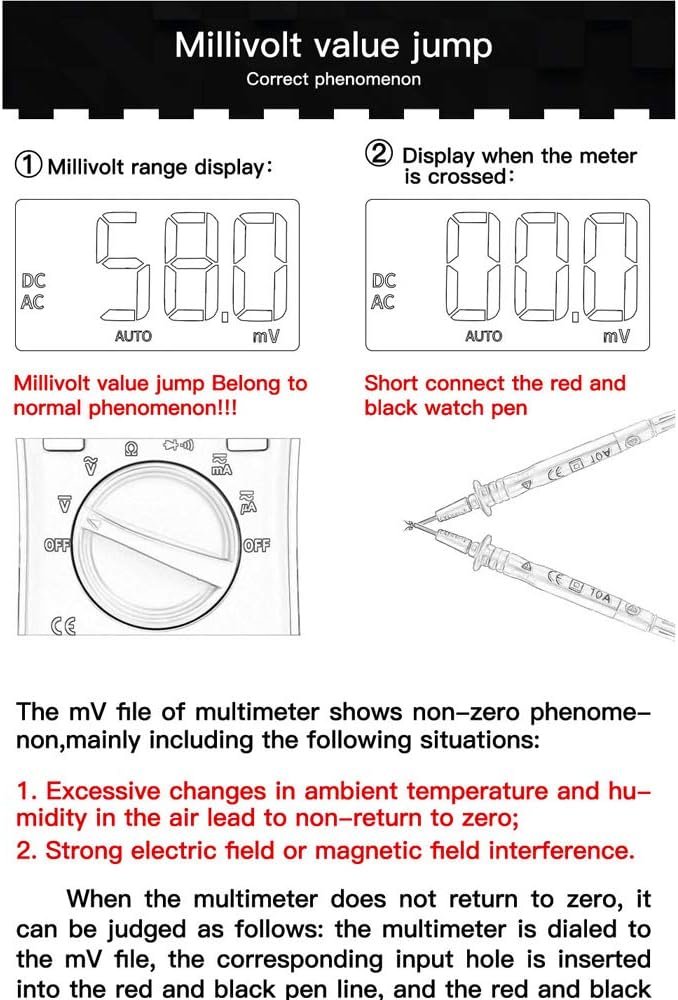
ചിത്രം 7: Millivolt range display and method to check for zero return by shorting test leads.
6.2 പൊതു പ്രശ്നങ്ങൾ
- ഡിസ്പ്ലേ ഇല്ല: ബാറ്ററി ഇൻസ്റ്റാളേഷനും ചാർജ് ലെവലും പരിശോധിക്കുക. ആവശ്യമെങ്കിൽ ബാറ്ററികൾ മാറ്റിസ്ഥാപിക്കുക.
- തെറ്റായ വായനകൾ: Ensure test leads are correctly connected to the appropriate input jacks. Verify the rotary dial is set to the correct measurement function and range.
- പ്രതികരണം ഇല്ല: Turn the multimeter off and then on again. If the issue persists, replace batteries.
7 സ്പെസിഫിക്കേഷനുകൾ
| ഫീച്ചർ | സ്പെസിഫിക്കേഷൻ |
|---|---|
| മോഡൽ | അനെങ് V01B |
| പ്രദർശിപ്പിക്കുക | 4000 കൗണ്ട്സ് എൽസിഡി |
| അളക്കൽ തരം | Digital Multimeter (True-RMS, Auto-Ranging) |
| ഡിസി വോളിയംtage | അതെ |
| എസി വോളിയംtage | അതെ |
| ഡിസി കറൻ്റ് | അതെ |
| എസി കറന്റ് | അതെ |
| പ്രതിരോധം | അതെ |
| കപ്പാസിറ്റൻസ് | അതെ |
| ആവൃത്തി | അതെ |
| ഡയോഡ് ടെസ്റ്റ് | അതെ |
| തുടർച്ചയായ പരിശോധന | അതെ |
| NCV (നോൺ-കോൺടാക്റ്റ് വോളിയംtage) | അതെ |
| ബാക്ക്ലൈറ്റ് | അതെ |
| ഫ്ലാഷ്ലൈറ്റ് | അതെ |
| പവർ ഉറവിടം | ബാറ്ററിയിൽ പ്രവർത്തിക്കുന്നത് |
| നിറം | നീല |
| യു.പി.സി | 630282728851 |
| ASIN | B0831BWKWL |
8. വാറൻ്റിയും പിന്തുണയും
Specific warranty information and customer support details are not provided in the available product data. Please refer to the product packaging, the manufacturer's official website, or contact your retailer for warranty terms and technical support inquiries.