
Andoer HDV-201LM
Andoer HDV-201LM 1080p Digital Video Camera User Manual
Model: HDV-201LM
1. ആമുഖം
This manual provides detailed instructions for the safe and effective use of your Andoer HDV-201LM Digital Video Camera. Please read this manual thoroughly before operating the device and retain it for future reference.
The Andoer HDV-201LM is a 1080p Full HD digital video camera featuring a 5-megapixel CMOS sensor, capable of capturing video at 1920x1080p at 30 frames per second and still images up to 24 megapixels (interpolated). It includes a 16X digital zoom, a 3.0-inch TFT-LCD screen with 270-degree rotation, and supports external accessories via a hot shoe mount.
2. പാക്കേജ് ഉള്ളടക്കം
താഴെ ലിസ്റ്റ് ചെയ്തിരിക്കുന്ന എല്ലാ ഇനങ്ങളും നിങ്ങളുടെ പാക്കേജിൽ ഉൾപ്പെടുത്തിയിട്ടുണ്ടെന്ന് ഉറപ്പാക്കുക. ഏതെങ്കിലും ഇനങ്ങൾ നഷ്ടപ്പെട്ടിട്ടുണ്ടെങ്കിലോ കേടായിട്ടുണ്ടെങ്കിലോ, ദയവായി നിങ്ങളുടെ റീട്ടെയിലറെ ബന്ധപ്പെടുക.
- 1 x Andoer HDV-201LM Digital Video Camera
- 1 x Camera Bag
- 2 x Rechargeable 3.7V 800mAh Batteries (one pre-installed)
- 1 x USB കേബിൾ
- 1 x AV കേബിൾ
- 1 x റിമോട്ട് കൺട്രോൾ
- 1 x Camera User Manual (English)
- 1 x 0.39X Wide-Angle Lens
- 1 x ബാഹ്യ മൈക്രോഫോൺ
- 1 x Microphone Connection Cable
- 1 x Microphone User Manual (Chinese)
Note: A memory card is not included. A Class 10 or higher SD card (up to 32GB) is strongly recommended for optimal performance.
3. ഭാഗങ്ങൾ തിരിച്ചറിയൽ
Familiarize yourself with the various components of your digital video camera.

ചിത്രം 3.1: മുൻഭാഗം view of the Andoer HDV-201LM camera with attached wide-angle lens and external microphone.

ചിത്രം 3.2: വിശദമായി views highlighting the hot shoe mount, control buttons, battery compartment, and 1/4-inch tripod thread.
- ലെൻസ്: ചിത്രങ്ങളും വീഡിയോകളും പകർത്തുന്നതിനുള്ള പ്രധാന ഒപ്റ്റിക്കൽ ഘടകം.
- LCD സ്ക്രീൻ: 3.0-inch TFT-LCD display for viewing and menu navigation. Rotates 270 degrees.
- പവർ ബട്ടൺ: ക്യാമറ ഓൺ അല്ലെങ്കിൽ ഓഫ് ചെയ്യുന്നു.
- Record/Stop Button: വീഡിയോ റെക്കോർഡിംഗ് ആരംഭിക്കുകയോ നിർത്തുകയോ ചെയ്യുന്നു.
- ഫോട്ടോ ബട്ടൺ: നിശ്ചല ചിത്രങ്ങൾ പകർത്തുന്നു.
- സൂം ലിവർ (പ/വാട്ട്): Adjusts digital zoom (Wide/Telephoto).
- മെനു ബട്ടൺ: ക്യാമറ ക്രമീകരണങ്ങൾ ആക്സസ് ചെയ്യുന്നു.
- നാവിഗേഷൻ ബട്ടണുകൾ: മെനു നാവിഗേഷനും തിരഞ്ഞെടുപ്പിനും ഉപയോഗിക്കുന്നു.
- ഹോട്ട് ഷൂ മൗണ്ട്: For attaching external accessories like microphones or LED lights.
- ട്രൈപോഡ് ത്രെഡ്: 1/4-inch thread for mounting the camera on a tripod.
- ബാറ്ററി കമ്പാർട്ട്മെൻ്റ്: റീചാർജ് ചെയ്യാവുന്ന ബാറ്ററിയാണ് ഇവിടെ സ്ഥാപിച്ചിരിക്കുന്നത്.
- SD കാർഡ് സ്ലോട്ട്: ഒരു മെമ്മറി കാർഡ് ഇടുന്നതിന്.
- USB പോർട്ട്: For connecting to a computer or charging.
- എവി put ട്ട്പുട്ട്: For connecting to a television.
- LED ഫിൽ ലൈറ്റ്: കുറഞ്ഞ വെളിച്ചത്തിൽ അധിക പ്രകാശം നൽകുന്നു.
4. സജ്ജീകരണം
4.1 ബാറ്ററി ചാർജ് ചെയ്യുന്നു
- ബാറ്ററി കമ്പാർട്ട്മെൻ്റ് കവർ തുറക്കുക.
- Insert the provided 3.7V 800mAh battery, ensuring correct polarity. If an insulator tab is present, remove it before insertion.
- ബാറ്ററി കമ്പാർട്ട്മെൻ്റ് കവർ അടയ്ക്കുക.
- Connect the camera to a power source using the USB cable. The charging indicator will illuminate.
- പൂർണ്ണമായി ചാർജ് ചെയ്തുകഴിഞ്ഞാൽ, ഇൻഡിക്കേറ്റർ ലൈറ്റ് മാറുകയോ ഓഫാകുകയോ ചെയ്യും.
4.2 ഒരു മെമ്മറി കാർഡ് ചേർക്കുന്നു
- ക്യാമറ ഓഫാണെന്ന് ഉറപ്പാക്കുക.
- SD കാർഡ് സ്ലോട്ട് കണ്ടെത്തുക.
- Insert a Class 10 or higher SD card (up to 32GB) into the slot until it clicks into place.
- കാർഡ് നീക്കം ചെയ്യാൻ, അത് പുറത്തേക്ക് വരുന്നത് വരെ സൌമ്യമായി അമർത്തുക.
4.3. Attaching the Wide-Angle Lens
- Remove the protective cap from the camera lens.
- Carefully screw the 0.39X wide-angle lens onto the camera's main lens thread until secure.

Figure 4.1: The camera with the 0.39X super wide-angle lens attached, demonstrating its expanded field of view.
4.4. Attaching the External Microphone
- Slide the external microphone into the hot shoe mount on top of the camera.
- Connect the microphone cable to the camera's external microphone input port.
5. ക്യാമറ പ്രവർത്തിപ്പിക്കുക
5.1. പവർ ഓൺ/ഓഫ്
- To power on, open the LCD screen or press the ശക്തി ബട്ടൺ.
- To power off, close the LCD screen or press and hold the ശക്തി ബട്ടൺ.
5.2. വീഡിയോകൾ റെക്കോർഡുചെയ്യുന്നു
- Ensure the camera is in video mode (indicated on the LCD screen). If not, press the മോഡ് മാറാനുള്ള ബട്ടൺ.
- അമർത്തുക രേഖപ്പെടുത്തുക/നിർത്തുക button to start recording. A red indicator will typically flash.
- അമർത്തുക രേഖപ്പെടുത്തുക/നിർത്തുക റെക്കോർഡിംഗ് നിർത്താൻ വീണ്ടും ബട്ടൺ.
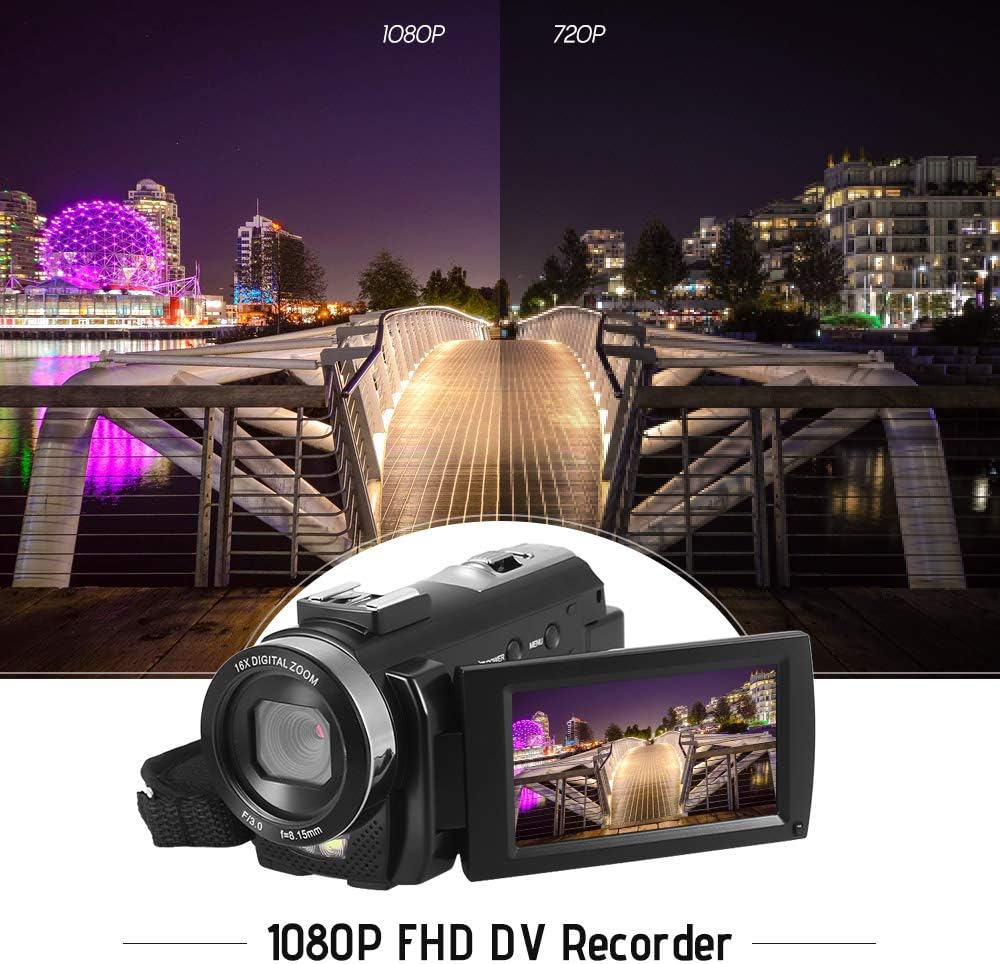
Figure 5.1: The camera is capable of recording in 1080p Full HD and 720p HD resolutions.
5.3. ഫോട്ടോ എടുക്കൽ
- Ensure the camera is in photo mode. If not, press the മോഡ് മാറാനുള്ള ബട്ടൺ.
- എൽസിഡി സ്ക്രീൻ ഉപയോഗിച്ച് നിങ്ങളുടെ ഷോട്ട് ഫ്രെയിം ചെയ്യുക.
- അമർത്തുക ഫോട്ടോ ഒരു ചിത്രം പകർത്താനുള്ള ബട്ടൺ.
5.4. ഡിജിറ്റൽ സൂം ഉപയോഗം
- ഉപയോഗിക്കുക W (വൈഡ്) ഒപ്പം ടി (ടെലിഫോട്ടോ) lever to adjust the 16X digital zoom.

Figure 5.2: The camera's 16X digital zoom allows for closer views of subjects.
5.5. മെനു ക്രമീകരണങ്ങൾ
- അമർത്തുക മെനു ക്രമീകരണങ്ങൾ ആക്സസ് ചെയ്യുന്നതിനുള്ള ബട്ടൺ.
- Use the navigation buttons to scroll through options such as:
- വൈറ്റ് ബാലൻസ്: Auto, Daylight, Cloudy, Fluorescent, Tungsten.
- സീൻ മോഡ്: Auto, Night, Portrait, Landscape, Backlight, Sport, Party, Beach, High Sensitivity.
- ഷൂട്ടിംഗ് മോഡ്: Single, Continuous.
- സമ്പർക്കം: Adjust ±3.0EV.
- സ്വയം-ടൈമർ: Off, 2s, 5s, 10s.
- ഓട്ടോ പവർ ഓഫ്: Off, 1min, 3min, 5min.
- ഭാഷ: English, German, French, Spanish, Italian, Turkish, Russian, Portuguese, Dutch, Simplified Chinese, Traditional Chinese, Japanese, Polish.
- മറ്റ് പ്രവർത്തനങ്ങൾ: Face Detection, Smile Capture, Beauty Face, Anti-Shake.
- അമർത്തുക OK or രേഖപ്പെടുത്തുക/നിർത്തുക തിരഞ്ഞെടുക്കലുകൾ സ്ഥിരീകരിക്കുന്നതിനുള്ള ബട്ടൺ.
- അമർത്തുക മെനു പുറത്തുകടക്കാൻ വീണ്ടും ബട്ടൺ.
5.6. ഒരു ടിവിയിലേക്ക് കണക്റ്റുചെയ്യുന്നു
- Use the provided AV cable to connect the camera's AV output to your television's AV input.
- Select the correct AV input channel on your TV to view camera content.
6. പരിപാലനം
6.1. ക്യാമറ വൃത്തിയാക്കൽ
- ക്യാമറ ബോഡി വൃത്തിയാക്കാൻ മൃദുവായതും ഉണങ്ങിയതുമായ തുണി ഉപയോഗിക്കുക.
- ലെൻസിനും എൽസിഡി സ്ക്രീനിനും, ഒരു പ്രത്യേക ലെൻസ് ക്ലീനിംഗ് തുണിയും ലായനിയും ഉപയോഗിക്കുക. കഠിനമായ രാസവസ്തുക്കൾ ഒഴിവാക്കുക.
6.2. സംഭരണം
- നേരിട്ടുള്ള സൂര്യപ്രകാശവും ഉയർന്ന താപനിലയും ഏൽക്കാത്ത തണുത്തതും വരണ്ടതുമായ സ്ഥലത്ത് ക്യാമറ സൂക്ഷിക്കുക.
- ക്യാമറ ദീർഘനേരം ഉപയോഗിച്ചില്ലെങ്കിൽ ബാറ്ററി നീക്കം ചെയ്യുക.
7. പ്രശ്നപരിഹാരം
| പ്രശ്നം | സാധ്യമായ കാരണം | പരിഹാരം |
|---|---|---|
| ക്യാമറ പവർ ഓൺ ചെയ്യുന്നില്ല. | ബാറ്ററി തീർന്നു അല്ലെങ്കിൽ ശരിയായി ചേർത്തിട്ടില്ല. | Charge the battery fully. Ensure the battery is inserted with correct polarity and the insulator tab is removed. |
| വീഡിയോ റെക്കോർഡ് ചെയ്യാനോ ഫോട്ടോകൾ എടുക്കാനോ കഴിയില്ല. | മെമ്മറി കാർഡ് നിറഞ്ഞിരിക്കുന്നു, ചേർത്തിട്ടില്ല, അല്ലെങ്കിൽ കേടായിരിക്കുന്നു. | ഒരു മെമ്മറി കാർഡ് ഇടുക. അനാവശ്യമായത് ഇല്ലാതാക്കുക. files or format the card (this will erase all data). Replace the card if corrupted. |
| മോശം വീഡിയോ/ചിത്ര നിലവാരം. | Insufficient lighting, dirty lens, or incorrect settings. | Ensure adequate lighting. Use the LED fill light if necessary. Clean the lens. Adjust white balance and scene mode settings. |
| ക്യാമറ മരവിക്കുന്നു അല്ലെങ്കിൽ പ്രതികരിക്കുന്നില്ല. | സോഫ്റ്റ്വെയർ തകരാറ് അല്ലെങ്കിൽ കുറഞ്ഞ ബാറ്ററി. | Remove and reinsert the battery to reset the camera. Ensure the battery is charged. |
8 സ്പെസിഫിക്കേഷനുകൾ
| ഫീച്ചർ | സ്പെസിഫിക്കേഷൻ |
|---|---|
| ബ്രാൻഡ് | അൻഡോയർ |
| മോഡൽ | HDV-201LM |
| ഇമേജ് സെൻസർ | 5 മെഗാപിക്സൽ സിഎംഒഎസ് സെൻസർ |
| വീഡിയോ റെസല്യൂഷൻ | 1920x1080P (FHD 30fps), 1280x720 (HD 30fps), 640x480 (VGA 30fps), 320x240 (VGA 30fps) |
| വീഡിയോ ഫോർമാറ്റ് | എ.വി.ഐ |
| ചിത്ര മിഴിവ് | 24MP (Interpolated), 20MP (Interpolated), 16MP (Interpolated), 12MP (Interpolated), 10MP (Interpolated), 7M Wide (Interpolated), 5MP, 3MP, 2M Wide, VGA |
| ഇമേജ് ഫോർമാറ്റ് | ജെ.പി.ജി |
| ഡിജിറ്റൽ സൂം | 16X |
| ലെൻസ് | ff (F/3.0 f=8.15mm) |
| മാക്സ് അപ്പർച്ചർ | 8.15 എഫ് |
| എൽസിഡി സ്ക്രീൻ | 3.0-inch TFT-LCD (16:9), 270-degree rotation |
| സംഭരണം | SD Card (up to 32GB, Class 10 recommended) |
| കണക്റ്റിവിറ്റി | USB 2.0, AV Output (NTSC/PAL) |
| വൈദ്യുതി വിതരണം | 1 x 3.7V 800mAh റീചാർജ് ചെയ്യാവുന്ന ബാറ്ററി |
| റിമോട്ട് കൺട്രോൾ ബാറ്ററി | 1 x 3V CR2025 Battery |
| ഓപ്പറേറ്റിംഗ് സിസ്റ്റം പിന്തുണ | Windows XP/Vista/7/8/10 |
| പ്രത്യേക സവിശേഷതകൾ | Anti-shake, Face Detection, Smile Capture, Beauty Face, Self-Timer, LED Fill Light, Hot Shoe Mount |
| അളവുകൾ | 13.5 x 5.5 x 6.5 സെ.മീ (5.3 x 2.2 x 2.6 ഇഞ്ച്) |
| ഭാരം | 273g (9.6oz) with battery |
| നിറം | കറുപ്പ് |
9. വാറൻ്റിയും പിന്തുണയും
വാറന്റി വിവരങ്ങൾക്കും സാങ്കേതിക പിന്തുണയ്ക്കും, നിങ്ങളുടെ വാങ്ങലിനൊപ്പം നൽകിയിരിക്കുന്ന ഡോക്യുമെന്റേഷൻ പരിശോധിക്കുകയോ നിങ്ങളുടെ റീട്ടെയിലറെ ബന്ധപ്പെടുകയോ ചെയ്യുക. ഏതെങ്കിലും വാറന്റി ക്ലെയിമുകൾക്കായി നിങ്ങളുടെ വാങ്ങിയതിന്റെ തെളിവ് സൂക്ഷിക്കുക.
Ask a question about this manual
Ask about setup, troubleshooting, compatibility, parts, safety, or missing instructions. Manuals+ will review the question and use this page’s manual context to help answer it.