
1. ആമുഖം
The HABOTEST HT106B Socket Tester is a compact and portable device designed for quick and accurate detection of socket wiring status. It features RCD (Residual Current Device) or GFCI (Ground Fault Circuit Interrupter) testing capabilities and voltage measurement with an LCD display. This manual provides essential information for safe and effective use of the device in various settings, including schools, laboratories, and factories.

Image 1: HABOTEST HT106B Socket Tester alongside its user manual.
2. സുരക്ഷാ നിർദ്ദേശങ്ങൾ
⚠ മുന്നറിയിപ്പ്:
- Always read this instruction manual carefully before use and strictly observe all safety rules, cautions, and warnings.
- To avoid possible electric shock or personal injury, always check the tester carefully for any damage before use. If any damage is found, discontinue use immediately and send it for repair.
- Ensure the RCD test is performed only under correct wiring conditions.
- When performing an RCD test, ensure all equipment on the power line is closed to prevent power failure or harm. Obtain permission if testing in public places.
3. സജ്ജീകരണം
The HT106B Socket Tester is designed for immediate use. Simply plug the device into a standard three-hole power outlet to begin testing.

ചിത്രം 2: വശം view of the HT106B Socket Tester, showing the plug pins.
4. പ്രവർത്തന നിർദ്ദേശങ്ങൾ
4.1. വോളിയംtagഇ ടെസ്റ്റ്
Insert the tester into a standard three-hole power outlet. The socket voltage value will be displayed on the tester's LCD screen in Volts (V).
- The test duration should not exceed 5 minutes.
- Exercise caution to avoid touching the RCD button during voltage testing to prevent accidental tripping of the leakage protection switch.
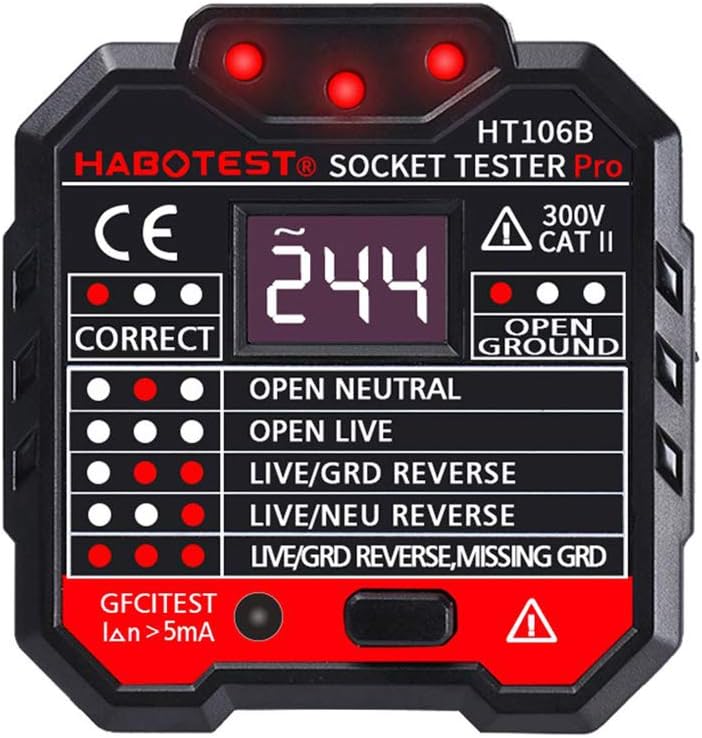
ചിത്രം 3: മുൻഭാഗം view of the HT106B Socket Tester displaying a voltage reading on its LCD screen.
4.2. RCD (or GFCI) Test
Insert the tester into a correctly wired three-hole power socket. Press the RCD/GFCI test button for less than 3 seconds. A properly functioning RCD/GFCI should trip (turn off the power) at this time. If the RCD/GFCI does not trip, it indicates a failure and requires professional electrician maintenance.
- The test duration should not exceed 5 minutes.
- RCD and GFCI functions cannot be used simultaneously.
4.3. Wiring Status Detection
The HT106B Socket Tester uses a series of indicator lights to quickly identify the wiring status of the socket. Refer to the functional control table and indicator results below to interpret the findings.

Image 4: Excerpt from the manual detailing RCD test instructions and the functional control table.

Image 5: Chart illustrating the indicator light patterns and their corresponding wiring test results.
| Indicator Pattern | Wiring Status |
|---|---|
| Two red lights (top row) | ശരിയാണ്: Lines are connected normally. |
| Red light in the middle (top row) | ഓപ്പൺ ഗ്രൗണ്ട്: The ground line is missing. |
| Red light on the left (top row) | ഓപ്പൺ ന്യൂട്രൽ: The neutral wire is missing. |
| No red light (top row) | തത്സമയം തുറക്കുക: Lack of "fire line" (live wire). |
| Two red lights on the right (top row) | ലൈവ്/ജിആർഡി റിവേഴ്സ്: Live and ground wires are misconnected. |
| Red lights on the left and right (top row) | ലൈവ്/NEU റിവേഴ്സ്: Wrong connection of live and neutral wires. |
| All three red lights (top row) | LIVE/GRD REVERSE, MISSING GRD: Faulty phase connection and missing ground. |
Note: This tester cannot distinguish between neutral line and ground wire reverse.
5. പരിപാലനം
വൃത്തിയാക്കൽ
Clean the tester with a soft, damp cloth. Do not use abrasive cleaners or other chemicals, as they may damage the device. Ensure the tester is completely dry before its next use.
6. പ്രശ്നപരിഹാരം
- RCD/GFCI does not trip during test: This indicates that the RCD/GFCI has failed. Immediately contact a professional electrician for inspection and repair.
- Wiring fault detected (e.g., Open Ground, Live/GRD Reverse): If the tester indicates a wrong connection, consult a professional electrician to repair the wiring. Do not attempt to fix faulty wiring yourself unless you are qualified.
7 സ്പെസിഫിക്കേഷനുകൾ
| ബ്രാൻഡ് | ഹബോട്ടെസ്റ്റ് |
| മോഡൽ | HT106B |
| ഓപ്പറേറ്റിംഗ് വോളിയംtage | 48 - 250V / 45 - 65Hz |
| വോളിയം അളക്കുന്നുtage | 48 - 250V / 45 - 65Hz |
| കൃത്യത | (2.0% + 2) |
| ഉയരം | < 2000 മി |
| ആർസിഡി ടെസ്റ്റ് കറന്റ് | 30mA |
| RCD വർക്കിംഗ് വോളിയംtage | 220 വി ± 20 വി |
| GFCI Test Current | > 5mA |
| GFCI വർക്കിംഗ് വോളിയംtage | 110 വി ± 20 വി |
| പ്രവർത്തന താപനില | 0°C - 40°C |
| പ്രവർത്തന ഹ്യുമിഡിറ്റി | 20% - 75% ആർഎച്ച് |
| സംഭരണ താപനില | -10°C - 50°C |
| സംഭരണ ഈർപ്പം | 20% - 80% ആർഎച്ച് |
| ഇനത്തിൻ്റെ ഭാരം | 59 ഗ്രാം |
| ഇനത്തിൻ്റെ വലിപ്പം | 58 x 64 x 60 മിമി |
| പവർ ഉറവിടം | കോർഡഡ് ഇലക്ട്രിക് |